
1. Introduction
This manual provides detailed instructions for the assembly, operation, and maintenance of your Sysracks 27U Server Rack Cabinet, model SRF 27.6.8. Please read this manual thoroughly before installation and use to ensure proper functionality and safety.
The Sysracks SRF-Series cabinet is designed to house and protect IT and networking equipment, offering features such as active cooling, temperature control, and secure access.
2. Safety Information
- Always ensure the cabinet is placed on a stable, level surface.
- Distribute equipment weight evenly within the cabinet to prevent tipping.
- Do not overload the power distribution unit (PDU). Adhere to the specified maximum current rating.
- Ensure proper grounding for all electrical components.
- Keep all ventilation openings clear to prevent overheating.
- Use caution when moving the cabinet, especially when loaded. Engage wheel brakes when stationary.
- Only qualified personnel should perform electrical connections or complex maintenance.
3. Package Contents
Your Sysracks 27U Server Rack Cabinet is supplied in flat-pack form for efficient transport and storage. Please verify that all components are present before beginning assembly:
- Cabinet frame components (top, bottom, side panels, doors)
- 4-fan cooling panel (pre-installed in roof)
- Temperature Control System (Thermostat, Thermosensor, LCD Screen)
- 8-way Power Distribution Unit (PDU) with surge protection
- Fixed vented shelf
- Heavy-duty casters with brake option
- Adjustable leveling feet (M10*70)
- Lockable latch handles for doors and side panels
- Set of keys (4 pcs)
- Mounting hardware (50 sets of bolts/nuts)
- 3 dust-tight brush strip panels for cable entry
- U-marking mounting rails
4. Assembly Instructions
The Sysracks 27U cabinet features an improved assembly process with a welded frame design and high-quality hardware, requiring no special tools or abilities. A detailed video guide and PDF assembly instructions are available from the manufacturer.
4.1 General Assembly Overview
- Unpack all components and verify against the package contents list.
- Attach the casters and/or leveling feet to the base of the cabinet. The casters allow for easy movement, while leveling feet provide stability and height adjustment.
- Assemble the main frame structure, securing the top and bottom panels to the vertical supports.
- Install the U-marking mounting rails inside the cabinet. These rails are adjustable to accommodate various equipment depths.
- Attach the front glass door and rear steel door. Ensure the lockable latch handles are correctly installed.
- Install the removable side panels, securing them with their respective locks.
- Mount the 8-way PDU and fixed vented shelf to the U-marking rails using the provided mounting hardware.
- Connect the pre-installed 4-fan cooling panel and the temperature control system (LCD screen, thermosensor).
- Install the dust-tight brush strip panels for cable entry at the top and bottom of the cabinet.
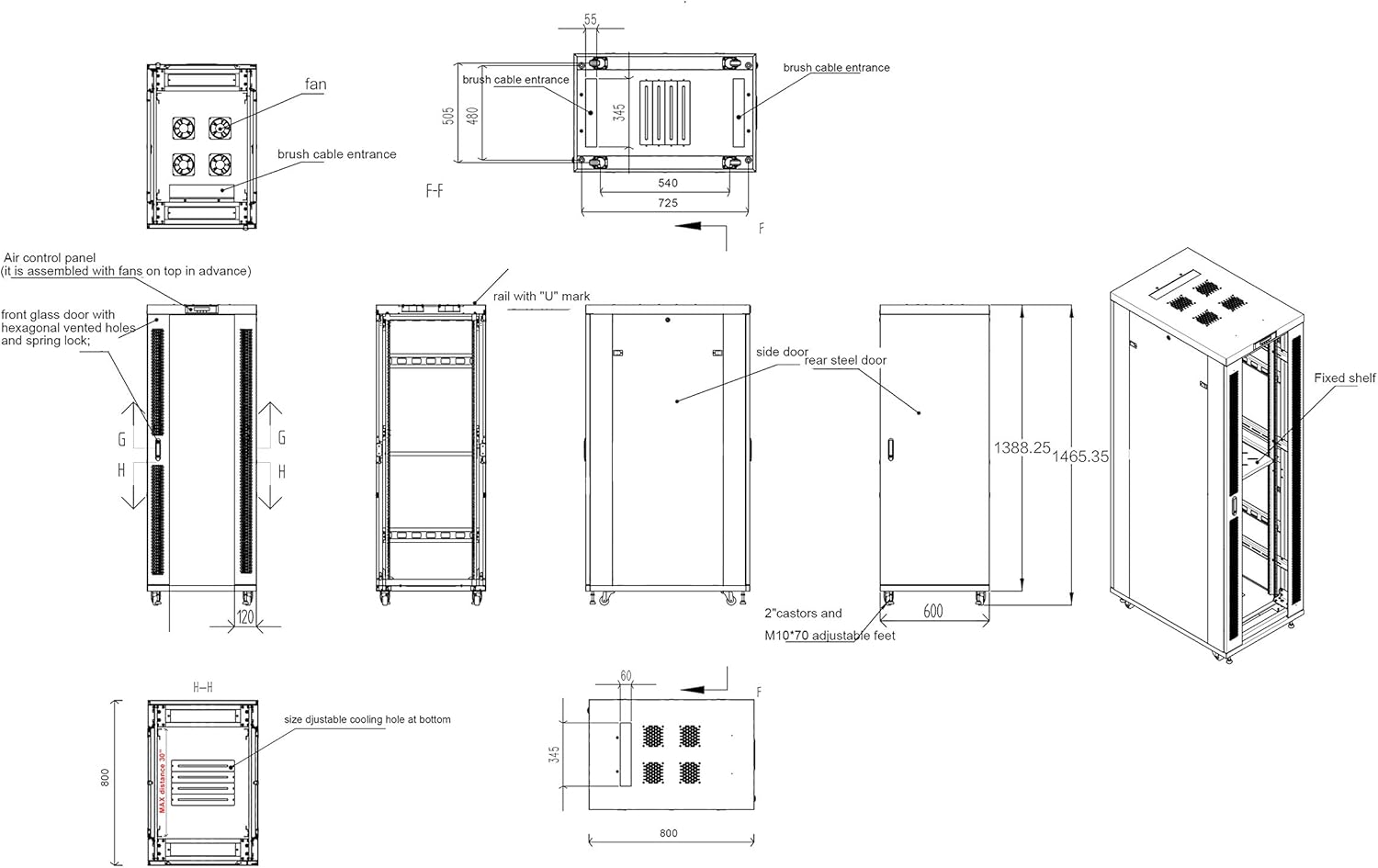
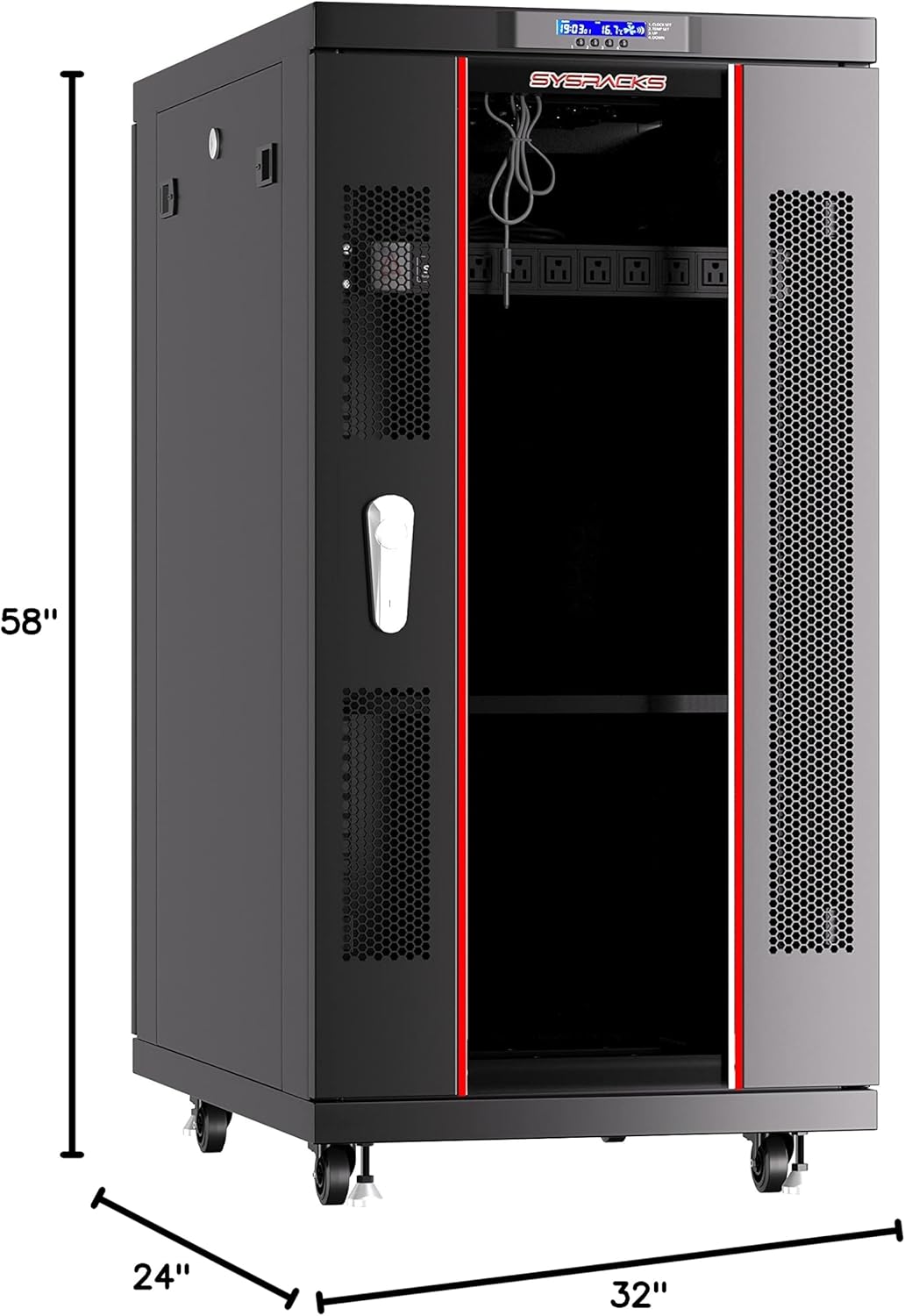
5. Product Features and Components
The Sysracks 27U Server Rack Cabinet is equipped with several features to optimize performance and security:
- LCD Screen & Air Control System: Located at the top front, this screen displays current temperature and allows for setting desired temperature thresholds for fan activation.
- 4 Cooling Fans: Integrated into the roof panel, these fans provide active ventilation with a capacity of 440m³/h to dissipate heat generated by equipment.
- 2M Wire Thermosensor: Detects temperature changes within the cabinet, feeding data to the air control system.
- 8-Way PDU (ROHC) with Surge Protection: Provides reliable power distribution to your equipment, protecting against power surges.
- Fixed Vented Shelf: Offers a stable platform for non-rack-mountable equipment, ensuring airflow.
- Lockable Doors and Side Panels: Front glass door with hexagon perforated metal frame, solid rear steel door, and removable side panels all feature lockable latch handles for enhanced security.
- Dust-tight Brush Strip Panels: Located at cable entry points to minimize dust ingress while allowing cable routing.


6. Operating Instructions
6.1 Power Distribution Unit (PDU)
The integrated 8-way PDU provides power to your rack-mounted equipment. Connect the PDU's main power cord to a suitable wall outlet. Plug your devices into the PDU outlets. The PDU includes surge protection to safeguard connected electronics.
6.2 Temperature Control System
The LCD screen displays the current internal temperature and allows you to set a desired temperature threshold. When the internal temperature exceeds this threshold, the 4 cooling fans will automatically activate to reduce heat. Once the temperature drops below the set point, the fans will turn off. Refer to the specific controls on the LCD screen for adjusting settings.
6.3 Locking Mechanisms
The front door, rear door, and side panels are equipped with lockable latch handles. Use the provided keys to secure the cabinet, preventing unauthorized access to your equipment. Ensure all panels are properly closed and locked after accessing the cabinet.
6.4 Cable Management
Utilize the dust-tight brush strip panels at the top and bottom of the cabinet for routing cables. This helps maintain a clean and organized interior while minimizing dust entry.
7. Maintenance
- Cleaning: Regularly wipe down the exterior surfaces of the cabinet with a soft, damp cloth. Avoid abrasive cleaners. For glass panels, use a glass cleaner.
- Fan Inspection: Periodically check the cooling fans for dust accumulation. If necessary, carefully clean the fan blades to ensure optimal airflow. Ensure the fan module is powered off before cleaning.
- Lock and Hinge Check: Inspect locks and hinges for smooth operation. Lubricate if necessary.
- Hardware Tightness: Occasionally check all bolts and nuts for tightness, especially after moving the cabinet or installing new equipment.
- Cable Management: Ensure cables are neatly routed and not obstructing airflow or door closure.
8. Troubleshooting
- Fans not operating: Check if the temperature setting on the LCD screen is correctly configured and if the internal temperature exceeds the set threshold. Verify power connection to the fan module.
- No power to PDU outlets: Ensure the PDU's main power cord is securely plugged into a live outlet. Check the PDU's circuit breaker or power switch.
- Cabinet overheating: Verify that all 4 cooling fans are operational. Ensure no obstructions are blocking the ventilation perforations on the doors or side panels. Check that the ambient room temperature is within acceptable limits.
- Difficulty closing/locking doors: Check for any internal obstructions. Ensure the cabinet is level. Inspect hinges and latch mechanisms for damage or misalignment.
For issues not resolved by these steps, please contact Sysracks customer support.
9. Technical Specifications
| Feature | Specification |
|---|---|
| Model | SRF 27.6.8 |
| Rack Units | 27U |
| External Dimensions (W x D x H) | 24" x 32" x 58" (600mm x 800mm x 1473mm) |
| Usable Depth | Up to 27"-28" (685-711mm) |
| Color | Black |
| Loading Capacity | Up to 1500 lbs (680 kg) |
| Item Weight | 142 lbs (64.4 kg) - (Note: Product listing states 200 lbs, refer to manufacturer for exact weight) |
| Material | Alloy Steel |
| Coating | Powder paint with decreasing and anti-corrosive phosphate |
| Ventilation | Active (4 cooling fans, 440m³/h) and Passive (perforated front door) |
| Temperature Control | Thermostat with LCD screen and thermosensor |
| Power Distribution | 8-way PDU with surge protection |
| Cable Entry | 3 dust-tight brush strip panels |
10. Warranty and Support
Sysracks offers a 2-year guarantee on all rack cabinet enclosures and accessories. For customer service support, technical assistance, or warranty claims, please contact Sysracks directly. You can find more information and contact details on the official Sysracks Store.