Introduction
This manual provides detailed instructions for the safe and efficient operation of your Mikado MD-856 Multimedia Bluetooth Speaker system. Please read this manual thoroughly before using the product and retain it for future reference.
Safety Information
- Do not expose the unit to rain or moisture to prevent fire or electric shock.
- Do not open the casing. Refer all servicing to qualified personnel.
- Ensure proper ventilation around the unit.
- Use only the power supply specified for this device.
- Keep away from direct sunlight, heat sources, and strong magnetic fields.
- Avoid placing heavy objects on the unit.
Package Contents
Please check that all items listed below are included in your package:
- Main Subwoofer Unit
- Satellite Speakers (5 units)
- Remote Control
- Usage Manual (this document)
- Warranty Certificate
- RCA Cable
- Antenna Cable
Product Overview
The Mikado MD-856 is a 5.1 channel multimedia speaker system designed to deliver rich audio. It features multiple connectivity options including Bluetooth, USB, SD card, FM radio, and AUX input.
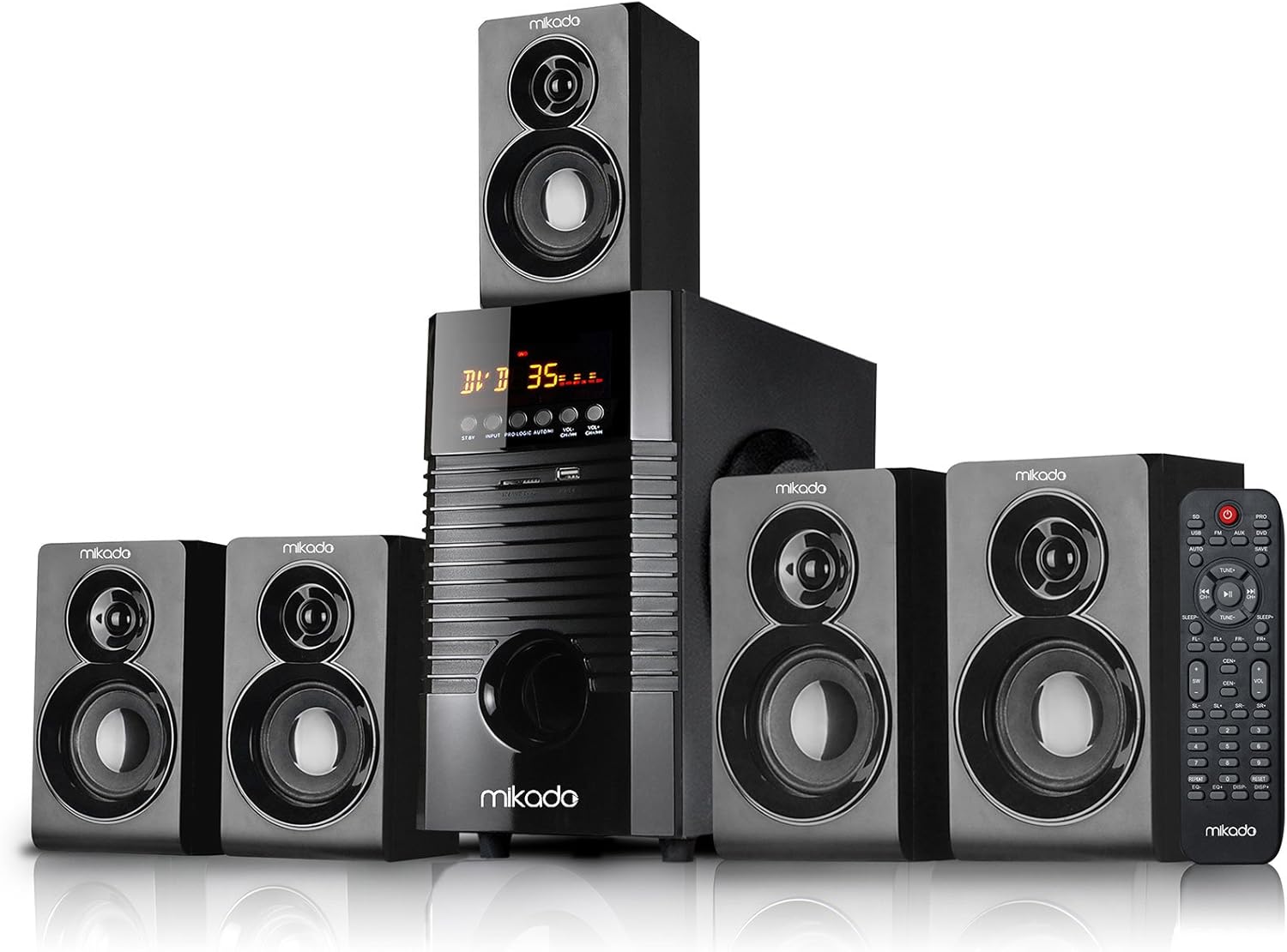
Figure 1: Front view of the Mikado MD-856 5.1 Multimedia Bluetooth Speaker system, showing the central subwoofer unit, five satellite speakers, and the remote control.

Figure 2: Rear panel of the Mikado MD-856 subwoofer, displaying various audio input and output ports, power switch, and power cable connection.
Setup
1. Speaker Connection
- Connect the five satellite speakers to the corresponding output ports on the rear panel of the main subwoofer unit. Ensure correct polarity (+ to + and - to -).
- Position the speakers for optimal 5.1 surround sound experience. Typically, one center speaker, two front speakers, and two rear speakers.
2. Power Connection
- Ensure the power switch on the rear panel is in the OFF position.
- Connect the power cable to the main subwoofer unit and then plug it into a standard electrical outlet.
3. Audio Input Connections
Choose one of the following methods to connect your audio source:
- RCA (AUX) Input: Use the provided RCA cable to connect your audio source (e.g., TV, PC, DVD player) to the "AUX AUDIO INPUT" ports on the rear panel. Match the red and white connectors.
- USB/SD Card: Insert a USB flash drive or SD card into the respective slots on the front panel of the subwoofer.
- FM Antenna: Connect the included antenna cable to the FM antenna port on the rear panel for improved radio reception.
Operating Instructions
1. Power On/Off
Flip the power switch on the rear panel to the ON position. The display on the front panel will illuminate.
2. Mode Selection
Press the "MODE" button on the front panel or the remote control to cycle through available input modes: Bluetooth, USB, SD, FM, and AUX.
3. Volume Control
Adjust the master volume using the large knob on the front panel or the volume buttons on the remote control.
4. Bluetooth Pairing
- Switch the speaker system to Bluetooth mode. The display will show "BT" or a similar indicator.
- Enable Bluetooth on your mobile device (smartphone, tablet, etc.) and search for available devices.
- Select "MD-856" from the list of devices. Once paired, you will hear a confirmation sound.
5. USB/SD Playback
When a USB drive or SD card is inserted, the system will automatically switch to USB/SD mode and begin playing compatible audio files. Use the remote control for playback functions (play/pause, next/previous track).
6. FM Radio
In FM mode, press the "SCAN" button on the remote control to automatically scan and save available radio stations. Use the "PREV/NEXT" buttons to navigate through saved stations.
Maintenance
- Cleaning: Use a soft, dry cloth to clean the surfaces of the speakers. Do not use liquid cleaners or abrasive materials.
- Storage: If storing the unit for an extended period, disconnect it from the power supply and store it in a cool, dry place.
- Ventilation: Ensure that the ventilation openings on the subwoofer are not blocked to prevent overheating.
Troubleshooting
| Problem | Possible Cause | Solution |
|---|---|---|
| No power | Power cable not connected; Power switch off; Power outlet faulty | Check power cable connection; Turn power switch ON; Try a different power outlet |
| No sound | Volume too low; Incorrect input mode; Audio cables not connected properly; Source device not playing | Increase volume; Select correct input mode; Check audio cable connections; Ensure source device is playing audio |
| Bluetooth not pairing | Speaker not in Bluetooth mode; Device too far; Bluetooth on device off | Switch to Bluetooth mode; Move device closer; Enable Bluetooth on your device |
| Poor FM reception | Antenna not connected; Weak signal | Connect FM antenna; Adjust antenna position for better signal |
Specifications
- Model: MD-856
- Brand: Mikado
- Speaker Type: Multimedia 5.1 Channel
- Connectivity Technology: Bluetooth, USB
- Speaker Maximum Output Power: 25 Watts
- Surround Sound Channel Configuration: 5.1
- Recommended Uses: PC - TV
- Product Dimensions: 35 x 35 x 44 cm
- Item Weight: 7.9 Kilograms
- Color: Black
- Included Components: Controller, Usage Manual, Warranty Certificate, RCA Cable, Antenna Cable
Warranty and Support
Your Mikado MD-856 speaker system comes with a Warranty Certificate. Please refer to the certificate for details regarding warranty coverage and terms. For technical support or service inquiries, please contact your local Mikado dealer or authorized service center.


