
1. Introduction
This manual provides comprehensive instructions for the RockJam DDMESH500 Electric Mesh Head Drum Kit. It covers assembly, operation, maintenance, and troubleshooting to ensure optimal performance and longevity of your instrument. Please read this manual thoroughly before using the drum kit.
2. Setup and Assembly
The RockJam DDMESH500 drum kit is designed for straightforward assembly. The main rack structure is pre-assembled, requiring only the unfolding of arms, attachment of feet, and mounting of individual components.
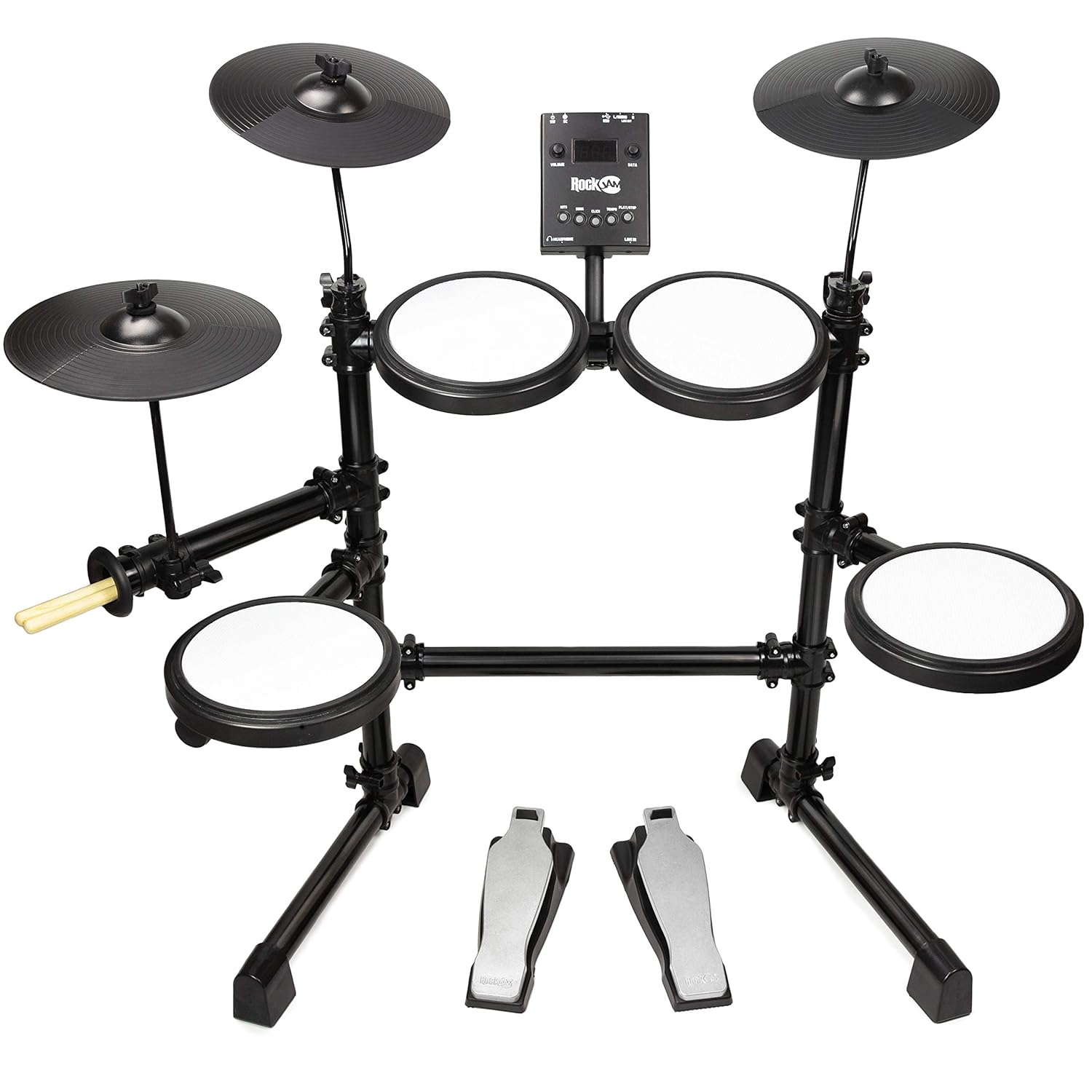
Figure 2.1: Fully assembled RockJam DDMESH500 Electric Mesh Head Drum Kit, showcasing the mesh pads, cymbals, drum module, and pedals.
2.1 Unpacking and Component Identification
Carefully unpack all components from the box. Verify that all parts listed in the packing list are present. A tuning key is included for minor adjustments.
2.2 Rack Assembly
- Unfold the pre-assembled rack arms to their extended positions.
- Insert the rack into the provided feet, ensuring a stable base.
2.3 Pad and Cymbal Mounting
- Attach the cymbal holders to the rack and then mount the cymbals.
- Mount the drum module onto its designated position on the rack.
- Position the mesh head pads (snare and toms) and rubber tom pads onto their respective mounts.
2.4 Pedal Placement
Place the bass drum pedal and hi-hat control pedal on the floor in comfortable playing positions.
2.5 Cabling
Connect all pads, cymbals, and pedals to the drum module using the provided cables. Ensure each connection is secure and corresponds to the correct input on the module.
3. Operating Instructions
The RockJam DDMESH500 module offers various features for an enhanced drumming experience.

Figure 3.1: Detailed view of the RockJam DDMESH500 drum module, showing controls and input/output ports.
3.1 Drum Module Functions
- Voices: The module includes 30 authentic drum kit voices. Use the 'KITS' button to cycle through different drum sounds.
- Demo Songs: Multiple demo songs are available for practice or enjoyment. Use the 'SONG' button to select and play demo tracks.
- Click/Metronome: A built-in metronome ('CLICK' button) assists with timing practice.
- Tempo Control: Adjust the tempo of demo songs or the metronome using the 'TEMPO' controls.
- Volume Control: Use the 'VOLUME' knob to adjust the overall output level.
- Data Dial: The 'DATA' dial is used for navigating menus and adjusting parameters.
3.2 Connectivity
- USB Out: Connect to a computer for MIDI data transmission, allowing use with digital audio workstations (DAWs) or virtual instruments.
- AUX In: Connect an external audio device (e.g., smartphone, MP3 player) to play along with your favorite music.
- Headphone Port: For private practice, connect headphones to this port.
- MIDI Out: Connect to other MIDI-compatible devices.
- Line Out (L/MONO, R): Connect to an amplifier, mixer, or recording interface for external sound output.
3.3 Drum Pads and Cymbals

Figure 3.2: A single mesh head drum pad, offering a realistic playing feel.
- Mesh Head Pads: The kit features velocity-sensitive mesh head pads for the snare (8-inch) and toms (8-inch), providing a natural and responsive playing feel.
- Rubber Toms: Three additional rubber tom pads are included.
- Cymbals: The kit includes 10-inch cymbals (hi-hat, crash, ride). The crash and ride cymbals may feature a choke function, allowing you to mute the sound by grabbing the edge after striking.

Figure 3.3: A detailed view of one of the 10-inch cymbals.
3.4 Pedals
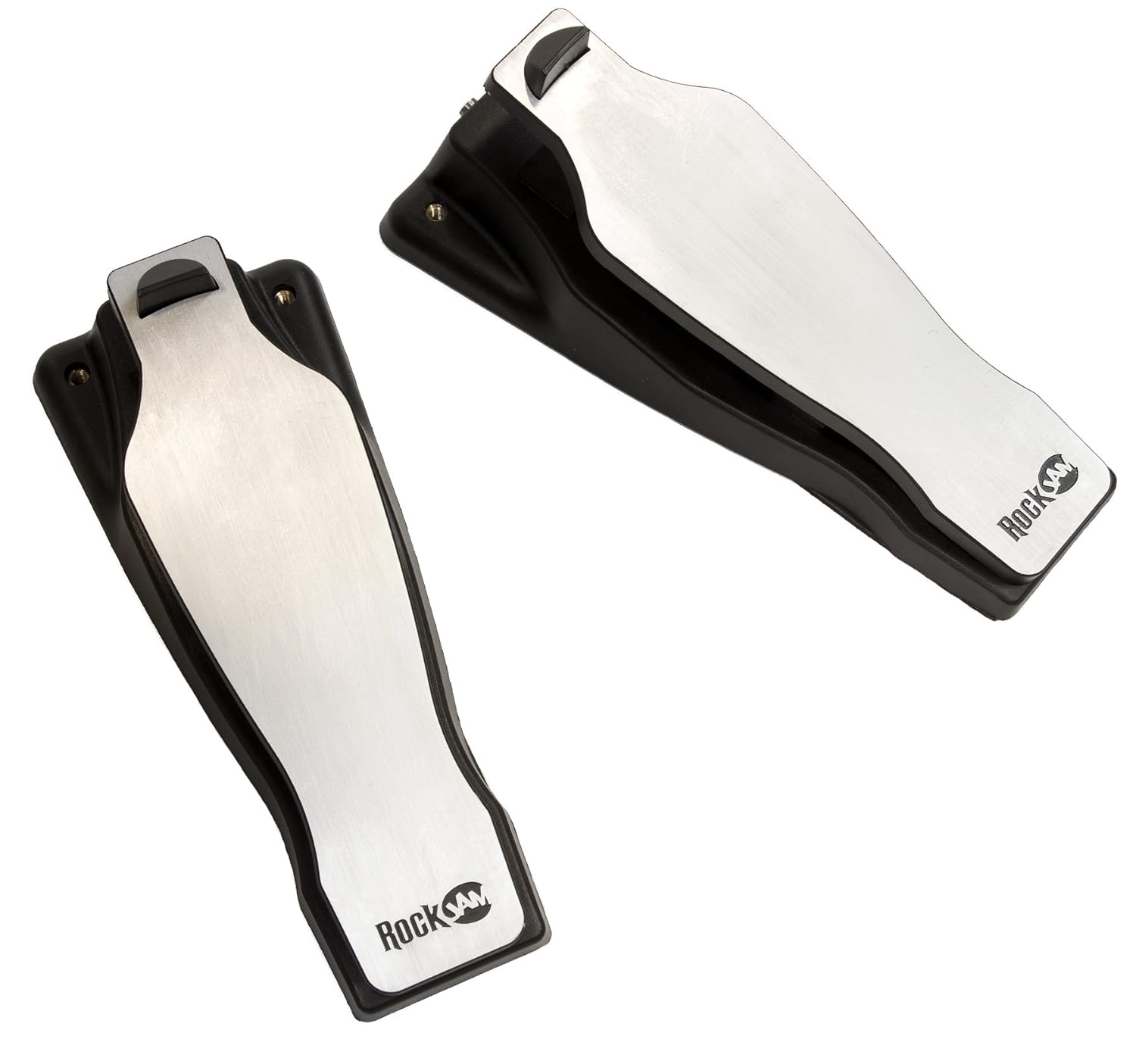
Figure 3.4: The bass drum and hi-hat control pedals.
- Bass Drum Pedal: Controls the bass drum sound.
- Hi-Hat Control Pedal: Controls the open, closed, and half-open states of the hi-hat cymbal.
4. Maintenance
Proper maintenance ensures the longevity and optimal performance of your drum kit.
- Cleaning: Use a soft, dry cloth to wipe down the pads, cymbals, module, and rack. Avoid abrasive cleaners or solvents.
- Storage: When not in use, store the drum kit in a dry environment away from direct sunlight and extreme temperatures. The kit can be folded for compact storage.
- Cable Management: Ensure cables are not kinked or strained. Secure them with cable ties if necessary to prevent damage.
- Pad Care: Avoid striking the mesh pads with excessive force or sharp objects, as this can damage the mesh.
5. Troubleshooting
If you encounter issues with your RockJam DDMESH500, refer to the following common troubleshooting steps.
- No Sound:
- Check all cable connections between pads, cymbals, pedals, and the module.
- Ensure the power adapter is securely connected and the module is powered on.
- Verify the master volume on the module is turned up.
- If using headphones or external speakers, ensure they are properly connected and their volume is adjusted.
- Inconsistent Pad Response:
- Check the cable connection for the specific pad or cymbal.
- Ensure the pad is securely mounted and not loose.
- Adjust sensitivity settings on the module if available (refer to module-specific advanced settings).
- Module Not Powering On:
- Confirm the power adapter is correctly plugged into both the module and a working power outlet.
- Try a different power outlet.
6. Specifications
| Feature | Detail |
|---|---|
| Model Name | DDMESH500 |
| Brand | RockJam |
| Item Weight | 9 Kilograms |
| Product Dimensions (LxWxH) | 68.6 x 12.7 x 66 Centimeters |
| Body Material | Alloy Steel |
| Pad Material | Mesh (Snare, Toms), Rubber (Toms, Cymbals) |
| Included Components | Snare, Bass Drum, Cymbal, Drum Sticks |
| Drum Module Voices | 30 Authentic Drum Kit Voices |
| Connectivity | USB Out, AUX In, Headphone Out, MIDI Out |
| Pad Configuration | 8-inch Snare, 8-inch Toms, 10-inch Cymbals |
7. Warranty Information
The RockJam DDMESH500 Electric Mesh Head Drum Kit comes with a 1-Year Warranty from the date of purchase. This warranty covers manufacturing defects under normal use. Please retain your proof of purchase for warranty claims. For specific terms and conditions, refer to the warranty card included with your product or contact RockJam customer support.
8. Support
For further assistance, technical support, or inquiries regarding your RockJam DDMESH500 Electric Mesh Head Drum Kit, please visit the official RockJam website or contact their customer service department. Contact information can typically be found on the product packaging or the manufacturer's website.
