1. Introduction
This manual provides detailed instructions for the operation and maintenance of your SKMEI GS10423 Sport Digital Smartwatch. Please read this manual thoroughly to ensure proper use and to fully utilize all features of your device. Keep this manual for future reference.

Figure 1: Front view of the SKMEI GS10423 Sport Digital Smartwatch.
2. Product Overview
2.1 Key Features
- Pedometer: Tracks steps, distance, and calories burned.
- Heart Rate Monitor: ECG measurement principle for heart health monitoring.
- Digital Display: Clear EL light for visibility in low light conditions.
- Waterproof: 50M water resistance suitable for daily use and swimming.
- Additional Functions: Alarm Clock, Stopwatch (Chrono), Countdown, Data Storage, Lock feature, Low Power Tips.
- Connectivity: Bluetooth for data synchronization (Android operating system compatible).
2.2 Watch Components
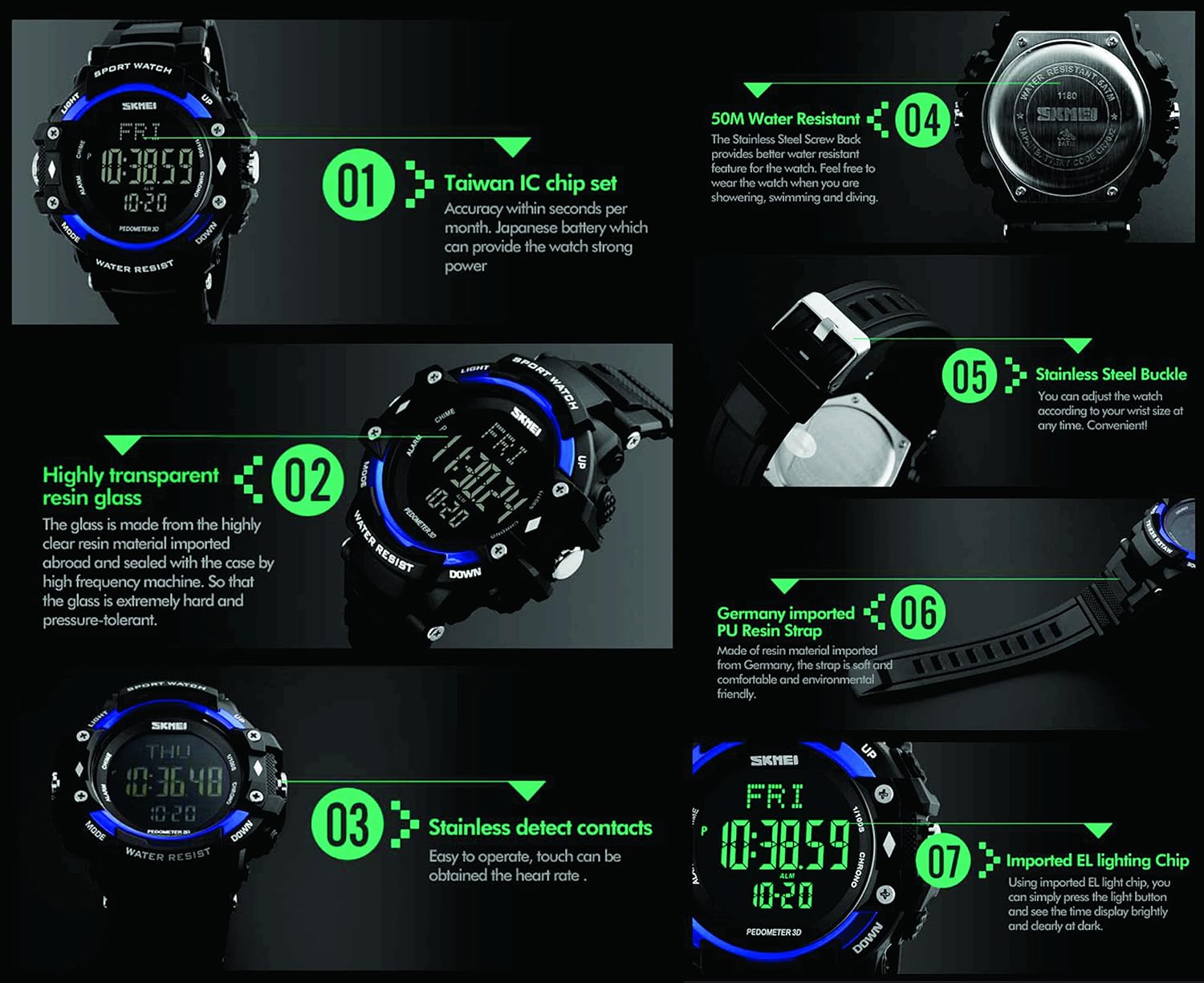
Figure 2: Detailed view of the smartwatch highlighting key components and features.
- Taiwan IC Chip Set: Provides accurate timekeeping and stable performance.
- Highly Transparent Resin Glass: Durable and pressure-tolerant display cover.
- Stainless Detect Contacts: Used for heart rate measurement.
- 50M Water Resistant: Suitable for showering, swimming, and daily water exposure.
- Stainless Steel Buckle: Adjustable for a secure fit.
- Germany Imported PU Resin Strap: Comfortable and durable wrist strap.
- Imported EL Lighting Chip: Ensures a bright and clear display in the dark.

Figure 3: Watch display showing various function icons including Pedometer, Heart Rate, Calories, Chrono, Alarm, Lock, 12/24 Hour, 50M waterproof, Low Power, and EL Light.
3. Setup
3.1 Initial Power On
Your smartwatch should power on automatically. If the display is blank, ensure the battery is charged. The watch typically comes with a protective film on the screen; remove it for better visibility.
3.2 Setting Time and Date
To set the time and date:
- Press the MODE button repeatedly until the time setting mode is displayed (usually indicated by flashing digits).
- Use the UP and DOWN buttons to adjust the hour, minute, year, month, and day.
- Press the MODE button again to confirm each setting and move to the next.
- Once all settings are complete, press the MODE button to exit the setting mode.
3.3 Bluetooth Connectivity (Android)
The SKMEI GS10423 is compatible with Android devices via Bluetooth. Specific pairing instructions may vary based on your phone's operating system and any companion app (if available). Generally, you will need to:
- Ensure Bluetooth is enabled on your Android smartphone.
- Access the Bluetooth settings on your phone and search for available devices.
- Select the SKMEI GS10423 from the list of found devices to initiate pairing.
- Follow any on-screen prompts on both your watch and phone to complete the pairing process.
4. Operating Instructions
4.1 Button Functions
- LIGHT Button: Activates the EL backlight for visibility in the dark.
- MODE Button: Cycles through different modes (Time, Alarm, Stopwatch, Pedometer, Heart Rate, etc.).
- UP Button: Used to increase values or navigate menus.
- DOWN Button: Used to decrease values or navigate menus.
4.2 EL Light
Press the LIGHT button to illuminate the display. The backlight will remain on for a few seconds.
4.3 Alarm Clock
To set the alarm:
- Press the MODE button until the alarm setting mode is displayed.
- Use the UP and DOWN buttons to adjust the alarm time.
- Press the MODE button to confirm and exit.
- To enable/disable the alarm, press the ALARM button (usually a dedicated button or a combination with MODE).
4.4 Stopwatch (Chrono)
To use the stopwatch:
- Press the MODE button until the stopwatch mode is displayed.
- Press the UP button to start the stopwatch.
- Press the UP button again to pause/resume.
- Press the DOWN button to reset the stopwatch to zero.
4.5 Pedometer and Activity Tracking
The watch features 24-hour activity tracking, recording movement distance, time, and calories burned.

Figure 4: The watch displaying total steps, distance, and calories consumed during activity.
To view pedometer data:
- Press the MODE button until the pedometer display is active.
- The display will show your total steps, estimated distance, and calories burned.
4.6 Heart Rate Monitor
The watch uses an ECG measurement principle to monitor your heart rate.

Figure 5: The watch displaying heart rate measurement, activated by touch.
To measure your heart rate:
- Ensure the watch is worn snugly on your wrist.
- Press the MODE button until the heart rate monitoring screen appears.
- Touch the stainless detect contacts (usually on the side or back of the watch) as instructed by the display.
- Remain still during the measurement for accurate results.
4.7 Waterproof Feature
The watch is 50M water resistant, meaning it can withstand splashes, rain, and is suitable for showering and swimming. It is not recommended for diving or high-pressure water activities.

Figure 6: The watch shown in a water environment, illustrating its 50M water resistance.
Important: Do not press any buttons while the watch is submerged in water, as this can compromise the water resistance seal.
4.8 Lock Feature
The watch includes a lock feature to prevent accidental button presses, especially useful during activities. Refer to the watch's on-screen prompts or specific button combinations (often involving holding down a button) to activate and deactivate the lock.
4.9 Low Power Tips
When the battery level is low, the watch may display a low power indicator. It is recommended to charge or replace the battery promptly to ensure continuous functionality and data integrity.
5. Maintenance
5.1 Cleaning
To clean your smartwatch, wipe it with a soft, damp cloth. Avoid using harsh chemicals, abrasive cleaners, or solvents, as these can damage the watch's finish and components. Ensure the watch is dry before wearing or storing.
5.2 Battery
The watch uses a Lithium Ion battery. If battery replacement is necessary, it is recommended to have it performed by a qualified technician to maintain the watch's water resistance and functionality.
6. Troubleshooting
- Display is blank: Check battery level. If the battery is low, replace or charge it.
- Inaccurate Heart Rate/Pedometer readings: Ensure the watch is worn snugly on your wrist. Remain still during heart rate measurements. Calibrate the pedometer if an option is available in settings.
- Buttons not responding: Check if the lock feature is activated. If so, deactivate it.
- Water ingress: If water enters the watch despite its water resistance, cease use immediately and contact customer support.
- Bluetooth connection issues: Ensure Bluetooth is enabled on both devices. Try unpairing and re-pairing the watch with your phone. Restart both devices.
7. Specifications
| Feature | Specification |
|---|---|
| Brand | SKMEI |
| Model Number | GS10423 |
| Connectivity Type | Bluetooth |
| Wireless Type | Bluetooth |
| Operating System | Android compatible |
| Special Features | Alarm Clock, Blood Pressure Monitor (implied by heart rate), Sleep Monitor (implied by activity tracking), Pedometer, Heart Rate Monitor, Stopwatch, Countdown, EL Light, Lock, Waterproof |
| Water Resistance | 50M |
| Battery Cell Composition | Lithium Ion |
| Item Weight | 372 g |
8. Warranty and Support
For warranty information or technical support, please refer to the documentation provided at the time of purchase or contact your retailer. You may also visit the official SKMEI website for further assistance.