
Cooler Master MAM-G1CN-924PC-R1
Cooler Master MasterAir G100M RGB Low Profile CPU Air Cooler
Model: MAM-G1CN-924PC-R1 | Brand: Cooler Master
Product Overview
The Cooler Master MasterAir G100M is a compact, low-profile CPU air cooler designed for systems with limited space, such as small form factor cases and HTPCs. It features Cooler Master's unique Heat Column Technology, which maximizes the direct contact surface area for efficient heat transfer from the CPU. The integrated RGB ring and fan provide customizable lighting effects, compatible with various motherboard RGB software for synchronized illumination.

Figure 1: MasterAir G100M with purple RGB illumination.
Key Features
- Heat Column Technology: Features a custom copper heat column that significantly increases the direct contact surface area, enhancing heat transfer and cooling performance.
- Low Profile Design: With a height of 74.5mm (2.9 inches), it is ideal for compact builds and small form factor cases where space is a premium.
- RGB Illumination: The integrated RGB ring and fan are certified compatible with major motherboard RGB software, allowing for full color customization and synchronization with other system components.
- Wired RGB Controller: Includes a dedicated wired RGB controller for easy customization of colors and effects, even without motherboard RGB software.
- Wide CPU Socket Support: Compatible with a broad range of Intel (LGA2066, LGA2011 v3, LGA2011, LGA1151, LGA1150, LGA1156, LGA1155, LGA1366) and AMD (AM4, AM3+, AM3, AM2+, AM2, FM2+, FM2, FM1) CPU sockets.


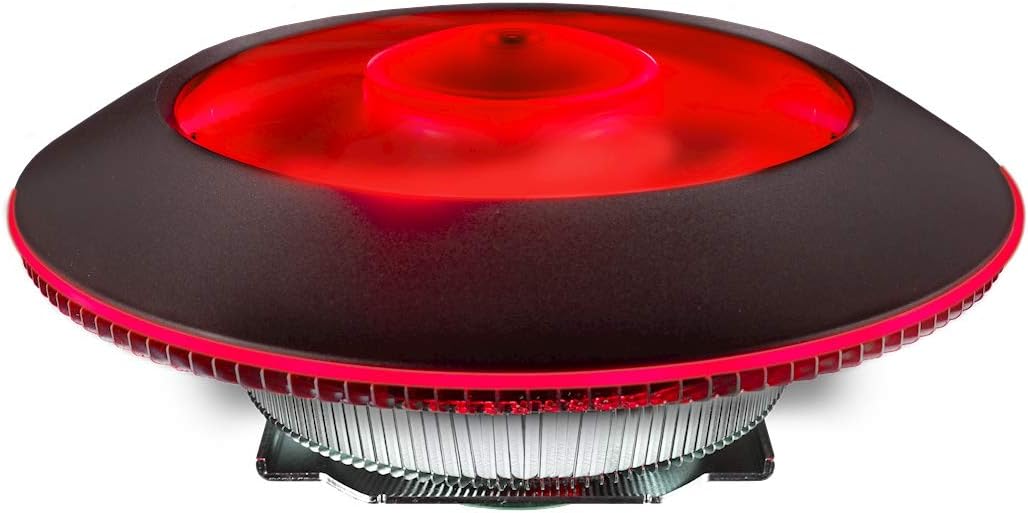
Figure 2: The MasterAir G100M showcasing various RGB lighting options when installed in a system.
Setup and Installation
Proper installation is crucial for optimal performance. Please refer to the detailed steps below and the official installation video for guidance.
Installation Steps Overview:
- Prepare Motherboard: Ensure your motherboard is compatible with the cooler's mounting system. Install the appropriate backplate and standoffs for your CPU socket type (Intel or AMD).
- Apply Thermal Paste: Apply a small amount of thermal paste (included or preferred) to the center of your CPU's integrated heat spreader (IHS).
- Mount Cooler: Carefully align the cooler with the mounting holes on the motherboard. Gently place the cooler onto the CPU, ensuring even contact.
- Secure Cooler: Use the provided mounting screws and the special tool to secure the cooler firmly to the motherboard. Tighten screws in a diagonal pattern to ensure even pressure.
- Connect Fan and RGB Cables: Connect the 4-pin PWM fan cable to the CPU_FAN header on your motherboard. Connect the RGB cable from the cooler to either your motherboard's RGB header (if compatible) or the included wired RGB controller.
- Cable Management: Route cables neatly to avoid interference with other components or airflow.

Figure 3: Detailed dimensions of the MasterAir G100M, highlighting its low-profile design.

Figure 4: Underside view of the cooler, revealing the copper heat column for direct CPU contact.
Official Installation Video:
Video 1: Official Cooler Master G100M Installation Guide. This video provides a visual walkthrough of the installation process.
Product Overview Video:
Video 2: Cooler Master MasterAir G100M Product Overview. This video highlights the cooler's features and design.
Operating Instructions
Once installed, the MasterAir G100M operates automatically, with its fan speed controlled by the motherboard's CPU fan header based on CPU temperature. The RGB lighting can be controlled in two ways:
- Motherboard RGB Software: If your motherboard has a compatible 4-pin RGB header (12V-G-R-B) and supporting software (e.g., ASUS Aura Sync, MSI Mystic Light, Gigabyte RGB Fusion, ASRock Polychrome Sync), connect the cooler's RGB cable directly to the motherboard. You can then control the lighting effects and colors through the motherboard's utility.
- Wired RGB Controller: If your motherboard lacks a compatible RGB header or you prefer standalone control, connect the cooler's RGB cable to the included wired RGB controller. Use the buttons on the controller to cycle through various colors, lighting modes, and adjust brightness.
For optimal cooling performance, ensure proper airflow within your PC case. Avoid obstructing the cooler's fan or fins.
Maintenance
Regular maintenance helps ensure the longevity and efficiency of your CPU cooler.
- Dust Removal: Periodically (e.g., every 3-6 months), use compressed air to blow dust out of the cooler's fins and fan blades. Ensure the fan is not spinning rapidly during this process to prevent damage to the bearings.
- Fan Cleaning: For stubborn dust, gently wipe the fan blades with a soft, dry cloth.
- Thermal Paste: Re-applying thermal paste is generally not required unless the cooler is removed from the CPU. If you re-install the cooler, clean off old thermal paste from both the CPU and cooler base and apply new paste.
Always power down and unplug your computer before performing any maintenance.
Troubleshooting
This section addresses common issues you might encounter with your MasterAir G100M cooler.
| Problem | Possible Cause | Solution |
|---|---|---|
| High CPU Temperatures |
|
|
| RGB Lighting Not Working |
|
|
| Excessive Fan Noise |
|
|
| Interference with RAM/Components |
|
|
Specifications
| Model Number | MAM-G1CN-924PC-R1 |
| Dimensions (L x W x H) | 145mm x 145mm x 74.5mm (5.7"L x 5.7"W x 2.9"H) |
| Material | Aluminum Fins, Copper Heat Column |
| Fan Speed | 600 - 2500 RPM (PWM) ± 10% |
| Air Flow | 22.63 CFM ± 10% |
| Noise Level | 30.0 dBA (Max) |
| Power Connector | 4-Pin (PWM) |
| Rated Voltage | 12 VDC |
| Rated Current | 0.37A |
| Power Consumption | 4.44W |
| CPU Socket Support | Intel LGA2066 / LGA2011-v3 / LGA2011 / LGA1151 / LGA1150 / LGA1156 / LGA1155 / LGA1366 AMD AM4 / AM3+ / AM3 / AM2+ / AM2 / FM2+ / FM2 / FM1 |
| Weight | 1.46 pounds (0.66 kg) |
Warranty and Support
Cooler Master products come with a limited warranty. Please refer to the official Cooler Master website for detailed warranty terms and conditions specific to your region. For technical support, driver downloads, or further assistance, visit the Cooler Master support page.
Official User Manual (PDF): Download Here
Related documentsMAM-G1CN-924PC-R1


Ask a question about this manual
Ask about setup, troubleshooting, compatibility, parts, safety, or missing instructions. Manuals+ will review the question and use this page’s manual context to help answer it.