
1. Introduction
This manual provides comprehensive instructions for the setup, operation, maintenance, and troubleshooting of your Lenovo ThinkPad T580 laptop. Designed for high performance and portability, the ThinkPad T580 offers robust features for productivity and security. Please read this manual thoroughly to ensure proper use and care of your device.
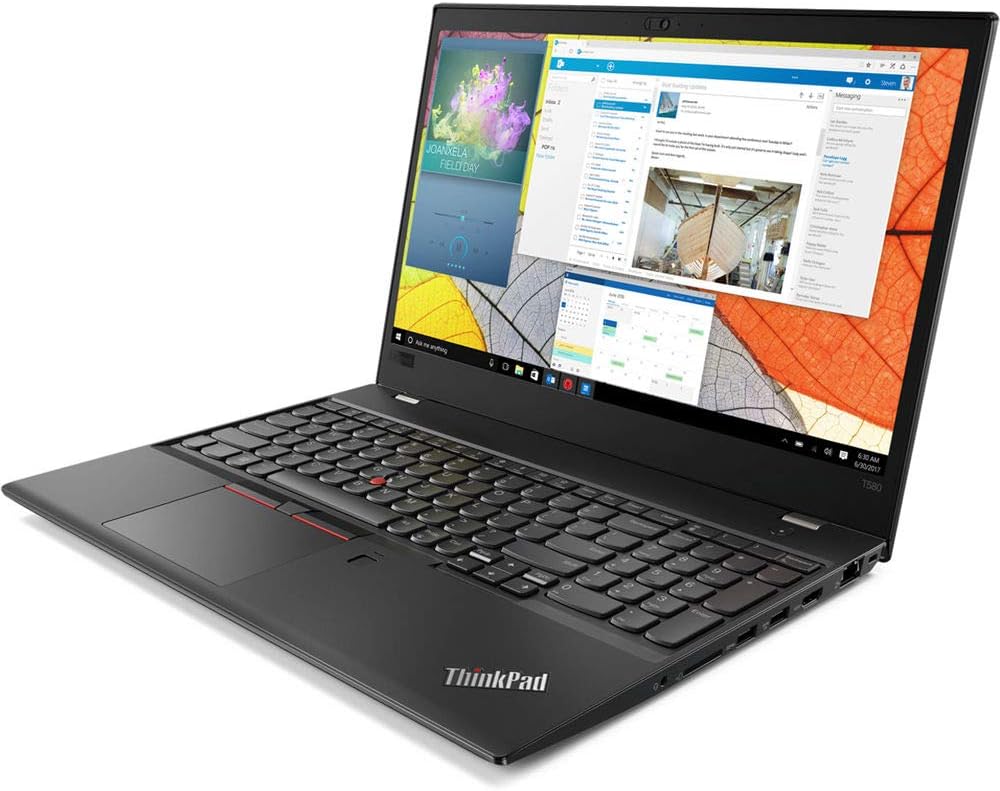
Figure 1.1: Lenovo ThinkPad T580 Laptop. This image shows the laptop from an angled perspective, highlighting its sleek design and the vibrant display with various applications open.
2. Setup
2.1 Unboxing and Initial Inspection
Carefully remove all components from the packaging. Verify that the following items are present:
- Lenovo ThinkPad T580 Laptop
- AC Power Adapter and Power Cord
- User Guide (this document)
Inspect the laptop for any visible damage. If any components are missing or damaged, contact your vendor or Lenovo support immediately.
2.2 Connecting the Power Adapter
Before initial use, connect the laptop to a power source. Locate the USB-C power port on the side of the laptop. Connect the AC power adapter to the laptop and then plug the power cord into a grounded electrical outlet.
2.3 Initial Boot and Windows Setup
Press the power button, typically located on the top right of the keyboard deck. The laptop will power on and guide you through the initial Windows 10 Pro setup process. Follow the on-screen prompts to configure language, region, network settings, and user accounts.
3. Operation
3.1 Powering On/Off and Sleep Mode
- Power On: Press the power button.
- Shut Down: Click the Windows Start button, then select Power > Shut down.
- Sleep Mode: Close the lid or click the Windows Start button, then select Power > Sleep.
3.2 Keyboard and Input Devices
The ThinkPad T580 features a full-sized keyboard, a TrackPoint pointing device, and a multi-touch touchpad.
- Keyboard: Standard QWERTY layout with function keys (Fn) for system controls.
- TrackPoint: A red pointing stick located between the G, H, and B keys. Use it with the dedicated left, right, and middle click buttons below the spacebar.
- Touchpad: Supports multi-touch gestures for navigation, scrolling, and zooming.
3.3 Understanding Ports and Connectivity
The ThinkPad T580 is equipped with various ports for connecting peripherals and external devices:
- USB-C Ports: Used for power, data transfer, and video output. One port supports Thunderbolt 3 for high-speed data and display connections.
- USB 3.0 Ports: For connecting USB devices such as external drives, mice, and keyboards.
- HDMI Port: For connecting to external displays or projectors.
- RJ45 Ethernet Connector: For wired network connections.
- Audio Jack: For connecting headphones or external speakers.
3.4 Power Bridge Technology
The ThinkPad T580 features Power Bridge Technology, allowing you to swap out the external battery with a fully charged one without powering down the laptop. This extends operational time without interruption.
3.5 Security Features
- Fingerprint Reader: Located on the palm rest, it allows for secure, biometric login. Register your fingerprints through Windows Settings.
- ThinkShutter: A physical cover for the webcam, providing enhanced privacy. Slide the shutter to open or close the camera lens.
4. Maintenance
4.1 Cleaning the Laptop
To maintain your laptop's appearance and functionality:
- Use a soft, lint-free cloth slightly dampened with water or a screen cleaner for the display.
- For the keyboard and chassis, use a soft cloth. Avoid harsh chemicals or abrasive materials.
- Ensure the laptop is powered off and unplugged before cleaning.
4.2 Battery Care
To maximize battery lifespan:
- Avoid extreme temperatures.
- Do not fully discharge the battery frequently.
- If storing the laptop for an extended period, ensure the battery is charged to about 50%.
4.3 Software Updates
Regularly update your operating system and drivers to ensure optimal performance and security. Windows Update can be accessed via Windows Settings > Update & Security.
5. Troubleshooting
This section addresses common issues you might encounter with your ThinkPad T580.
5.1 Power Issues
- Laptop does not turn on: Ensure the power adapter is securely connected and the outlet is functional. Try a different outlet.
- Battery not charging: Verify the power adapter connection. Check for any damage to the adapter or cable.
5.2 Display Issues
- No image on screen: Connect an external monitor to check if the issue is with the laptop's display. Restart the laptop.
- Flickering screen: Update graphics drivers. Adjust display refresh rate in Windows settings.
5.3 Connectivity Issues
- Wi-Fi not connecting: Ensure Wi-Fi is enabled. Restart your router and laptop. Check network adapter drivers.
- USB device not recognized: Try a different USB port. Ensure the device drivers are installed.
For more complex issues, refer to the Lenovo support website or contact technical support.
6. Specifications
| Feature | Specification |
|---|---|
| Model Name | ThinkPad T580 (20L9001MUS) |
| Processor | Intel Core i7 (1.8 GHz, 4 Cores) |
| RAM | 8 GB DDR3 (2400 MHz) |
| Storage | 256 GB SSD |
| Display | 15.6 Inches (Max Resolution: 1920x1080 Pixels) |
| Graphics | Intel UHD Graphics 620 (Integrated) |
| Operating System | Windows 10 Pro |
| Ports | 2x USB 3.0, USB-C (Thunderbolt 3), HDMI, RJ45 Ethernet |
| Wireless Connectivity | 802.11g |
| Dimensions (LxWxH) | 14.4 x 0.79 x 9.95 inches |
| Weight | 4.29 pounds |
| Special Features | Fingerprint Reader, Power Bridge Technology |
7. Warranty and Support
7.1 Warranty Information
Your Lenovo ThinkPad T580 laptop comes with a standard limited warranty. For detailed terms and conditions, including warranty period and coverage, please refer to the warranty card included with your product or visit the official Lenovo support website.
7.2 Customer Support
For technical assistance, service requests, or further information, please contact Lenovo customer support through their official website or the contact numbers provided in your product documentation. When contacting support, please have your laptop's model number (20L9001MUS) and serial number ready.