
1. Introduction
This manual provides essential information for the safe and efficient operation of your Salicru SPS Advance RT2 Uninterruptible Power Supply (UPS). The SPS Advance RT2 is a line-interactive UPS designed to protect your electronic equipment from power disturbances, ensuring continuous and stable power delivery. It features a pure sine wave output, permanent AVR stabilization, and a versatile tower/rack convertible format.
The package includes the UPS unit, power cable, two IEC output connection cables, a USB communication cable for UPS/PC connection, a quick guide, warranty information, and a base for tower configuration along with fixings for rack installation.

Figure 1: Salicru SPS Advance RT2 UPS shown in both tower and rack formats, highlighting its versatile design.
2. Safety Information
Please read all safety instructions carefully before installing, operating, or maintaining the UPS. Failure to follow these instructions may result in electric shock, fire, or serious injury.
- Do not open the UPS casing. There are no user-serviceable parts inside. Refer all servicing to qualified service personnel.
- Do not connect the UPS to its own output.
- Do not connect appliances that could overload the UPS, such as hair dryers or vacuum cleaners.
- Ensure the UPS is connected to a grounded AC power outlet.
- Do not block ventilation openings. Ensure adequate airflow around the UPS.
- The UPS contains batteries that can present a risk of electric shock and high short-circuit current.
- Disconnect the UPS from the AC power source before performing any maintenance or cleaning.
- The UPS is designed for indoor use only. Avoid exposure to direct sunlight, liquids, or excessive humidity.
3. Setup and Installation
3.1 Unpacking and Inspection
Carefully unpack the UPS and inspect it for any shipping damage. If any damage is found, do not install the unit and contact your dealer.
3.2 Choosing a Location
Place the UPS in a clean, dry, and temperature-controlled environment. Ensure the ambient temperature is within the recommended operating range (typically 0-40°C). Maintain at least 20 cm of clearance around the ventilation openings.
3.3 Configuration (Tower/Rack)
The SPS Advance RT2 can be configured as a tower or rack-mount unit. Use the provided base for tower setup or the included fixings for rack installation.

Figure 2: The UPS configured in a vertical tower orientation, suitable for standalone placement.
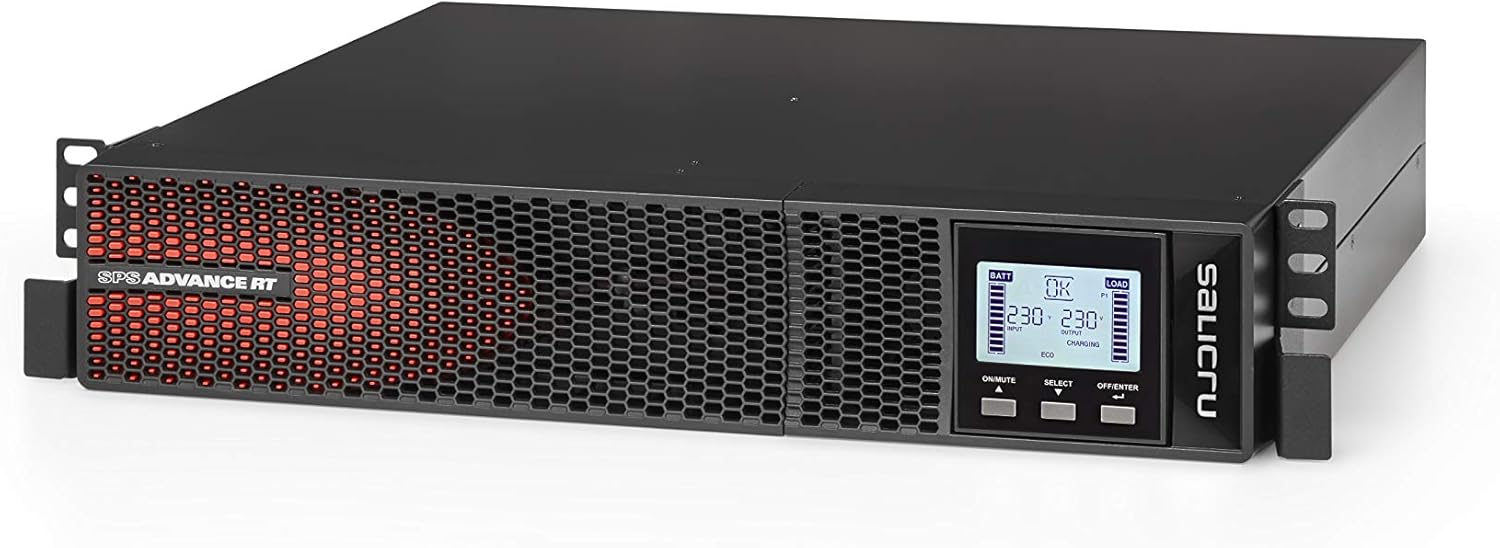
Figure 3: The UPS configured for horizontal rack mounting, ideal for server environments.
3.4 Connecting the UPS
- Input Power Connection: Connect the UPS to a grounded AC power outlet using the provided power cable.
- Output Connections: Connect your critical equipment (computers, servers, network devices) to the output receptacles on the rear panel of the UPS using the supplied IEC cables.
- Communication Cable: Connect the USB communication cable from the UPS to your computer for monitoring and management software (if applicable).
- External Battery (Optional): If using an external battery pack, connect it to the designated port on the rear panel.
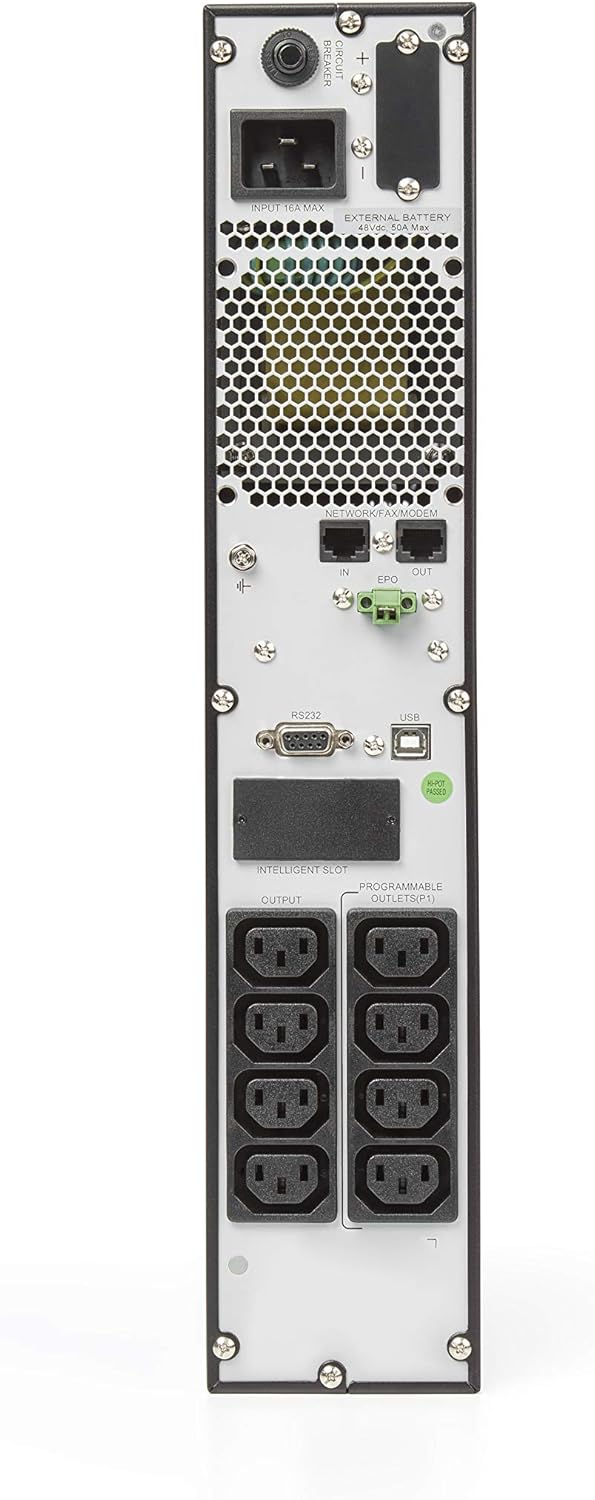
Figure 4: Rear panel connections, including input power, output receptacles, USB, and serial ports.
4. Operating the UPS
4.1 Initial Startup
After connecting all necessary cables, press the "ON/MUTE" button on the front panel to power on the UPS. The LCD display will illuminate, and the UPS will perform a self-test.
4.2 LCD Display and Control Panel
The UPS features an LCD control panel that provides real-time status information and allows for configuration adjustments. The panel includes buttons for "ON/MUTE", "SELECT", and "OFF/ENTER".
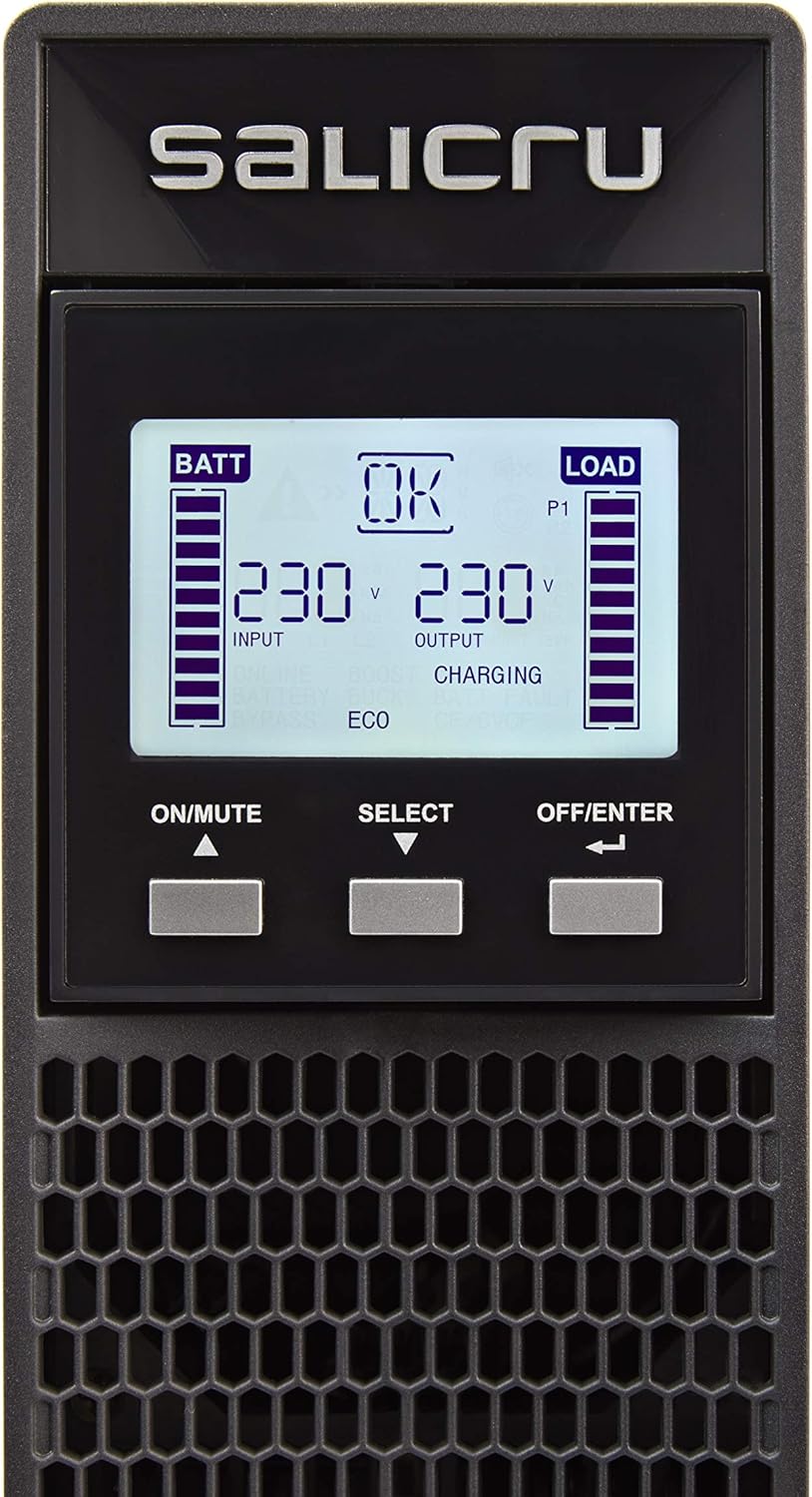
Figure 5: Detailed view of the LCD display and control buttons for monitoring and configuration.
LCD Display Indicators:

Figure 6: Diagram illustrating the various indicators and information displayed on the LCD panel.
- BATT: Battery charge level indicator.
- LOAD: Output load level indicator.
- INPUT/OUTPUT Voltage: Displays real-time input and output voltage.
- Status Icons: Icons for Online, Battery, Bypass, ECO mode, Charging, Fault, etc.
4.3 Operating Modes
The UPS operates in several modes:
- Online Mode: Normal operation where the UPS provides conditioned power to connected equipment.
- Battery Mode: Activated during a power outage, the UPS supplies power from its internal batteries.
- Bypass Mode: If an internal fault occurs or during maintenance, the UPS can switch to bypass mode, supplying utility power directly to the load.
- ECO Mode: An energy-saving mode where the UPS operates with higher efficiency under stable power conditions.
4.4 Automatic Voltage Regulation (AVR)
The SPS Advance RT2 features permanent Automatic Voltage Regulation (AVR) to stabilize incoming utility power, correcting sags and surges without switching to battery power, thus preserving battery life.
5. Maintenance
5.1 Battery Care
The UPS contains a Lithium-ion battery. For optimal battery life:
- Keep the UPS connected to AC power to ensure the battery remains charged.
- Perform a battery self-test periodically (refer to the full manual for instructions).
- Replace batteries only with the same type and rating as specified by Salicru.
5.2 Cleaning
Clean the exterior of the UPS with a soft, dry cloth. Do not use liquid or aerosol cleaners. Ensure ventilation openings are free from dust and debris.
5.3 Storage
If storing the UPS for an extended period, ensure the battery is fully charged, then disconnect it from the AC power. Recharge the battery every three months to prevent deep discharge.
6. Troubleshooting
This section provides solutions to common issues you may encounter with your UPS. For more complex problems, please contact technical support.
| Problem | Possible Cause | Solution |
|---|---|---|
| UPS does not turn on. | No AC input power; Battery deeply discharged. | Check power cable connection and wall outlet. Allow UPS to charge for several hours. |
| UPS beeps continuously in battery mode. | Low battery warning. | Save open files and shut down connected equipment. The UPS will shut down automatically when battery is depleted. |
| Overload warning. | Too many devices connected. | Disconnect non-essential equipment from the UPS output. |
| UPS switches to battery mode frequently. | Unstable utility power; Sensitivity setting too high. | Check utility power quality. Adjust UPS sensitivity setting (refer to full manual). |
7. Specifications
| Feature | Detail |
|---|---|
| Brand | Salicru |
| Model Number | SPS.2000.ADV RT2 |
| Type | Line-Interactive UPS |
| Power Capacity | 2000 VA / 1800 W |
| Output Power Factor | 0.9 |
| Input Voltage | 170-280 Volts (AC) |
| Output Voltage | 230 Volts (AC) |
| Waveform | Pure Sine Wave |
| Battery Type | Lithium-ion (1 required) |
| Recharge Time | 4 hours (to 90% capacity) |
| Form Factor | Tower/Rack (2U) |
| Color | Green |
| Weight | 20 Kilograms |
| Plug Type | Type C/EF – 2 pins (European/hybrid FR-DE socket) |
| Communication Ports | USB, RS232, Intelligent Slot (SNMP/Relay) |
8. Warranty and Support
The Salicru SPS Advance RT2 UPS comes with a 2-year warranty from the date of purchase. Please retain your proof of purchase for warranty claims.
For technical support, service, or warranty inquiries, please contact your local Salicru dealer or visit the official Salicru website for contact information. Do not attempt to repair the unit yourself, as this will void the warranty.
For more detailed information, refer to the complete user manual available on the manufacturer's website or included with your product documentation.


