
Introduction
This manual provides comprehensive instructions for the Sony WF-SP700N Wireless Noise-Cancelling In-Ear Headphones. These truly wireless earbuds feature digital noise-cancelling technology, an ambient sound mode, and EXTRA BASS for enhanced audio. Designed for active lifestyles, they are splash-proof and offer a secure, comfortable fit. Please read this manual thoroughly to ensure proper use and optimal performance of your headphones.
Product Overview
The Sony WF-SP700N headphones consist of two independent earbuds and a portable charging case. Familiarize yourself with the components and their functions.
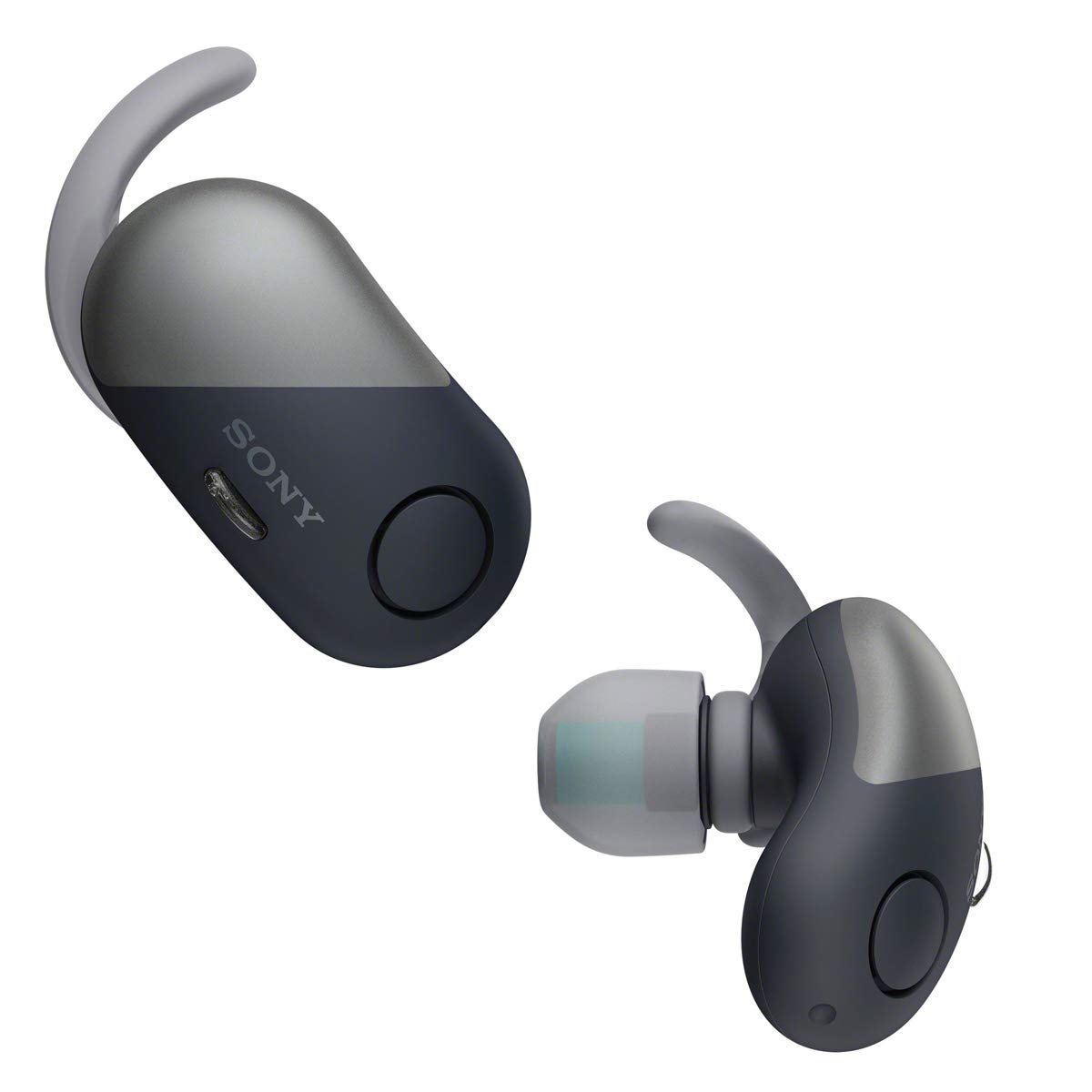
Figure 1: Sony WF-SP700N Wireless Noise-Cancelling In-Ear Headphones and Charging Case.
Earbud Components
- Main Button: Controls playback, calls, and voice assistant.
- Microphone: For calls and voice commands.
- Charging Contacts: Connects to the charging case.
- Indicator Light: Displays power status, pairing status, and charging status.
- Ear Tip: Provides sound isolation and comfort.
- Arc Supporter (Ear Fin): Ensures a secure fit during activity.

Figure 2: Close-up view of the Sony WF-SP700N earbuds, highlighting the main button and charging port.
The earbuds are designed with a main button for various controls and a micro USB port for charging. The indicator light provides visual feedback on the device's status.

Figure 3: Sony WF-SP700N earbuds featuring the ear tips and arc supporters for a stable fit.
Each earbud is equipped with a soft ear tip and an arc supporter (ear fin) to ensure a comfortable and secure fit, especially during physical activities.
Charging Case
The compact charging case protects your earbuds and recharges them on the go. It features charging slots for each earbud and an indicator light for its own charging status.

Figure 4: The Sony WF-SP700N earbuds securely placed within their charging case.
Setup
1. Charging the Headphones
Before initial use, fully charge the headphones and the charging case.
- Place the left and right earbuds into the charging case. Ensure the charging contacts align.
- Connect the charging case to a USB power source using the supplied Micro USB cable.
- The indicator light on the charging case will illuminate during charging and turn off when complete.
A full charge provides up to 3 hours of playback with noise-cancelling on, and the charging case provides an additional 2 charges, totaling up to 9 hours of battery life.
2. Pairing with a Bluetooth Device
The WF-SP700N headphones can be paired with your smartphone or other Bluetooth-enabled devices.
- Initial Pairing: When you take the earbuds out of the charging case for the first time, they automatically enter pairing mode. The indicator lights on both earbuds will flash blue.
- Manual Pairing: If the earbuds are not in pairing mode, press and hold the main button on both earbuds for approximately 7 seconds until the indicator lights flash blue.
- On your device, go to Bluetooth settings and select "WF-SP700N" from the list of available devices.
- Once connected, the indicator lights will stop flashing and remain solid blue for a few seconds before turning off.
For NFC-compatible devices, simply touch the charging case to your device to initiate pairing.
3. Achieving a Secure Fit
Proper fit is crucial for sound quality and noise-cancelling effectiveness. The headphones come with various sizes of ear tips and arc supporters.
- Experiment with different ear tip sizes to find the one that creates a snug seal in your ear canal.
- Select the appropriate arc supporter size to ensure the earbud stays firmly in place, especially during exercise.
- Insert the earbud into your ear and twist it gently until the arc supporter fits comfortably against your ear ridge.

Figure 5: The Sony WF-SP700N earbuds designed for a secure fit during physical activity.
Operating Instructions
Power On/Off
- Power On: The earbuds automatically power on when removed from the charging case. Alternatively, press and hold the main button on each earbud for about 2 seconds.
- Power Off: Place the earbuds back into the charging case. They will automatically power off and begin charging. To manually power off, press and hold the main button on each earbud for about 7 seconds.
Music Playback Controls
- Play/Pause: Press the main button on either earbud once.
- Next Track: Press the main button on the right earbud twice quickly.
- Previous Track: Press the main button on the right earbud three times quickly.
- Volume Control: Adjust volume directly on your connected device.
Call Management
- Answer/End Call: Press the main button on either earbud once.
- Reject Call: Press and hold the main button on either earbud for about 2 seconds.
Noise Cancelling and Ambient Sound Mode
The WF-SP700N features Digital Noise Cancelling and Ambient Sound Mode. These modes can be toggled using the main button on the left earbud or through the Sony Headphones Connect app.
- Noise Cancelling: Minimizes ambient noise for an immersive listening experience.
- Ambient Sound Mode: Allows you to hear surrounding sounds while listening to music, useful for outdoor activities or when awareness is needed.
- Toggle Modes: Press the main button on the left earbud once to cycle between Noise Cancelling, Ambient Sound Mode, and Off.
Maintenance
Regular maintenance ensures the longevity and performance of your headphones.
- Cleaning: Wipe the earbuds and charging case with a soft, dry cloth. Do not use alcohol, benzene, thinner, or other chemical cleaners.
- Ear Tips and Arc Supporters: Remove and clean the ear tips and arc supporters with mild soap and water if necessary. Ensure they are completely dry before reattaching.
- Charging Contacts: If charging issues occur, gently clean the charging contacts on both the earbuds and the case with a dry cotton swab.
- Storage: Store the headphones in their charging case when not in use to protect them from dust and damage. Avoid extreme temperatures.
- Water Resistance: The headphones are IPX4 splash-proof, meaning they are protected from splashing water from any direction. However, they are not fully waterproof and should not be submerged in water. Ensure the charging port cover is securely closed.
Troubleshooting
If you encounter issues with your WF-SP700N headphones, refer to the following common solutions:
| Problem | Solution |
|---|---|
| No power/Cannot turn on | Ensure the earbuds and charging case are fully charged. |
| Cannot pair with device |
|
| No sound or intermittent sound |
|
| Noise cancelling not effective |
|
For more detailed troubleshooting, please refer to the official Sony support website or the full product manual.
Specifications
| Feature | Detail |
|---|---|
| Model Name | WF-SP700N |
| Connectivity Technology | Bluetooth, NFC |
| Bluetooth Version | 4.1 |
| Bluetooth Range | 10 Meters |
| Noise Control Features | Active Noise Cancellation |
| Water Resistance Level | IPX4 (Splash-proof) |
| Battery Life (Playback) | Up to 3 hours (with NC on), up to 9 hours total with charging case |
| Audio Driver Size | 6.1 Millimeters |
| Material | Plastic, Rubber, Silicone |
| Item Weight | 7.6 Grams (each earbud) |
Warranty and Support
For warranty information, product registration, and further technical support, please visit the official Sony website or contact Sony customer service. Keep your proof of purchase for warranty claims.
Sony Support Website: www.sony.com/electronics/support