
Autel AL539B
Autel AL539B OBD2 Scanner, Battery Tester & AVOmeter User Manual
Model: AL539B | Brand: Autel
1. Introduction
The Autel AL539B is an advanced 3-in-1 diagnostic tool combining a full OBDII/EOBD scanner, a battery tester, and an AVOmeter. It is designed to provide comprehensive vehicle analysis for rapid, accurate diagnosis and timely repair, compatible with most 1996 and newer American, Asian, and European OBDII/CAN compliant vehicles.

Image: Autel AL539B device highlighting its key features.
2. What's in the Box
Verify that all items are present in your package:
- Autel AL539B Main Unit
- Battery Test Cable
- 3.7V Li-ion Battery
- USB Cable
- OBDII Cable
- User's Manual

Image: The Autel AL539B device, its carrying pouch, and the user manual.
3. Setup
To begin using your Autel AL539B, follow these steps:
- Charge the Device: Ensure the internal 3.7V Li-ion battery is sufficiently charged using the provided USB cable.
- Locate OBDII Port: Identify your vehicle's 16-pin Data Link Connector (DLC), usually located under the dashboard on the driver's side.
- Connect to Vehicle: Plug the OBDII cable into the vehicle's DLC. The AL539B will automatically power on.
- Initial Scan: The device will establish communication with the vehicle's ECU. Once connected, you can navigate the menu to perform various diagnostic functions.

Image: The Autel AL539B connected to a vehicle's OBD2 port, ready for diagnosis.
4. Operating the AL539B
The AL539B offers three primary diagnostic functions: OBDII/EOBD Scan, Battery Test, and AVOmeter (Circuit Test).
4.1. Full OBDII/EOBD Functions
This mode allows you to access emission-related diagnostic trouble codes (DTCs) and vehicle information.
- Read Codes: Displays Diagnostic Trouble Codes (DTCs) stored in the vehicle's computer.
- Erase Codes: Clears DTCs from the vehicle's computer and turns off the Check Engine Light (MIL).
- Live Data: Displays real-time data from the vehicle's sensors in text or graph format.
- Freeze Frame: Shows a snapshot of operating conditions at the time an emission-related fault occurred.
- I/M Readiness: Checks the readiness of the emission monitoring systems.
- O2 Sensor Test: Retrieves O2 sensor monitor test results.
- On-Board Monitor Test: Retrieves test results for emission-related powertrain components and systems.
- EVAP System Test: Initiates a leak test for the vehicle's EVAP system.
- Vehicle Information: Retrieves the Vehicle Identification Number (VIN), Calibration ID (CALID), and Calibration Verification Number (CVN).

Image: Overview of the full OBD2 functions available on the AL539B.
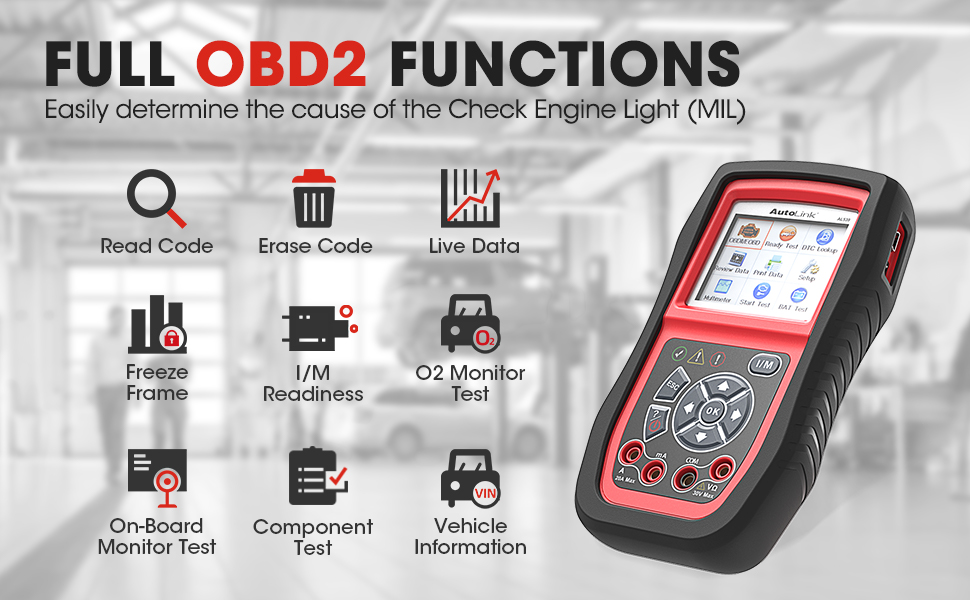
Image: The AL539B displaying various live data parameters and diagnostic results.
4.2. Battery Test
The Battery Test function is designed to test 12-volt automotive batteries, including Regular, AGM, AGM/Spiral, and Gel types. It provides a comprehensive analysis of battery health, starter performance, and charging system efficiency.
- Battery Health Test: Displays battery voltage and CCA (Cold Cranking Amps) value, with suggestions like "Good Battery," "Charge Battery," or "Bad Battery."
- Starter Test: Checks the cranking voltage, voltage percentage, and cranking time to predict if the battery will fail to start the vehicle.
- Charging System Test: Evaluates the generator's output voltage and charging current, and checks for excessive ripple.

Image: The AL539B connected to a vehicle battery, performing a battery test.

Image: The AL539B displaying battery test results, showing the battery's health status.
4.3. Circuit Test (AVOmeter)
The built-in AVOmeter allows you to test voltage, continuity, and current, simplifying electrical system troubleshooting.
- Voltage Test (AC/DC): Measures voltage in electrical components. (Note: Do not test voltages above 30V to prevent damage.)
- Resistance Test: Measures resistance between two circuit points. (Note: If resistance is above 50 Ohm, it will display 0L.)
- Current Test: Measures current flow (0A~20A). (Note: Do not test currents above 20A to prevent damage.)
- Diode Test: Tests diodes by connecting probes to battery terminals correctly.

Image: The AL539B displaying various AVOmeter test results, including continuity, current, and voltage.
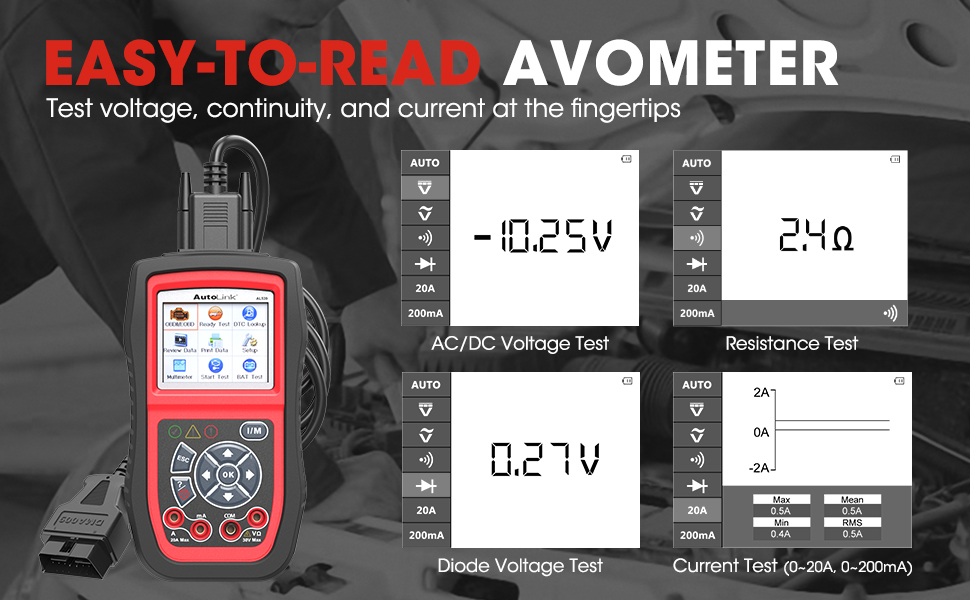
Image: The AL539B displaying detailed AVOmeter test results for various electrical parameters.
4.4. Product Overview Video
Video: Official overview of the Autel AL539B, demonstrating its features and functions.
5. Maintenance
Keep your AL539B updated and functioning optimally.
- Software Updates: Download and install the "Autel Maxi Link II Tool Kit" on your computer. Connect the scan tool to the computer via a USB cable and run updates through the internet to ensure the latest software version.
- Data Printing: You can print out stored diagnostic data or customized test reports via a Windows-based PC for record-keeping or consultation.
- Cleaning: Use a soft, damp cloth to clean the device. Avoid abrasive cleaners or solvents.
6. Troubleshooting
If you encounter issues with your AL539B, refer to the following common problems and solutions:
- Device Cannot Be Turned On:
- Method 1: Test the device on a few more vehicles. If it still doesn't turn on, there might be an issue with the DB16 pin of the machine, preventing normal power supply from the vehicle.
- Method 2: Measure the voltage signal of the 16th pin of the vehicle's OBD diagnostic socket. If it is 12V, it indicates a problem with the scanner itself.
- Incorrect Readings: Ensure all cables are securely connected and the correct test mode is selected. Refer to the specific test section in the manual for detailed instructions.
7. Specifications
| Feature | Specification |
|---|---|
| Brand | Autel |
| Model | AutoLink AL539B |
| Item Weight | 2.44 pounds |
| Package Dimensions | 11.89 x 8.82 x 3.78 inches |
| Operating System | Android 4.4 |
| First Available Date | January 31, 2018 |
8. Warranty & Support
The Autel AL539B comes with a lifetime update policy. You can download and install updates via the "Autel Maxi Link II Tool Kit" on your computer. There is no need for product registration on the Autel website as it is not a subscribed item.
For any technical support or questions, please feel free to reach out via email or Q&A through the platform where you purchased the device. Autel provides 24/7 after-sale support.
Ask a question about this manual
Ask about setup, troubleshooting, compatibility, parts, safety, or missing instructions. Manuals+ will review the question and use this page’s manual context to help answer it.