
Makita DGA513Z
Makita DGA513Z 18V Li-Ion LXT Brushless 125mm Angle Grinder User Manual
Model: DGA513Z | Brand: Makita
1. Product Overview
The Makita DGA513Z is a cordless angle grinder designed for professional use. It is powered by an 18V Li-Ion LXT slide type battery (not included) and features a brushless motor for extended run time and efficiency. This model is equipped with advanced technologies to enhance performance and user safety.

Figure 1: Makita DGA513Z Angle Grinder with guard and side handle.
Key Features:
- Brushless Motor: Provides longer run time, increased power, and extended tool life.
- Automatic Torque Drive Technology (ADT): Automatically adjusts cutting speed and torque during operation for optimal performance based on load conditions.
- Active Feedback Sensing Technology (AFT): Shuts down the tool if the rotation speed suddenly slows down, protecting the user from kickback.
- Anti-restart Function: Prevents accidental startup if the battery is inserted with the switch locked on.
- Electronic Current Limiter: Offers overload protection for the motor.
- Variable Speed Control Dial: Allows adjustment of the rotational speed up to 8,500 RPM.
- Lock-on Function: For continuous operation.
- Battery Fuel Gauge: Indicates remaining battery capacity.
- Tool-free Wheel Guard Adjustment: For quick and easy repositioning.

Figure 2: The 18V Lithium-Ion battery system powers the DGA513Z.
2. Safety Information
Always observe basic safety precautions when using power tools to reduce the risk of fire, electric shock, and personal injury. Read and understand all instructions before operating the tool.
General Safety Rules:
- Wear appropriate personal protective equipment (PPE), including safety glasses, hearing protection, and gloves.
- Ensure the workpiece is securely clamped or stable before beginning work.
- Keep hands and body clear of the rotating wheel.
- Do not operate the tool in explosive atmospheres, such as in the presence of flammable liquids, gases, or dust.
- Keep children and bystanders away while operating a power tool.
- Store idle tools out of reach of children and other untrained persons.
Specific Grinder Safety:
- Always use the correct type and size of grinding wheel for the application.
- Ensure the wheel guard is properly installed and adjusted to provide maximum protection.
- Be aware of the Active Feedback Sensing Technology (AFT) which will shut down the tool if the wheel binds, preventing kickback.
- The anti-restart function prevents the tool from starting if the battery is inserted while the switch is in the "ON" position. Always ensure the switch is in the "OFF" position before inserting a battery.
3. Setup
3.1 Battery Installation
The Makita DGA513Z operates on an 18V Li-Ion LXT battery. Ensure the battery is fully charged before use.
- Align the battery with the battery housing on the tool.
- Slide the battery into the housing until it clicks into place. Ensure it is securely latched.
- To remove, press the release button on the battery and slide it out.

Figure 3: Battery fuel gauge indicating charge level.
3.2 Attaching the Side Handle
The side handle can be attached to either side of the grinder for improved control and comfort, depending on your working position and handedness.
- Locate the threaded holes on both sides of the grinder's gear housing.
- Screw the side handle firmly into the desired hole.
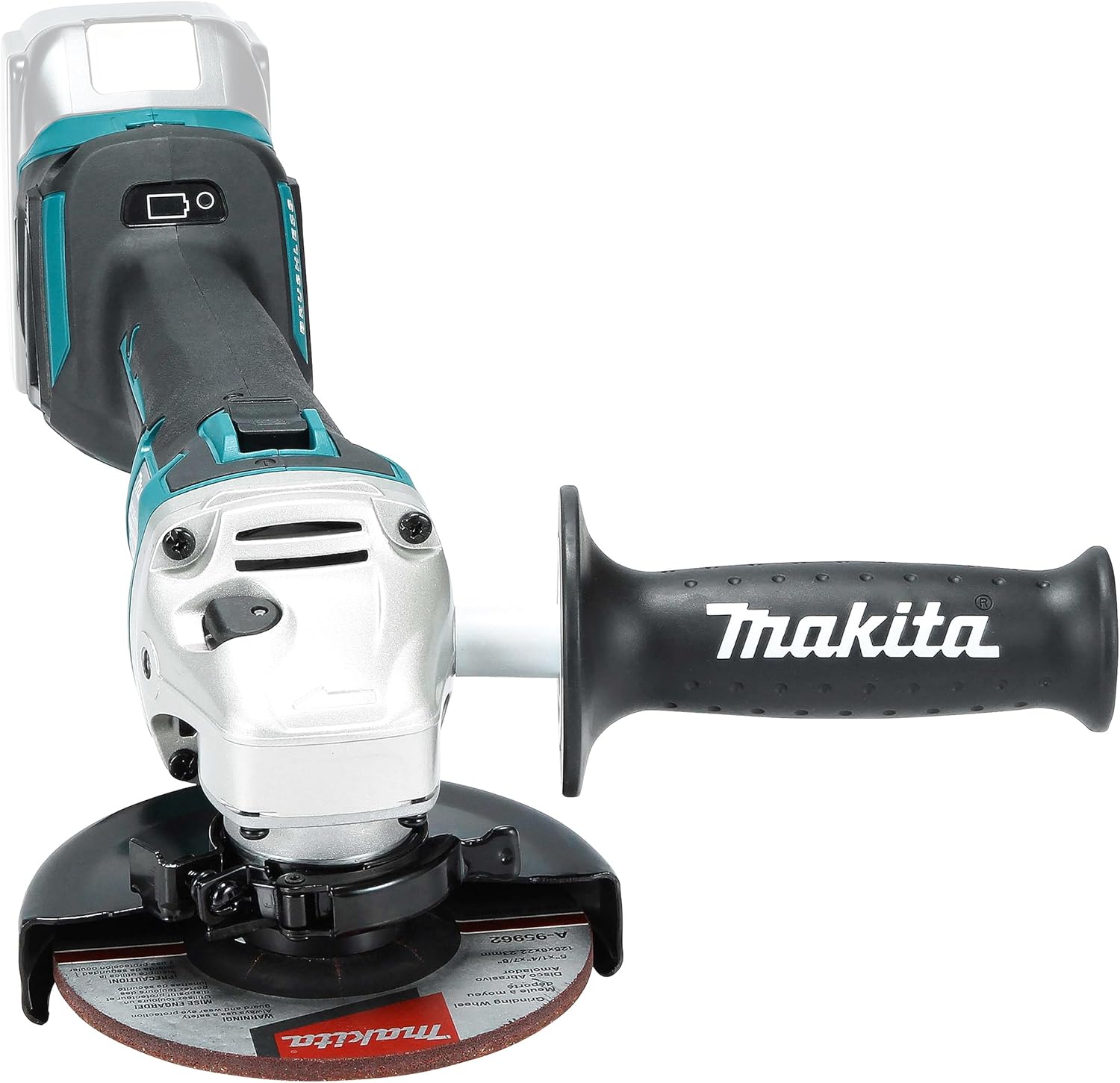
Figure 4: Front view of the grinder with the side handle attached.
3.3 Adjusting the Wheel Guard
The wheel guard can be adjusted without tools to protect the user from sparks and debris. Always ensure the guard is positioned correctly for the task.
- Lift the lever on the wheel guard.
- Rotate the guard to the desired position.
- Push the lever down to lock the guard in place.

Figure 5: Adjusting the tool-free wheel guard.
4. Operating Instructions
4.1 Powering On/Off
The DGA513Z features a slide switch for operation.
- To start the tool, slide the switch forward to the "ON" position.
- For continuous operation, push the front part of the switch down to lock it.
- To stop the tool, release the switch. If locked on, push the rear part of the switch up to release it, then release the switch.

Figure 6: Operating the slide switch for power control.
4.2 Variable Speed Control
The grinder is equipped with a variable speed control dial, allowing you to select the optimal speed for different materials and applications.
- Locate the speed control dial on the tool body.
- Rotate the dial to select the desired speed setting from 1 to 5, corresponding to RPMs from 3000 to 8500.

Figure 7: Variable speed control dial.

Figure 8: Brushless motor housing with speed chart indicating RPM ranges.
4.3 Automatic Torque Drive Technology (ADT)
The ADT feature automatically adjusts the cutting speed and torque to optimize performance under varying load conditions. This ensures efficient operation and prevents motor strain.
4.4 Grinding and Cutting Techniques
When grinding or cutting, always maintain a firm grip on the tool with both hands. Apply steady, even pressure. Avoid excessive force, which can lead to kickback or damage to the wheel and tool. Allow the tool's speed and torque to do the work.

Figure 9: The angle grinder in operation, demonstrating cutting of a metal pipe.

Figure 10: Another view of the angle grinder in use, showing proper two-hand grip.
5. Maintenance
Regular maintenance ensures the longevity and safe operation of your Makita DGA513Z angle grinder.
5.1 Cleaning
- Always remove the battery before cleaning.
- Clean the tool's ventilation openings regularly to prevent overheating. Use a soft brush or compressed air.
- Wipe down the tool body with a damp cloth. Do not use harsh chemicals or abrasive cleaners.
- Periodically remove the wheel guard and clean any accumulated dust or debris from around the spindle and gear housing.
5.2 Wheel Replacement
Always use genuine Makita or recommended grinding/cutting wheels. Refer to the wheel manufacturer's instructions for proper installation and safety.
- Ensure the tool is switched off and the battery is removed.
- Press the spindle lock button to prevent the spindle from rotating.
- Use the provided wrench to loosen and remove the flange nut.
- Remove the old wheel and clean the flanges.
- Place the new wheel onto the inner flange, ensuring it is correctly seated.
- Replace the flange nut and tighten it securely with the wrench while holding the spindle lock button.
5.3 Battery Care
- Store batteries in a cool, dry place away from direct sunlight and heat.
- Do not store batteries in a discharged state for extended periods.
- Use only Makita genuine chargers for charging.
6. Troubleshooting
This section addresses common issues you might encounter with your angle grinder.
| Problem | Possible Cause | Solution |
|---|---|---|
| Tool does not start. | Battery not inserted correctly or discharged. Anti-restart function activated. | Ensure battery is fully charged and properly inserted. If the switch was ON when battery was inserted, turn switch OFF then ON again. |
| Tool stops during operation. | Overload protection (Electronic Current Limiter) or Active Feedback Sensing Technology (AFT) activated. Battery discharged. | Reduce pressure on the tool. Check for binding of the wheel. Allow tool to cool down. Recharge or replace battery. |
| Reduced performance or excessive vibration. | Worn or damaged grinding wheel. Incorrect wheel installation. Debris in the tool. | Replace the grinding wheel. Ensure the wheel is correctly installed and the flange nut is tightened. Clean the tool and spindle area. |
If the problem persists after attempting these solutions, contact Makita customer support or an authorized service center.
7. Specifications
| Feature | Detail |
|---|---|
| Model Number | DGA513Z |
| Voltage | 18 Volts |
| Wattage | 50 watts |
| Maximum Rotational Speed | 8500 RPM |
| Disc Diameter | 125mm (5 inches) |
| Power Source | Battery Powered (Li-Ion LXT) |
| Item Weight | 2.3 Kilograms (5.06 pounds) |
| Product Dimensions | 14.09"L x 6.34"W x 5.35"H |
| Material | Alloy Steel |
| Country of Origin | Romania |
8. Warranty and Support
Makita provides a manufacturer warranty for the DGA513Z angle grinder.
- Standard Warranty: 1 year manufacturer warranty from the date of purchase.
- Extended Warranty: An additional 2 years of warranty is available when the product is registered within 30 days of purchase.
- Warranty Exclusions: This guarantee does not apply where non-genuine or non-recommended parts or accessories are fitted to the tool. The use of non-genuine or compatible batteries and chargers with Makita Tools will invalidate the Makita guarantee for our tools.
For warranty claims, technical support, or service, please contact your local Makita authorized service center or visit the official Makita website for contact information.
You can find more information and support on the official Makita website: www.makita.com
Related documentsDGA513Z


Ask a question about this manual
Ask about setup, troubleshooting, compatibility, parts, safety, or missing instructions. Manuals+ will review the question and use this page’s manual context to help answer it.