
Project Nursery PNMAL2
Project Nursery Smart Wi-Fi Baby Monitor PNMAL2 User Manual
Brand: Project Nursery
Introduction
This manual provides comprehensive instructions for the setup, operation, and maintenance of your Project Nursery Smart Wi-Fi Baby Monitor, model PNMAL2. Please read this manual thoroughly before using the device to ensure proper functionality and safety. This monitor allows you to remotely view and interact with your child using a smartphone or tablet, and integrates with Amazon Alexa and Google Assistant for enhanced control.
Safety Information
- Keep the monitor and all accessories out of reach of children.
- Do not place the camera or power cord within 3 feet of the crib or playpen.
- Use only the power adapter supplied with the product.
- Ensure the camera is placed on a stable, flat surface or securely mounted to a wall.
- Avoid exposing the device to extreme temperatures, direct sunlight, or moisture.
- Do not attempt to open or repair the device yourself. Refer all servicing to qualified personnel.
Package Contents
Verify that all items are present in the package:
- Project Nursery Smart Wi-Fi Baby Monitor (Camera Unit)
- Power Cord with Adapter
- Mounting Template and Screws (for wall mounting)
- Quick Start Guide
- Instruction Manual (this document)
Product Overview
The Project Nursery Smart Wi-Fi Baby Monitor features a sleek design with a camera unit that can pan, tilt, and zoom. It connects to your home Wi-Fi network to provide remote viewing capabilities.

Image: The Project Nursery Smart Wi-Fi Baby Monitor camera unit shown alongside a smartphone displaying the live feed and control options (sound on, talk, snapshot).
The camera unit includes a lens for video capture, an infrared sensor for night vision, a microphone for audio detection and two-way communication, and a speaker for playing lullabies and two-way talk. The base contains the Wi-Fi module and power input.
Setup Instructions
Follow these steps to set up your Project Nursery Smart Wi-Fi Baby Monitor:
- Power On the Camera: Place the camera in the desired location, ensuring it has a clear view of the area you wish to monitor. Plug the power cord into the camera and then into a wall outlet. The camera will power on and indicate readiness for setup.
- Download the App: Download the free "Project Nursery Smart Camera" app from the Apple App Store (for iOS devices) or Google Play Store (for Android devices).
- Create an Account: Open the app and follow the on-screen instructions to create a new user account or log in if you already have one.
- Connect to Wi-Fi:
- Ensure your smartphone is connected to a 2.4GHz Wi-Fi network. The monitor only supports 2.4GHz Wi-Fi.
- In the app, select "Add Device" and follow the prompts to connect your camera to your home Wi-Fi network. This typically involves scanning a QR code displayed on your phone with the camera lens.
- Activate Alexa Skill (Optional): If you wish to use Alexa voice commands, open the Amazon Alexa app, search for the "Project Nursery" skill, and enable it. Link your Project Nursery account when prompted.
- Activate Google Assistant (Optional): If you wish to use Google Assistant voice commands, open the Google Home app, search for the "Project Nursery" service, and link your account.

Image: The Project Nursery Smart Wi-Fi Baby Monitor illustrating its remote viewing capabilities, showing a parent monitoring from home and another monitoring from a remote location via a computer.
Operating Instructions
Using the Project Nursery Smart Camera App
Once connected, you can access various features through the app:
- Live View: Tap on your camera in the app to view the live video feed.
- Pan, Tilt, Zoom (PTZ): Swipe your finger across the screen or use the on-screen controls to adjust the camera's viewing angle and zoom in/out.
- Two-Way Talk: Press and hold the "Talk" button in the app to speak through the camera's speaker. Release to listen.
- Record Video & Snap Photos: Use the dedicated buttons in the app to record video clips or capture still images directly to your mobile device.
- Lullabies and Sounds: Access a selection of pre-loaded lullabies and soothing sounds (e.g., pink noise, waves, rain) to play through the camera's speaker.
- Alerts: Configure settings for sound, motion, and temperature detection. Receive alerts directly to your smartphone when these events occur. Sensitivity levels can be adjusted.
- Night Vision: The camera automatically switches to infrared night vision in low-light conditions, providing a clear view in the dark.
- Multi-Camera Support: The app supports adding up to 4 cameras (sold separately) for monitoring multiple rooms.
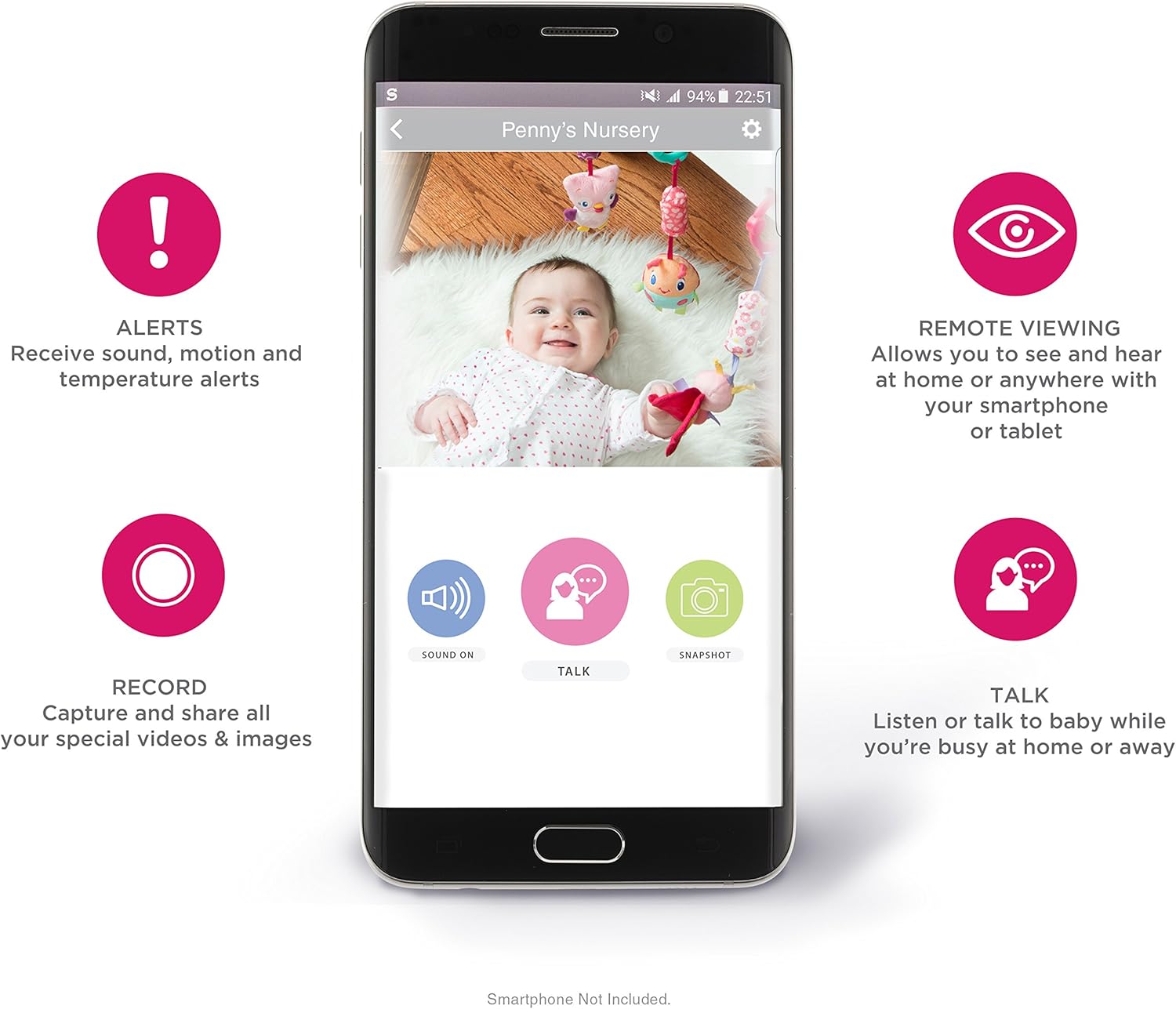
Image: A smartphone screen displaying the Project Nursery app interface, highlighting features such as alerts, remote viewing, recording, and two-way talk.
Voice Control with Amazon Alexa and Google Assistant
After enabling the respective skills/services, you can control your monitor using voice commands:
- View Live Feed: "Alexa, show [camera name]" on compatible Alexa video devices (e.g., Echo Show, Echo Spot, Fire TV).
- Camera Movement: "Alexa, move camera to the left/right/up/down."
- Record Video/Capture Photo: "Alexa, record a video" or "Alexa, capture a photo."
- Play Lullabies: "Alexa, play a lullaby."
- Check Temperature: "Alexa, what's the room temperature in the nursery?"
- Similar commands are available for Google Assistant.

Image: The Project Nursery Smart Wi-Fi Baby Monitor positioned among various Amazon Alexa devices, including an Echo speaker, an Echo Dot, an Echo Show, and a Fire TV remote, illustrating its compatibility with the Alexa ecosystem.

Image: An illustration showing the Project Nursery Smart Wi-Fi Baby Monitor responding to the voice command "Alexa, pan baby's camera right," with an arrow indicating the camera's movement.

Image: A diagram illustrating the interaction with Alexa, where a user asks "Alexa, when was motion last detected by Penny's camera?" and Alexa responds, "The last motion was at 2:35 PM."
Maintenance
- Cleaning: Gently wipe the camera lens and body with a soft, dry cloth. Do not use abrasive cleaners or solvents.
- Storage: If storing the device for an extended period, disconnect it from power and store it in a cool, dry place.
- Firmware Updates: Periodically check the Project Nursery Smart Camera app for available firmware updates to ensure optimal performance and security.
Troubleshooting
| Problem | Possible Solution |
|---|---|
| Camera not connecting to Wi-Fi. |
|
| No video feed in the app. |
|
| Alexa/Google Assistant commands not working. |
|
| Delayed two-way talk audio. |
|
Specifications
| Model Number | PNMAL2 |
| Wireless Communication | Wi-Fi (2.4GHz only) |
| Video Capture Format | MPEG-4 |
| Alert Type | Audio and Motion |
| Room Type | Nursery |
| Material | Plastic |
| Wattage | 5 watts |
| Item Dimensions (L x W x H) | 3.39 x 5.71 x 4.02 inches |
| Package Weight | 0.59 Kilograms |
| International Protection Rating | IP54 |
| UPC | 044476133671 |
| Compatible Devices | Smartphone (iOS/Android), Amazon Alexa devices, Google Assistant devices |
| Mounting Type | Wall Mount |
| Color | White |
Warranty Information
Project Nursery products are designed and manufactured to the highest quality standards. For detailed warranty information, including terms, conditions, and duration, please refer to the official Project Nursery website or contact their customer support directly. Keep your proof of purchase for warranty claims.
Support
If you encounter any issues or have questions not covered in this manual, please visit the official Project Nursery support website for FAQs, additional resources, and contact information for customer service. You can typically find support details on the product packaging or the manufacturer's website.
Related documentsPNMAL2


Ask a question about this manual
Ask about setup, troubleshooting, compatibility, parts, safety, or missing instructions. Manuals+ will review the question and use this page’s manual context to help answer it.