
1. Introduction
The TOPDON V2200PLUS is a versatile 2-in-1 device designed to jump-start vehicles and test battery health. This portable unit provides 2200A peak current, suitable for up to 8.0L gasoline and 6.0L diesel engines. It also functions as a power bank and features an integrated flashlight. This manual provides essential information for safe and effective use of your V2200PLUS.

Image 1.1: The TOPDON V2200PLUS unit with its battery clamps and a smartphone showing the battery test results from the BatteryLab app.
2. Product Overview and Features
The TOPDON V2200PLUS combines powerful jump-starting capabilities with advanced battery testing functions, all in a durable and portable design.
Key Features:
- High Peak Current: Delivers 2200 Amps peak current to start 12V lead-acid batteries.
- Engine Compatibility: Capable of jump-starting vehicles with up to 8.0L gasoline and 6.0L diesel engines.
- Battery Tester Function: Integrated Bluetooth module for detailed battery health analysis via the BatteryLab mobile app.
- Boost Mode: Allows starting of severely discharged or damaged batteries.
- Multi-functional Power Bank: Equipped with 2 USB QC 18W ports and 1 16.8V DC port for charging electronic devices.
- Integrated Flashlight: 300-lumen ultra-bright flashlight with SOS beacon function for emergencies.
- Durable Design: V0 level fireproof, IP64 waterproof, and drop-proof construction with silicone corner protection.

Image 2.1: Overview of the V2200PLUS highlighting its dual functionality and key performance metrics.

Image 2.2: Illustration of the V2200PLUS's robust construction, emphasizing its reinforced shell, silicone corner protection, and drop resistance.
3. What's in the Box
Upon opening your TOPDON V2200PLUS package, you should find the following items:
- TOPDON V2200PLUS Car Battery Jump Starter Unit
- Heavy-Duty Battery Clamps
- USB-C Cable
- User Manual (this document)
- EVA Carrying Case

Image 3.1: All items included in the TOPDON V2200PLUS product package.
4. Safety Information
Read all safety warnings and instructions before using this product. Failure to follow the warnings and instructions may result in electric shock, fire, and/or serious injury.
- Always wear eye protection and protective clothing when jump-starting a battery.
- Do not use the jump starter if the battery clamps or cables are damaged.
- Ensure the jump starter is fully charged before use for optimal performance.
- Connect the positive (red) clamp to the positive (+) battery terminal and the negative (black) clamp to the negative (-) battery terminal or a suitable ground point on the vehicle chassis.
- Avoid touching the positive and negative clamps together to prevent sparks.
- Do not expose the jump starter to rain or wet conditions. The device is IP64 rated for water resistance, but not submersion.
- Keep out of reach of children.
- Do not attempt to disassemble or modify the unit.
- Store the unit in a cool, dry place away from direct sunlight and extreme temperatures.

Image 4.1: The V2200PLUS incorporates safety features such as reverse polarity protection and spark-free technology.
5. Setup
5.1 Initial Charging
Before first use, fully charge the TOPDON V2200PLUS. Connect the included USB-C cable to the unit and a suitable USB wall adapter (not included). The LED indicators on the unit will show the charging progress. All four LEDs will be solid when fully charged.
5.2 Bluetooth App Installation (for Battery Testing)
To utilize the battery testing features, download the BatteryLab app on your smartphone.
- Download the BatteryLab App from the Google Play Store (for Android) or the Apple App Store (for iOS).
- Ensure Bluetooth is enabled on your smartphone.
- Connect the battery clamps to the vehicle battery (as described in the jump-starting section).
- Open the BatteryLab app and tap the Bluetooth icon to establish a connection with the V2200PLUS unit.
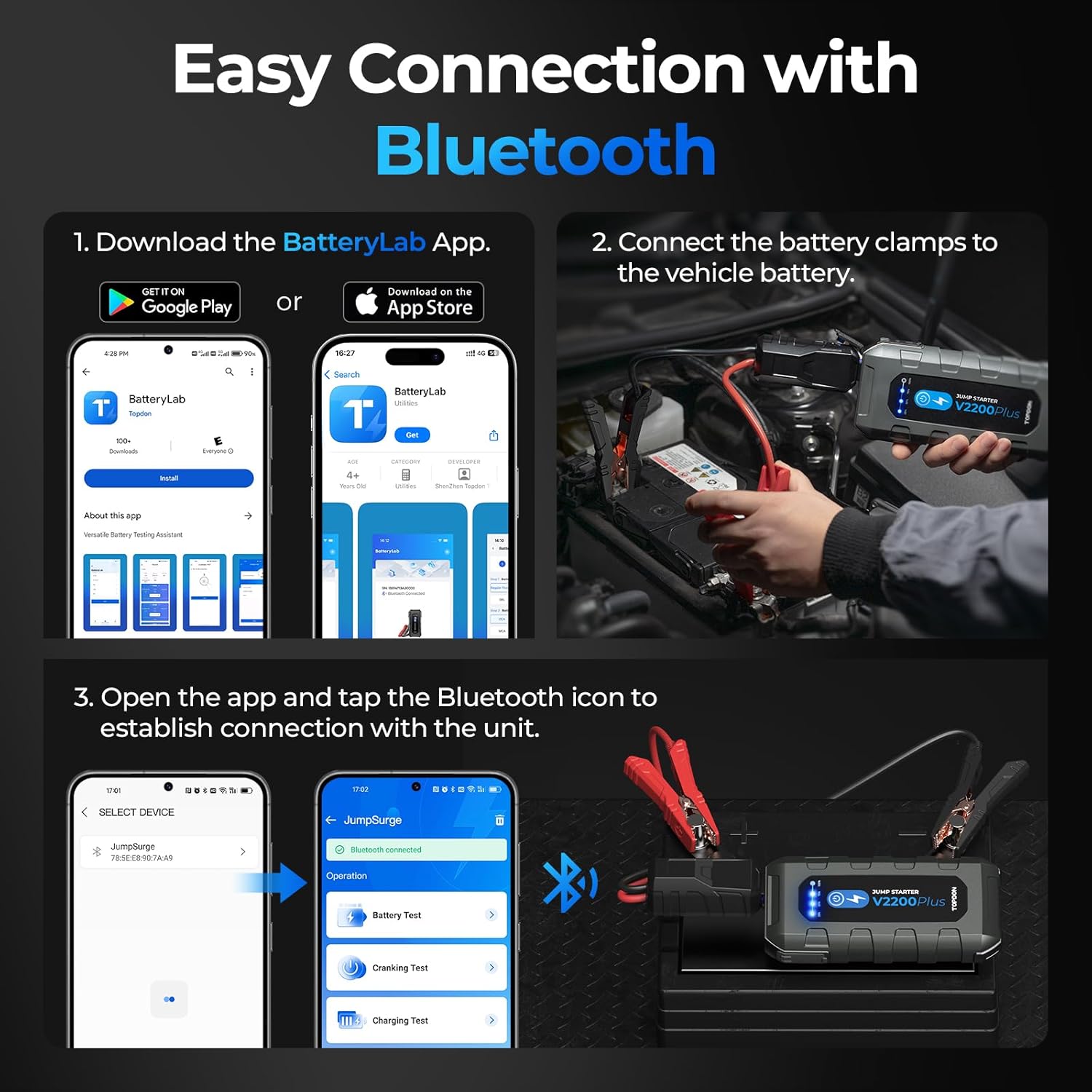
Image 5.1: Step-by-step guide for connecting the V2200PLUS to the BatteryLab app via Bluetooth.
6. Operating Instructions
6.1 Jump Starting a Vehicle
- Prepare the Vehicle: Ensure the vehicle's ignition is off and all accessories (lights, radio, etc.) are turned off.
- Connect Clamps: Connect the red (+) clamp to the positive (+) terminal of the vehicle's battery. Connect the black (-) clamp to the negative (-) terminal of the vehicle's battery or a solid, unpainted metal part of the engine block/chassis.
- Power On: Turn on the TOPDON V2200PLUS. The indicator light on the unit should turn green, indicating a proper connection.
- Start Vehicle: Attempt to start the vehicle. If it does not start immediately, wait 30 seconds before trying again. Do not crank for more than 3 seconds per attempt.
- Disconnect: Once the vehicle starts, disconnect the black (-) clamp first, then the red (+) clamp from the battery.
Boost Mode:
If the vehicle battery is severely discharged or damaged, the standard jump-start procedure may not work. In such cases, use Boost Mode:
- Connect the clamps as described above.
- Press and hold the 'BOOST' button on the V2200PLUS for approximately 3 seconds.
- The unit will enter Boost Mode. Attempt to start the vehicle within 30 seconds.
- Disconnect the clamps immediately after the vehicle starts.

Image 6.1: The V2200PLUS in Boost Mode, designed to start dead or damaged batteries.
6.2 Battery Testing (via BatteryLab App)
After connecting the V2200PLUS to your vehicle battery and pairing with the BatteryLab app (as per Section 5.2), you can perform various battery tests:
- Battery Test: Assesses the battery's State of Health (SOH), State of Charge (SOC), and internal resistance.
- Charging Test: Analyzes the vehicle's charging system, including ripple analysis, load voltage, and no-load voltage.
- Cranking Test: Evaluates the battery's cranking performance, including cranking analysis, cranking voltage, and cranking time.
The app provides a detailed, professional-level inspection report, helping to identify potential battery issues and prevent unexpected breakdowns.
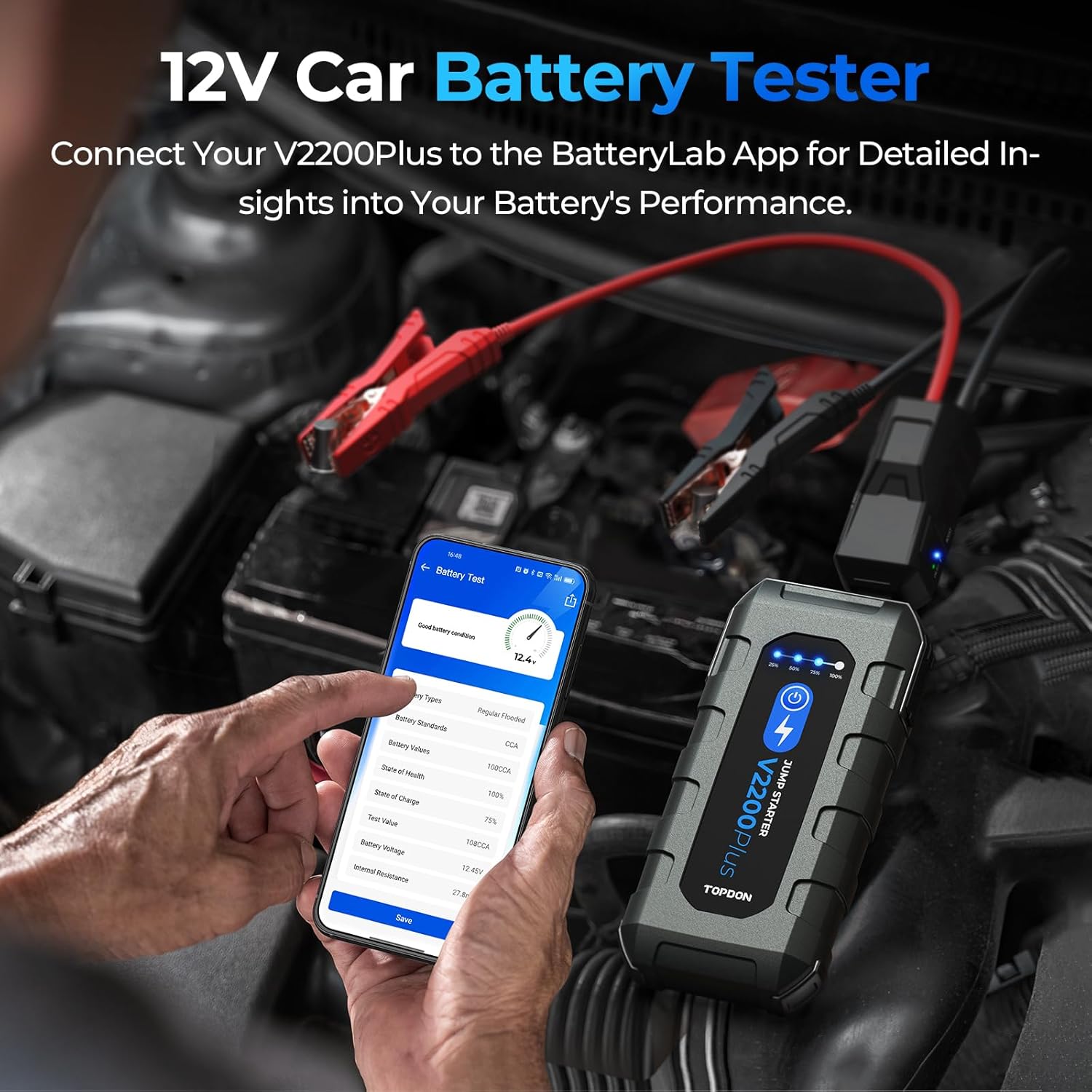
Image 6.2: The BatteryLab app interface displaying comprehensive battery test results.
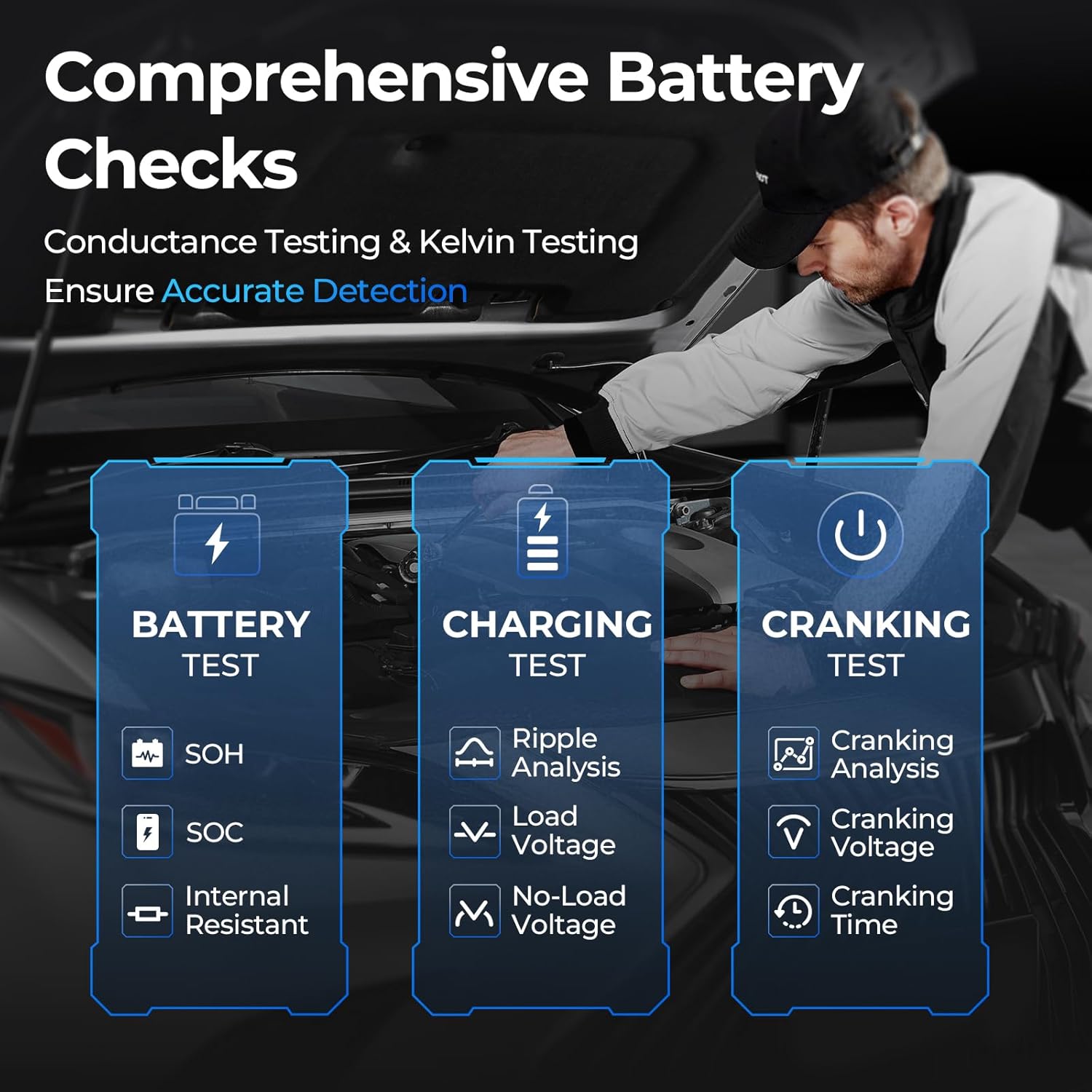
Image 6.3: Overview of the comprehensive battery, charging, and cranking tests available through the BatteryLab app.

Image 6.4: The BatteryLab app's interface for assessing battery health, showing key metrics like State of Health and State of Charge.
6.3 Power Bank Function
The V2200PLUS can serve as a portable power source for your electronic devices.
- USB Ports: Use the two USB QC 18W ports to charge smartphones, tablets, and other USB-powered devices.
- DC Port: The 16.8V DC port can power compatible 12V accessories.
6.4 Flashlight Operation
The integrated flashlight provides illumination and an SOS signal for emergencies.
- Press the flashlight button once to turn it on.
- Press again to cycle through different modes (e.g., solid, strobe, SOS).
- Press and hold to turn off.
7. Maintenance
7.1 Charging
To maintain optimal battery life and readiness, it is recommended to fully charge the V2200PLUS every 3-6 months, even when not in use. This prevents deep discharge and prolongs the internal battery's lifespan.
7.2 Storage
Store the unit in its EVA carrying case in a cool, dry environment, away from direct sunlight, moisture, and extreme temperatures. The recommended operating temperature range is 14°F to 122°F (-10°C to 50°C).

Image 7.1: The V2200PLUS is designed for various climates with V0 fire resistance, IP54 water resistance, and a wide operating temperature range.
7.3 Cleaning
Wipe the unit with a soft, dry cloth. Do not use harsh chemicals or abrasive materials.
8. Troubleshooting
If you encounter issues with your TOPDON V2200PLUS, refer to the following common problems and solutions:
| Problem | Possible Cause | Solution |
|---|---|---|
| Unit does not turn on | Battery is completely discharged. | Charge the unit fully before use. |
| Vehicle does not start | Incorrect clamp connection. Vehicle battery is severely damaged. Jump starter battery is low. | Ensure clamps are connected correctly (red to +, black to -). Try Boost Mode. If still no start, the vehicle battery may be beyond jump-starting. Recharge the V2200PLUS. |
| No Bluetooth connection to app | Bluetooth is off on phone. App not open or paired. Clamps not connected to battery. | Enable Bluetooth on your phone. Open the BatteryLab app and initiate pairing. Ensure the clamps are properly connected to the vehicle battery. |
| Flashlight not working | Unit battery is low. | Charge the V2200PLUS. |
9. Specifications
| Specification | Value |
|---|---|
| Brand | TOPDON |
| Model | V2200PLUS |
| Peak Output Current | 2200 Amps |
| Engine Compatibility | Up to 8.0L Gas / 6.0L Diesel |
| Battery Type | Lithium Ion (1 included) |
| Product Dimensions | 11"D x 4"W x 6"H |
| Item Weight | 3.2 Pounds (approx. 3.15 pounds) |
| Water Resistance | IP64 |
| Fire Resistance | V0 Level |
| Operating Temperature | 14°F to 122°F (-10°C to 50°C) |
| USB Output | 2 x QC 18W |
| DC Output | 1 x 16.8V |
| Flashlight Output | 300 Lumens |
| Certifications | UL, FCC |
10. Warranty and Support
The TOPDON V2200PLUS comes with a 1-year quality assurance. Additionally, TOPDON provides lifetime free technical support for this product. For any inquiries, technical assistance, or warranty claims, please contact TOPDON customer service through their official channels or the retailer where the product was purchased.