Product Overview
The OXO Good Grips 11-Pound Stainless Steel Food Scale is designed for precise measurement of food ingredients. Its durable stainless steel surface is smudge- and fingerprint-resistant, ensuring easy cleaning. A unique pull-out display prevents shadowing from large plates or bowls, making readings clear and accessible. The scale offers unit conversion between ounces, pounds, grams, and kilograms, and features a convenient zero function for taring the scale before adding ingredients.
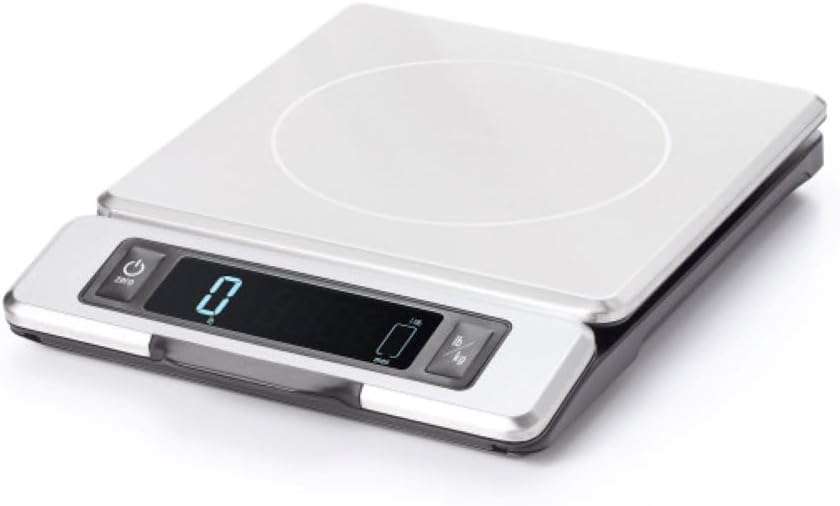
The OXO Good Grips Food Scale features a sleek stainless steel weighing platform and a digital display unit that slides out for improved visibility.
Setup
Battery Installation
The scale requires 4 AAA batteries (included). Locate the battery compartment on the underside of the scale. Open the compartment, insert the batteries according to the polarity indicators (+/-), and close the cover securely.

The scale's battery compartment is located on the bottom, requiring 4 AAA batteries for operation.
Operating Instructions
Power On/Off
Press the 'Power' button (usually marked with a circle and vertical line) to turn the scale on. The display will light up and show '0.0'. To turn off the scale, press and hold the 'Power' button for a few seconds.
Unit Conversion
The scale can measure in ounces (oz), pounds (lb), grams (g), or kilograms (kg). Press the 'lb/kg' button to cycle through the available units. The selected unit will be displayed on the screen.

Easily switch between ounces, pounds, grams, and kilograms using the dedicated unit conversion button.
Tare (Zero) Function
To weigh multiple ingredients in the same container, or to exclude the weight of a bowl, use the 'Zero' (Tare) function. Place an empty container on the scale, then press the 'Zero' button. The display will reset to '0.0', allowing you to add ingredients and measure only their weight.

The zero function allows you to subtract the weight of a container, ensuring accurate measurement of ingredients.
Pull-Out Display
For improved readability when using large plates or bowls that might obscure the display, gently pull the display unit forward from the main body of the scale. This extends the display, making it easier to view measurements. Push it back into place when not needed.

The innovative pull-out display ensures clear visibility of measurements, even when using oversized containers.
Video: The #1 Selling Point of the OXO Good Grips Scale
This video highlights the key feature of the OXO Good Grips Food Scale: its pull-out display, which prevents large bowls or plates from obscuring the weight reading. It demonstrates how the display slides out smoothly, making it easy to read measurements during food preparation.
Maintenance and Care
Cleaning
The stainless steel platform is smudge- and fingerprint-resistant. To clean, wipe the surface with a damp cloth and mild detergent. Do not immerse the scale in water or place it in a dishwasher. The removable platform can be detached for more convenient cleaning.

The stainless steel surface is designed to resist smudges and fingerprints, making cleanup simple.
Troubleshooting
Inaccurate Readings
Ensure the scale is placed on a flat, stable surface. Avoid placing it near strong electromagnetic fields or extreme temperature changes. If readings are inconsistent, try recalibrating by turning the scale off and on, or replacing the batteries.
Display Not Lighting Up
Check battery installation and ensure batteries are not depleted. Replace batteries if necessary.
Specifications
| Feature | Detail |
|---|---|
| Brand | OXO |
| Color | Black |
| Recommended Uses For Product | Food |
| Special Feature | Large Display;Portable;Backlit Display |
| Display Type | Digital |
| Weight Limit | 11 Pounds (5 kg) |
| Form Factor | Mini |
| Material | Stainless Steel |
| Readout Accuracy | +/- 0.1 oz or +/- 1 g |
| Item Weight | 1.8 Pounds |
| Weigh Scale Type | Counter Scale |
| Measurement Type | Weight (lb, kg, oz, g) |
| Manufacturer | OXO International Ltd. |
| Unit Count | 1.0 Count |
| UPC | 719812683034 |
| Global Trade Identification Number | 00719812683034 |
| Product Dimensions | 9.5 x 7.13 x 1.25 inches |
| Country of Origin | China |
| Item model number | 11214800 |
| Batteries | 4 AAA batteries required. (included) |
| Date First Available | January 29, 2018 |
Warranty and Support
For warranty information or customer support, please refer to the official OXO website or contact OXO International Ltd. directly. A digital user manual is also available for download.
Official User Manual (PDF): Download PDF
Visit the OXO Store: OXO Store on Amazon