
Introduction
This manual provides instructions for the proper setup, operation, and maintenance of your Ozark Trail 50 lb Electronic Fish Scale. Designed for anglers, this digital scale offers precise weight measurements for your catches, featuring backlit keys for easy readability and a memory function to store multiple measurements.

Image 1: Ozark Trail 50 lb Electronic Fish Scale in its retail packaging.
Setup
- Unpacking: Carefully remove the scale from its packaging. Inspect for any damage.
- Battery Installation:
Locate the battery compartment cover on the back of the scale. Open the cover and insert the required batteries (typically AAA, check the compartment for specific type and polarity markings). Ensure correct polarity (+/-) before closing the cover securely.
- Initial Power On: Press the POWER/ZERO button to turn on the scale. The backlit display should illuminate, and the scale will perform a self-test before displaying "0.00" or similar.
Operating Instructions
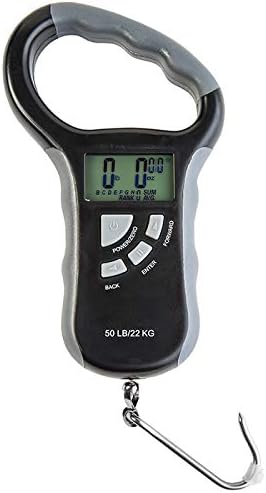
Image 2: Front view of the Ozark Trail 50 lb Electronic Fish Scale, showing the display and control buttons.
- Power On/Off:
- To turn on, press the POWER/ZERO button.
- To turn off, press and hold the POWER/ZERO button for a few seconds until the display turns off. The scale may also have an auto-off feature to conserve battery.
- Changing Units (lb/kg):
With the scale powered on, press the UNIT button (often combined with another function or a dedicated button) to cycle between pounds (lb) and kilograms (kg). The selected unit will be displayed on the screen.
- Zeroing/Tare Function:
If you are using a container or holding device to weigh your catch, attach it to the hook before turning on the scale or after turning it on and pressing the POWER/ZERO button. This will reset the display to zero, effectively subtracting the weight of the container.
- Weighing a Catch:
- Ensure the scale is powered on and displaying "0.00".
- Carefully attach your fish to the hook.
- Hold the scale steady. The display will show the weight of your catch.
- Wait for the reading to stabilize before recording the weight.
- Storing Measurements:
This scale can store up to eight measurements. After weighing a fish, press the ENTER button to save the current weight. Use the FORWARD and BACK buttons to navigate through the memory slots if needed before saving.
- Recalling Stored Measurements:
To view previously stored weights, press the BACK or FORWARD buttons when the scale is not actively weighing. The display will show the stored weights, and may also show totals and averages if available.
Maintenance
- Cleaning: Wipe the scale with a soft, damp cloth after each use. Do not use abrasive cleaners or immerse the scale in water.
- Storage: Store the scale in a dry place, away from extreme temperatures and direct sunlight. If storing for an extended period, remove the batteries to prevent leakage.
- Battery Replacement: When the battery indicator appears on the display, or if the scale fails to power on, replace the batteries following the instructions in the "Setup" section.
Troubleshooting
| Problem | Possible Cause | Solution |
|---|---|---|
| Scale does not turn on. | Dead or incorrectly installed batteries. | Check battery polarity. Replace batteries if necessary. |
| Inaccurate readings. | Scale not zeroed; unstable surface; exceeding weight capacity. | Ensure scale is zeroed before use. Use on a stable surface. Do not exceed 50 lb (22.7 kg) capacity. |
| Display shows "Err" or similar error. | Overload; internal error. | Remove weight immediately if overloaded. Turn off and on again. If error persists, contact support. |
Specifications
- Brand: Ozark Trail
- Model: Electronic Fish Scale
- Maximum Weight Capacity: 50 lbs (22.7 kg)
- Measurement Precision: 5 grams
- Units: Pounds (lb), Kilograms (kg)
- Features: Backlit display, Memory storage (up to 8 measurements), Tare function.
- ASIN: B079CXVGSS
- UPC: 847309015904
Warranty and Support
For warranty information or technical support, please refer to the documentation included with your purchase or contact Ozark Trail customer service directly. Keep your purchase receipt as proof of purchase for any warranty claims.
Note: Specific warranty terms may vary by region and retailer.