1. Introduction
This manual provides instructions for the safe and effective use of your Manfrotto Befree Advanced Aluminum Tripod, model MKBFRLA4BK-BH. This portable and versatile tripod is designed for photographers and videographers requiring a stable and adaptable support system. It features a robust aluminum construction, a ball head with friction control, and lever-type leg locks for quick and secure setup.

A full view of the Manfrotto Befree Advanced Aluminum Tripod, showcasing its three-leg design and central column, ready for camera mounting.
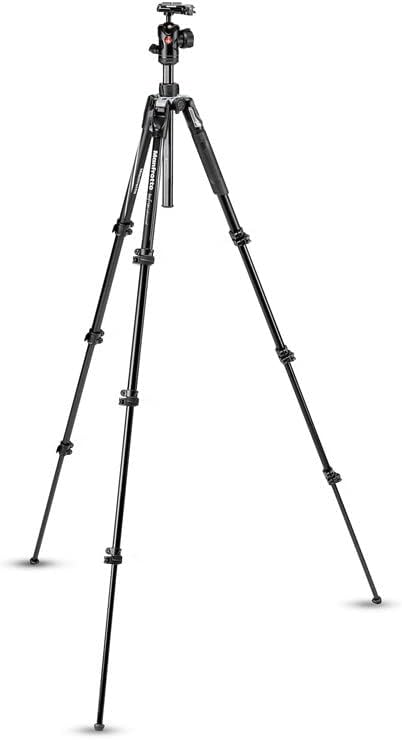
This image emphasizes the tripod's robust design, indicating a safety payload of 9 kg (19.84 lbs) and confirming its construction from durable aluminum material.
2. Setup Instructions
2.1 Unpacking and Initial Inspection
Carefully remove all components from the packaging. Inspect the tripod for any signs of damage. Ensure all parts listed in the product documentation are present.
2.2 Extending the Tripod Legs
- Place the tripod on a flat, stable surface.
- Release the lever locks on each leg section. The lever locks are designed for quick and secure deployment.
- Extend each leg section to the desired length.
- Firmly close the lever locks to secure the leg sections in place. Ensure all locks are fully engaged before mounting equipment.

A detailed view of the lever lock mechanism on the tripod legs, indicating how to quickly and securely extend or retract the leg sections.
2.3 Adjusting Leg Angles
The tripod legs can be independently adjusted to three different angles for stability on uneven terrain or for low-angle shooting. Pull the leg angle selector near the top of each leg and set it to the desired position.
2.4 Extending the Center Column
For additional height, unlock the center column collar and extend the column upwards. Securely tighten the collar once the desired height is reached. For maximum stability, extend the center column only when necessary.
2.5 Attaching the Camera Plate
The tripod features a quick-release plate compatible with Manfrotto RC2 and Arca-Swiss systems. Attach the plate to the base of your camera using the screw provided. Ensure it is securely fastened.
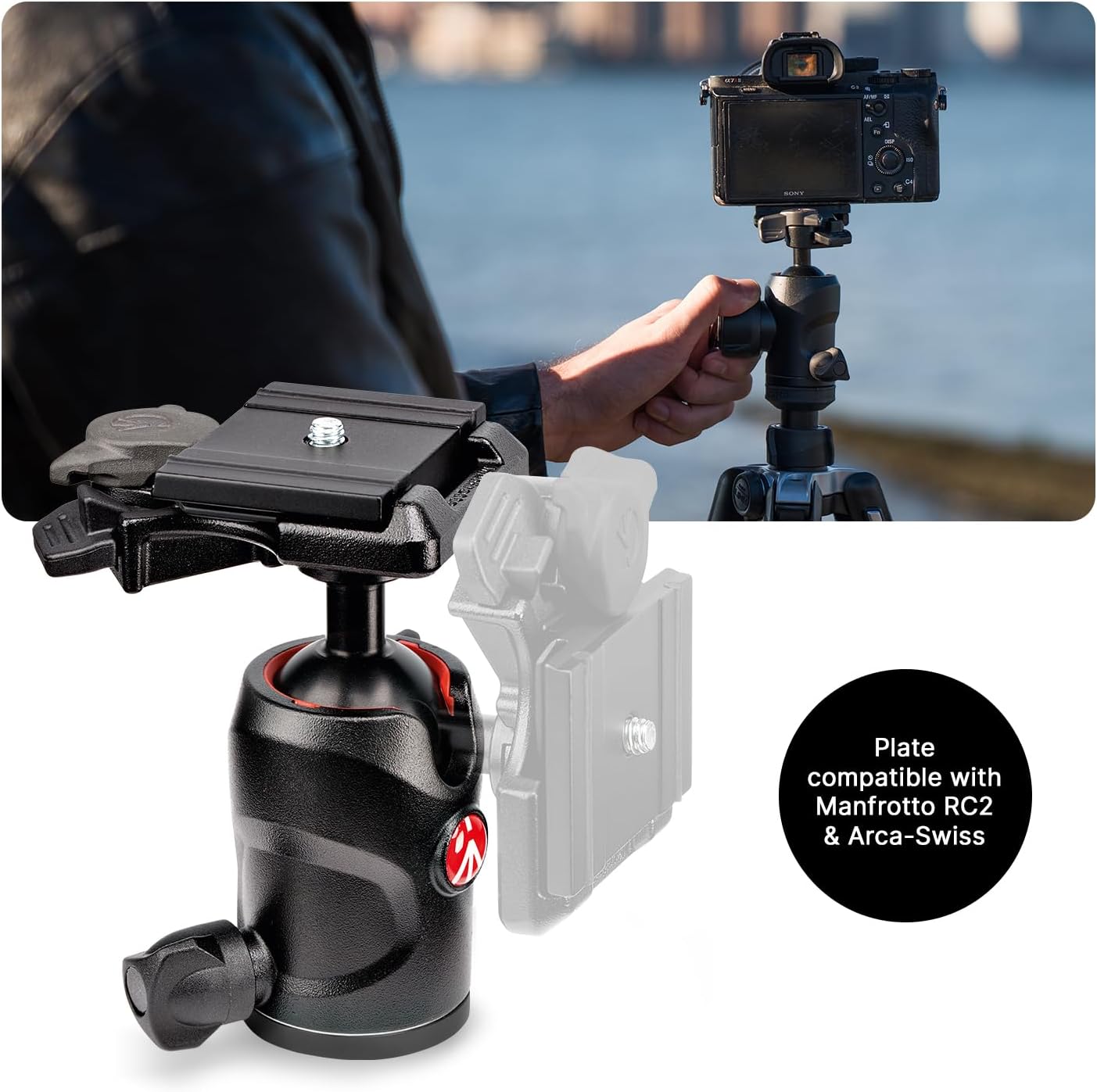
The quick release plate for the Manfrotto Befree Advanced Tripod, demonstrating compatibility with both Manfrotto RC2 and Arca-Swiss plate systems for broad camera support.
2.6 Using the Easy Link Attachment
The tripod includes an Easy Link attachment point on the shoulder. This allows for the connection of external accessories such as LED lights, reflectors, or microphones using compatible arms or clamps.

This image highlights the Easy Link attachment point on the tripod's shoulder, allowing users to connect external accessories like lights or reflectors.
3. Operating Instructions
3.1 Mounting Your Camera
- Ensure the quick-release plate is securely attached to your camera.
- Open the quick-release clamp on the ball head.
- Slide the camera with the attached plate into the clamp.
- Close the quick-release clamp firmly until it clicks into place, ensuring the camera is locked. Gently test the camera's security before releasing your grip.
3.2 Adjusting the Ball Head
The ball head allows for flexible positioning of your camera. It features three main controls:
- Main Lock Knob: Loosen this knob to allow full movement of the ball head for framing. Tighten it to lock the camera in position.
- Friction Control Knob: This smaller knob adjusts the tension of the ball movement. Set it to provide enough resistance to prevent the camera from flopping when the main lock is loose, but still allow smooth movement.
- Pan Lock Knob: This knob controls the horizontal rotation (panning) of the head. Loosen it for smooth panoramic movements and tighten it to lock the head in a specific horizontal direction.
3.3 Folding for Transport
To fold the tripod for compact storage and transport:
- Remove your camera from the quick-release plate.
- Retract the center column fully and lock its collar.
- Retract all leg sections and close their lever locks.
- Fold the legs upwards, reversing their position so they wrap around the ball head. This compact design reduces the tripod's length significantly.

This image illustrates the Manfrotto Befree Advanced Tripod's versatility, displaying its maximum height of 151 cm (59.45 in), an intermediate height of 128 cm (59.45 in), and its compact folded length of 40 cm (16.93 in) for transport.
4. Maintenance
4.1 Cleaning
- Wipe down the tripod legs and head with a soft, damp cloth after each use, especially if used in dusty, sandy, or wet environments.
- Avoid using harsh chemicals or abrasive cleaners, as these can damage the finish or internal components.
- For sand or grit in leg locks, extend the leg fully, gently clean the mechanism, and ensure no debris remains before closing.
4.2 Inspection
- Regularly check all screws, knobs, and lever locks to ensure they are tight and functioning correctly.
- Inspect the rubber feet for wear and tear.
- Ensure the quick-release plate mechanism operates smoothly and securely.
4.3 Storage
Store the tripod in a dry, clean environment, preferably in its carrying bag, to protect it from dust and moisture.
5. Troubleshooting
5.1 Tripod Instability
- Issue: Tripod feels wobbly or unstable.
Solution: Ensure all leg section lever locks are fully engaged. Check that the leg angle selectors are properly set. Verify the center column collar is tightened. Avoid over-extending the center column, especially with heavy equipment.
5.2 Ball Head Movement Issues
- Issue: Camera sags or moves after locking the ball head.
Solution: Ensure the main lock knob is fully tightened. Adjust the friction control knob to provide adequate resistance for your camera's weight. - Issue: Ball head movement is stiff or gritty.
Solution: Clean the ball head area with a soft, dry cloth. Avoid applying lubricants unless specifically recommended by the manufacturer.
5.3 Leg Locks Sticking
- Issue: Leg sections are difficult to extend or retract.
Solution: Clean the leg sections and lever lock mechanisms to remove any dirt or debris. Ensure the locks are fully open before attempting to extend or retract.
6. Specifications
| Feature | Specification |
|---|---|
| Model Name | MKBFRLA4BK-BH |
| Product Dimensions | 4.65 x 4.65 x 17.52 inches (folded) |
| Item Weight | 3.96 pounds (1.8 Kilograms) |
| Material | Aluminum |
| Weight Limit | 8 Kilograms (17.6 lbs) |
| Maximum Height | 151 Centimeters (59.45 inches) |
| Minimum Height | 40 Centimeters (15.75 inches) |
| Tripod Head Type | Ball Head |
| Compatible Devices | Camera |
7. Support and Warranty
For technical support, service, or warranty information, please refer to the official Manfrotto website or contact your local Manfrotto distributor. Keep your proof of purchase for warranty claims.


