
WALI SLK202
WALI Universal Soundbar Wall Mount Instruction Manual
Model: SLK202
1. Product Overview
The WALI Universal Soundbar Wall Mount (Model SLK202) is designed to securely mount your soundbar or center channel speaker to various wall types. Its robust construction and adjustable features ensure optimal placement and stability for an enhanced audio experience.
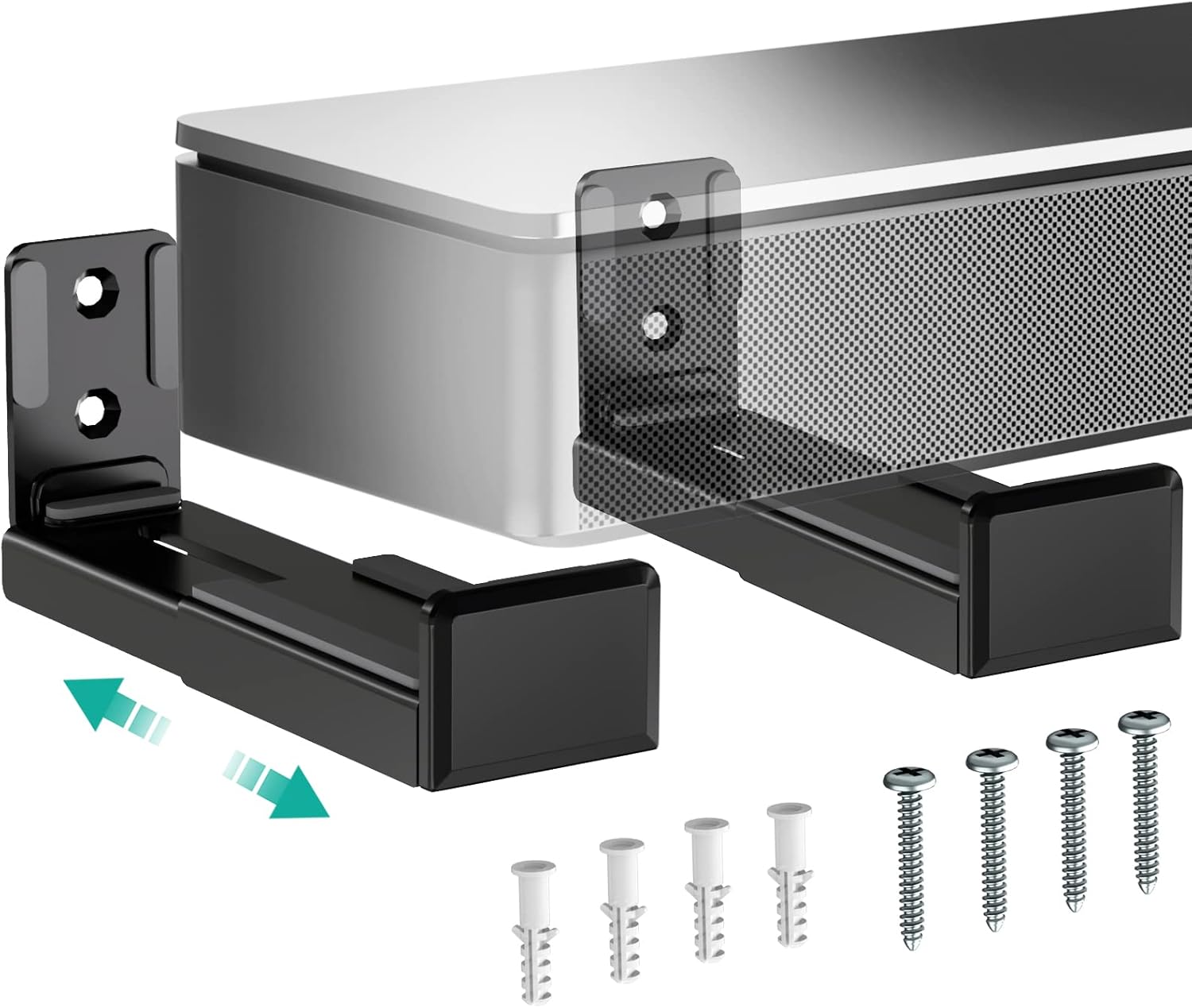
This dual bracket system is compatible with a wide range of soundbars and bookshelf speakers, supporting devices up to 33 lbs (15 kg). The arms extend from 3.5 to 6.1 inches from the wall, allowing for flexible positioning. Integrated anti-skid pads protect your speaker from scratches and provide a firm grip.
2. Safety Information
Please read and understand all instructions before installation and use. Failure to do so may result in personal injury or property damage.
- Weight Capacity: Do not exceed the maximum weight capacity of 33 lbs (15 kg). Overloading can cause instability and potential injury.
- Wall Type: Ensure the mounting surface (wood stud, concrete, brick/stone wall) is capable of supporting the combined weight of the mount and your speaker.
- Tools: Use appropriate tools for installation. If unsure, consult a qualified professional.
- Children: Keep small parts and packaging materials away from children, as they may pose a choking hazard.
- Maintenance: Regularly check that the mount is secure and that all screws are tightened.
3. Package Contents
Verify that all components are present before beginning installation:
- WALI Speaker Wall Mount Brackets (2 pieces)
- Mounting Hardware Kit (screws, anchors, etc.)
- User Manual (this document)
4. Setup and Installation
Follow these steps for secure installation of your WALI Soundbar Wall Mount:
4.1 Pre-Installation Checks
- Confirm your speaker's weight is less than 33 lbs (15 kg).
- Measure your speaker's depth to ensure it fits within the adjustable arm range (3.5 to 6.1 inches).
- Identify the type of wall you will be mounting to (wood stud, concrete, brick/stone). This will determine the appropriate hardware to use.
4.2 Mounting the Brackets
- Marking Drill Holes: Position one bracket on the wall at your desired height. Use a pencil to mark the locations for the drill holes. Ensure the marks are level. Repeat for the second bracket, ensuring proper spacing for your soundbar.

Image: Use a pencil to mark the precise locations for drilling on the wall. - Drilling Holes: Using an appropriate drill bit for your wall type, drill pilot holes at the marked locations.

Image: Drill pilot holes into the wall at the marked positions. - Insert Anchors (if needed): For drywall or hollow walls, insert the appropriate wall anchors into the drilled holes. For wood studs, concrete, or brick/stone, anchors may not be required, or specific heavy-duty anchors might be used.

Image: Choose appropriate mounting hardware based on your wall type. Anchors are typically used for drywall. - Secure Brackets: Align the brackets with the drilled holes and secure them firmly to the wall using the provided screws. Ensure they are tightly fastened for maximum stability.
4.3 Attaching the Speaker
- Adjust Arm Depth: Loosen the small screw on the underside of each bracket arm. Extend or retract the arm to match the depth of your soundbar or speaker.

Image: Adjust the depth of the mounting arms to fit your speaker by loosening the screw underneath and sliding the arm. - Place Speaker: Carefully place your soundbar or speaker onto the extended arms. The anti-skid pads on the arms will help secure the speaker and prevent scratches.
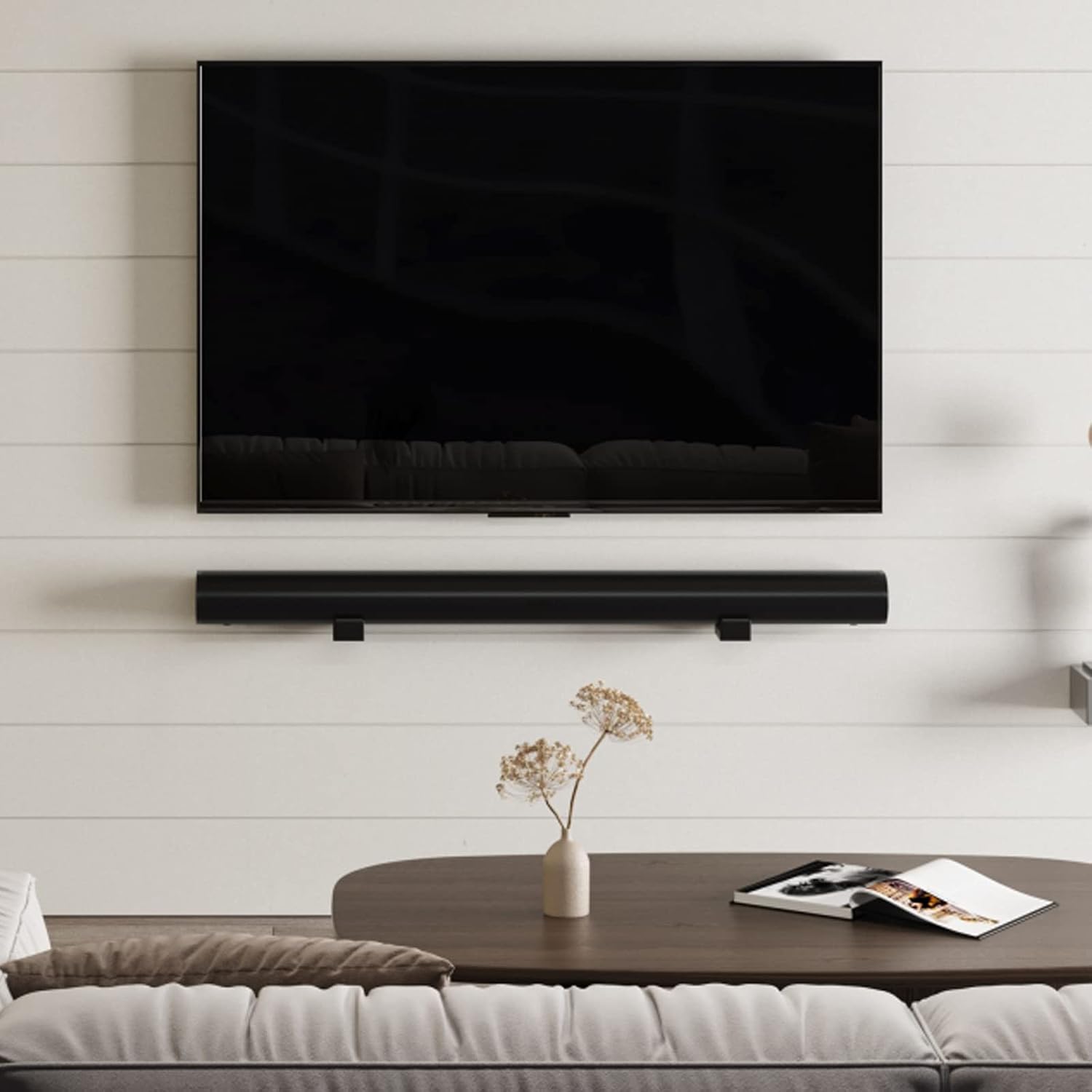
Image: A soundbar is shown mounted beneath a television, demonstrating the installed product. 
Image: A bookshelf speaker is mounted on a wall beside a computer monitor, showcasing the mount's versatility. - Secure Depth: Once the speaker is in place and the depth is correct, tighten the small screws on the underside of the arms to lock the depth in position.
5. Operating and Adjustments
The WALI Soundbar Wall Mount offers simple adjustments to optimize your speaker's position:
- Depth Adjustment: To change how far your speaker extends from the wall, loosen the locking screw on the underside of each arm, slide the arm to the desired position (between 3.5 and 6.1 inches), and then re-tighten the screw.
- Speaker Protection: The integrated rubber pads on the arms provide cushioning and prevent your speaker from sliding or getting scratched.

Image: Detail of the mount's arms, highlighting the rubber pads and rounded corners designed to protect the speaker.
6. Maintenance
To ensure the longevity and continued performance of your WALI Soundbar Wall Mount:
- Cleaning: Wipe the mount with a soft, dry cloth to remove dust. Avoid abrasive cleaners or solvents.
- Periodic Checks: Periodically inspect all mounting screws and connections to ensure they remain tight and secure. Re-tighten if necessary.
- Damage: If any part of the mount appears damaged or worn, discontinue use and contact customer support.
7. Troubleshooting
If you encounter issues with your WALI Soundbar Wall Mount, refer to the following common solutions:
| Problem | Possible Cause | Solution |
|---|---|---|
| Mount feels unstable or wobbly. | Screws are loose; incorrect wall anchors used; wall not strong enough. | Ensure all screws are tightened. Verify correct wall anchors were used for your wall type. If the wall is too weak, consider reinforcing it or choosing a different mounting location. |
| Speaker slides on the mount. | Anti-skid pads are missing or damaged; arms not adjusted correctly. | Check that all anti-skid pads are in place. Ensure the arms are adjusted to the correct depth and the locking screws are tightened. |
| Arms do not extend/retract smoothly. | Locking screw is too tight; debris in the sliding mechanism. | Loosen the locking screw completely before adjusting. Check for any obstructions in the sliding mechanism and clear them. |
8. Specifications
| Feature | Detail |
|---|---|
| Model Number | SLK202 |
| Brand | WALI |
| Material | High-quality steel |
| Color | Black |
| Weight Capacity | Up to 33 lbs (15 kg) |
| Arm Extension (from wall) | 3.5 to 6.1 inches |
| Product Dimensions (each bracket) | 1.88 x 3.18 x 4.44 inches |
| Item Weight (each bracket) | 3.2 ounces |
| Mounting Type | Wall Mount |
| Compatible Devices | Soundbars, Bookshelf Speakers |
9. Warranty and Support
WALI is committed to providing high-quality products and excellent customer service.
- For detailed warranty information, please refer to the official WALI website or the documentation included with your purchase.
- For further assistance, technical support, or any questions regarding your WALI Soundbar Wall Mount, our experienced and friendly US-based customer support team is available to assist 7 days a week.
- You can also find a digital version of the user manual here.
Related documentsSLK202


Ask a question about this manual
Ask about setup, troubleshooting, compatibility, parts, safety, or missing instructions. Manuals+ will review the question and use this page’s manual context to help answer it.