
1. Introduction
Thank you for choosing the Snailax Vibration Back Massager with Heat. This manual provides essential information for the safe and effective operation of your new massage cushion. Please read it thoroughly before first use and retain it for future reference.
Important Note: This product is a VIBRATION massager only. It does not feature Shiatsu kneading massage with rolling balls. If you are seeking a Shiatsu massager, this product is not suitable for your needs.
Key features of your Snailax Vibration Back Massager include:
- 6 powerful vibrating massage motors targeting upper back, mid back, lower back, and thighs.
- 5 program modes and 4 variable vibration intensities for customizable massage.
- Soothing heat function for the full back and seat, with two heat levels.
- Automatic shut-off timer for safety and convenience.
- Soft, ultra-plush polyester fabric for comfort.
- Non-slip rubber bottom and adjustable straps for secure placement.
2. Safety Information
Please adhere to the following safety guidelines to prevent injury or damage to the device:
- Always use the massager on a flat, stable surface.
- Do not use if you have any medical conditions, are pregnant, or have recently had surgery without consulting your doctor.
- Keep the massager dry and unplug it when not in use.
- Do not use if the power cord or plug is damaged.
- Allow the massager to cool down after each use, especially after prolonged operation.
- This massager provides vibration massage only, not Shiatsu Kneading massage with rolling balls. Do not use if you are expecting a different type of massage.
- The seat massager is equipped with an overheating protection system and an auto shut-off timer for safe use.
3. Product Components
Your Snailax Vibration Back Massager includes the following main components:
- Massage Cushion: The main body of the massager, featuring integrated vibrating motors and heating elements.
- Handheld Controller: Used to select massage modes, intensity, heat, and target zones.
- Power Adapter: Connects the massager to an electrical outlet.
- Adjustable Straps: Located on the back of the cushion to secure it to a chair.

Image: The Snailax Vibration Back Massager cushion with its wired remote control.
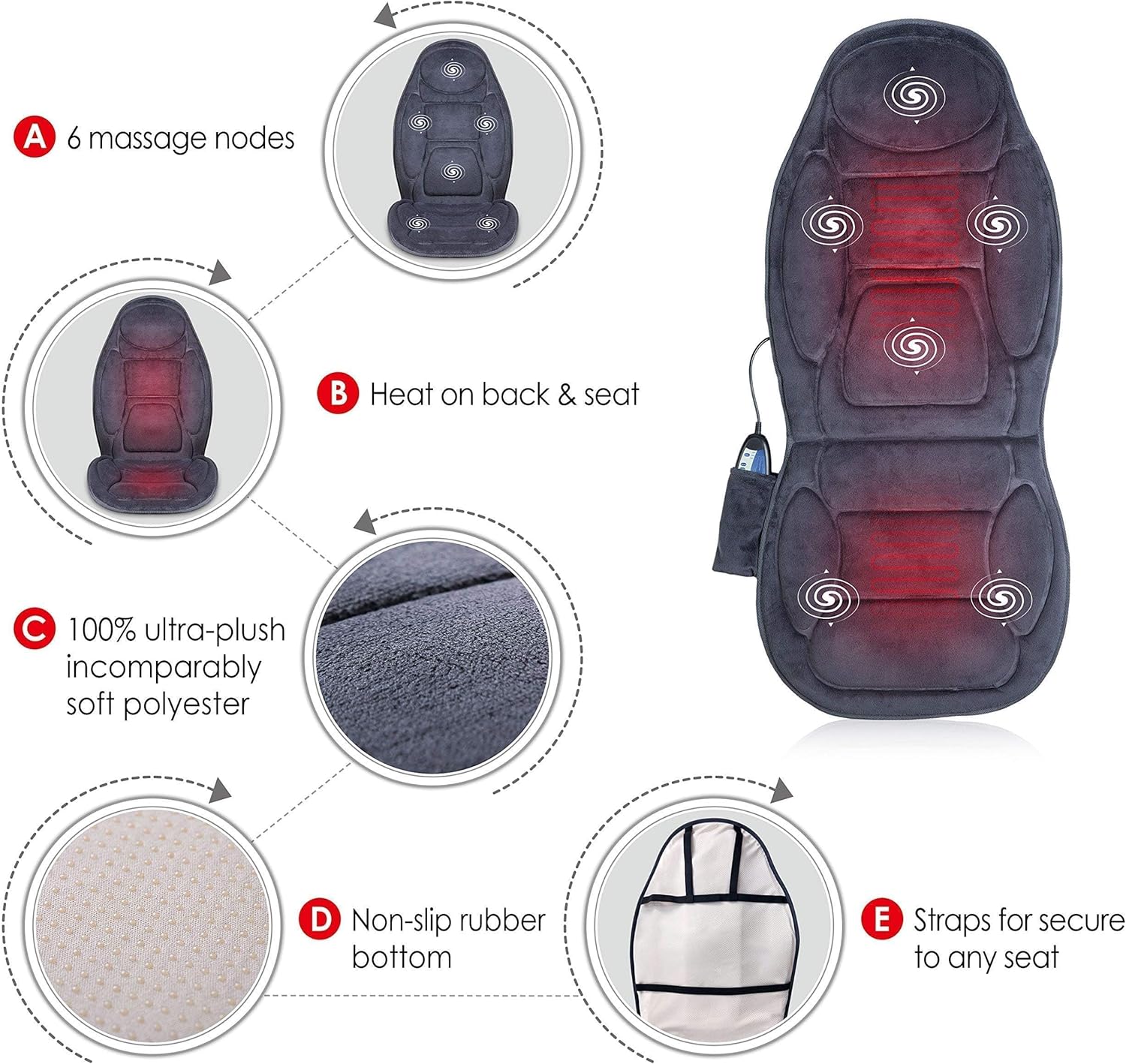
Image: Detailed diagram illustrating the internal components and features of the massage cushion, including massage nodes, heating areas, fabric type, non-slip base, and securing straps.
4. Setup
Follow these steps to set up your massage cushion:
- Unpack: Carefully remove the massager and all accessories from its packaging.
- Position: Place the massage cushion on your desired chair, sofa, or office chair. Ensure it is centered and stable.
- Secure: Use the dual adjustable straps located on the back of the cushion to secure it to the chair. This prevents the cushion from slipping during use.
- Connect Power: Plug the power adapter into the massager's input jack, then plug the adapter into a standard electrical outlet.

Image: The massage cushion laid out with its power adapter and manual, indicating its dimensions for proper fit on various chairs.
5. Operating Instructions
Operate your Snailax Vibration Back Massager using the handheld controller:
Power On/Off
- Press the POWER button to turn the massager on or off.
Massage Zones
The massager features 6 vibrating motors targeting 4 distinct zones:
- Upper Back
- Mid Back
- Lower Back/Hips
- Thighs
You can select all 4 zones at once or activate them individually using the corresponding buttons on the controller.
Massage Modes
Choose from 5 program modes to vary the vibration pattern:
- Refer to your controller for specific mode names (e.g., Pulsating, Tapping, Rolling, Kneading, Auto).
- Press the MODE button to cycle through the available programs.
Vibration Intensity
Adjust the intensity of the vibration massage to your preference:
- There are 4 variable vibration intensities (Low, Medium, High, and a stronger setting).
- Press the INTENSITY button to change the vibration strength. The default setting is Low for gentle relaxation. For stronger massage, adjust to High.
Heat Function
Activate the soothing heat for added comfort:
- The heat function targets the full back and seat.
- Press the HEAT button to turn the heat on or off. There are 2 heat levels.
- The heat will radiate gentle warmth to relax sore muscles and improve circulation.
Auto Shut-Off Timer
For safety and energy conservation, the massager is equipped with an auto shut-off timer:
- The massager will automatically turn off after a set period (typically 15, 30, or 60 minutes, depending on the model and setting).
- You can usually adjust the timer duration using the TIMER button on the controller.
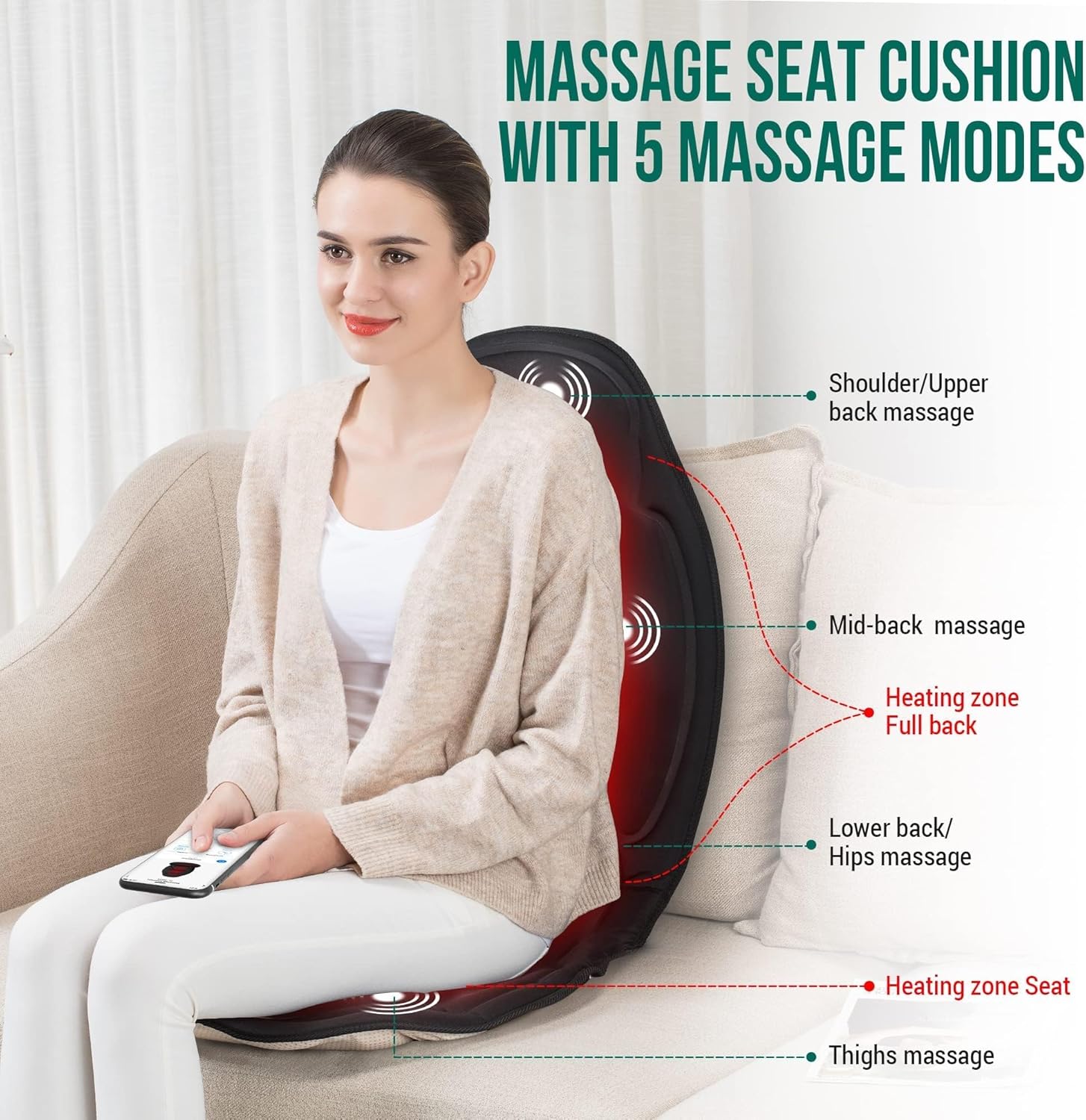
Image: Visual representation of the massage zones and heating areas on the cushion while in use.
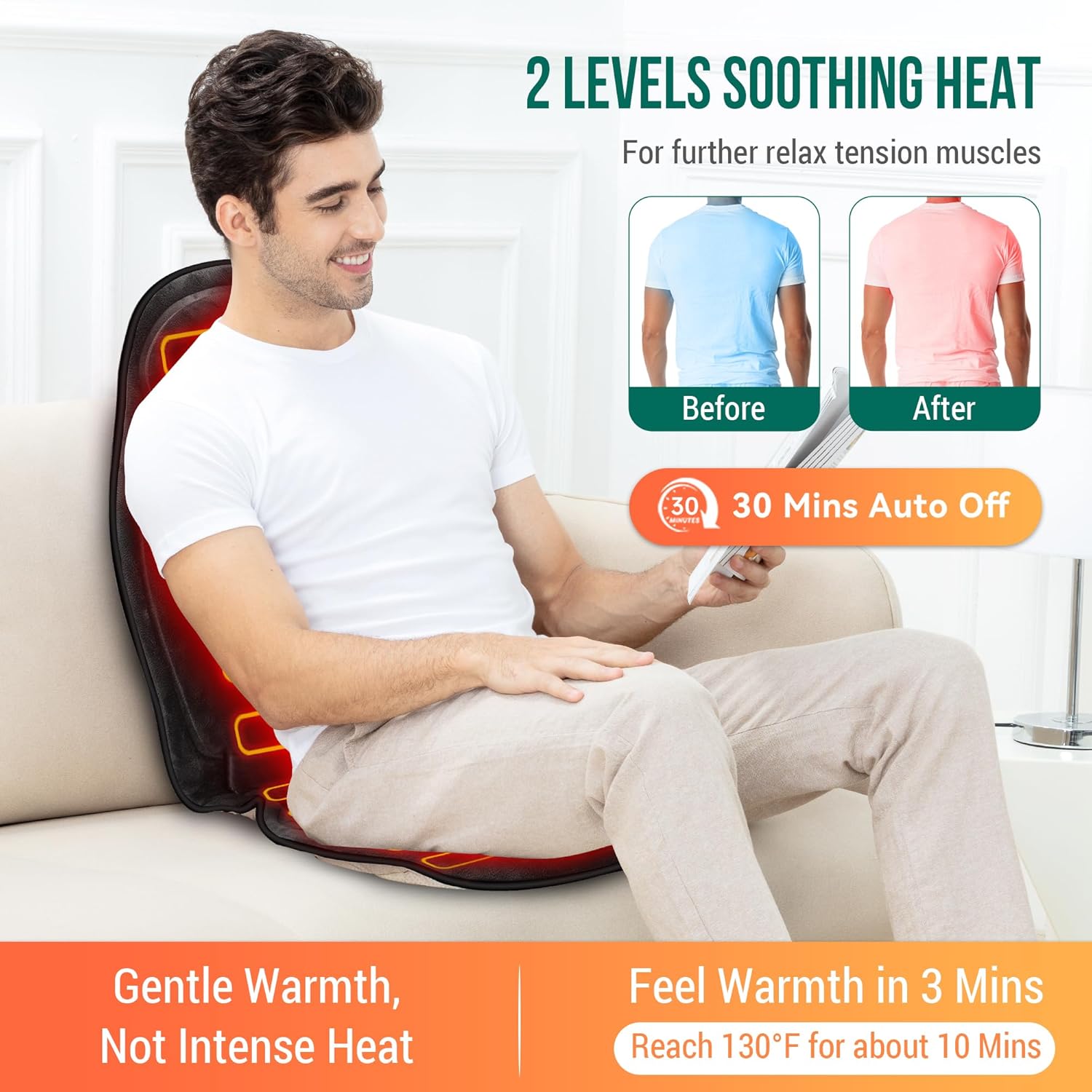
Image: Illustration of the heat function's effect and the automatic shut-off feature.
6. Maintenance
Proper care and maintenance will extend the life of your Snailax Vibration Back Massager:
- Cleaning: Always unplug the massager before cleaning. Wipe the surface with a soft, damp cloth. Do not use abrasive cleaners or immerse the unit in water.
- Storage: When not in use, store the massager in a cool, dry place, away from direct sunlight and extreme temperatures. Avoid placing heavy objects on the massager.
- Cord Care: Do not wrap the power cord tightly around the unit. Avoid twisting or kinking the cord.
7. Troubleshooting Guide
If you encounter any issues with your Snailax Vibration Back Massager, please refer to the table below for common problems and their solutions:

Image: The official troubleshooting guide table for the Snailax massage cushion.
| Fault | Solutions |
|---|---|
| Does not provide enough massage | The product has three levels of vibration massage intensity. The default is Low. Please try to adjust the gear to High for a stronger massage experience. |
| The massage is not active in all regions | The massage motor for that region may have been switched off. Press the 'Power' button that corresponds to that region to activate. |
| Device switches off suddenly | The device will switch off when the timer runs out. Continue using by pressing the 'Power' button. If the device has run for 60 mins, turn back on after resting the unit for 15 mins. Over-heat protection function activated. Device is switched off for your safety. Please rest device for 15-30 mins before restarting. |
| Device fails to start | Check if device has been used for more than 30 mins. If so, let device rest for 15 mins before continuing. Device may require longer time to cool in warmer environments. Check if adapter is plugged into socket. Check if adapter output is connected to device power inlet wire. |
| Jerky motion of vibrations from device | Excessive pressure may have been applied onto the device. Reduce the load and try again. |
8. Specifications
| Model Number | AL262P |
| Product Dimensions | 42 x 18.5 x 1.4 inches |
| Item Weight | 2.3 Pounds |
| Material | Foam, Polyester |
| Power Source | Corded Electric |
| Wattage | 30 watts |
| Bulb Voltage | 12 volts |
| Manufacturer | Snailax |
| Date First Available | February 25, 2018 |
9. Warranty and Support
For detailed warranty information, please refer to the documentation included with your product or contact Snailax customer support directly. While specific warranty terms are not provided here, Snailax typically offers support for their products.
You can also refer to the official User Manual PDF for additional details:
For further assistance, please visit the official Snailax store or contact their customer service.