1. Introduction
The HeadRush FRFR-112 is an active 2000-watt full-range, flat-response 12-inch/2-way cabinet designed for use with guitar multi-FX and amp modeling processors. It delivers a precise, full response across the entire frequency range without artificial coloration, ensuring your processed guitar tones are heard exactly as intended. This manual provides essential information for safe and effective use of your FRFR-112 cabinet.
2. Setup
2.1 Unpacking
Carefully remove the FRFR-112 cabinet from its packaging. Ensure all components listed in the 'What's in the Box' section are present: FRFR-112 unit, Power Cable, User Guide, and Safety & Warranty Manual. Retain the packaging for future transport or storage.
2.2 Placement
The FRFR-112 offers flexible placement options:
- Floor Wedge: Position the cabinet on the floor in a tilt-back orientation for use as a personal monitor.
- Pole-Mounted: The cabinet can be mounted on a standard speaker pole for elevated sound projection.
- Upright: Place the cabinet vertically on a stable surface.
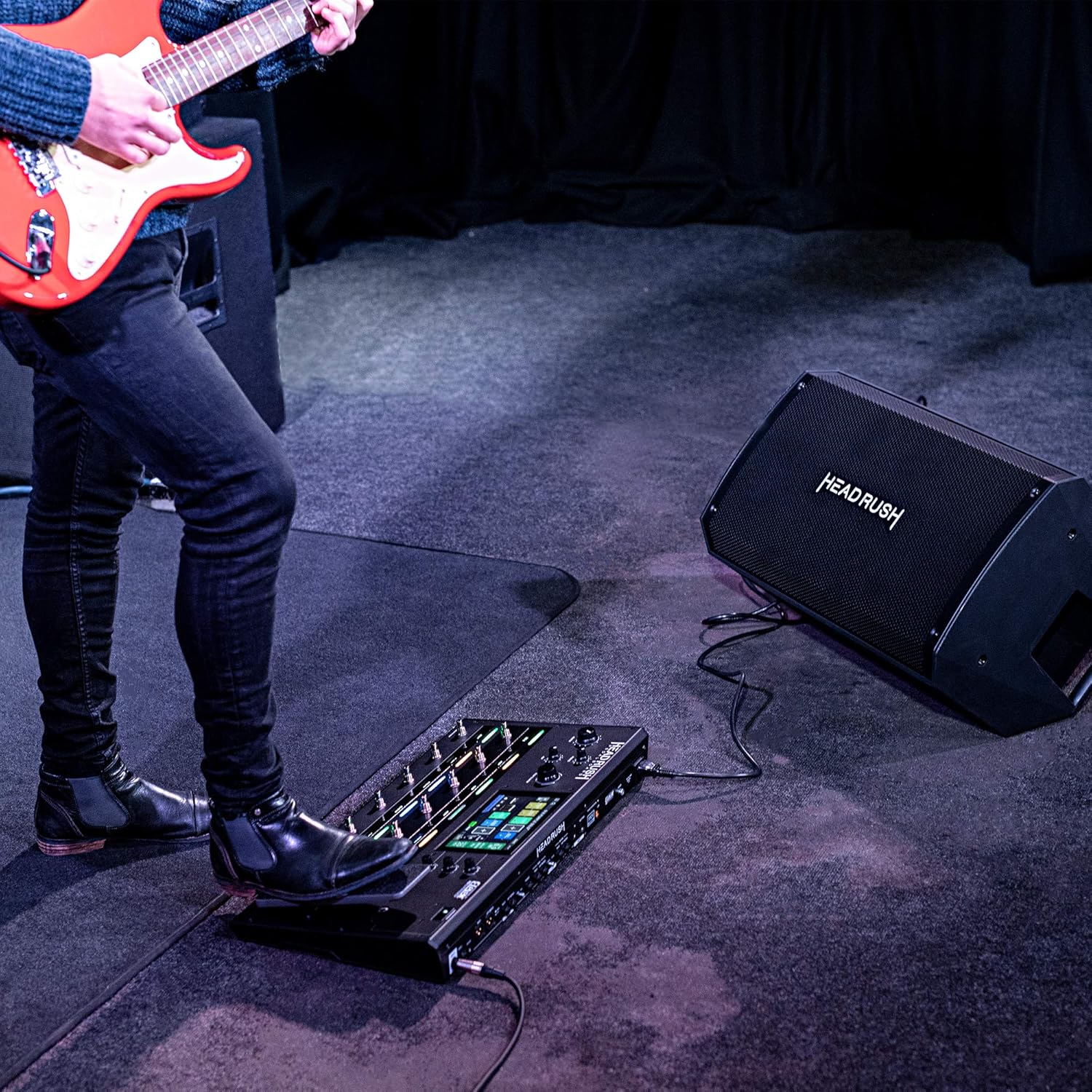
Image: Guitarist using the HeadRush FRFR-112 in a floor wedge position with a multi-FX pedalboard.

Image: The HeadRush FRFR-112 cabinet shown in a pole-mounted configuration.
2.3 Connections
The FRFR-112 features versatile connectivity:
- Inputs: Two (2) XLR/TRS 1/4-inch combo inputs are provided. Connect your multi-FX processor or other audio sources to these inputs. Each input has an independent volume control.
- Output: One (1) XLR output allows you to send your mixed signal to a front-of-house (FOH) mixer or to link additional FRFR-112 cabinets for a larger setup.
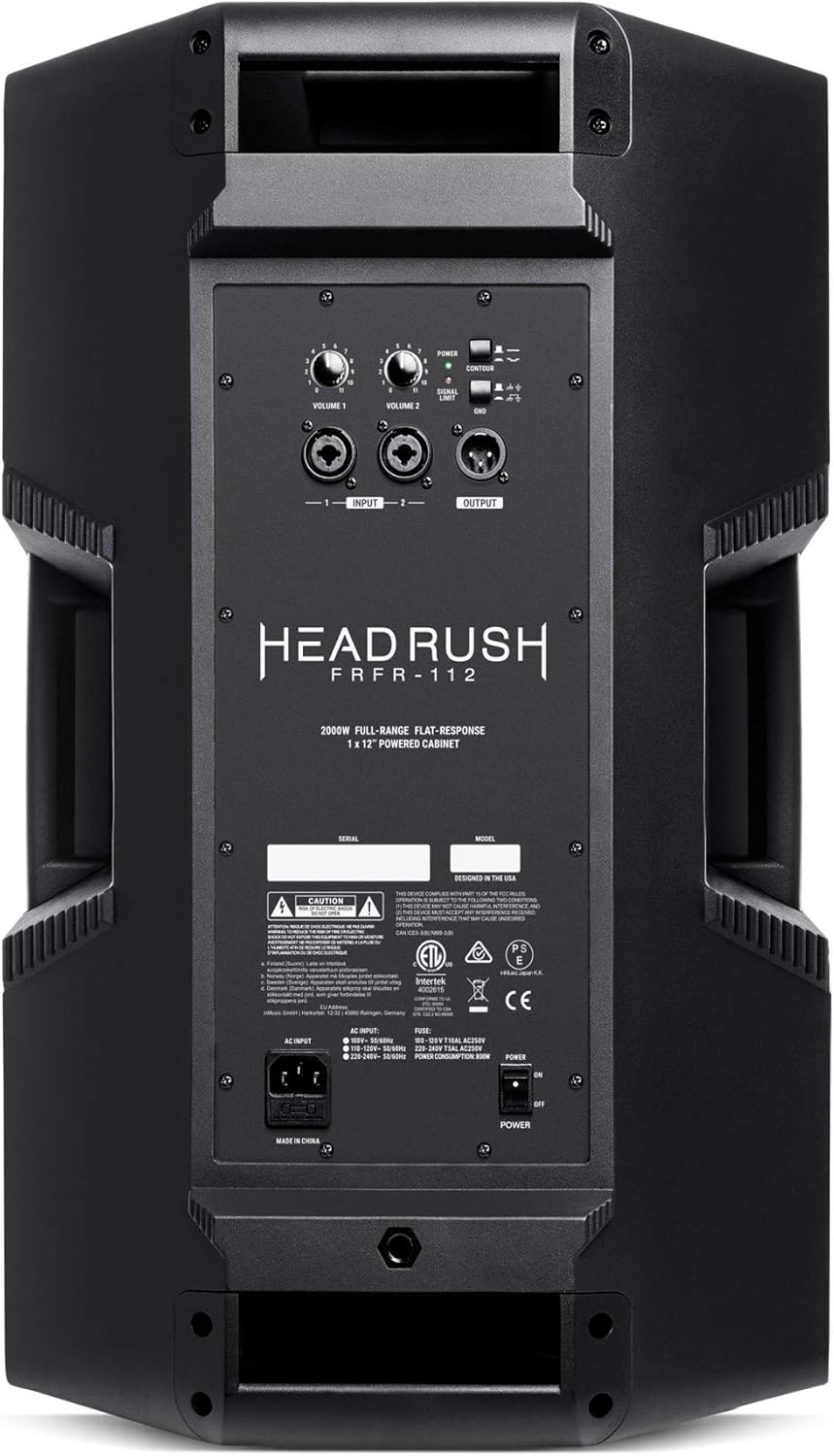
Image: Rear panel of the FRFR-112, highlighting the two combo inputs, XLR output, and control knobs.
2.4 Power
Connect the included power cable to the AC input on the rear panel of the FRFR-112 and then to a grounded power outlet. Ensure the power switch is in the OFF position before connecting. The unit is designed for corded electric power.
3. Operating Instructions
3.1 Powering On/Off
- Ensure all volume controls on the FRFR-112 are set to minimum.
- Power on your multi-FX processor or other connected audio sources first.
- Flip the power switch on the FRFR-112 to the ON position. The power indicator LED will illuminate.
- To power off, reverse this order: turn off the FRFR-112 first, then your audio sources.
3.2 Volume Controls
Each of the two XLR/TRS combo inputs has an independent volume control knob. Adjust these to balance the levels of your connected audio sources. The FRFR-112 delivers 2000 watts of peak power, providing ample headroom for any venue. Start with low volume settings and gradually increase to a comfortable listening level.
3.3 Ground-Lift Switch
The ground-lift switch is located on the rear panel. If you experience unwanted hum or noise, particularly in venues with grounding issues, engage this switch to help eliminate the noise. Experiment with the switch position to find the cleanest signal.
3.4 Contour EQ Switch
The contour EQ switch is designed to help your sound cut through muddy-sounding stage mixes. Engaging this switch applies a pre-set EQ curve that enhances clarity and presence. Use this feature as needed to optimize your sound in different live environments.
3.5 Linking Additional Cabinets
The XLR output can be used to link multiple FRFR-112 cabinets. Connect an XLR cable from the output of the first FRFR-112 to an input of the next FRFR-112. This allows you to expand your monitoring system or create a stereo setup.
3.6 Official Product Video
Video: Official product overview of the HeadRush FRFR-112, demonstrating its features and connectivity for guitar multi-FX and amp modeling processors.
Video: Demonstration of an active speaker for guitar, showcasing its use with various setups and highlighting its sound capabilities.
4. Maintenance
4.1 Cleaning
Regularly clean the exterior of the FRFR-112 with a soft, dry cloth. Avoid using abrasive cleaners, solvents, or harsh chemicals, as these can damage the finish. Ensure no liquids enter the speaker grille or control panel.
4.2 Storage
When not in use for extended periods, store the FRFR-112 in a dry, dust-free environment. If possible, use the original packaging or a protective cover to prevent dust accumulation and physical damage.
5. Troubleshooting
5.1 No Sound
- Check that the FRFR-112 is powered on and the power LED is illuminated.
- Verify that the power cable is securely connected to both the unit and the power outlet.
- Ensure all volume controls on the FRFR-112 and your connected audio sources are turned up.
- Check all audio cables for proper connection and ensure they are not damaged.
- Test with a different audio source or cable to isolate the problem.
5.2 Unwanted Hum or Noise
- Engage the ground-lift switch on the rear panel to reduce hum caused by ground loops.
- Ensure all cables are properly shielded and in good condition.
- Try connecting the FRFR-112 and your audio sources to the same power strip or outlet.
5.3 Signal Clipping
- If the signal limit LED illuminates frequently, reduce the input volume from your audio source or the corresponding volume control on the FRFR-112.
- Ensure your audio source is not sending an excessively hot signal to the FRFR-112.
6. Specifications
| Feature | Specification |
|---|---|
| Model Number | FRFR112 |
| Item Weight | 35 pounds (15.88 kg) |
| Product Dimensions | 13.8 x 13.9 x 23.8 inches (35.05 x 35.31 x 60.45 cm) |
| Output Wattage | 2000 Watts (Peak) |
| Speaker Size | 12-inch woofer |
| Connectivity | 2 x XLR/TRS 1/4-inch Combo Inputs, 1 x XLR Output |
| Power Source | Corded Electric |
| Color | Black |

Image: Dimensions of the HeadRush FRFR-112 cabinet.
7. Warranty and Support
For detailed warranty information and customer support, please refer to the 'Safety & Warranty Manual' included with your HeadRush FRFR-112 product. You can also visit the official HeadRush website for additional resources and contact information.


