
Ikan EVF50
Ikan EVF50 Monitor Cage with Viewfinder Instruction Manual
For DH5 and DH5e On-Camera Monitors
1. Introduction
The Ikan EVF50 transforms your DH5 or DH5e monitor into a 4K capable electronic viewfinder. This product includes a form-fitting aluminum cage that provides protection and additional mounting points. The integrated viewfinder features an adjustable diopter and a comfortable Ultrasuede eye cushion, designed to enhance your monitoring experience.
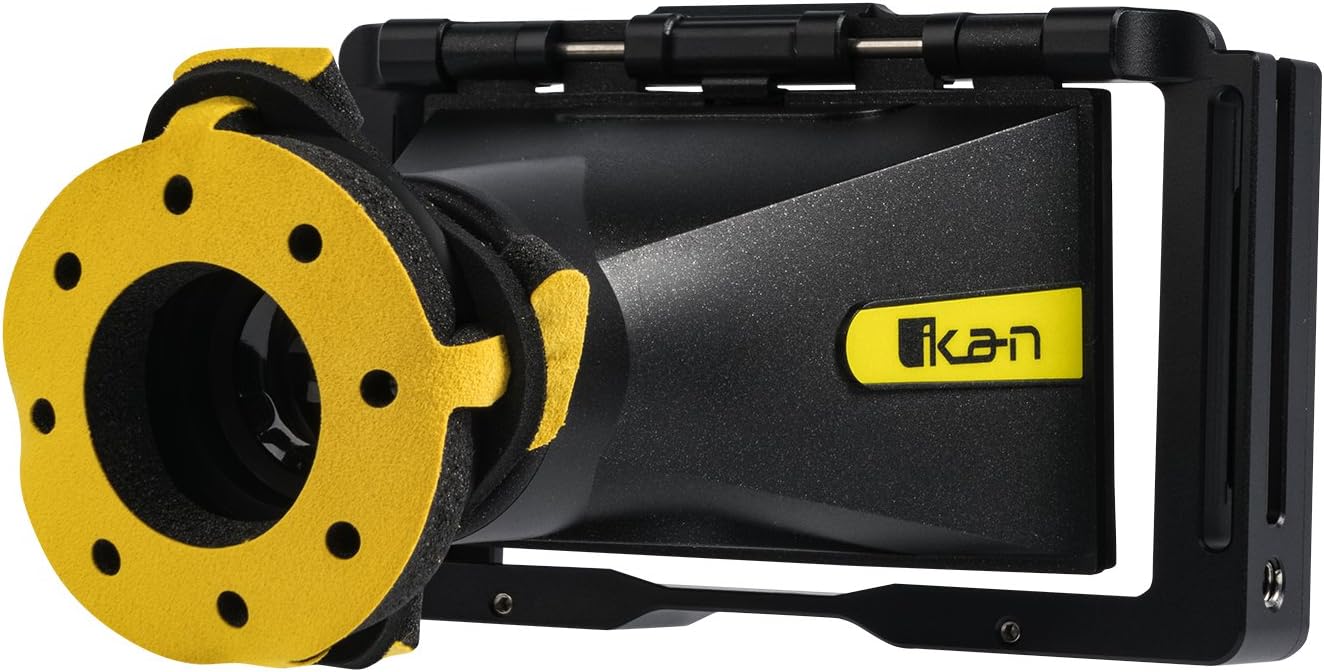
Figure 1: The Ikan EVF50 Monitor Cage with Viewfinder.
2. What's in the Box
Verify that all components are present in the packaging:
- Bluestar Eye Cushion
- EVF50 Cage
- EVF50 Viewfinder
- Hex Tool
3. Setup
Follow these steps to assemble and prepare your Ikan EVF50 Monitor Cage with Viewfinder:
- Insert the Monitor: Carefully slide your DH5 or DH5e monitor into the form-fitting EVF50 cage. Ensure it is seated securely within the cage's frame.

Figure 2: Side view of the EVF50 cage, illustrating the monitor insertion slot.
- Attach the Viewfinder: The viewfinder component is designed to integrate with the cage. Align the viewfinder with the monitor's screen and secure it using the provided hardware and hex tool.

Figure 3: Top view showing the viewfinder attached to the cage.

Figure 4: Detail of the viewfinder's hinge mechanism.

Figure 5: Using the hex tool for assembly.
- Install Eye Cushion: Place the Bluestar Ultrasuede eye cushion onto the viewfinder eyepiece for comfortable viewing.
- Connect Cables: Utilize the cage's cable locks to manage and secure any necessary cables connected to your monitor, preventing accidental disconnections.

Figure 6: Rear view of the cage, highlighting cable management features.
- Mounting: The cage features multiple 1/4-20 mounting points for attaching to camera rigs or other accessories.
4. Operating the Viewfinder
Once assembled, the EVF50 provides an enhanced viewing experience for your DH5/DH5e monitor:
- Viewing: Look through the eyepiece to view your monitor's display. The Ultrasuede eye cushion provides comfort during extended use.
- Diopter Adjustment: Rotate the diopter adjustment ring on the viewfinder to achieve a sharp, clear image tailored to your vision.
- Flip-Up Function: The viewfinder can be easily flipped up, allowing direct access to the monitor screen when the electronic viewfinder is not required.
5. Maintenance
Proper maintenance ensures the longevity and optimal performance of your EVF50 Monitor Cage with Viewfinder:
- Cleaning the Cage: Wipe the aluminum cage with a soft, dry cloth to remove dust and fingerprints. Avoid abrasive cleaners.
- Cleaning the Viewfinder Lens: Use a lens cleaning solution and a microfiber cloth specifically designed for optical surfaces. Gently wipe the lens to avoid scratches.
- Eye Cushion Care: The Ultrasuede eye cushion can be gently cleaned with a damp cloth and mild soap if necessary. Allow it to air dry completely before reattaching.
- Storage: When not in use, store the EVF50 in a clean, dry environment, preferably in a protective case, to prevent dust accumulation and physical damage.
6. Troubleshooting
Refer to the following common issues and solutions:
- Monitor Does Not Fit Securely:
Ensure you are using a compatible Ikan DH5 or DH5e monitor. Verify that the monitor is inserted correctly and fully seated within the cage.
- Image Through Viewfinder is Blurry:
Adjust the diopter ring on the viewfinder until the image appears sharp and in focus for your eyesight.
- Cables Are Loose or Disconnecting:
Utilize the integrated cable locks on the cage to secure your monitor's cables, preventing accidental pulls or disconnections.
7. Specifications
| Feature | Detail |
|---|---|
| Product Dimensions | 8 x 4 x 7.25 inches |
| Item Weight | 1.14 pounds |
| Item Model Number | EVF50 |
| Brand | Ikan |
| Manufacturer | Ikan |
| Compatibility | Ikan DH5 or DH5e On-Camera Monitors |
| Mounting Points | Multiple 1/4-20 threads |
| Eye Cushion Material | Bluestar Ultrasuede |
8. Warranty and Support
For warranty information, technical support, or service inquiries regarding your Ikan EVF50 Monitor Cage with Viewfinder, please contact Ikan customer support directly. Refer to the official Ikan website for the most current contact details and warranty policies.
Online Resources: www.ikan.com
Related documentsEVF50


Ask a question about this manual
Ask about setup, troubleshooting, compatibility, parts, safety, or missing instructions. Manuals+ will review the question and use this page’s manual context to help answer it.