
Introduction
This manual provides detailed instructions for the safe and proper installation, operation, and maintenance of your Barkan Long TV Wall Mount, Model 4800.B. This full-motion articulating mount is designed to securely hold flat or curved screens ranging from 13 to 90 inches and weighing up to 132 lbs (60 kg).
The mount features dual arms for enhanced stability and offers four movements: rotation, folding, swivel, and tool-free tilt adjustment. Its patented mechanism accommodates various screen types, including those with unusual back structures, without requiring additional adapters.
Safety Information
WARNING: Improper installation can lead to serious injury or damage. If you are unsure about the installation process, please consult a qualified professional.
- Weight Capacity: Do not exceed the maximum weight capacity of 132 lbs (60 kg).
- Screen Size: Ensure your TV screen size is within the recommended range of 13-90 inches.
- Wall Type: This mount is designed for installation on wood-stud drywall or concrete walls. Do not install on drywall/gypsum/plaster without wood studs.
- Child Safety: The mount includes a Fall Proof system to prevent disengagement of the screen, enhancing child safety by securing the TV to the wall.
- Tools: Use appropriate tools for installation, including a drill, level, and stud finder. Wear safety glasses during drilling.
Package Contents
Before beginning installation, verify that all parts and hardware are included in the package. Refer to the assembly instructions provided with the product for a complete list and visual guide.

Image: Barkan TV Wall Mount Hardware Kit. This image displays various screws (M4, M6, M8), washers, plastic spacers, wall screws, and wall anchors, organized in labeled bags.
The hardware kit includes various screws of different sizes and lengths to fit most TV models. If the provided screws are too long, use a spacer between the screw and the adapter to prevent damage to the TV.
Video: Unboxing, assembly instructions and main features. This video demonstrates checking package contents and initial assembly steps for the Barkan TV mount.
Specifications
- Model Number: 4800.B
- Screen Size Compatibility: 13-90 inches
- Weight Capacity: Up to 132 lbs (60 kg)
- VESA Compatibility: 100x200, 200x100, 200x200, 300x300, 300x400, 400x200, 400x300, 400x400, 600x400 mm and non-VESA up to 600x400 mm
- Minimum Distance from Wall: 3.1 inches (8 cm)
- Maximum Distance from Wall: 27.4 inches (70 cm)
- Movement Type: Full Motion Articulating (Rotate, Fold, Swivel, Tilt)
- Tilt Angle: 0° to 10° (tool-free)
- Swivel Angle: Up to 120° (near screen connection plate), 180° (near wall double arm)
- Leveling Adjustment: ±5°
- Material: Metal
- Color: Black
- Product Dimensions: 19.65 x 9.72 x 5.71 inches
- Item Weight: 16.96 pounds

Image: Detailed diagram showing the dimensions, tilt, swivel, and leveling capabilities of the Barkan TV mount.
Setup and Installation
The Barkan TV mount is designed for easy and fast assembly, typically involving three main steps:
- Connect the adapters to the TV: Attach the TV plate and adapters to the rear side of your television, ensuring the correct screws and spacers are used based on your TV's VESA pattern and back structure.
- Install the bracket on the wall: Secure the wall bracket to your chosen wall location. Use a stud finder for wood-stud drywall or appropriate anchors for concrete walls. A drilling template is included to assist with accurate hole placement.
- Snap the TV onto the bracket: Carefully lift and attach the TV (with adapters) onto the wall bracket. The Fall Proof system will engage to secure the TV.

Image: Visual representation of the 3-step assembly process: connecting adapters to TV, installing wall bracket, and snapping TV onto the bracket.

Image: Illustrates suitable wall types (drywall with wood studs, concrete blocks/concrete wall) and lists required tools such as a drill, level, safety glasses, and stud finder.

Image: Demonstrates how the patented adapter mechanism allows the mount to fit both flat and curved TVs, as well as TVs with non-standard back structures.

Image: Shows various backscreen connection patterns in millimeters (Width x Height) and how the 4 adapters can be positioned. It also advises contacting support if your pattern is not listed.
Operating the Mount
The Barkan Long TV Wall Mount offers flexible positioning for optimal viewing:
- Full Motion: Easily rotate, swivel, or tilt the TV by gently pushing or pulling it to the desired angle.
- Extension: The mount extends from a minimum of 3.1 inches (8 cm) to a maximum of 27.4 inches (70 cm) from the wall, allowing for viewing from various locations and positioning the screen around a corner.
- Tilt: Adjust the screen tilt from 0° to 10° without the need for tools.
- Swivel: The screen connection plate swivels up to 120°, and the double arm rotates 180° near the wall.
- Leveling: A built-in mechanism allows for ±5° screen leveling adjustment.
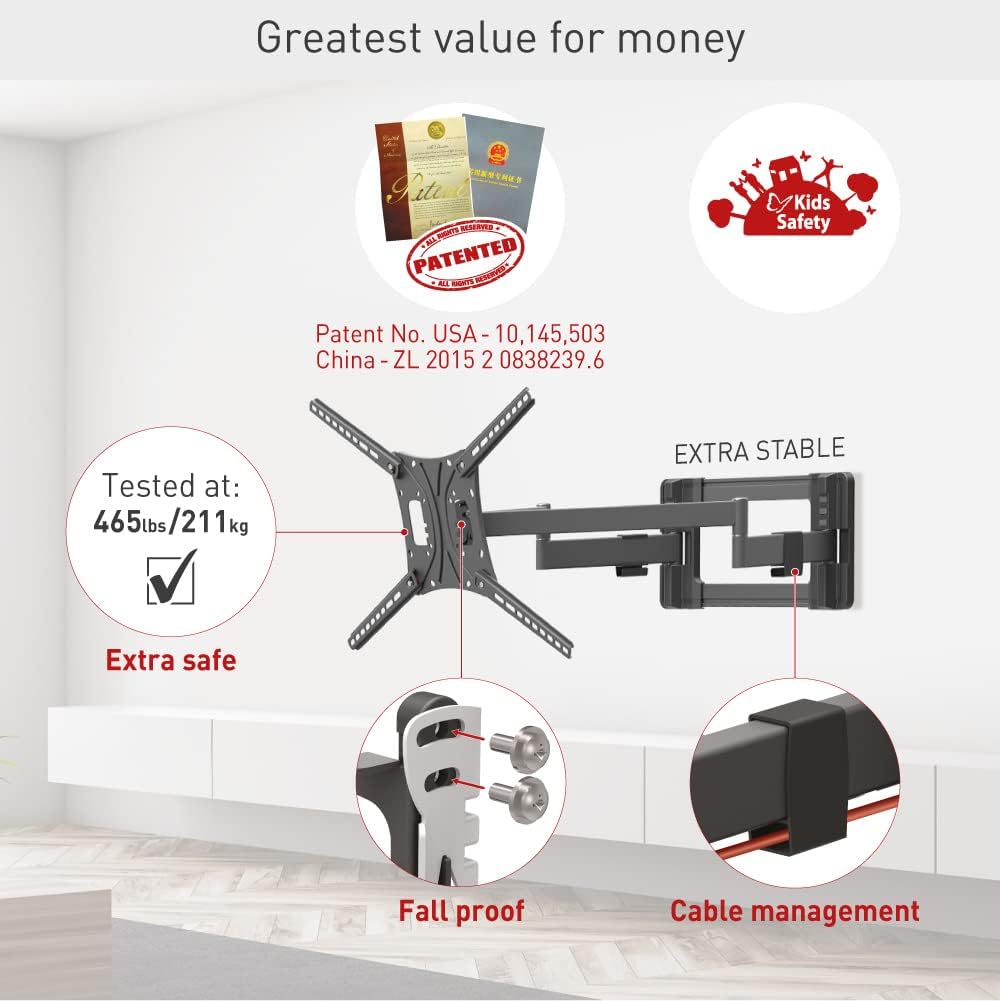
Image: Highlights the mount's full motion capabilities including tilt, swivel, and extension, along with its extra stable design and fall-proof mechanism.
Video: Demonstrates the full motion capabilities of the Barkan TV mount, including rotation, folding, swivel, and tilt adjustments, highlighting its stability and patented features for flat and curved screens.
Maintenance
- Lubrication: Lubricate the hinges once a year, or whenever movement becomes difficult, to ensure smooth operation.
- Security Check: Once every six months, check that the mount remains strongly secured to the wall and that none of the hinges have become disengaged.
- Cleaning: Clean the mount with a soft, dry cloth. Avoid abrasive cleaners or solvents.
Troubleshooting
If you encounter any issues with your Barkan TV Wall Mount, please consider the following:
- Difficulty in Movement: If the arms are difficult to move, try lubricating the hinges as described in the Maintenance section.
- Mount Instability: Re-check all screws and wall anchors to ensure they are fully tightened and securely fastened. Refer to the installation steps.
- TV Not Level: Use the built-in screen leveling mechanism to adjust the TV's horizontal alignment.
- Missing Parts or Installation Issues: If any parts are missing or you have issues with installation, please contact Barkan customer support.
Warranty
The Barkan Long TV Wall Mount (Model 4800.B) comes with a Lifetime Limited Warranty. Barkan products undergo strict quality tests, and this mount has been tested with four times its declared weight capacity to ensure durability and safety.
Support
For additional information, FAQs, video demonstrations, or any assistance, please visit the official Barkan website or contact our customer service team.
- Website: www.barkanmounts.com
- Email Support: sales.usa@barkanmounts.com
Our customer service experts are available every day of the week to help with any questions or concerns you may have.


