
Product Overview
The CHI Spin N Curl rotating curler is designed to create flawless, beachy waves with ease. Hair is drawn into the ceramic curl chamber where it is heated and timed to produce perfect curls and waves every time. This device features digital temperature display with adjustable settings suitable for various hair textures, minimizing heat damage. Ceramic heat technology, combined with negative ions, promotes shinier, healthier, and more beautiful hair.
Key Features:
- Effortless Curling: Automatically draws hair into the curl chamber for easy styling.
- Adjustable Temperature: Digital display with preset settings for different hair textures (up to 410°F/210°C).
- Ceramic Heat Technology: Produces far infrared heat and negative ions for shiny, healthy hair.
- Safety Features: Closed chamber design protects against burns, and includes a 1-hour auto shut-off for safety.
- Dual Voltage: AC 110-240V for convenient travel.
- Swivel Cord: 9 ft. (2.8 m) swivel cord for hassle-free styling.

Figure 1: CHI Spin N Curl Curling Iron. This image displays the main unit of the curling iron, highlighting its sleek black design and digital display.
Setup
- Unpack: Carefully remove the CHI Spin N Curl from its packaging. Ensure all components, including the cleaning tool, are present.
- Inspect: Check the device for any visible damage. Do not use if damaged.
- Plug In: Insert the power cord into a suitable electrical outlet. The device supports dual voltage (AC 110-240V) for international travel.
- Power On: Press and hold the power button (usually indicated by a power symbol) until the digital display illuminates.
- Select Temperature: Use the temperature control buttons (+/-) to select your desired heat setting. Refer to the "Operating Instructions" for recommended temperatures based on hair type.
Operating Instructions
For best results, ensure hair is dry and detangled before use. The CHI Spin N Curl is ideal for hair lengths between 6 inches and 16 inches.
- Prepare Hair: Section your hair into small, manageable strands, approximately ¾ inch to 1 inch wide. Avoid inserting larger sections to prevent tangling.
- Position Device: Hold the CHI Spin N Curl vertically with the open curl chamber facing towards your head. Ensure the side marked "This side towards head" is indeed facing your head.
- Insert Hair: Place the section of hair into the opening of the curl chamber.
- Initiate Curl: Press and hold the arrow button corresponding to the desired curl direction (left or right). The device will automatically draw the hair into the chamber and begin curling.
- Wait for Beeps: Continue holding the button until you hear 4 rapid beeps. This indicates the curl is set. Release the button.
- Release Curl: Gently pull the device straight down from the hair to release the perfectly formed curl.
- Repeat: Continue this process for all sections of hair until desired style is achieved.

Figure 2: Proper technique for using the CHI Spin N Curl. This image illustrates a user inserting a section of hair into the device's chamber.
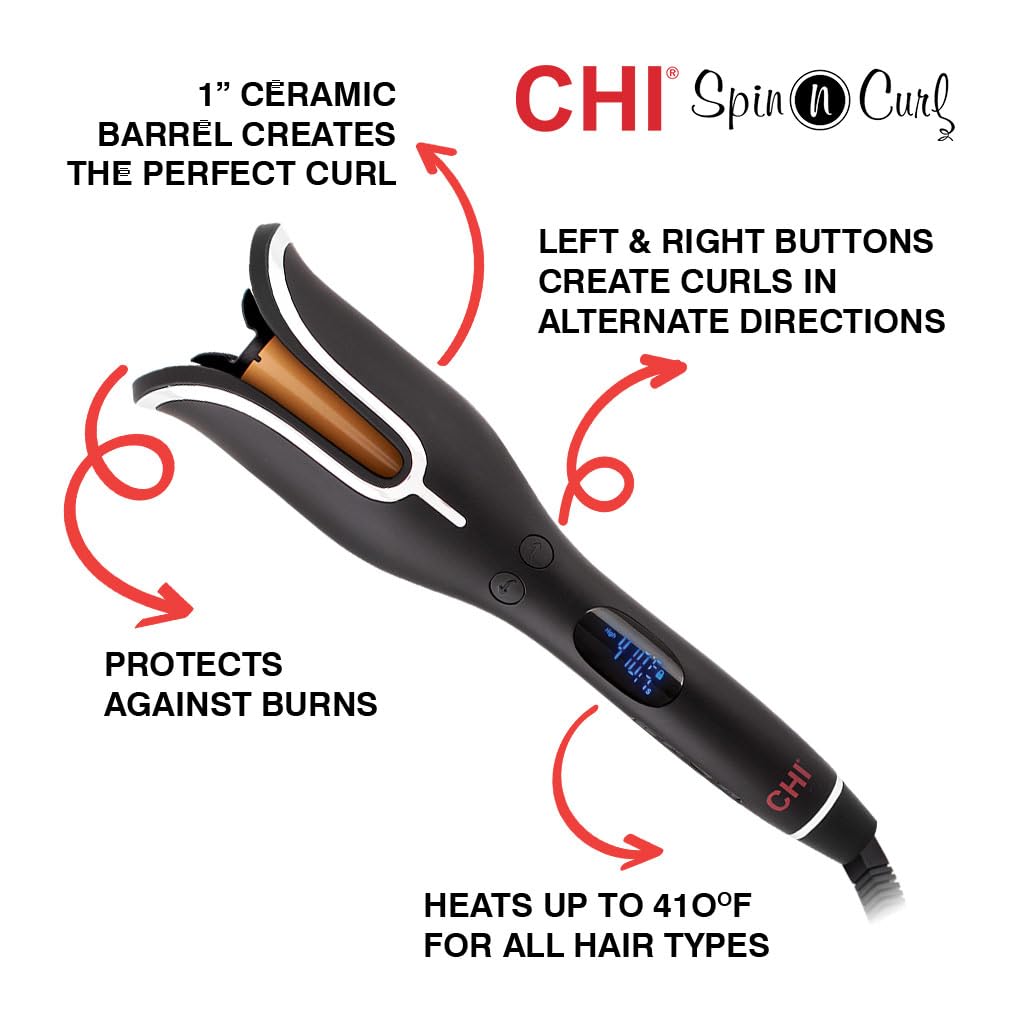
Figure 3: Diagram highlighting key features such as the 1" ceramic barrel, directional buttons, and burn protection.

Figure 4: Close-up view of the closed curl chamber, emphasizing the safety design.

Figure 5: Guide illustrating different curl preferences (Classic, Loose, Soft) achievable with the device.
Maintenance
- Cleaning: Ensure the device is unplugged and completely cool before cleaning. Use the provided cleaning tool to remove any hair or debris from the curl chamber. Wipe the exterior with a soft, damp cloth. Do not use harsh chemicals or abrasive cleaners.
- Storage: Store the CHI Spin N Curl in a cool, dry place, away from moisture and direct sunlight. Ensure the cord is not wrapped tightly around the device, as this can cause damage.
Troubleshooting
| Problem | Possible Cause | Solution |
|---|---|---|
| Device not turning on. | Not plugged in correctly; Power outlet issue. | Ensure the device is securely plugged into a working outlet. Test the outlet with another appliance. |
| Hair getting tangled in the chamber. | Section of hair is too large; Hair is not detangled. | Use smaller sections (¾ to 1 inch). Ensure hair is completely detangled before inserting. |
| Device beeps continuously or stops mid-curl. | Hair section is too large or improperly inserted; Device safety feature activated. | Release the hair immediately. Ensure hair is clean, dry, and properly sectioned before re-attempting. |
| Curls are not holding. | Incorrect temperature setting; Hair type requires longer hold time. | Increase the temperature setting or allow the hair to remain in the chamber for a slightly longer duration (within safe limits). Use a styling product for better hold. |
Specifications
| Feature | Detail |
|---|---|
| Product Dimensions | 5.7 x 3.14 x 3.14 inches; 1.7 Pounds |
| Item Model Number | CA2247 |
| UPC | 813843038600 |
| Manufacturer | Farouk Systems Inc |
| Country of Origin | China |
| Material | Ceramic |
| Max Temperature | 410°F/210°C |
| Auto Shut-off | 1 hour |
| Cord Length | 9 ft. (2.8 m) Swivel Cord |
Warranty & Support
For warranty information and customer support, please refer to the documentation included with your product or visit the official CHI website. Keep your purchase receipt as proof of purchase for any warranty claims.
For additional assistance, you may contact Farouk Systems Inc. customer service.


