
Whirlpool C00311013
Bauknecht Whirlpool Washing Machine Start/Reset Button Key Cap Instruction Manual
Model: C00311013
1. Introduction
This manual provides instructions for the installation and proper use of the Bauknecht Whirlpool Washing Machine Start/Reset Button Key Cap, model C00311013. This is an original replacement part designed for specific Whirlpool and Bauknecht washing machine models, including the AWO and AWS series. Please read these instructions carefully before proceeding with installation to ensure safe and correct operation.
2. Safety Information
Always prioritize safety when working with electrical appliances. Failure to follow these safety guidelines may result in electric shock, injury, or damage to the appliance.
- Disconnect Power: Before attempting any installation or repair, ensure the washing machine is completely disconnected from the main power supply. Unplug the appliance from the wall socket.
- Qualified Personnel: If you are unsure about any step, consult a qualified technician.
- Original Parts: Use only genuine replacement parts as specified by the manufacturer.
- Tools: Use appropriate tools for the task.
3. Product Overview
The Bauknecht Whirlpool Start/Reset Button Key Cap (Model C00311013) is a white plastic component designed to replace a damaged or missing control button on compatible washing machines. It functions as the primary interface for starting and resetting wash cycles.

Figure 1: Front view of the Bauknecht Whirlpool Start/Reset Button Key Cap. This image shows the two white plastic key caps, designed to fit into the control panel of a washing machine, providing the tactile interface for the start and reset functions.

Figure 2: Angled view of the key caps, highlighting their shape and the small tabs used for securing them in place. The design ensures a precise fit within the washing machine's control panel.

Figure 3: Rear view of the key caps, showing the internal structure and mounting points. These points are crucial for proper engagement with the underlying electronic switches of the washing machine.
4. Installation Instructions
Follow these steps carefully to install the replacement start/reset button key cap.
- Prepare the Appliance:
- Ensure the washing machine is unplugged from the electrical outlet.
- Turn off the water supply to the washing machine.
- Access the Control Panel:
Depending on your washing machine model (AWO & AWS series), you may need to carefully remove the top panel or front control panel to access the internal components where the button is located. Refer to your washing machine's specific service manual for detailed instructions on accessing the control panel.
- Remove the Old Key Cap:
Gently pry off the old or broken key cap. It may be held in place by small plastic clips or simply friction. Be careful not to damage the underlying switch mechanism.
- Install the New Key Cap:
Align the new Bauknecht Whirlpool Start/Reset Button Key Cap (Model C00311013) with the corresponding switch on the control board. Press firmly but gently until it clicks into place. Ensure it is seated securely and operates smoothly when pressed.
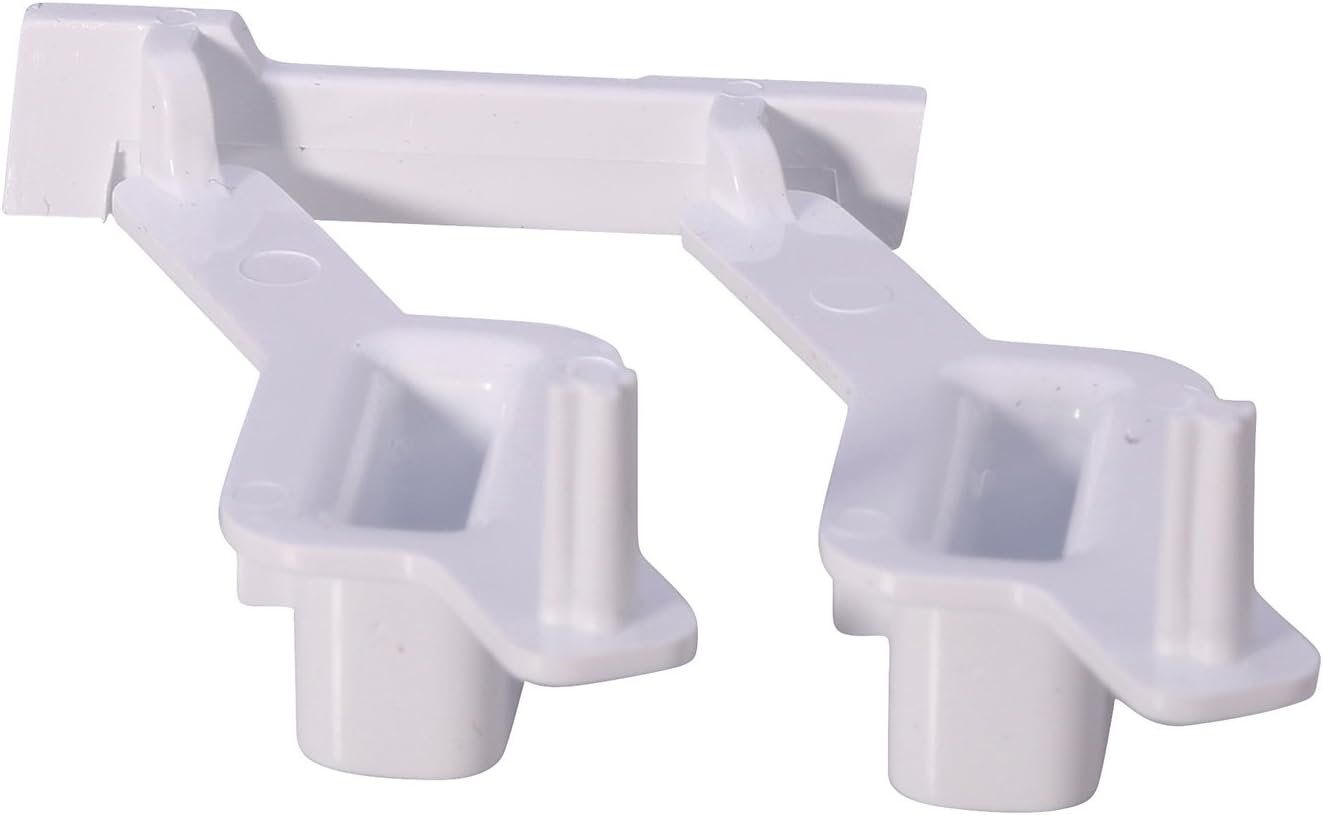
Figure 4: Underside view of the key caps, illustrating the clips and posts that engage with the washing machine's control panel and switch. Proper alignment of these features is essential for correct installation.
- Reassemble the Appliance:
Carefully reattach the control panel and any other parts that were removed. Ensure all screws and fasteners are securely tightened.
- Test Functionality:
Plug the washing machine back into the electrical outlet and restore the water supply. Test the new start/reset button to ensure it functions correctly and initiates/resets cycles as expected.
5. Operating Notes
Once installed, the key cap functions identically to the original part. Press the button to initiate a wash cycle or to reset the machine as per your washing machine's operational instructions. No special operation is required for the key cap itself.
6. Maintenance
The key cap requires minimal maintenance. Keep the control panel clean by wiping it with a soft, damp cloth. Avoid using abrasive cleaners or solvents, as these can damage the plastic. Ensure no liquids seep into the control panel area.
7. Troubleshooting
If you encounter issues after installing the key cap, consider the following:
- Button Not Responding:
- Ensure the key cap is fully seated and clicked into place.
- Verify that the washing machine is powered on and properly connected to the electrical supply.
- Check if the underlying switch mechanism is damaged. If so, the switch itself may need replacement, not just the cap.
- Key Cap Feels Loose:
- Re-check the installation to ensure the clips on the key cap are properly engaged with the control panel.
For persistent issues, consult your washing machine's service manual or contact a qualified appliance technician.
8. Specifications
| Brand | Whirlpool / Bauknecht |
| Model Number | C00311013 |
| Part Number | 481071425341 |
| Item Weight | 20 g |
| Compatibility | Whirlpool and Bauknecht AWO & AWS series washing machines |
| Color | White |
9. Warranty and Support
This product is an original Whirlpool replacement part. For specific warranty information regarding replacement parts, please refer to the documentation provided with your original washing machine or contact Whirlpool customer support directly. Support for installation or troubleshooting beyond this manual's scope should be directed to a qualified appliance technician or Whirlpool customer service.
For further assistance, please visit the official Whirlpool website or contact their customer service department.
Ask a question about this manual
Ask about setup, troubleshooting, compatibility, parts, safety, or missing instructions. Manuals+ will review the question and use this page’s manual context to help answer it.