
1. Introduction
This manual provides instructions for the installation and care of your Fiskars Replacement Handles for the Professional Pruner PB-8 M (Model 1026282). These handles are designed to restore the ergonomic grip and functionality of your existing Fiskars PB-8 M pruner, ensuring continued comfortable and efficient use.
The replacement handles are suitable for both right-handed and left-handed users and are made from durable, lightweight fiberglass-reinforced plastic with a non-slip coating for a firm and comfortable grip, ideal for medium-sized hands.

Image 1.1: The Fiskars Replacement Handles for PB-8 M Pruner, showing the two orange and black handles along with the accompanying screws and nuts for installation.
2. Setup & Installation
Before beginning the installation, ensure your pruner is clean and free of debris. It is recommended to wear appropriate safety gloves during this process.
2.1 Included Components:
- 2 x Fiskars Replacement Handles (Orange/Black)
- Fasteners (screws and nuts)
2.2 Installation Steps:
- Disassembly: Carefully remove the old handles from your Fiskars PB-8 M pruner. This typically involves unscrewing the existing fasteners. Keep any reusable components, such as springs or washers, if they are not included in the replacement kit.
- Handle Placement: Position the new replacement handles onto the pruner body, ensuring they align correctly with the screw holes and any internal mechanisms (e.g., spring housing).
- Secure Fasteners: Insert the provided screws through the designated holes in the handles and pruner body. Secure them with the nuts. Do not overtighten initially.
- Test Functionality: Once all fasteners are in place, gently tighten them. Test the pruner's opening and closing mechanism to ensure smooth operation. Adjust tightness as needed to allow for free movement without excessive play.
- Final Check: Confirm that both handles are securely attached and that the pruner functions as intended.
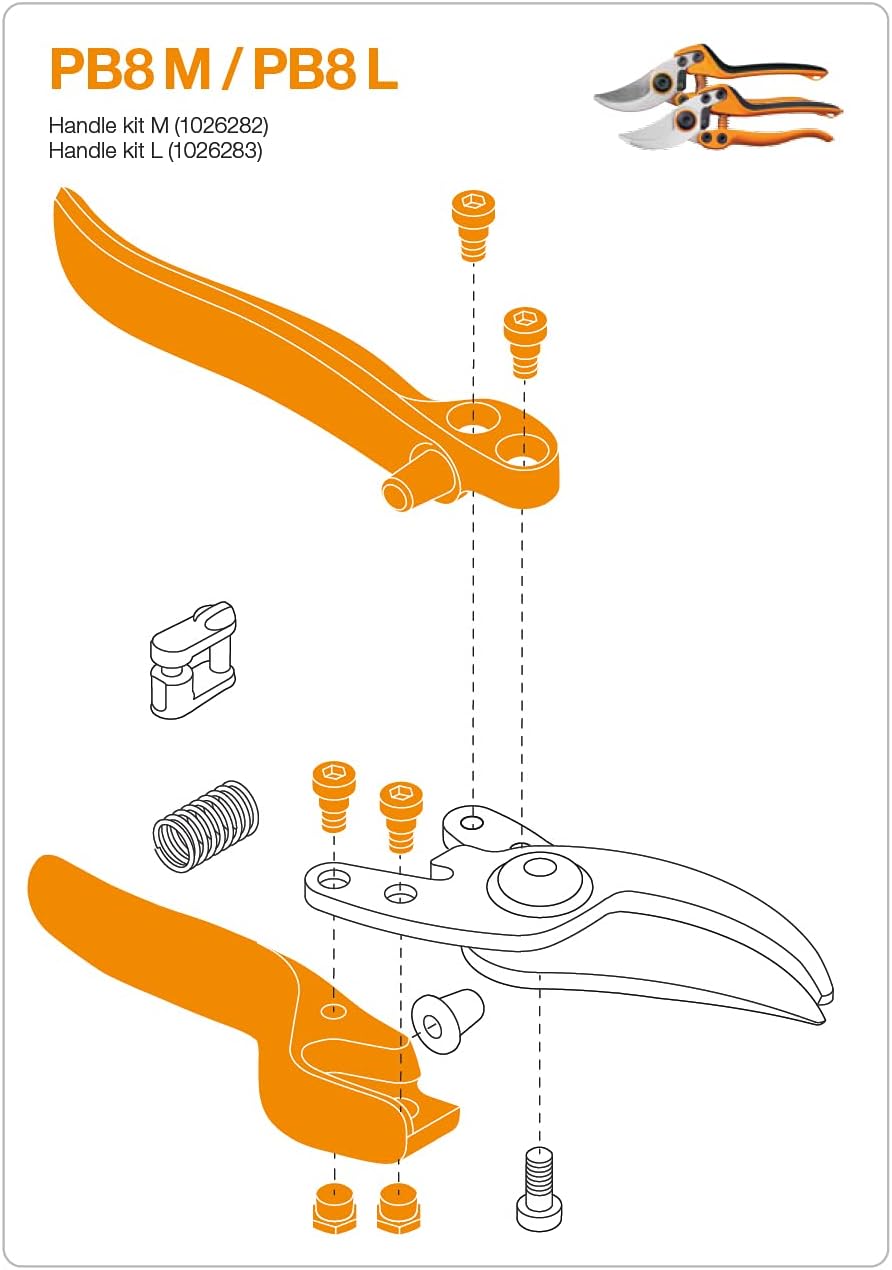
Image 2.1: Exploded diagram illustrating the assembly of the Fiskars PB-8 M Pruner handles and components, including screws, nuts, and the spring mechanism.
3. Operating Instructions
With the new handles installed, your Fiskars PB-8 M pruner is ready for use. These handles are designed to provide an optimal grip for comfortable and efficient pruning tasks.
- Grip: Hold the pruner firmly but comfortably. The non-slip coating on the handles enhances grip security, especially during extended use.
- Cutting Technique: Position the blade around the branch to be cut. Apply steady pressure to the handles to make a clean cut. Avoid twisting the pruner during a cut, as this can damage the blade or the branch.
- Safety Lock: Always engage the safety lock when the pruner is not in use to prevent accidental opening and injury.
Safety Warning: Always keep fingers clear of the blades. Use caution when handling sharp tools.
4. Maintenance
Proper maintenance extends the life of your Fiskars pruner and ensures optimal performance. While these instructions focus on the handles, general pruner care is essential.
- Cleaning: After each use, clean the blades and handles to remove sap, dirt, and debris. A damp cloth is usually sufficient for the handles. For blades, use a stiff brush and a suitable cleaning solution if necessary.
- Lubrication: Periodically apply a light oil to the pivot point and blade surfaces to ensure smooth operation and prevent rust.
- Blade Sharpening: Keep the blades sharp for clean cuts. Refer to your original pruner manual or Fiskars guidelines for proper sharpening techniques.
- Handle Inspection: Regularly inspect the handles for any signs of wear, damage, or looseness. Ensure all fasteners remain tight.
- Storage: Store the pruner in a dry place with the safety lock engaged.
5. Troubleshooting
| Problem | Possible Cause | Solution |
|---|---|---|
| Handles feel loose after installation. | Fasteners are not sufficiently tightened. | Gently tighten the screws and nuts until the handles are secure, but still allow the pruner to operate smoothly. Avoid overtightening. |
| Pruner mechanism is stiff after handle replacement. | Fasteners are overtightened, or pivot point needs lubrication. | Loosen the handle fasteners slightly. Apply a drop of light oil to the pivot point. Ensure no debris is obstructing movement. |
| Handles appear damaged or cracked. | Impact damage or material fatigue. | If the handles are significantly damaged, they should be replaced to ensure safe operation. Contact Fiskars customer support for replacement options. |
6. Specifications
| Feature | Detail |
|---|---|
| Product Name | Replacement Handles for Professional Pruner PB-8 M |
| Model Number | 1026282 |
| Brand | Fiskars |
| Color | Orange/Black |
| Style | Replacement Handles for PB-8 M |
| Material | Fiberglass-reinforced plastic (SoftGrip finish) |
| Quantity of Items | 1 (set of handles and fasteners) |
| Hand Orientation | Ambidextrous |
| Compatible Pruner Model | Fiskars Professional Pruner PB-8 M (Ref: 1020204) |
7. Warranty & Support
Fiskars products are known for their quality and durability. For specific warranty information regarding your replacement handles or the Fiskars Professional Pruner PB-8 M, please refer to the warranty documentation included with your original product or visit the official Fiskars website.
If you require further assistance, have questions about installation, or need to report a defect, please contact Fiskars customer support. Contact details can typically be found on the Fiskars website or product packaging.
Online Resources: For additional information, product registration, and FAQs, please visit the official Fiskars website.

