
Oxsubor AUX TO USB
Oxsubor AUX to USB Adapter Instruction Manual
Model: AUX TO USB
Introduction
This manual provides essential instructions for the proper use and care of your Oxsubor AUX to USB Adapter. This adapter is designed to enable playback of MP3 music files from a USB flash drive through compatible car audio systems. Please read this manual thoroughly before use to ensure optimal performance and avoid potential issues.
Product Overview
The Oxsubor AUX to USB Adapter is a compact and durable cable designed for specific car audio applications. It features a 3.5mm male audio jack on one end and a USB 2.0 female port on the other.

Image: The Oxsubor AUX to USB Adapter, featuring a 3.5mm male audio jack and a USB 2.0 female port.
Key Features:
- Car AUX-in Compatibility: Specifically designed for car audio systems equipped with a 3.5mm AUX-IN port and a built-in MP3 decoding function.
- USB 2.0 Support: Connects to USB 2.0 flash drives for playing MP3 audio.
- MP3 File Playback: Enables playback of MP3 music files directly from a USB drive through your car stereo.
- Compact Design: Small and portable for easy integration into your vehicle.
Compatibility and Requirements
This adapter has specific compatibility requirements. Please review the following carefully before attempting to use the product.
Essential Requirements:
- Your car audio system must have a 3.5mm AUX-IN port.
- Your car audio system must have a built-in MP3 decoding function. Without this function, the adapter will not work.
- Only USB 2.0 flash drives are supported. USB 3.0 or other versions are not compatible.
- The maximum capacity for the USB flash drive is 8GB.
- Only MP3 music files are supported on the USB drive. Do not store videos, folders, or other file types.
Incompatible Devices:
This adapter is not suitable for use with:
- Headphones
- Speakers
- Mobile Phones
- Computers
- Cameras
- Microphones
- Monitors
- Any AUX port that is passive (audio input only) and lacks MP3 decoding capability.

Image: Visual representation of important compatibility notices, highlighting supported and unsupported devices and formats.
Setup Instructions
- Prepare your USB Flash Drive:
- Ensure your USB flash drive is USB 2.0 and has a maximum capacity of 8GB.
- Format the USB drive if necessary.
- Load only MP3 music files onto the root directory of the USB drive. Do not create folders or include other file types.
- Connect the USB Drive: Insert your prepared USB flash drive into the female USB 2.0 port of the Oxsubor AUX to USB Adapter.
- Connect to Car AUX-IN: Plug the 3.5mm male audio jack of the adapter into your car's 3.5mm AUX-IN port.

Image: Diagram showing the connection of a USB flash drive to the adapter and the adapter to a car's AUX-IN port.
Video: Demonstration of connecting a USB drive to the adapter and using it in a car audio system.
Operating Instructions
Once the adapter and USB drive are connected to your car's AUX-IN port:
- Select AUX Input: On your car stereo, select the AUX input source. This is usually labeled "AUX" or "AUX-IN".
- Automatic Playback: If your car stereo has a built-in MP3 decoder, it should automatically detect the USB drive and begin playing the MP3 files.
- Control Playback: Use your car stereo's controls (e.g., next track, previous track, volume) to manage music playback. The adapter itself does not have controls.
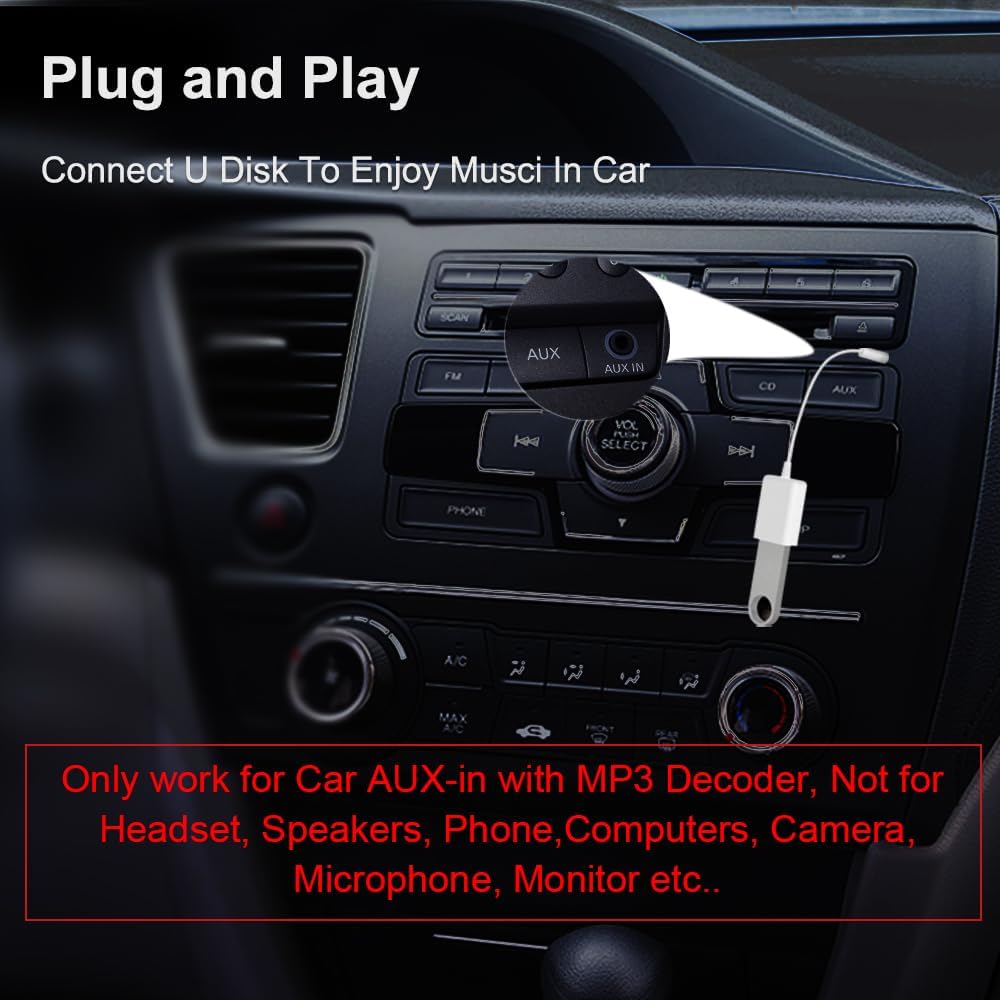
Image: The adapter connected to a car's AUX-IN port, ready for music playback.
Video: Short demonstration of the adapter's plug-and-play functionality in a car environment.
Maintenance
- Keep the adapter clean and free from dust and moisture.
- Avoid bending or twisting the cable excessively to prevent internal damage.
- Store the adapter in a cool, dry place when not in use.
Troubleshooting
- Issue: No music playback or adapter not recognized.
Solution:
- Verify your car stereo has a built-in MP3 decoding function. This adapter will not work with passive AUX ports.
- Ensure the USB flash drive is USB 2.0 and its capacity is 8GB or less.
- Confirm that only MP3 files are stored on the USB drive, and they are in the root directory (not within folders).
- Check all connections to ensure they are secure.
- Try a different USB flash drive to rule out issues with the drive itself.
- Ensure the car stereo is set to the correct AUX input source.
- Issue: Sound quality is poor or intermittent.
Solution:
- Check for loose connections at both the AUX port and the USB port.
- Ensure the MP3 files on your USB drive are not corrupted.
- Clean the AUX port and USB port if there is any visible debris.
Specifications
| Brand: | Oxsubor |
| Model Number: | AUX TO USB |
| Connector Type: | 3.5mm Male Audio Jack to USB 2.0 Female |
| Color: | White |
| Compatible Devices: | Car AUX ports with MP3 decode function |
| USB Drive Compatibility: | USB 2.0, Max 8GB capacity, MP3 files only |
| Item Weight: | 0.317 ounces |
| Package Dimensions: | 4.65 x 2.83 x 0.39 inches |

Image: Detailed dimensions of the adapter for reference.
Warranty and Support
Your Oxsubor AUX to USB Adapter comes with a 24-month replacement warranty and lifetime support. If you encounter any issues or have questions regarding the adapter's functionality with your vehicle, please contact Oxsubor customer support for assistance.
Ask a question about this manual
Ask about setup, troubleshooting, compatibility, parts, safety, or missing instructions. Manuals+ will review the question and use this page’s manual context to help answer it.