
Beikell B6007
Beikell Car Phone Holder Instruction Manual
Model: B6007
Introduction
This manual provides instructions for the proper setup, operation, and maintenance of your Beikell Adjustable Car Phone Holder.
Product Overview
The Beikell Car Phone Holder is designed to securely hold your smartphone in your vehicle, offering adjustable viewing angles and easy one-hand operation. It features a strong suction cup for stable installation on dashboards or windshields.

The Beikell Car Phone Holder, a robust and adjustable mount for smartphones in vehicles.
Setup and Installation
Choosing an Installation Location
The Beikell Car Phone Holder can be securely installed on either your vehicle's windshield or dashboard.

The phone holder can be mounted on the windshield for clear visibility or on the dashboard for a lower profile. Both options utilize the strong suction cup.
Installation Steps
- Clean the Surface: Ensure the chosen surface (windshield or dashboard) is clean, dry, and free of dust or oils.
- Attach the Suction Cup: Press the suction cup firmly onto the desired surface.
- Engage the Lock: Push down the lever on the base of the suction cup to create a vacuum seal and lock the holder in place.
- Adjust the Arm: Loosen the wing nuts on the adjustable arm to extend or pivot the arm to your preferred length and angle. Tighten the wing nuts to secure the position.
- Adjust the Holder: Loosen the nut behind the phone cradle to adjust the ball joint for optimal viewing angle (360° rotation). Tighten the nut to secure.
This video demonstrates the installation process of the Beikell Car Phone Holder, including attaching the suction cup and adjusting the arm and cradle.
Operating Instructions
Inserting Your Phone
The phone holder features a one-button release system for easy phone insertion and removal.
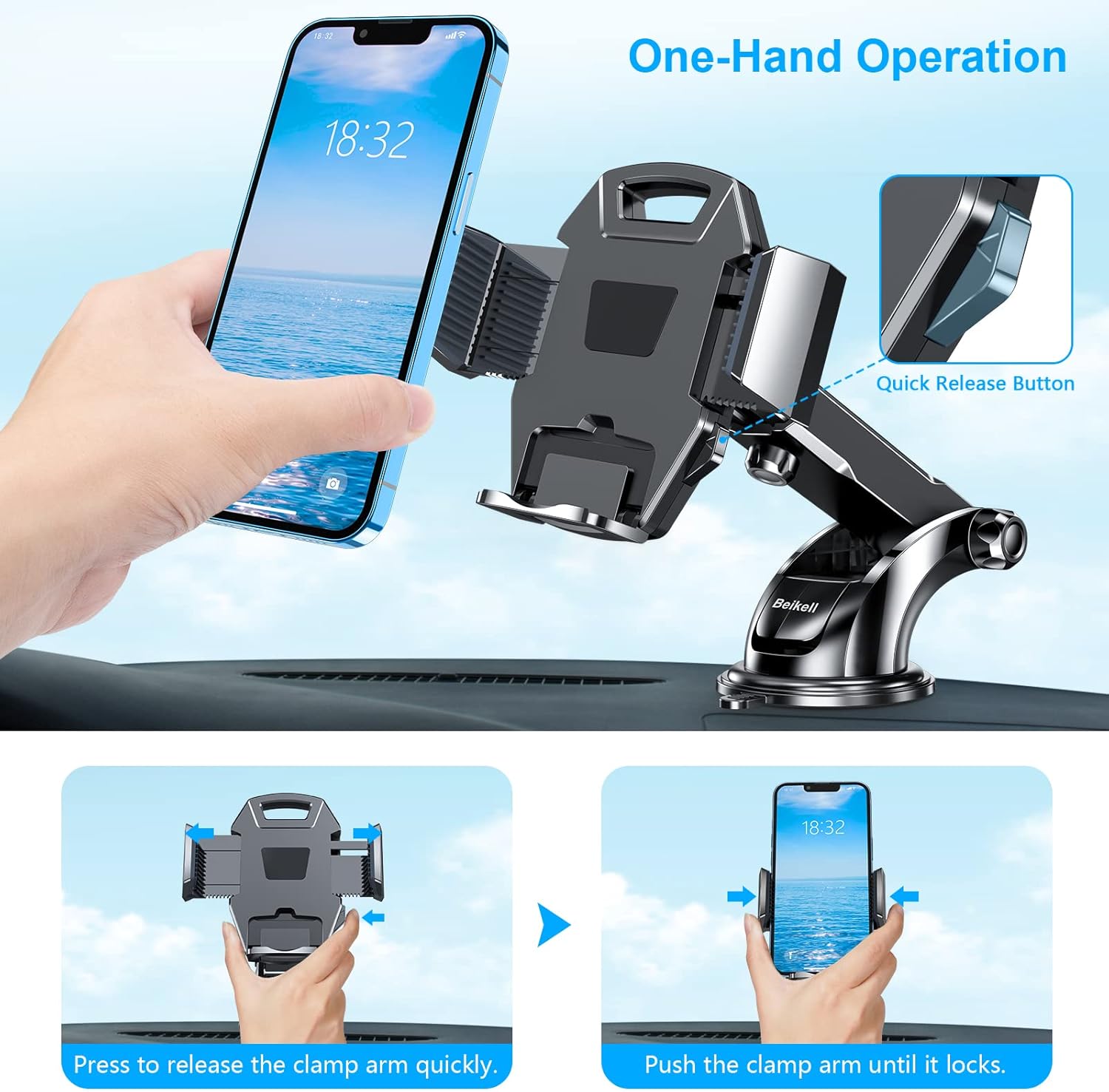
To insert your phone, press the quick release button on the side of the holder to open the clamp arms. Place your phone into the cradle and gently push the clamp arms inward until they securely hold the phone.
Adjusting Viewing Angle
The highly-flexible ball-joint allows for 360° rotation, providing infinite viewing angles. The telescopic arm can extend up to 2.3 inches and pivot up or down for optimal viewing.
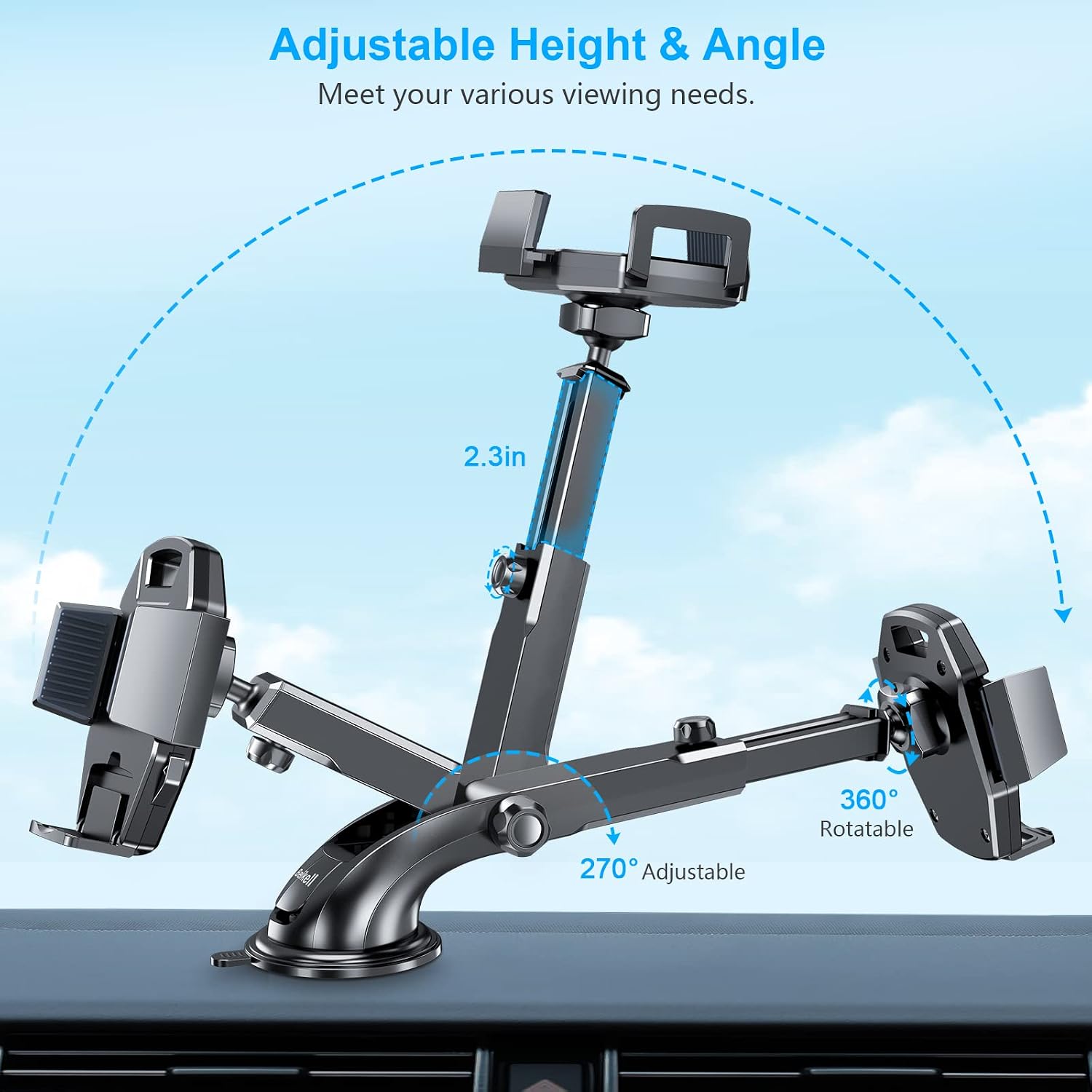
The holder's arm can extend and pivot, and the phone cradle can rotate 360 degrees, allowing you to position your phone for the most comfortable and safest viewing experience while driving.
Key Features
Secure Stable Install
The extra strong suction cup with a super sticky gel pad ensures the holder sticks securely on the dashboard or most flat surfaces. It can be removed easily by pulling the suction pad without leaving any nasty mark.

The suction cup provides powerful adhesion, capable of holding significant weight, and is washable and reusable to maintain its stickiness.
Durable and Full Protection
Constructed from heat-resistant PC material, this phone holder offers enhanced stability. The silicone arms protect your phone from scratches and prevent it from falling during driving.

The holder provides stable 3-point support for your phone, even on rough roads, with soft silicone padding to prevent scratches and an open bottom for charging cable access.
Wide Compatibility
The adjustable arms accommodate smartphones ranging from 4.7 to 6.7 inches in size.

The adjustable clamp arms ensure compatibility with a broad range of smartphone models, from compact to larger sizes.
Maintenance
Cleaning the Suction Cup
If the suction cup loses its stickiness, rinse it with warm water and let it air dry. Do not use harsh chemicals or abrasive materials. This will restore its adhesive properties.
Troubleshooting
Suction Cup Not Sticking
- Ensure the surface is clean and dry before application.
- Press firmly on the suction cup while engaging the lock lever.
- If the gel pad is dirty, rinse it with warm water and air dry to restore stickiness.
- Avoid installing on porous or uneven surfaces.
Phone Not Holding Securely
- Ensure the clamp arms are fully closed around the phone.
- Verify your phone's size is within the compatible range (4.7-6.7 inches).
- Check if the ball joint nut is tightened sufficiently.
Specifications
| Feature | Detail |
|---|---|
| Brand | Beikell |
| Model Number | B6007 |
| Product Dimensions | 5.12 x 3.35 x 2.56 inches |
| Item Weight | 7.4 ounces |
| Compatible Phone Sizes | 4.7 - 6.7 inches |
| Mounting Type | Dashboard, Windshield |
| Material | Heat resistant PC, Silicone |
| Special Features | Quick Release Button, One-Hand Operation, Rotatable, Heat Resistant, Adjustable |
Warranty and Support
Beikell products come with a standard manufacturer's warranty. For detailed warranty information, product support, or technical assistance, please visit the official Beikell website or contact their customer service.
Contact Information:
Email: support@ibeikell.com
Website: www.ibeikell.com
Related documentsB6007


Ask a question about this manual
Ask about setup, troubleshooting, compatibility, parts, safety, or missing instructions. Manuals+ will review the question and use this page’s manual context to help answer it.