Product Overview
The TAVR Dual Mobile TV Stand is a versatile and robust solution designed to accommodate most 32-70 inch flat or curved screen televisions. Featuring two TV brackets, locking wheels, and an adjustable shelf, this stand offers flexibility for various applications, including gaming, presentations, and general entertainment. Its mobile design allows for easy relocation, while its sturdy construction ensures stability and safety for your valuable equipment.

Figure 1: TAVR Dual Mobile TV Stand with a single TV mounted, showcasing its sleek design and integrated shelf.
Safety Information
- Read all instructions carefully before assembly and use.
- Do not exceed the maximum weight capacity of 110 lbs (50 kg).
- Ensure all screws and bolts are securely tightened before mounting the TV and moving the stand.
- Always lock the wheels when the stand is in a stationary position to prevent accidental movement.
- Distribute weight evenly on the shelves and TV brackets.
- Keep children and pets away from the stand during assembly and when moving it.
- Use appropriate VESA mounting screws for your TV to prevent damage.
Parts List
Before beginning assembly, ensure all parts are present and undamaged. Refer to the diagram below for identification.
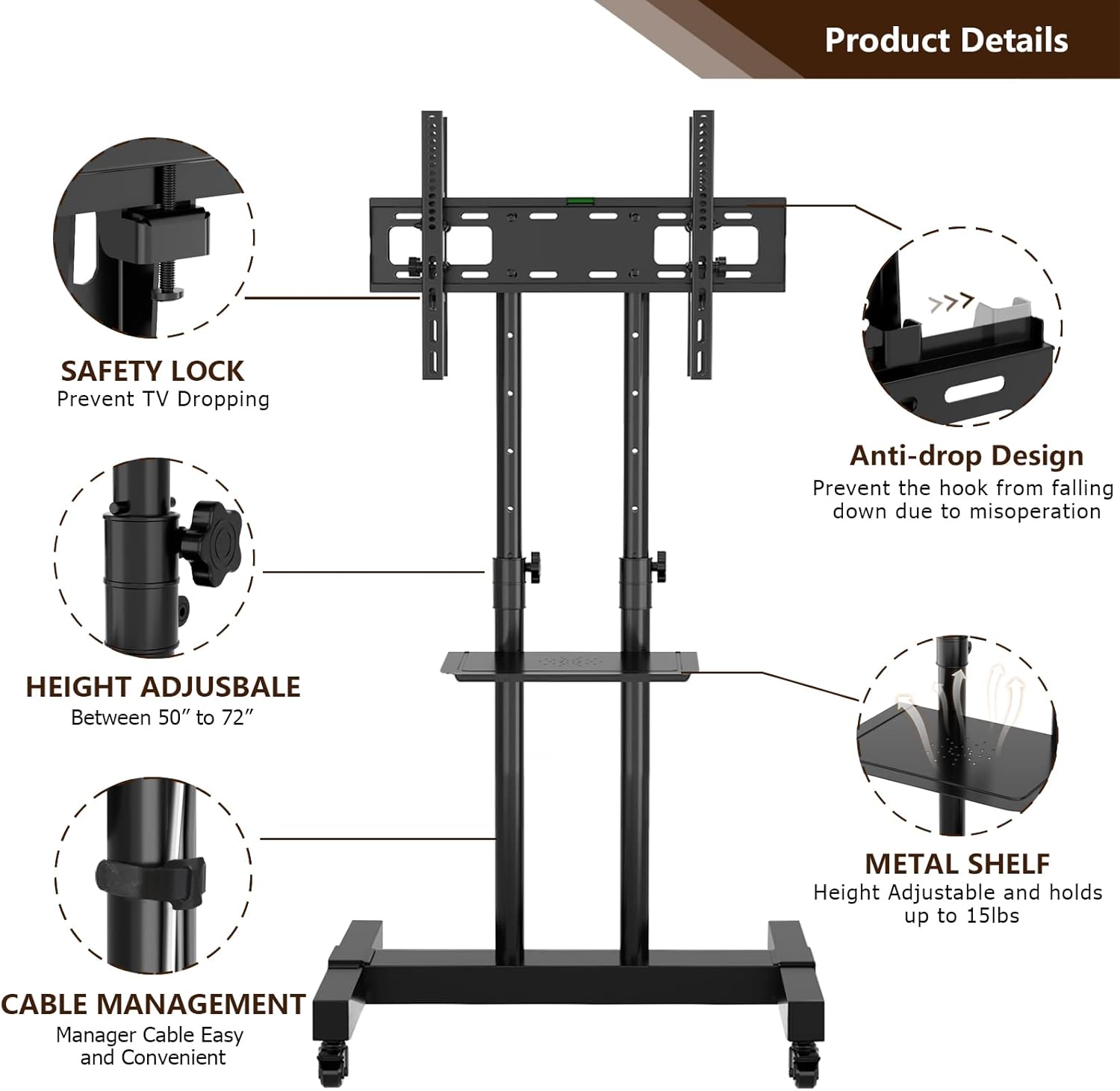
Figure 2: Exploded view of the TV stand components and key features.
- Base Frame (with pre-installed casters)
- Vertical Support Columns (2)
- TV Mounting Plate
- Adjustable AV Shelf
- TV Brackets (2 sets for dual TV option)
- Hardware Kit (various screws, washers, nuts, and tools)
- Cable Management Clips
Setup and Installation
Follow these steps for proper assembly of your TAVR Dual Mobile TV Stand. It is recommended to have two people for certain steps, especially when mounting the television(s).
Step 1: Assemble the Base
Connect the horizontal base bar to the two vertical base legs. Ensure the pre-installed locking wheels are facing outwards. Secure with the provided screws and tools.
Video 1: Detailed installation guide for the TAVR Mobile TV Stand (Model MT1001, similar to MT1002). This video demonstrates the assembly process from start to finish, including base assembly, column attachment, shelf installation, and TV mounting.
For visual guidance, refer to the initial segments of the provided installation video (0:12 - 0:48) which illustrate the base assembly and wheel attachment.
Step 2: Attach Vertical Support Columns
Insert the two vertical support columns into the designated holes on the assembled base. Secure them firmly using the provided bolts and washers. Ensure they are upright and stable.
The installation video (0:49 - 1:15) provides a clear demonstration of this step.
Step 3: Install the AV Shelf
Position the adjustable AV shelf between the two vertical columns at your desired height. Secure it using the provided screws and brackets. The shelf is designed to hold A/V equipment such as gaming consoles, tablets, or cable boxes.

Figure 3: Height adjustment capabilities of the TV stand and AV shelf.
Refer to the installation video (1:25 - 1:47) for detailed instructions on attaching the shelf.
Step 4: Attach TV Mounting Plate and Brackets
Attach the main TV mounting plate to the top of the vertical support columns. Then, secure the TV brackets to the back of your television using the appropriate VESA screws from the hardware kit. Ensure the brackets are aligned with the mounting holes on your TV.
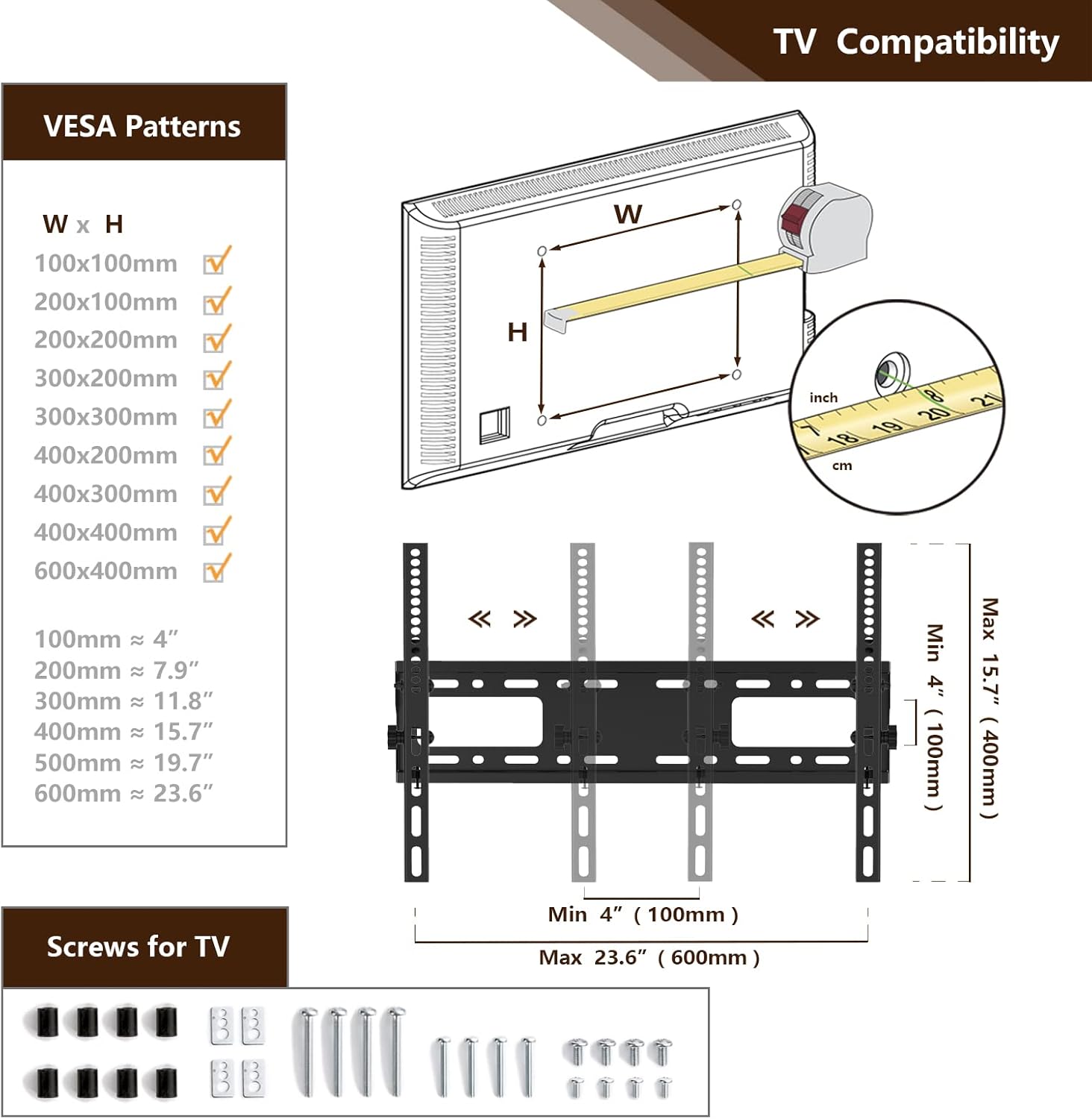
Figure 4: VESA patterns supported and included TV mounting hardware.
The installation video (2:01 - 2:30) demonstrates the attachment of the mounting plate and brackets to the TV.
Step 5: Mount the TV(s)
Carefully lift your television and hook the attached TV brackets onto the main mounting plate. Ensure the TV is securely seated. Tighten any safety screws or locking mechanisms to prevent accidental dislodgement.

Figure 5: Illustration of single and dual TV installation options.
The installation video (2:34 - 2:41) shows the final TV mounting step.
Operating Instructions
- Height Adjustment: The TV mounting bracket and the AV shelf are height adjustable. Loosen the adjustment knobs on the vertical columns, slide the components to the desired height (TV: 50-72 inches; Shelf: 5-32 inches from the base), and securely tighten the knobs.
- Tilt Adjustment: The TV mounting bracket can be tilted up and down by 15 degrees to achieve the optimal viewing angle. Loosen the tilt mechanism, adjust the angle, and re-tighten.
- Mobility: The stand is equipped with four heavy-duty 360° mobile casters. Two of these casters have brakes. To move the stand, unlock the brakes. To keep the stand stationary, engage the brakes on the front casters.
- Cable Management: Utilize the integrated cable management clips or holes on the columns to route and organize your TV and device cables, ensuring a neat and safe setup.
Maintenance
- Regularly check all screws and connections to ensure they remain tight and secure.
- Clean the stand with a soft, dry cloth. Avoid abrasive cleaners or solvents that may damage the finish.
- Inspect the wheels periodically for any debris or wear that might impede smooth movement.
Troubleshooting
- Stand is wobbly: Ensure all assembly screws are fully tightened. Check that the base is on a flat, level surface.
- TV not fitting: Verify your TV's VESA pattern matches the stand's compatibility (100x100mm to 600x400mm). Ensure your TV size is within the 32-70 inch range and weight is under 110 lbs.
- Wheels not locking/moving smoothly: Check for debris caught in the wheels. Ensure the brake levers are fully engaged or disengaged as needed.
- Difficulty adjusting height: Loosen the adjustment knobs sufficiently before attempting to slide the components. Do not force adjustments.
Specifications
| Feature | Detail |
|---|---|
| Brand | TAVR Furniture |
| Model Number | MT1002 |
| TV Compatibility | 32-70 inch Flat/Curved Screens |
| VESA Compatibility | 100x100mm to 600x400mm |
| Weight Capacity (TV) | 110 lbs (50 kg) |
| Height Adjustment (TV) | 50 to 72 inches |
| Tilt Angle | Up to 15 degrees |
| AV Shelf Capacity | Up to 15 lbs |
| Product Dimensions (Overall) | 30" (L) x 24" (W) x 50-72" (H) |
| Material | Metal |
| Color | Black |
| Movement Type | Swivel, Mobile (with locking wheels) |
Warranty and Support
TAVR Furniture products are designed for durability and performance. For any questions regarding assembly, operation, or troubleshooting, please contact TAVR Furniture customer support. Keep your purchase receipt for warranty claims.
For more information or to contact support, visit the official TAVR Furniture store: TAVR Furniture Store.


