
JVC TH-M327B
JVC TH-M327B 37" Bluetooth Sound Bar User Manual
Model: TH-M327B
Introduction
This manual provides detailed instructions for the setup, operation, maintenance, and troubleshooting of your JVC TH-M327B 37" Bluetooth Sound Bar. Please read this manual thoroughly before using the product to ensure proper operation and to maximize your listening experience.
The JVC TH-M327B is a 2.0 Channel Sound Bar designed to enhance your home audio experience, whether for movies, sports, or TV shows. It features built-in Bluetooth for wireless audio streaming and offers versatile placement options including tabletop and wall mounting.
Product Overview
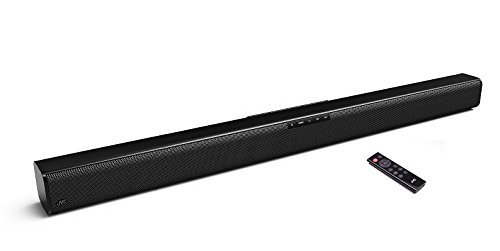
Figure 1: JVC TH-M327B 37-inch Bluetooth Sound Bar with remote control.
This image shows the JVC TH-M327B 37-inch Bluetooth Sound Bar in black, positioned horizontally, with its accompanying remote control placed to the right. The sound bar features a mesh grille across its front and top, and control buttons are visible on its upper surface.
The JVC TH-M327B sound bar is a sleek, black audio device designed to deliver clear and robust sound. It includes a remote control for convenient operation and can be placed on a tabletop or mounted on a wall.
Setup
Package Contents
- JVC TH-M327B 37" Bluetooth Sound Bar
- Remote Control
- Power Adapter (AC)
- Wall Mounting Hardware (if included)
- User Manual (this document)
Placement Options
The sound bar offers flexible placement:
- Tabletop Placement: Place the sound bar on a stable, flat surface in front of your television or display. Ensure there are no obstructions in front of the sound bar for optimal sound projection.
- Wall Mounting: The sound bar is wall mountable, and necessary parts are included. Refer to the wall mounting template (if provided separately) for precise drilling locations. Ensure the wall can support the weight of the sound bar securely.
Connecting the Sound Bar
- Power Connection: Connect the AC power adapter to the sound bar's power input port, then plug the adapter into a standard wall outlet.
- Audio Connection (Wired):
- Optical (Recommended): Connect an optical audio cable (not always included) from your TV's optical output to the sound bar's optical input.
- RCA/Auxiliary: Connect an RCA or 3.5mm auxiliary cable (not always included) from your TV's audio output to the corresponding input on the sound bar.
- USB Connection: For playing audio from a USB drive, insert the USB drive into the USB port on the sound bar.
Operating Instructions
Powering On/Off
Press the Power button on the sound bar or the remote control to turn the unit on or off.
Input Source Selection
Press the Input or Source button on the remote control to cycle through available input sources (e.g., Bluetooth, Optical, AUX, USB).
Bluetooth Pairing
The sound bar features built-in Bluetooth Version 4.2 for wireless audio streaming.
- Turn on the sound bar and select the Bluetooth input source. The sound bar will enter pairing mode, indicated by a flashing LED indicator.
- On your Bluetooth-enabled device (smartphone, tablet, etc.), enable Bluetooth and search for available devices.
- Select "JVC TH-M327B" (or similar name) from the list of devices.
- Once paired, the LED indicator on the sound bar will stop flashing and remain solid. You can now stream audio from your device to the sound bar.
Volume Control
Adjust the volume using the Volume Up (+) and Volume Down (-) buttons on the sound bar or the remote control.
EQ Settings
The sound bar includes easy-to-use pre-loaded EQ settings to optimize your audio experience. Press the EQ button on the remote control to cycle through different sound modes (e.g., Movie, Music, News).
Maintenance
- Cleaning: Use a soft, dry cloth to clean the surface of the sound bar. Do not use liquid cleaners or aerosol sprays, as they may damage the finish or internal components.
- Ventilation: Ensure the sound bar has adequate ventilation. Do not block any ventilation openings.
- Storage: If storing the sound bar for an extended period, disconnect it from power and store it in a cool, dry place.
- Avoid Moisture: This product is not waterproof. Keep it away from water and high humidity environments.
Troubleshooting
| Problem | Possible Cause | Solution |
|---|---|---|
| No power | Power cable not connected; Power outlet not active | Ensure power cable is securely connected. Try a different power outlet. |
| No sound | Incorrect input source selected; Volume too low; Audio cable not connected properly; TV/device audio output settings | Select the correct input source. Increase volume. Check audio cable connections. Adjust TV/device audio output to external speakers or PCM. |
| Bluetooth pairing failure | Sound bar not in pairing mode; Device too far; Interference | Ensure sound bar is in Bluetooth pairing mode. Move device closer to sound bar. Avoid strong electromagnetic interference. |
| Remote control not working | Batteries drained; Obstruction between remote and sound bar | Replace batteries. Ensure clear line of sight to the sound bar's sensor. |
Specifications
- Model Name: TH-M327B
- Speaker Type: Soundbar
- Channel Configuration: 2.0 Channel
- Speaker Size: 37 Inches
- Connectivity Technology: Bluetooth, USB
- Bluetooth Version: 4.2
- Power Source: AC
- Color: Black
- Product Dimensions (L x W x H): 37.4 x 2.4 x 2.4 inches
- Item Weight: 6.98 pounds
- Mounting Type: Tabletop, Wall Mountable
- Controller Type: Remote Control
- UPC: 600136198765
- Manufacturer: JVC
- Date First Available: January 15, 2018
- Waterproof: No
Warranty and Support
For warranty information and technical support, please refer to the warranty card included with your product or visit the official JVC support website. Keep your purchase receipt as proof of purchase for warranty claims.
JVC Official Website: www.jvc.com
For further assistance, you may contact JVC customer service through the contact information provided on their website.
Ask a question about this manual
Ask about setup, troubleshooting, compatibility, parts, safety, or missing instructions. Manuals+ will review the question and use this page’s manual context to help answer it.