1. Introduction
This manual provides comprehensive instructions for the installation, operation, and maintenance of your Tecnolite CTRLCCT-001 CCT Lamp Control. This remote control is designed to manage Tecnolite Live Smart CCT (Correlated Color Temperature) lighting products, allowing you to adjust light intensity and color temperature to create your desired ambiance.
The Tecnolite CTRLCCT-001 control is part of the LIVE SMART line, capable of controlling up to 32 devices (16 per channel). It features dynamic white control, enabling seamless transitions between warm and cool white light.
2. Package Contents
Please verify that all items are present in the package:
- 1 x Tecnolite CTRLCCT-001 CCT Lamp Control
- 2 x AAA Batteries
- 1 x Instruction Manual (this document)
3. Product Overview
The Tecnolite CTRLCCT-001 is a compact and lightweight remote control designed for ease of use. It features dedicated buttons for power, dimming, and color temperature adjustment.
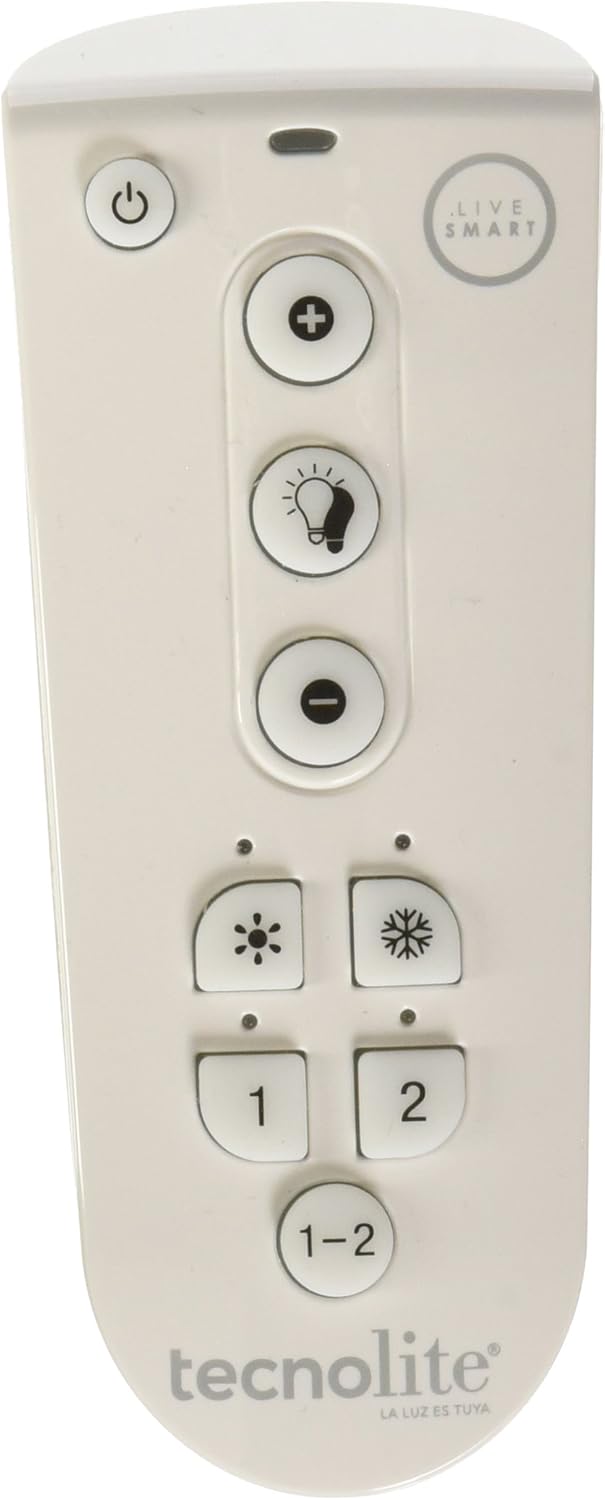
Image 3.1: Front view of the Tecnolite CTRLCCT-001 CCT Lamp Control, showing power, dimming, and color temperature buttons, along with channel selection.
The control is designed with an IP55 rating, providing protection against limited dust ingress and low-pressure water jets, making it suitable for various indoor environments.
4. Setup and Pairing
Before using the control, ensure the included AAA batteries are correctly inserted. The control requires 2 AAA alkaline batteries.
4.1. Battery Installation
- Locate the battery compartment on the back of the control.
- Open the compartment cover.
- Insert two AAA batteries, ensuring correct polarity (+/-).
- Close the battery compartment cover securely.
4.2. Pairing with Tecnolite Live Smart Devices
The CTRLCCT-001 control needs to be paired with your Tecnolite Live Smart CCT lamps or fixtures. Follow these steps for successful pairing:
- Ensure the Tecnolite Live Smart device you wish to pair is powered on and within close proximity (approximately 2 cm) to the control.
- Press and hold either button 1 or 2 on the control.
- The device will blink three times to confirm successful pairing.
- Repeat this process for each device you wish to pair, assigning them to either channel 1 or 2.

Image 4.1: Illustration of the pairing process, showing the remote being held near a light bulb and the bulb blinking three times to indicate successful pairing.
5. Operating the Control
Once paired, you can use the control to manage your Tecnolite Live Smart CCT lighting. The control allows you to adjust brightness and color temperature.

Image 5.1: Detailed view of the remote control with explanations for each button: Power, Brightness Up (+), Brightness Down (-), Warm White (sun icon), Cool White (snowflake icon), Channel 1, Channel 2, and Channel 1-2 (all channels).
5.1. Button Functions
- Power Button (⏻): Turns the paired lights on or off.
- Brightness Up (+): Increases the light intensity with each press.
- Brightness Down (-): Decreases the light intensity with each press.
- Warm White (Sun icon ☀): Changes the light color towards warmer tones (e.g., 2700K).
- Cool White (Snowflake icon ❄): Changes the light color towards cooler tones (e.g., 6500K).
- Channel 1 (1): Selects channel 1 to control devices paired to it.
- Channel 2 (2): Selects channel 2 to control devices paired to it.
- All Channels (1-2): Controls all devices paired to both channel 1 and channel 2 simultaneously.
5.2. Adjusting Light Ambiance
The dynamic white feature allows you to select the perfect light temperature for any activity:
- Soft White (2700K): Ideal for relaxing and resting.
- Neutral White (4100K): Suitable for activating and feeling fresh.
- Intense White (6500K): Best for concentrating, precision tasks, and high visibility.

Image 5.2: Visual representation of different color temperatures in a living space, demonstrating the effect of 2700K (warm), 4100K (neutral), and 6500K (cool) lighting.
6. Maintenance
6.1. Cleaning
To clean the control, use a soft, dry cloth. Do not use abrasive cleaners or solvents, as these may damage the surface.
6.2. Battery Replacement
When the control's performance diminishes or it stops responding, it may be time to replace the batteries. Follow the battery installation steps in Section 4.1.
- Always use new AAA alkaline batteries.
- Do not mix old and new batteries, or different types of batteries.
- Dispose of used batteries responsibly according to local regulations.
7. Troubleshooting
| Problem | Possible Cause | Solution |
|---|---|---|
| Control not responding | Dead or incorrectly installed batteries. | Replace batteries, ensuring correct polarity. |
| Lights not responding to control | Device not paired or out of range. | Re-pair the device (refer to Section 4.2). Ensure the device is within range of the control. |
| Inconsistent light behavior | Interference or multiple controls. | Ensure no other controls are interfering. Re-pair if necessary. |
8. Specifications
| Model Number: | CTRLCCT-001 |
| Brand: | Tecnolite |
| Color: | White |
| Power Source: | Battery (2 x AAA) |
| Battery Cell Type: | Alkaline |
| Included Components: | Control, batteries, instruction manual |
| Dimensions (L x W x H): | 4.6 x 2.2 x 11.4 cm (1.81 x 0.87 x 4.49 inches) |
| Weight: | 150 g (0.33 lbs) |
| IP Rating: | IP55 |
| Light Type: | LED (CCT) |
| Light Color: | Warm White, Dynamic White |

Image 8.1: Technical drawing illustrating the dimensions of the Tecnolite CTRLCCT-001 CCT Lamp Control (Length: 114.5 ± 2 mm, Width: 46 ± 2 mm, Thickness: 22 ± 2 mm).

Image 8.2: The Tecnolite CTRLCCT-001 CCT Lamp Control shown in a hand, highlighting its ergonomic design and approximate dimensions (114 mm length, 42 mm width).
9. Warranty and Support
For warranty information or technical support, please refer to the official Tecnolite website or contact their customer service directly. Keep your purchase receipt as proof of purchase.
Tecnolite Customer Service: Please visit Tecnolite's Amazon Store for more information or contact details.


