
1. Product Overview
The Profile Design Aeria Hydration System is engineered for seamless integration with the Aeria Ultimate Stem (70mm or 100mm), creating a fully integrated front-end solution for triathlon and time trial bicycles. This system is designed to enhance aerodynamic performance and provide convenient hydration during rides.
Key features include:
- Integrated Design: Seamlessly connects with the Profile Design Aeria Ultimate Stem for optimal aerodynamics.
- Durable Construction: Made from BPA-free, food-safe HDPE material for safety and longevity.
- No-Splash Fill Port: Designed for rapid and clean refills without spillage.
- Magnetic Straw Mount: Ensures the straw remains in an aerodynamic position and is easily accessible.
- Bite Valve: Provides controlled fluid delivery.
- Removable Computer Mount: Allows for convenient placement of cycling computers.

Image 1.1: The Aeria Hydration System integrated with an aerobar setup.
2. What's in the Box
Your Profile Design Aeria Hydration System package includes the following components:
- Aero Water Bottle (30oz / 857ml capacity)
- Straw with Bite Valve
- Magnetic Straw Mount
- No-Splash Fill Port Cap
- Removable Computer Mount
- Installation Hardware (specific to Aeria Ultimate Stem integration)

Image 2.1: Exploded view of the Aeria Hydration System components.
3. Setup and Installation
Compatibility Note: This hydration system is only compatible with the Profile Design Aeria Ultimate Stem (70mm or 100mm) or with a 1/Seventeen stem and 1/Seventeen Stem HSF Aeria Faceplate. Ensure you have the correct stem before proceeding with installation.
3.1. Attaching the Hydration System to the Stem
- Ensure your Aeria Ultimate Stem is securely installed on your bicycle.
- Align the base of the Aeria Hydration System with the mounting points on the Aeria Ultimate Stem.
- Secure the hydration system using the provided hardware. Typically, this involves two small screws that attach the system to the underside of the stem. Refer to the detailed instructions provided with your Aeria Ultimate Stem for precise torque specifications.
- Verify that the system is firmly attached and does not wobble.
3.2. Assembling the Bottle Components
- Insert the straw into the designated opening on the bottle cap.
- Attach the bite valve to the end of the straw.
- Place the magnetic straw mount onto the straw, ensuring it can slide freely for adjustment.
- Secure the no-splash fill port cap onto the bottle opening.
3.3. Installing the Computer Mount
The removable computer mount attaches to the front of the hydration system, providing an optimal viewing angle for your cycling computer. Slide the computer mount into its designated slot until it clicks securely into place.
Video 3.1: This video demonstrates the installation and features of a similar front hydration system, including bottle integration, bento box, fill port, straw mount, and computer mount. While not the exact Profile Design Aeria system, it illustrates general principles of integrated front hydration system setup.
4. Operating Instructions
4.1. Filling the Bottle
To fill the bottle, open the no-splash fill port cap located on the top of the system. Pour your preferred hydration fluid into the opening. The design minimizes splashing, allowing for quick refills even while riding. Close the cap securely after filling.
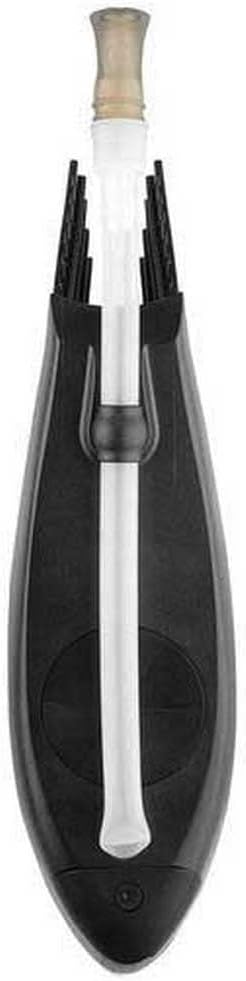
Image 4.1: Top view showing the fill port and straw placement.
4.2. Drinking from the System
The magnetic straw mount keeps the straw positioned aerodynamically. When you need to drink, simply pull the straw towards your mouth. The bite valve allows for controlled fluid intake. After drinking, release the straw, and the magnetic mount will guide it back into its aerodynamic position.
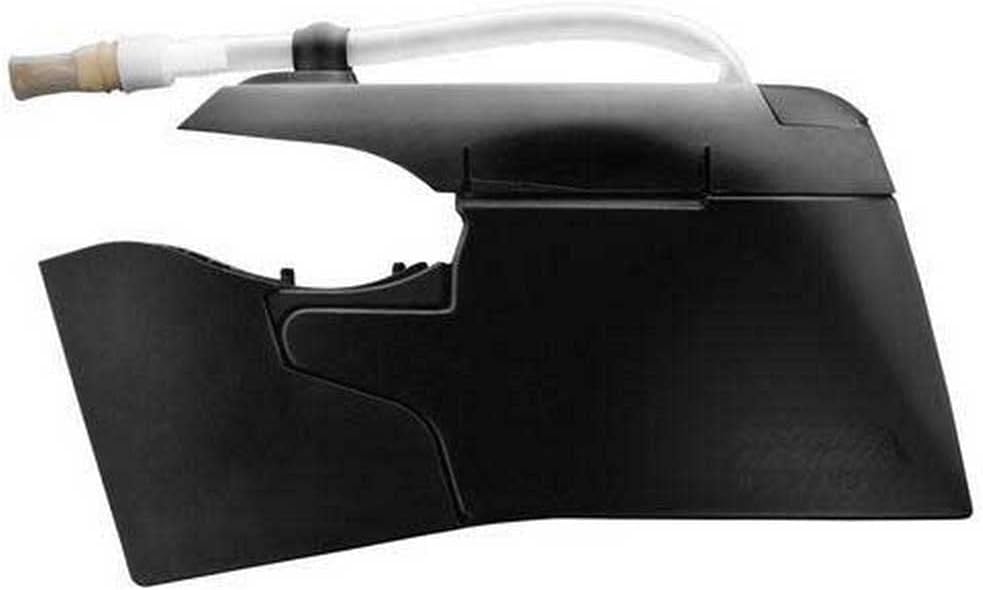
Image 4.2: Side view illustrating the straw and bite valve.
4.3. Using the Computer Mount
Attach your cycling computer to the integrated mount for easy viewing of your ride data without breaking your aerodynamic position.
5. Maintenance and Cleaning
Regular cleaning is essential to maintain hygiene and prolong the life of your hydration system.
- Disassembly: The bottle and its components (straw, bite valve, fill port cap, computer mount) are designed for easy disassembly for thorough cleaning. Carefully detach each part.
- Washing: Wash all components with warm, soapy water. Use a bottle brush for the interior of the bottle and a small brush for the straw and bite valve to ensure all residue is removed.
- Rinsing: Rinse all parts thoroughly with clean water to remove any soap residue.
- Drying: Allow all components to air dry completely before reassembly to prevent mold or mildew growth.
- Reassembly: Once dry, reassemble the system, ensuring all caps and connections are secure.
The detachable bento box (if applicable to your model) can also be removed and cleaned separately for ease of maintenance.
6. Troubleshooting
- Leakage: If you experience leakage, first check that all components, especially the fill port cap and the bottle's connection to the stem, are securely fastened. Ensure the rubber washer or seal is properly seated and not damaged. Overfilling the bottle can also cause minor spills.
- Difficulty Filling: If the fill port seems restricted, ensure the cap is fully open and there are no obstructions. The "no splash" design requires a steady pour.
- Straw Not Staying in Place: Verify that the magnetic straw mount is correctly positioned on the straw and that the magnet on the system is clean and free of debris.
- System Wobbles: Re-check the installation screws connecting the hydration system to the Aeria Ultimate Stem. Ensure they are tightened to the manufacturer's recommended torque specifications.
7. Specifications
| Feature | Detail |
|---|---|
| Model Name | Aeria Ultimate Integrated Hydration System |
| Model Number | 0348820001 |
| Brand | Profile Design |
| Construction Material | BPA-Free, Food-safe HDPE |
| Color | Matte Black |
| Capacity | 30 oz (857 ml) |
| Product Dimensions | 15"L x 9"W x 2.5"H |
| Item Weight | 0.42 Kilograms |
| Compatibility | Profile Design Aeria Ultimate Stem (70mm or 100mm) or 1/Seventeen stem with HSF Aeria Faceplate |
8. Warranty Information
This Profile Design Aeria Hydration System comes with a Limited Warranty. For specific details regarding coverage, duration, and claims procedures, please refer to the official warranty documentation provided with your purchase or visit the Profile Design official website.
Typically, warranty coverage addresses manufacturing defects and material flaws under normal use. Damage resulting from improper installation, misuse, accidents, or unauthorized modifications is generally not covered.
9. Customer Support
Should you encounter any issues, have questions about installation, operation, or maintenance, or require warranty service, please contact Profile Design customer support.
For the most up-to-date contact information and support resources, please visit the official Profile Design website:
When contacting support, please have your product model name (Aeria Ultimate Integrated Hydration System) and model number (0348820001) readily available.