
1. Introduction
The Withings Sleep Tracking Pad is an advanced device designed to provide comprehensive insights into your sleep patterns without requiring you to wear anything. Placed discreetly under your mattress, it monitors various sleep metrics including sleep cycles, heart rate, and snoring events, transmitting data wirelessly to the Health Mate app on your smartphone. This manual will guide you through the setup, operation, and maintenance of your Withings Sleep device.
2. Setup
2.1 Package Contents
Ensure all components are present:
- Withings Sleep Tracking Pad
- USB Power Adapter
- Quick Installation Guide
2.2 Physical Installation
Place the Withings Sleep Tracking Pad directly under your mattress, positioned at chest level where you typically sleep. Ensure the cable extends from under the mattress to reach a power outlet.

Image: Withings Sleep Tracking Pad correctly positioned under a mattress.
2.3 Power Connection
Connect the USB cable from the pad to the provided power adapter, then plug the adapter into a wall outlet. The device requires continuous power to function.
2.4 App Installation & Pairing
Download the 'Health Mate' app from your smartphone's app store (available on iOS and Android). Open the app and follow the on-screen instructions to create an account or log in. The app will guide you through the process of detecting and pairing your Withings Sleep device via Bluetooth and connecting it to your home Wi-Fi network.
Video: Official guide on how to set up your Withings Sleep device.
2.5 Calibration
After initial setup, the device will perform a calibration. During this process, ensure no one is on the bed. The app will indicate when calibration is complete and the device is ready for use.
3. Operating Your Withings Sleep
3.1 Automatic Sleep Tracking
Once set up, the Withings Sleep Tracking Pad automatically detects when you get into and out of bed. It begins tracking your sleep as soon as you lie down and stops when you leave the bed in the morning. Data is automatically synced to your Health Mate app via Wi-Fi.
3.2 Health Mate App Overview
The Health Mate app is your central hub for all sleep data. It provides a daily 'Sleep Score' and detailed breakdowns of your night.
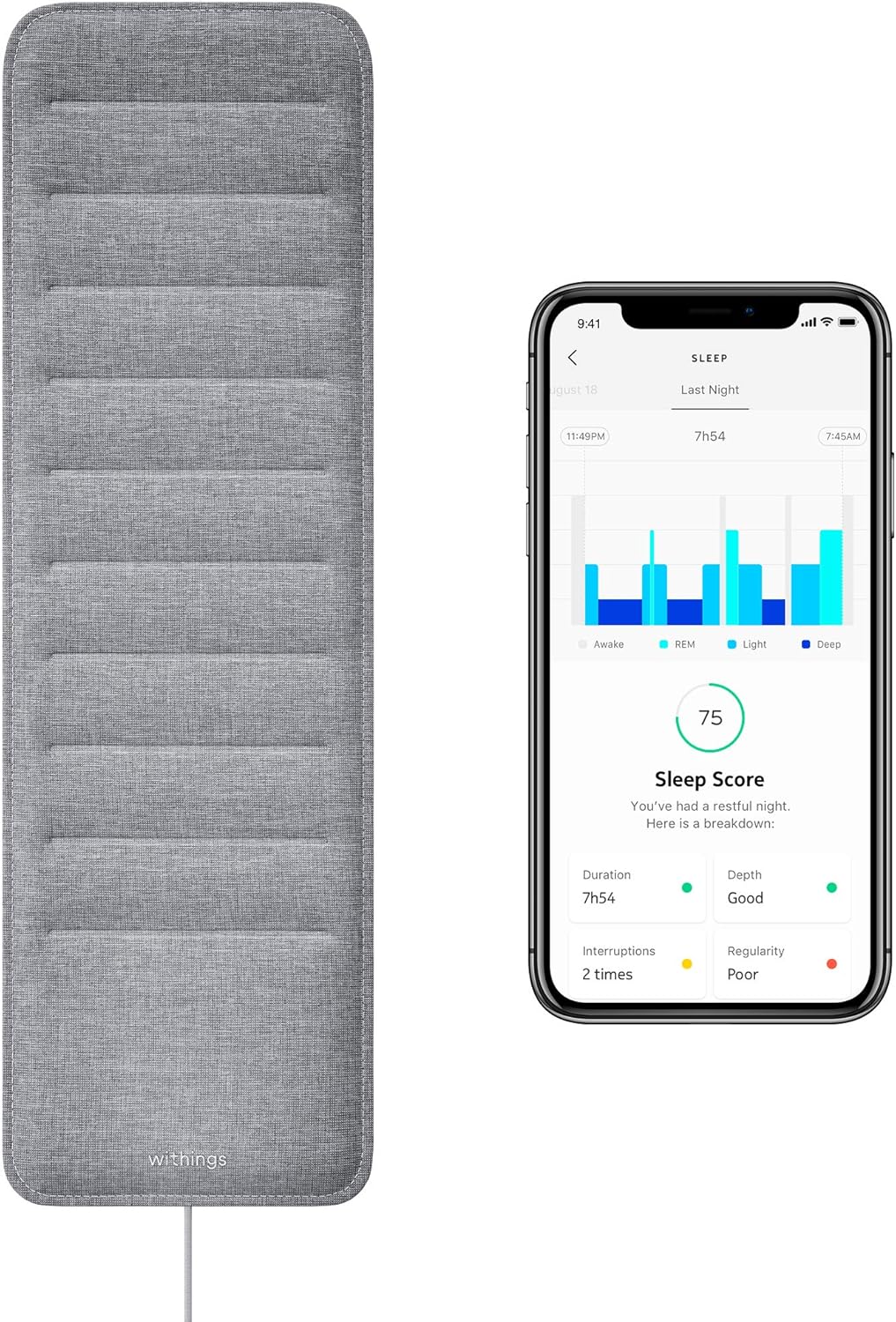
Image: The Withings Sleep Tracking Pad alongside the Health Mate app displaying sleep data.
3.3 Sleep Metrics Explained
- Sleep Score: A comprehensive score (0-100) indicating the overall quality of your sleep. A higher score indicates better sleep.
- Duration: The total time spent asleep.
- Depth: Breakdown of your sleep into Light, REM (Rapid Eye Movement), and Deep sleep phases.
- Regularity: Consistency of your bedtime and wake-up times.
- Interruptions: Number of times you woke up during the night.
- Heart Rate: Your average sleep heart rate throughout the night.
- Snoring Events: Detection and duration of snoring episodes. This feature can be disabled in the app settings if desired.

Image: Detailed view of snoring events within the Health Mate app.
3.4 Integration with Other Platforms
The Withings Sleep Tracking Pad can integrate with other health platforms and smart home systems:
- Apple Health: Syncs sleep data to your Apple Health app.
- IFTTT (If This Then That): Allows you to create custom automations based on your sleep data (e.g., dim lights when you get into bed, turn on coffee maker when you wake up).

Image: Health Mate app highlighting compatibility with Apple Health and IFTTT.
Video: Overview of Withings Sleep features and benefits.
4. Maintenance
The Withings Sleep Tracking Pad requires minimal maintenance. Keep the pad clean by wiping it with a dry, soft cloth. Do not immerse the device in water or use harsh chemicals. Ensure the area under the mattress remains dry and free of debris.
5. Troubleshooting
- No Data in App: Check if the device is properly plugged in and connected to Wi-Fi. Ensure your smartphone's Bluetooth is enabled during initial setup or if re-pairing is needed.
- Inaccurate Readings: Verify the pad is correctly positioned under the mattress at chest level. Ensure no one else is on the bed during sleep, as the device is designed for single-user tracking.
- Connectivity Issues: Restart your Wi-Fi router and the Withings Sleep device. If issues persist, try re-pairing the device through the Health Mate app.
- Snoring Detection Not Working: Check if snoring detection is enabled in the app settings.
6. Specifications
| Feature | Detail |
|---|---|
| Model Number | WSM02-All-US |
| Product Dimensions | 9"L x 7.4"W x 0.19"H |
| Item Weight | 0.6 Pounds |
| Material | Premium fabric |
| Color | Grey |
| Sensor Type | Pneumatic, Auditory |
| Connectivity | Wi-Fi, Bluetooth |
| Manufacturer | Withings Inc |
| Country of Origin | China |
7. Warranty & Support
Your Withings Sleep Tracking Pad is covered by the manufacturer's warranty. Please refer to the warranty information provided in your product packaging or visit the official Withings support website for details. For technical assistance, troubleshooting, or further inquiries, please contact Withings Customer Support. A detailed User Manual (PDF) is also available for download from the product's support page.


