
Introduction
This manual provides essential instructions for the safe and efficient operation, installation, and maintenance of your Ideal-Air Pro Series 60 Pint Dehumidifier. Please read this manual thoroughly before using the appliance and retain it for future reference.
The Ideal-Air Pro Series 60 Pint Dehumidifier is a commercial-grade unit designed to remove excess moisture from the air in environments such as greenhouses, workshops, and grow rooms. It features an automatic restart function, an internal condensate pump, and a washable filter for convenience and durability.
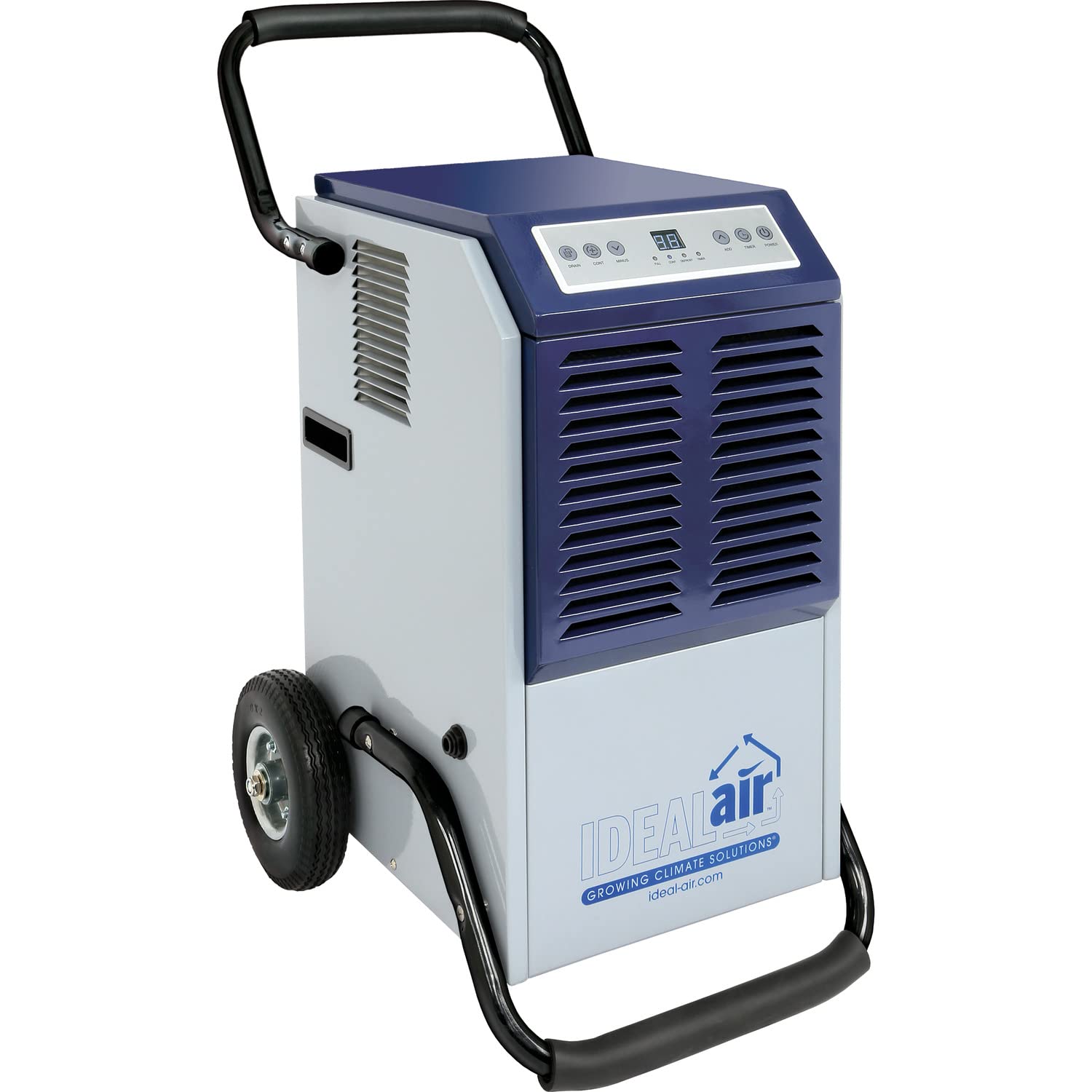
Image: Front view of the Ideal-Air Pro Series 60 Pint Dehumidifier, showcasing its compact design with handles and wheels.
Safety Instructions
Always follow basic safety precautions when using electrical appliances to reduce the risk of fire, electric shock, or injury.
- Ensure the power supply matches the unit's requirements (115V, 60Hz, 4.6 Amps).
- Do not operate the unit with a damaged cord or plug.
- Do not block air inlets or outlets.
- Keep the unit away from water sources and flammable materials.
- Always unplug the unit before cleaning or performing maintenance.
- Do not attempt to repair or disassemble the unit yourself. Contact qualified service personnel.
- Ensure the unit is placed on a stable, level surface.
Product Features
- Moisture Removal: Up to 60 pints per day (at 86°F, 80% RH).
- Automatic Restart: Unit restarts automatically after a power outage.
- Internal Condensate Pump: For continuous drainage.
- Washable Filter: Easy to remove and clean for consistent performance.
- Digital Control Panel: Easy-to-read display for humidity settings.
- Built-in Defrost: Designed for operation down to 41°F (5°C).
- Durable Construction: Powder-coated metal casing.
- Portability: Built-in handles and wheels for easy maneuvering.
Setup
- Unpacking: Carefully remove the dehumidifier from its packaging.
- Upright Positioning: Place the unit upright for a minimum of 3 hours before initial use. This allows the refrigerant to settle.
- Placement: Position the dehumidifier in the desired location, ensuring adequate air circulation around the unit. Avoid placing it against walls or obstructions.
- Power Connection: Plug the power cord into a grounded 115V, 60Hz electrical outlet.
- Drainage Setup:
- Internal Condensate Pump: The unit features an internal condensate pump for continuous drainage. Connect a suitable drain hose (not included) to the pump outlet. Ensure the hose leads to a drain or collection point.
- Gravity Drain (Optional): If the internal pump is not desired or if a gravity drain is preferred, ensure the unit is elevated and connect a hose to the gravity drain port.

Image: Close-up view of the external drain plug, indicating the connection point for continuous drainage.
Operating Instructions
The dehumidifier is controlled via a digital control panel located on the top of the unit.

Image: Digital control panel with buttons for Power, Timer, Add, Minus, Continuous, and Drain, along with indicator lights for Full, Cont, Defrost, and Timer.
- Power On/Off: Press the POWER button to turn the unit on or off.
- Setting Desired Humidity: Use the ADD (up arrow) and MINUS (down arrow) buttons to adjust the desired humidity level. The digital display will show the set humidity.
- Continuous Operation: Press the CONT button for continuous dehumidification, regardless of the set humidity level. The "CONT" indicator light will illuminate.
- Timer Function: Press the TIMER button to set a delay for the unit to turn on or off. Use the ADD and MINUS buttons to adjust the desired time.
- Drain Function: The DRAIN button activates the internal condensate pump to remove collected water.
- Indicator Lights:
- FULL: Illuminates when the internal reservoir (if used without continuous drain) is full.
- CONT: Illuminates during continuous operation.
- DEFROST: Illuminates when the unit is in defrost mode.
- TIMER: Illuminates when the timer function is active.
Maintenance
Regular maintenance ensures optimal performance and longevity of your dehumidifier.
- Filter Cleaning:
The air filter should be cleaned regularly, typically every two weeks, or more often depending on air quality.
- Turn off and unplug the unit.
- Remove the filter from its slot (refer to image).
- Wash the filter with warm, soapy water. Rinse thoroughly.
- Allow the filter to air dry completely before reinserting.

Image: Side view of the dehumidifier with the removable air filter pulled out for cleaning.
- Condensate Pump Maintenance:
The internal condensate pump can accumulate debris over time, potentially leading to clogs. Regular inspection and cleaning are recommended.
- Turn off and unplug the unit.
- Access the pump compartment (consult a qualified technician if unsure).
- Inspect the pump and tubing for any blockages or buildup.
- Clean any debris carefully.
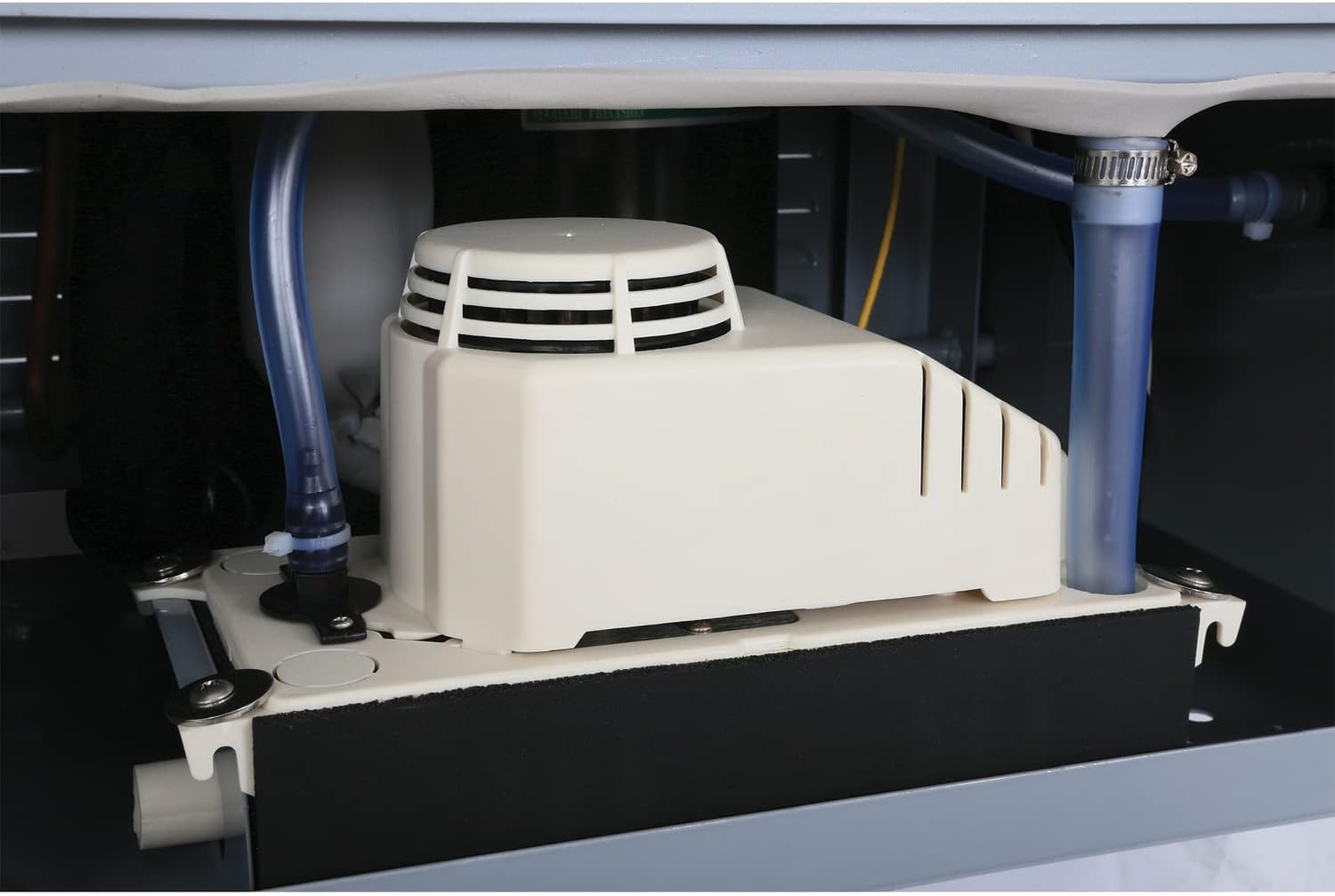
Image: Internal view of the dehumidifier showing the condensate pump assembly.
- Exterior Cleaning: Wipe the exterior with a soft, damp cloth. Do not use harsh chemicals or abrasives.
Troubleshooting
| Problem | Possible Cause | Solution |
|---|---|---|
| Unit does not turn on. | No power, power cord loose, circuit breaker tripped. | Check power connection, ensure outlet is functional, reset circuit breaker. |
| Dehumidifier not removing moisture. | Filter clogged, humidity setting too high, room temperature too low, unit too small for space. | Clean air filter, lower humidity setting, ensure ambient temperature is within 41-95°F (5-35°C). |
| Unit is icing up. | Ambient temperature too low, refrigerant issue. | Ensure room temperature is above 41°F (5°C). If problem persists, contact service. |
| Water leakage or pump not working. | Drain hose kinked or clogged, condensate pump clogged or faulty. | Check drain hose for obstructions. Inspect and clean condensate pump. If pump is faulty, contact service. |
| Unit is noisy. | Unit not level, fan obstruction, loose parts. | Ensure unit is on a level surface. Check for obstructions in fan area. Contact service if noise persists. |
Specifications

Image: Graphic displaying key specifications including power, water removal, unit weight, dimensions, and refrigerant type.
| Feature | Detail |
|---|---|
| Model Number | HGC701604 |
| Brand | Ideal-Air |
| Capacity | 60 Pints per Day (at 86°F, 80% RH) |
| Power Supply | 115V, 60Hz, 4.6 Amps (529 watts) |
| Temperature Range | 41°F - 95°F (5°C - 35°C) |
| Refrigerant | R410A |
| Product Dimensions (D x W x H) | 22" x 25" x 46" |
| Item Weight | 73 Pounds |
| Material | Metal |

Image: Diagram showing the dimensions of the dehumidifier: 22 inches deep, 25 inches wide, and 46 inches high.

Image: Performance chart illustrating dehumidifying capacity (pints per day) at various temperatures and humidity levels, including an "Indoor Garden Zone".
Warranty and Support
This Ideal-Air Pro Series Dehumidifier is manufactured by Hawthorne Hydroponics, LLC.
For warranty information, technical support, or service inquiries, please contact Hawthorne Hydroponics, LLC directly. Refer to your purchase documentation or the manufacturer's website for specific contact details and warranty terms.
Extended protection plans may be available for purchase separately from third-party providers. These plans are not directly offered or managed by Ideal-Air or Hawthorne Hydroponics, LLC.
Note: The manufacturer's warranty typically covers defects in materials and workmanship for a limited period. Issues arising from improper installation, maintenance, or unauthorized repairs may not be covered.