
Important Safety Instructions
Please read this manual carefully before operating your Ideal-Air dehumidifier. Keep this manual for future reference. Failure to follow these instructions may result in electric shock, fire, or personal injury.
- Always connect the unit to a properly grounded electrical outlet.
- Do not operate the unit with a damaged power cord or plug. If the power cord is damaged, it must be replaced by the manufacturer or a qualified service agent.
- Do not block the air inlet or outlet. Maintain at least 8 inches (20 cm) of clearance around the unit.
- Do not insert fingers or foreign objects into the air inlet or outlet.
- Ensure the unit is placed on a stable, level surface to prevent water spillage.
- Always unplug the dehumidifier before cleaning or performing any maintenance.
- This appliance is not intended for use by persons (including children) with reduced physical, sensory or mental capabilities, or lack of experience and knowledge, unless they have been given supervision or instruction concerning use of the appliance by a person responsible for their safety.
- Do not use the unit in areas where flammable liquids or gases are stored.
Product Overview
The Ideal-Air 50 Pint Dehumidifier is designed to remove excess moisture from the air, creating a more comfortable and healthy environment. It features a digital display for easy control and monitoring.
Components
- Control Panel with Digital Display
- Air Inlet Grille
- Air Outlet Grille
- Removable Water Tank
- Continuous Drain Outlet
- Casters for Mobility
- Power Cord
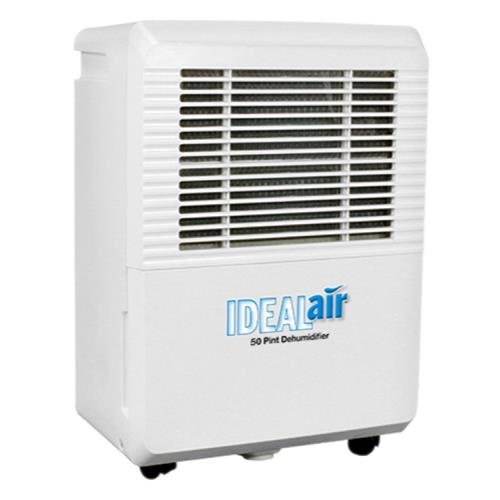
Figure 1: Front view of the Ideal-Air 50 Pint Dehumidifier. This image shows the main body of the dehumidifier, including the front grille for air intake and the 'IDEALair 50 Pint Dehumidifier' branding.
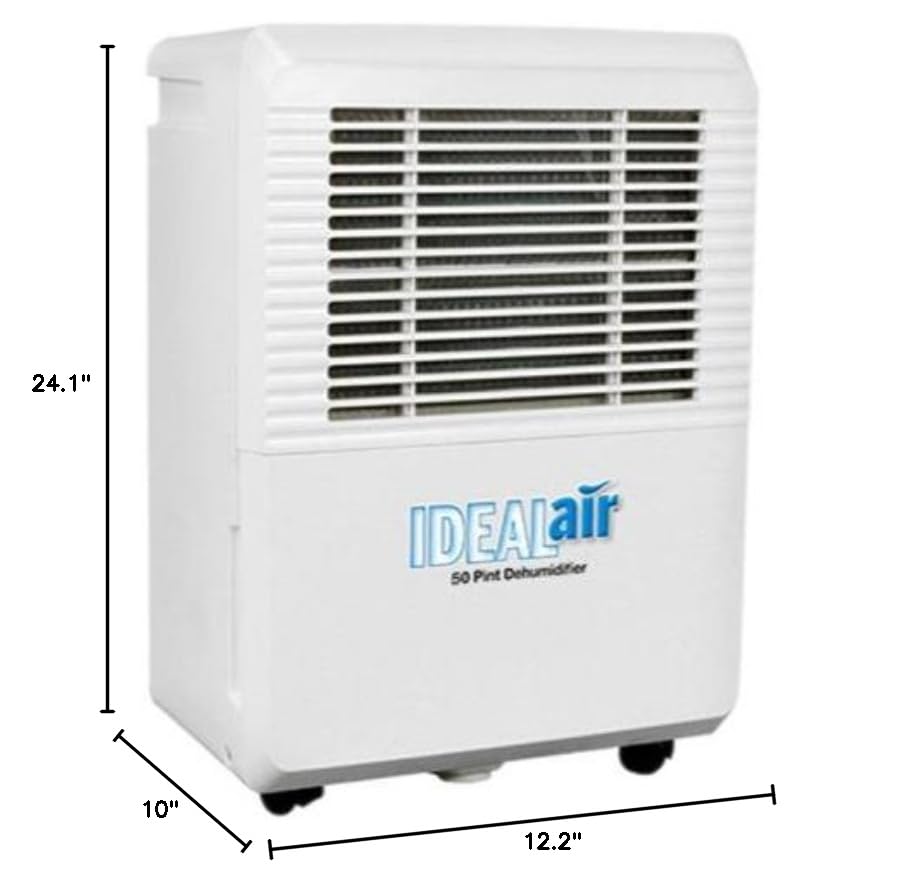
Figure 2: Ideal-Air 50 Pint Dehumidifier with indicated dimensions. This image illustrates the product's depth (10"), width (12.2"), and height (24.1").
Setup and Installation
Unpacking
- Carefully remove the dehumidifier from its packaging.
- Remove all packing materials, including any tape or protective films.
- Inspect the unit for any shipping damage. If damaged, do not operate and contact customer support.
Placement
- Place the dehumidifier on a firm, level surface that can support its weight when the water tank is full.
- Ensure there is at least 8 inches (20 cm) of space on all sides of the unit for proper air circulation.
- Avoid placing the unit near heat sources, such as radiators or ovens, or in direct sunlight.
- Do not place the unit in an area where the temperature will fall below 41°F (5°C), as this can cause the coils to freeze.
Power Connection
- Plug the power cord into a grounded 120V, 60Hz electrical outlet.
- Do not use extension cords or adapter plugs.
Operating Instructions
Control Panel
The control panel features a digital display and various buttons for setting the desired humidity level, fan speed, and timer functions.
Setting Desired Humidity
- Press the 'Power' button to turn on the unit.
- Use the 'Humidity Up' or 'Humidity Down' buttons to set your desired humidity level. The digital display will show the current room humidity and then flash your set humidity.
- The unit will operate until the set humidity level is reached, then cycle off. It will restart automatically if the humidity rises above the set level.
Continuous Drainage
For continuous operation without emptying the water tank, connect a standard garden hose (not included) to the continuous drain outlet at the back of the unit. Ensure the hose is sloped downwards to allow gravity drainage into a suitable floor drain.
Water Tank Full Indicator
When the water tank is full, the 'Full' indicator light will illuminate, and the unit will automatically shut off. Empty the water tank and replace it securely to resume operation.
Auto-Defrost Function
If frost builds up on the evaporator coils, the unit will automatically enter defrost mode. The compressor will turn off, and the fan will continue to run until the frost melts. This is a normal operating function.
Timer Function
The timer allows you to set the unit to turn on or off automatically after a specified number of hours (1-24 hours). Press the 'Timer' button and use the 'Up' or 'Down' buttons to set the desired time.
Fan Speed
The unit offers 3 fan speeds. Press the 'Fan Speed' button to cycle through the available speeds (Low, Medium, High) to adjust the airflow and noise level.
Maintenance
Regular maintenance ensures optimal performance and extends the lifespan of your dehumidifier.
Cleaning the Air Filter
- Turn off the dehumidifier and unplug it from the power outlet.
- Remove the air filter from the back or side of the unit (refer to diagram in product overview if available).
- Wash the filter with warm, soapy water. Rinse thoroughly and allow it to air dry completely before reinstalling.
- Clean the air filter every two weeks or more frequently if the unit is used in a dusty environment.
Cleaning the Unit
- Wipe the exterior of the unit with a soft, damp cloth. Do not use harsh chemicals or abrasive cleaners.
- Clean the water tank regularly to prevent mold and mildew growth.
Storage
- If storing the unit for an extended period, ensure the water tank is empty and clean.
- Clean the air filter.
- Wrap the power cord neatly.
- Store the unit upright in a cool, dry place, away from direct sunlight and extreme temperatures.
Troubleshooting Guide
Before contacting customer support, please refer to the following table for common issues and solutions.
| Problem | Possible Cause | Solution |
|---|---|---|
| Unit does not turn on. | No power; Power cord not plugged in; Water tank full or not properly seated. | Check power connection; Empty and re-seat water tank. |
| No water collected. | Room temperature too low; Humidity level already low; Air filter clogged; Continuous drain hose connected and draining. | Ensure room temperature is above 41°F (5°C); Check set humidity level; Clean air filter; Verify continuous drain setup. |
| Unit runs constantly. | Set humidity level too low; Room size too large for unit capacity; Doors/windows open. | Increase set humidity; Ensure unit is appropriate for room size; Close doors and windows. |
| Unit is noisy. | Unit not on a level surface; Air filter clogged; Fan obstruction. | Place on a level surface; Clean air filter; Check for obstructions in fan area. |
| Frost on coils. | Normal operation (auto-defrost); Room temperature too low. | Allow auto-defrost to complete; Ensure room temperature is above 41°F (5°C). |
Product Specifications
| Feature | Detail |
|---|---|
| Brand | Ideal-Air |
| Model Number | 700828 |
| Capacity | 50 Pints (6 Liters) per day |
| Recommended Floor Area | Up to 4500 Square Feet |
| Product Dimensions (D x W x H) | 10" x 12.2" x 24.1" |
| Item Weight | 39.6 Pounds |
| Color | White |
| Special Feature | Digital Display |
| Number of Speeds | 3 |
| Recommended Uses | Commercial |
| Included Components | Power Cord |
| ASIN | B078Y6S243 |
Warranty and Customer Support
This Ideal-Air dehumidifier comes with a manufacturer's warranty. Please refer to the warranty card included with your purchase for specific terms and conditions, including coverage duration and limitations.
For technical assistance, troubleshooting beyond this guide, or warranty claims, please contact Ideal-Air customer support. Contact information is typically provided on the product packaging or the manufacturer's official website.


