
Introduction
Thank you for choosing the BLACK+DECKER RCDV404BND540 Air Compressor. This manual provides essential information for the safe and efficient operation, setup, maintenance, and troubleshooting of your new air compressor. Please read this manual thoroughly before operating the unit and keep it for future reference.
Important Safety Instructions
Always follow basic safety precautions when using electrical appliances to reduce the risk of fire, electric shock, and personal injury. Failure to follow these instructions may result in serious injury or property damage.
- Read all instructions: Familiarize yourself with the controls and proper use of the compressor.
- Electrical Safety: Ensure the power supply matches the voltage specified on the compressor's rating plate. Use only grounded outlets.
- Personal Protective Equipment: Always wear safety glasses or goggles when operating the compressor. Hearing protection is recommended.
- Work Area: Keep the work area clean, well-lit, and free from obstructions. Do not operate in explosive atmospheres, such as in the presence of flammable liquids, gases, or dust.
- Children and Bystanders: Keep children and bystanders away from the operating compressor.
- Maintenance: Disconnect the power supply before performing any maintenance or adjustments.
- Pressure Release: Always release air pressure from the tank before storing or servicing the unit.
Setup
1. Unpacking and Inspection
Carefully remove the compressor from its packaging. Inspect the unit for any damage that may have occurred during shipping. If any damage is found, do not operate the compressor and contact customer support.
2. Attaching Wheels and Feet
Attach the wheels to the designated axles on the compressor frame using the provided hardware. Secure the rubber feet to the opposite end of the frame to ensure stability.
3. Installing the Air Filter
Locate the air filter assembly. Screw the air filter into the intake port on the compressor pump. Ensure it is hand-tightened securely to prevent dust and debris from entering the pump.
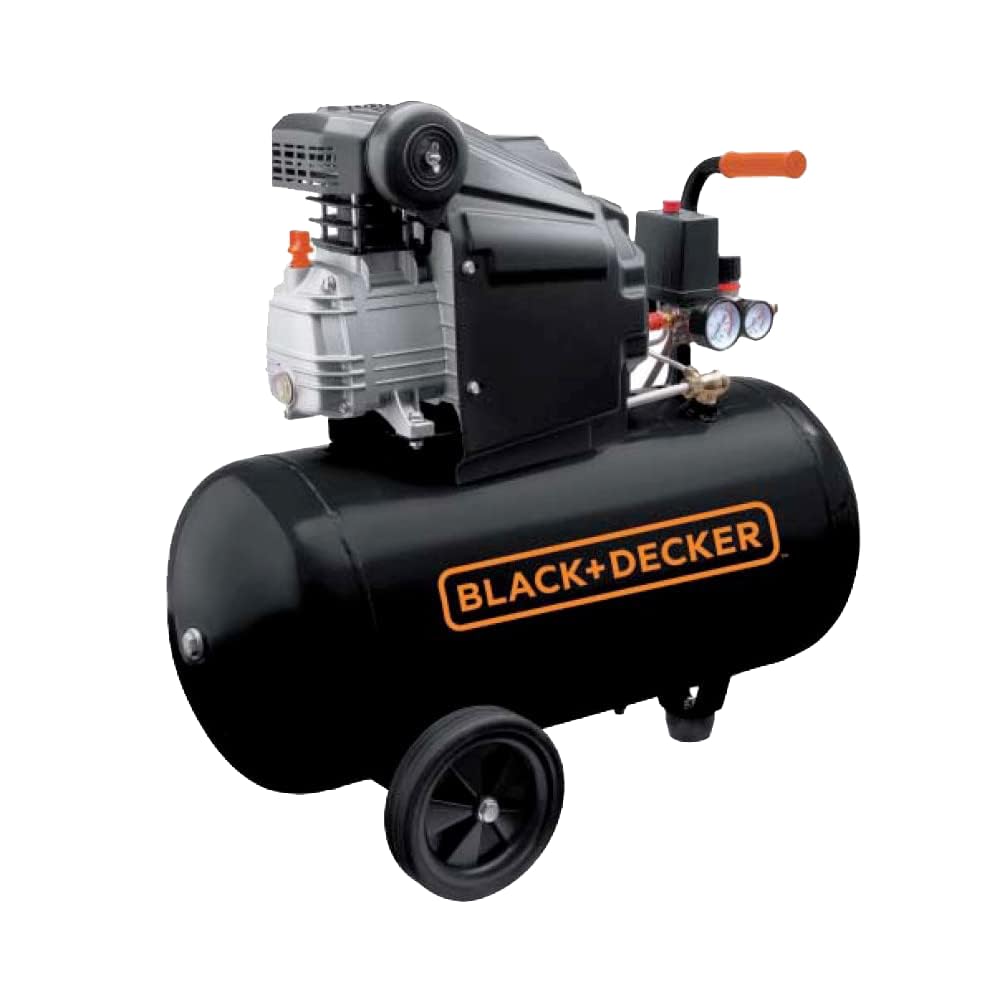
Image: The BLACK+DECKER RCDV404BND540 air compressor shown with its wheels and air filter properly installed, ready for operation.
4. Electrical Connection
Connect the power cord to a grounded 230 Volt electrical outlet. Ensure the circuit can handle the compressor's power requirements (2 horsepower motor).
Operating Instructions
1. First Use and Break-in
Before first use, ensure the tank drain valve is closed. Turn on the compressor and allow it to run for approximately 15-20 minutes with the air outlet valve open. This helps to break in the motor and pump components. After this period, close the outlet valve and allow the tank to fill to maximum pressure, then turn off the compressor and drain the tank.
2. Starting and Stopping the Compressor
- To Start: Ensure the pressure regulator is set to minimum pressure. Plug in the compressor and flip the ON/OFF switch to the 'ON' position. The compressor will start filling the tank.
- To Stop: Flip the ON/OFF switch to the 'OFF' position. The compressor will stop, but the tank will remain pressurized.
3. Adjusting Air Pressure
Use the pressure regulator knob to adjust the output air pressure. Turn clockwise to increase pressure and counter-clockwise to decrease pressure. Monitor the regulated pressure gauge to set the desired working pressure for your tools.
4. Connecting Air Tools
Attach your air hose to the quick-connect coupler on the compressor. Connect your air tool to the other end of the hose. Ensure all connections are secure before operating the tool.
Maintenance
Regular maintenance ensures the longevity and optimal performance of your air compressor. Always disconnect the power supply before performing any maintenance.
1. Draining Condensation (Daily/After Each Use)
Moisture accumulates in the air tank. To prevent rust and corrosion, drain the condensation daily or after each use. Place a container under the drain valve located at the bottom of the tank. Open the valve slowly to release water and air. Close the valve once all moisture is expelled.
2. Cleaning/Replacing the Air Filter (Monthly or as Needed)
A clogged air filter reduces compressor efficiency. Unscrew the air filter cover and remove the filter element. Clean it with compressed air or replace it if heavily soiled or damaged. Reassemble the filter.
3. General Cleaning
Keep the exterior of the compressor clean. Wipe down with a damp cloth. Do not use harsh chemicals or abrasive cleaners. Ensure cooling fins on the motor and pump are free from dust and debris for proper heat dissipation.
4. Storage
Before storing, ensure the tank is drained of all condensation and air pressure is released. Store the compressor in a clean, dry, and well-ventilated area, protected from extreme temperatures.
Troubleshooting
| Problem | Possible Cause | Solution |
|---|---|---|
| Compressor does not start | No power, tripped circuit breaker, faulty switch. | Check power connection, reset circuit breaker, contact service if switch is faulty. |
| Compressor runs continuously or cycles frequently | Air leak in tank or fittings, faulty pressure switch, open drain valve. | Check for leaks (use soapy water), tighten fittings, close drain valve, contact service for pressure switch. |
| Low air pressure at outlet | Regulator set too low, clogged air filter, air leak in hose/tool. | Adjust regulator, clean/replace air filter, check hose/tool connections for leaks. |
| Unusual noise or vibration | Loose components, worn pump parts, insufficient lubrication (if applicable). | Inspect and tighten loose parts. If noise persists, contact qualified service personnel. |
For issues not listed here or if solutions do not resolve the problem, please contact BLACK+DECKER customer support.
Specifications
| Feature | Detail |
|---|---|
| Brand | BLACK+DECKER |
| Model Number | RCDV404BND540 |
| Product Dimensions | 76.5 x 32.5 x 63 cm |
| Item Weight | 32.7 Kilograms |
| Voltage | 230 Volt |
| Power Source | Corded Electric |
| Maximum Power | 2 Horsepower |
| Capacity | 50 Liters |
| Tank Volume | 50 Liters |
| Maximum Working Pressure | 8 Bar |
| Special Features | Highly efficient coaxial transmission |
| Recommended Uses | Tire inflation, Cleaning |
Warranty and Support
For warranty information, technical support, or to order replacement parts, please refer to the official BLACK+DECKER website or contact their customer service department. Keep your purchase receipt as proof of purchase for warranty claims.
Note: Specific warranty terms and conditions may vary by region.


