
1. Product Overview
The Weivision 1080P 360 Degree Bird's Eye-View Camera DVR System provides a comprehensive surround view of your vehicle, significantly enhancing driving safety by eliminating blind spots. This system is designed for various vehicles, including cars and pickups up to 22ft, offering easy installation and calibration. It features a 4-channel 1080P recording capability, a 7-inch HD display, and supports up to 128GB for loop recording.

Image: The system features a Quad Core CPU for fast panoramic correction and supports 2560*1440 resolution for cycle recording.
2. Package Contents
Please verify that all components listed below are included in your package:
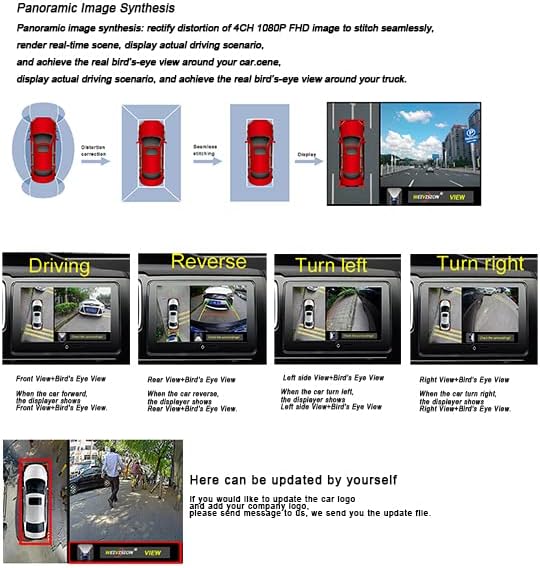
Image: All components included in the package, such as the control box, cameras, cables, and monitor.
- Control Module
- Front View Camera
- Rear View Camera
- Left View Camera
- Right View Camera
- 7-inch HD Monitor Kit
- Power Cable
- Rear Camera Cable (19ft)
- Front Camera Cable (11ft)
- Left Camera Cable (11ft)
- Right Camera Cable (11ft)
- IR Receiver
- Remote Control
- User Manual
- 1.6M*1.2M Calibration Cloth (4pcs)
3. Setup and Wiring
Proper installation is crucial for optimal performance. It is recommended to test the system before permanent installation. Refer to the wiring diagram below for connection details.
3.1 Camera Installation
- Front Camera: Typically mounted at the front of the vehicle, often near the grille.
- Rear Camera: Mounted at the rear, usually above the license plate.
- Left & Right Cameras: Installed on the side mirrors or under the side mirrors for a clear side view.

Image: Detailed wiring diagram illustrating connections between the host unit, four cameras, shock sensor, USB port, and the AV output to the display monitor.
3.2 Power Connection
Connect the red wire to ACC ON (switched 12V), the yellow wire to the vehicle's battery (constant 12V), and the black wire to the cathode of the battery (ground). The blue wire connects to the DVD screen trigger line if applicable.
4. Operation
The system operates automatically based on vehicle status, providing relevant camera views to assist the driver.
4.1 System Activation
- When the vehicle ignition is switched ON, the system will instantly activate. The monitor will display the 360-degree Bird's Eye-View image and one individual camera view simultaneously.
4.2 Driving Modes
- Normal Driving: The system displays the 360-degree Bird's Eye-View image along with the Front camera view.
- Left Turn: When the vehicle's left indicator is engaged, the system displays the 360-degree Bird's Eye-View image and the Left camera view.
- Right Turn: When the vehicle's right indicator is engaged, the system displays the 360-degree Bird's Eye-View image and the Right camera view.
- Reverse: When reverse gear is engaged, the system displays the 360-degree Bird's Eye-View image and the Rear camera view.

Image: Visual representation of how the panoramic image is synthesized from four camera feeds, displaying views for driving, reversing, and turning left or right.
4.3 System Settings
The system offers various settings for recording, display, and control, accessible via the remote control and on-screen menu.

Image: Screenshots of the system's user interface, showing options for recording settings, display adjustments, control configurations, birdview calibration, and accessing recorded video lists.
4.4 Parking Monitoring
When the vehicle is parked and a shock is detected, the shocking sensor will trigger the system to automatically record a video within 2-3 seconds and lock it, providing evidence in case of incidents.

Image: Illustration of the parking monitoring function, where a shock sensor detects an impact and initiates automatic video recording.
4.5 Night Vision Recording
The system utilizes a Sony sensor and 6-glass lens with strong light suppression and noise reduction technology, enabling clear recording even in low-light conditions.

Image: Demonstration of the Super HD Night Vision capability, showing clear camera views in dark environments.
5. Calibration
The Weivision 360 Degree Around View Camera System features simplified calibration, with auto-calibration completing in approximately 5 seconds. Manual calibration options are also available for fine-tuning.

Image: Diagram illustrating the simplified calibration process, showing the placement of calibration cloths around the vehicle.
For detailed calibration steps, please refer to the dedicated section in the included user manual or contact customer support.
6. Product Video
Watch this video to see the Weivision 360 Bird View System in operation, demonstrating its real-time capabilities.
Video: A demonstration of the Weivision 360 bird view system in action, showcasing its panoramic view and real-time monitoring features during driving and parking maneuvers.
7. Specifications
| Component | Specification |
|---|---|
| Camera Chip Sensor | 1/3 Color 225 sensor |
| Effective Pixels | 1280(H)x960(V) |
| Horizontal Resolution | 960H |
| Dynamic Range | > 78dB |
| Video Output | CVBS-PAL/NTSC |
| Waterproof Rating | IP67 |
| Video Resolution | 2560*1440 |
| Working Voltage (Camera) | 5V, Current < 100mA |
| CPU (Host) | Quad-core Cortex-A7 |
| FLASH (Host) | 4GB |
| DDR (Host) | 512MB |
| Working Voltage Range (Host) | 9-16V |
| Working Current (Host) | 400mA |
| Standby Current (Host) | < 10mA |
| Memory Support | Up to 128GB (exFAT format) |
| Monitor Resolution | 1024*600 |
| Monitor Size | 7 inches |
| Product Dimensions | 7 x 0.6 x 4.7 inches |
| Item Weight | 5.59 pounds |
| Connectivity | USB, RCA |
| Lens Type | Fisheye |
| Real Angle of View | 360 Degrees |
8. Troubleshooting
If you encounter issues with your Weivision 360 Camera System, please refer to the following common solutions:
- No Power/Monitor Not Turning On: Check all power connections (ACC, Battery, Ground). Ensure the vehicle's ignition is on. Verify the monitor's power cable is securely connected.
- No Camera Display: Ensure all camera cables are securely connected to the control module. Check the AV output connection to the monitor. Verify camera settings in the system menu.
- Distorted/Incorrect View: Perform a system calibration. Ensure calibration cloths are correctly placed as per the diagram. Check for any physical obstructions or damage to the cameras.
- DVR Not Recording: Ensure a compatible SD card (up to 128GB, exFAT format) is inserted. Check recording settings in the system menu.
- Intermittent Issues: Check for loose connections. Ensure proper grounding.
For persistent issues, please contact Weivision customer support.
9. Warranty and Support
Weivision products are designed for reliability and performance. For warranty information and technical support, please refer to the warranty card included in your package or visit the official Weivision website. Our customer service team is available to assist with any questions or concerns regarding your product.
Contact Information: Please refer to the contact details provided in your product packaging or on the official Weivision support page.