
1. Introduction
This manual provides detailed instructions for the VIFLYKOO BSJ-A5E-3 Vehicle GPS Tracking System. It covers product features, setup procedures, operational guidelines, maintenance tips, and troubleshooting information. Please read this manual thoroughly before using the device to ensure proper function and safety.
2. Product Overview
2.1 Key Features
- Real-Time Tracking: Provides precise, real-time location data and 12 months of tracking history.
- No Monthly Service Fee: Access to the tracking platform and service is free (SIM card fee not included).
- Waterproof Design: IP67 rated, ensuring durability in various weather conditions.
- Strong Magnetic Attachment: Equipped with industrial-strength magnets for secure, tool-free installation on metal surfaces.
- Long Standby Battery: Features a 7500mAh lithium-ion battery, offering up to 1 year of standby time on a single charge.
- Multifunction Alerts: Includes alerts for movement, speeding, low battery, device on/off, and geofence entry/exit.
- Voice Monitoring: Allows remote listening to the surroundings of the device.
- Geofencing: Define virtual boundaries and receive notifications when the tracker enters or exits these areas.
- Historical Trajectory: Review past routes and movement patterns via the application or web platform.

Figure 1: Overview of the VIFLYKOO BSJ-A5E-3's innovative features.
2.2 Package Contents
- 1 x VIFLYKOO BSJ-A5E-3 GPS Tracker
- 1 x User Manual (this document)
2.3 Device Components
The VIFLYKOO BSJ-A5E-3 tracker is a compact, black rectangular device. It features a power switch on one side and a SIM card slot (typically located internally or under a sealed cover for waterproofing). The device is designed for discreet placement.

Figure 2: Front and side view of the VIFLYKOO BSJ-A5E-3 GPS Tracker.
3. Setup
3.1 SIM Card Installation
- Ensure the device is powered off.
- Locate the SIM card slot. This is typically under a rubber seal or a removable cover to maintain waterproofing.
- Insert a standard 2G GSM/GPRS SIM card into the slot. Ensure the SIM card is active and has sufficient balance for data and SMS services. The device operates exclusively on 2G networks.
- Securely close the SIM card slot cover to maintain the device's IP67 waterproof rating.
3.2 Initial Charging
Before first use, fully charge the device. Connect the provided charging cable to the tracker and a compatible 5V-1A USB power adapter (not included). The charging parameters are 110-220V input and 5V-1A output. A full charge can take several hours.
3.3 Activating the Device and Platform Access
- After inserting the SIM card and charging, power on the device using the side switch.
- Download the dedicated tracking application (available for Android and iOS) or access the web tracking platform. Refer to the packaging or a separate quick start guide for specific app names or website URLs.
- Register your device on the platform using its unique ID number (usually found on the device itself or its packaging). Follow the on-screen instructions to complete the registration process.
4. Operating Instructions
4.1 Real-Time Tracking and Historical Trajectory
Once activated, you can monitor the device's location in real-time through the mobile application or web platform. The platform also allows you to view historical routes for up to 12 months, providing a comprehensive record of movement.

Figure 3: Viewing historical trajectory on a smartphone.
4.2 Geofence Setup
To set up a geofence:
- Access the geofence settings within the tracking application or web platform.
- Define a specific area on the map by drawing a polygon or circle.
- Configure alerts to be notified when the tracker enters or exits this defined zone.
4.3 Alert Functions
The device supports various alerts to keep you informed:
- Movement Alert: Notifies you if the tracker begins to move after being stationary.
- Speeding Alert: Triggers if the tracker exceeds a predefined speed limit.
- Low Battery Alert: Informs you when the battery level is critically low.
- Device On/Off Alert: Notifies you when the device is powered on or off.
4.4 Voice Monitoring (Remote Listening)
The remote listening feature allows you to dial the SIM card number in the tracker from an authorized phone number. The device will automatically answer, enabling you to listen to the ambient sounds around the tracker. This can be used as an auxiliary anti-theft measure.

Figure 4: Remote listening in action.
4.5 Magnetic Installation
The VIFLYKOO BSJ-A5E-3 features strong built-in magnets for easy and secure attachment to any metal surface. Recommended installation points in a vehicle include under the co-driver seat, under the rear windshield, inside the front bumper, armrest box, door glove compartment, or inside the rear bumper. Ensure the tracker is firmly attached and not obstructed by thick metal, which could interfere with GPS signal reception.

Figure 5: Recommended magnetic installation locations for the tracker.
5. Maintenance
5.1 Battery Management
- Regularly charge the device to maintain optimal performance.
- Avoid completely draining the battery frequently, as this can reduce its overall lifespan.
- If storing the device for an extended period, charge it to approximately 50-70% and recharge every few months to prevent deep discharge.
5.2 Waterproofing
The device is IP67 waterproof, meaning it is protected from dust and can withstand immersion in water up to 1 meter for 30 minutes. Ensure all covers and seals are properly closed to maintain this protection. Avoid exposing the device to high-pressure water jets or prolonged immersion beyond its rating.
5.3 Storage
Store the device in a cool, dry place away from direct sunlight and extreme temperatures. The recommended storage temperature range is -40°C to +85°C. The operating temperature range is -20°C to +55°C.
6. Troubleshooting
- Device not powering on: Ensure the battery is charged. Connect to a power source and try again.
- No GPS signal or inaccurate location: Ensure the device has a clear view of the sky. Avoid placing it under heavy metal obstructions. Verify the SIM card is active and has data.
- No network connection (2G): Check if the SIM card is correctly inserted and active. Confirm that 2G network coverage is available in the area.
- Battery draining quickly: This may occur with very frequent tracking updates. Adjust tracking frequency settings in the app if available. Ensure the device is fully charged.
- Cannot access tracking platform/app: Verify your internet connection. Ensure you are using the correct login credentials.
If issues persist, contact VIFLYKOO customer support or your retailer for further assistance.
7. Specifications
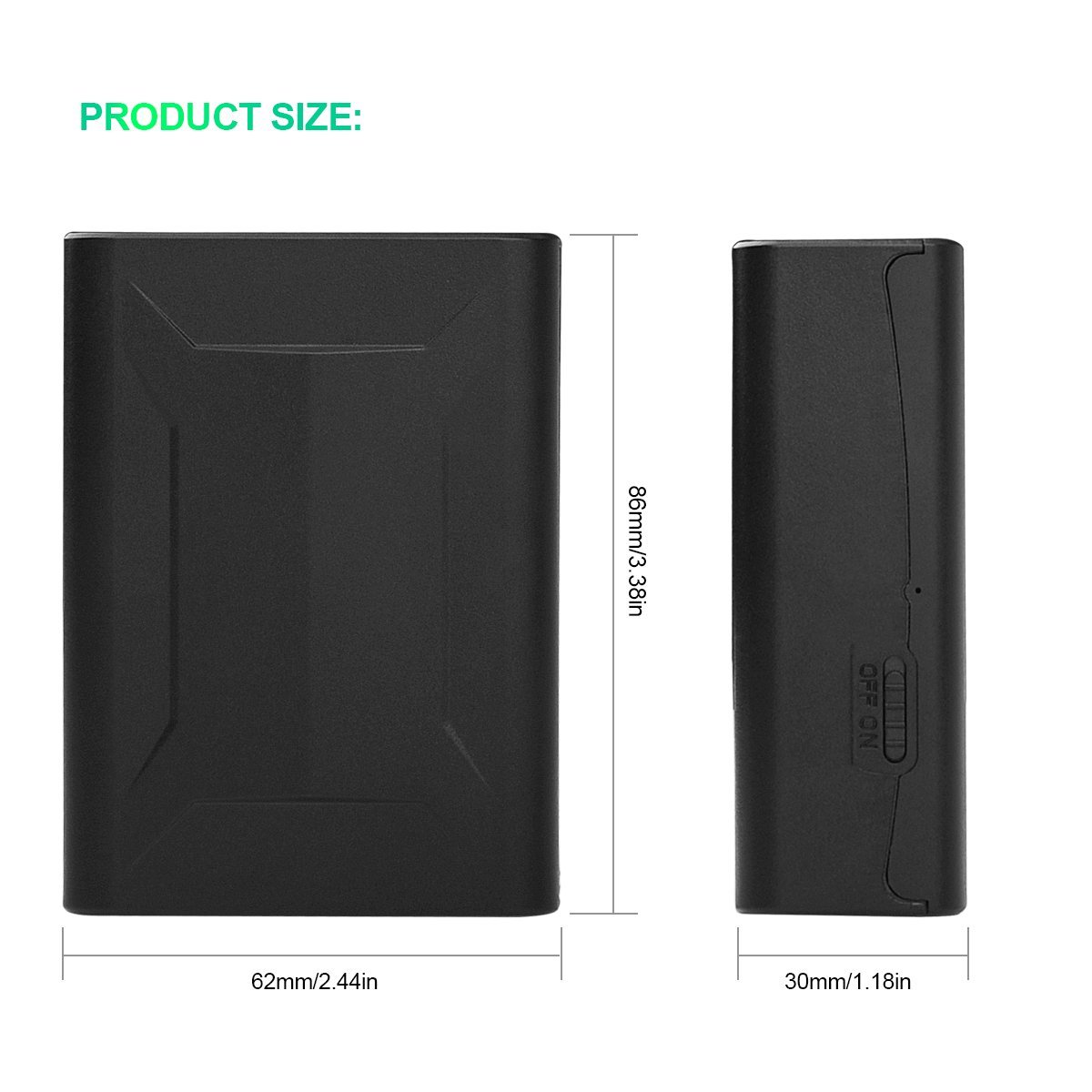
Figure 6: Product dimensions of the VIFLYKOO BSJ-A5E-3.
| Feature | Specification |
|---|---|
| Model | BSJ-A5E-3 |
| Network | GSM / GPRS (2G Network Only) |
| GPS Sensitivity | -159dBm |
| GPS Accuracy | Within 5 meters |
| Battery Capacity | 7500mAh Lithium Ion |
| Standby Time | Up to 1 year |
| Charging Parameters | Input: 110-220V; Output: 5V-1A |
| Enable Time (Cold Boot) | 45 seconds |
| Enable Time (Warm Boot) | 35 seconds |
| Enable Time (Hot Boot) | 1 second |
| Storage Temperature | -40°C to +85°C |
| Operating Temperature | -20°C to +55°C |
| Humidity | 5%-95% non-condensing |
| Waterproof Rating | IP67 |
| Dimensions (L x W x H) | 86mm x 62mm x 30mm (approx. 3.38in x 2.44in x 1.18in) |
| Weight | 295 g |
| Compatible Devices | Smartphone (for app access) |
| Specific Uses | Vehicle Tracking, Personnel Tracking, Asset Tracking, Pet Monitoring, Fleet Management |
8. Warranty and Support
For warranty information, please refer to the documentation provided at the time of purchase or contact your retailer. For technical support or further inquiries, please reach out to VIFLYKOO customer service through their official website or the contact details provided with your product.