
Introduction
The GODOX Xpro-S TTL Wireless Flash Trigger is designed for Sony cameras, offering advanced control over GODOX flash units. This trigger supports TTL autoflash, 1/8000s High-Speed Sync (HSS), multi-flash, manual flash, and flash exposure compensation. Its large LCD screen and dedicated group buttons provide intuitive operation for various lighting setups.
Setup
1. Battery Installation
The Xpro-S trigger uses two AA batteries. To install, locate the battery compartment on the side of the unit. Slide the cover open, insert the batteries according to the polarity indicators, and close the cover securely.

Image: The side of the Godox Xpro-S trigger showing the open battery compartment with two AA batteries. This illustrates correct battery placement.
2. Mounting on Camera
Attach the Xpro-S trigger to your Sony camera's hot shoe. Ensure it is securely fastened using the locking mechanism to prevent accidental detachment during use.
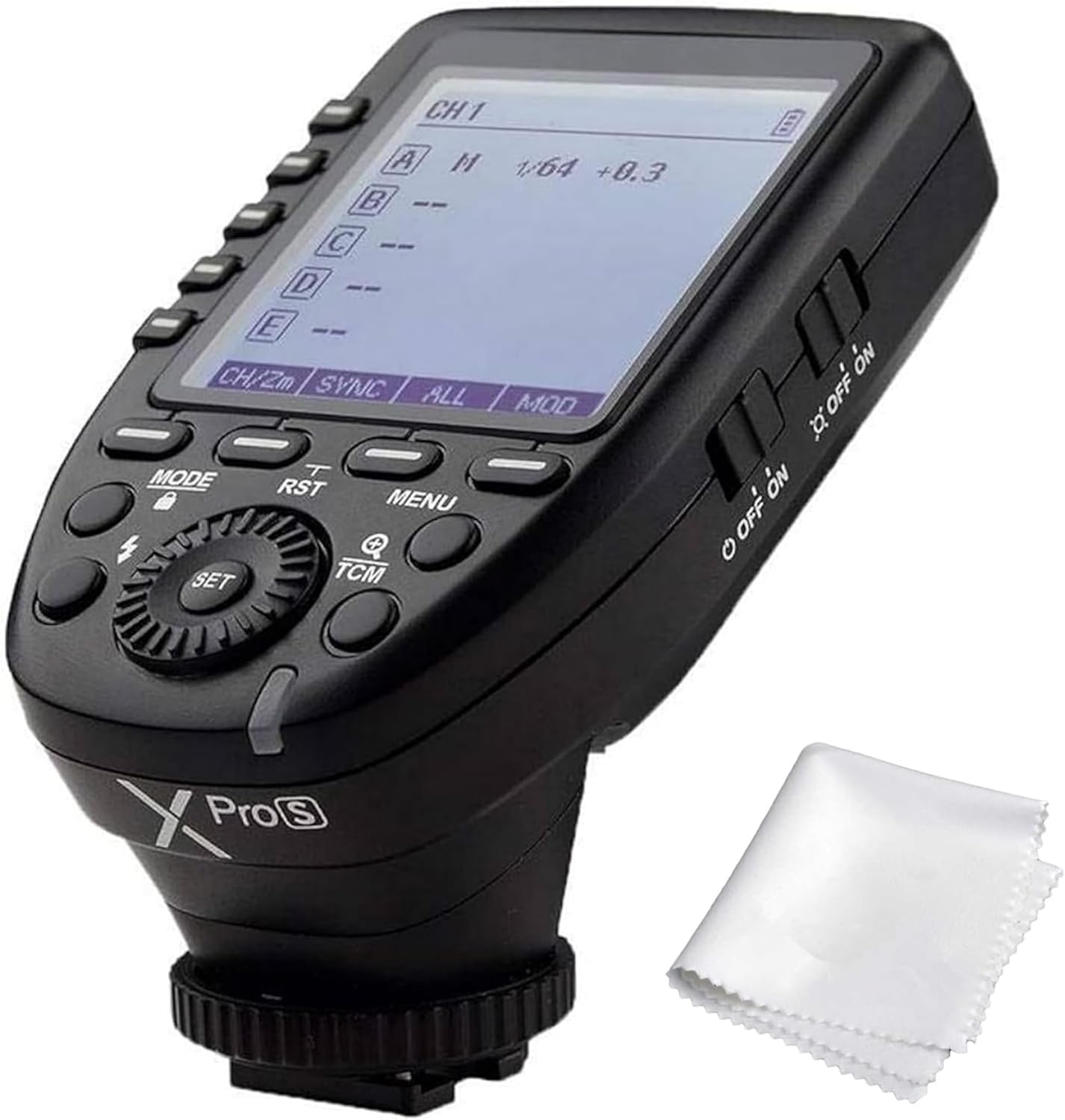
Image: The Godox Xpro-S trigger shown from an angled perspective, highlighting its large LCD screen and control buttons, mounted on a camera hot shoe.
3. Powering On
Locate the ON/OFF switch on the side of the trigger. Slide it to the 'ON' position to power on the device. The LCD screen will illuminate, displaying the current settings.
Operating Instructions
Basic Controls and Display
The Xpro-S features a large dot-matrix LCD for clear display of settings. Control buttons are located on the side and front for easy access to modes, groups, channels, and other functions.

Image: A close-up front view of the Godox Xpro-S trigger, showing the LCD screen with channel 1 selected, manual mode (M), 1/64 power, and +0.3 exposure compensation. The zoom is set to 24mm.
TTL Autoflash and Professional Functions
- Supports TTL Autoflash, 1/8000s High-Speed Sync (HSS), Multi Flash, and Manual Flash.
- Flash Exposure Compensation (FEC) for fine-tuning flash output.
- Magnification Function to display details of each group setting.
- One-Shoot & Multi-Shoot Setting for varied firing sequences.
- Group Modeling Lamp Control and Group Zooming.
- Adjusting All Groups' Output Value Simultaneously in M Mode.
TCM Transform Function
The TCM (TTL Convert Manual) button offers quick conversion and group switching:
- Long Press TCM Button: Transforms the flash value in TTL mode into the power output value in Manual (M) mode.
- Short Press TCM Button: Enables groups to be switched between one-group and multi-group mode.

Image: Illustration of the TCM button's functionality, demonstrating how a long press converts TTL flash values to manual power output.
Wireless ID and Channel Settings
The Xpro-S supports 16 groups and 32 channels for wireless control. The 01-99 Wireless ID setting ensures triggering only when master and slave units share the same channel and ID, effectively preventing signal interference.

Image: The Xpro-S display showing the menu for setting the 01-99 wireless ID, crucial for avoiding signal interference.
Versatile Using Methods
The Xpro-S can function in multiple ways:
- As a Wireless Godox Flash Trigger (for camera flash, outdoor flash, and studio flash).
- As a Wireless Shutter Release Trigger.
- As a Wireless Canon Speedlights Trigger (with appropriate receiver).
- As a Flash Trigger with a 2.5mm Sync Cord Jack.

Image: A visual representation of the Godox 2.4G Wireless X System's versatility, showing the trigger used with different types of flashes and as a shutter release.
Firmware Upgrades
The unit supports Type-C USB firmware upgrades to ensure compatibility and access to new features.
Maintenance
To maintain optimal performance, regularly clean the trigger with the included cleaning cloth. Ensure the hot shoe contacts are free from dust and debris.
Troubleshooting
- Signal Interference: Ensure the master and slave units are set to the same channel and 01-99 Wireless ID.
- Battery Life: Use fresh AA batteries. High-capacity rechargeable batteries are recommended for extended use.
- Flash Not Firing: Check battery levels, ensure secure hot shoe connection, and verify channel/ID settings.
Specifications
| Product Dimensions | 1.18 x 3.15 x 3.15 inches |
| Item Weight | 3.53 ounces |
| Compatible Mountings | Sony Alpha |
| Flash Sync Speed | 1/8000s |
| Channels | 32 |
| Groups | 16 |
| Wireless ID | 01-99 |
| Power Source | 2x AA Batteries |
What's in the Box
- 1x GODOX XPRO Flash Trigger
- 1x Cleaning Cloth
Official Product Videos
Easy to operate TTL flash trigger for Sony
Video: This video demonstrates the basic operation and ease of use of the Godox Xpro-S TTL flash trigger for Sony cameras, highlighting its intuitive controls.
Godox Xpro-S Flash Controller Hands On Review
Video: A hands-on overview of the Godox Xpro-S flash controller, showcasing its physical design, button layout, and general functionality when used with a camera.
My Favorite Godox Flash Trigger For My Sony Camera
Video: This video highlights the features and benefits of the Godox Xpro-S trigger specifically for Sony camera users, demonstrating its integration and control capabilities.
Warranty and Support
Specific warranty and support information is not provided in the product details. Please refer to the manufacturer's official website or contact your retailer for details regarding warranty coverage and customer support.