
Medeli KB-330
Contents
Medeli M17 Portable 61-Key Dynamic Keyboard User Manual
Model: KB-330
1. Introduction
Thank you for choosing the Medeli M17 Portable 61-Key Dynamic Keyboard. This manual provides essential information for the safe and effective use of your new instrument. Please read it thoroughly before operating the keyboard and keep it for future reference. The Medeli M17 is designed for musicians of all levels, offering a wide range of voices, styles, and features for learning and creative expression.
2. Safety Instructions
To prevent electric shock, fire, or injury, please observe the following precautions:
- Do not expose the keyboard to rain or moisture.
- Do not place objects filled with liquids, such as vases, on the keyboard.
- Use only the specified power adapter. Ensure the voltage matches your local power supply.
- Do not open the keyboard casing. Refer all servicing to qualified personnel.
- Keep the keyboard away from heat sources such as radiators, heat registers, stoves, or other apparatus (including amplifiers) that produce heat.
- Protect the power cord from being walked on or pinched, particularly at plugs, convenience receptacles, and the point where they exit from the apparatus.
- Unplug the keyboard during lightning storms or when unused for long periods.
3. Package Contents
Please check that your package contains the following items:
- Medeli M17 Portable 61-Key Dynamic Keyboard
- Power Adapter
- User Manual (this document)
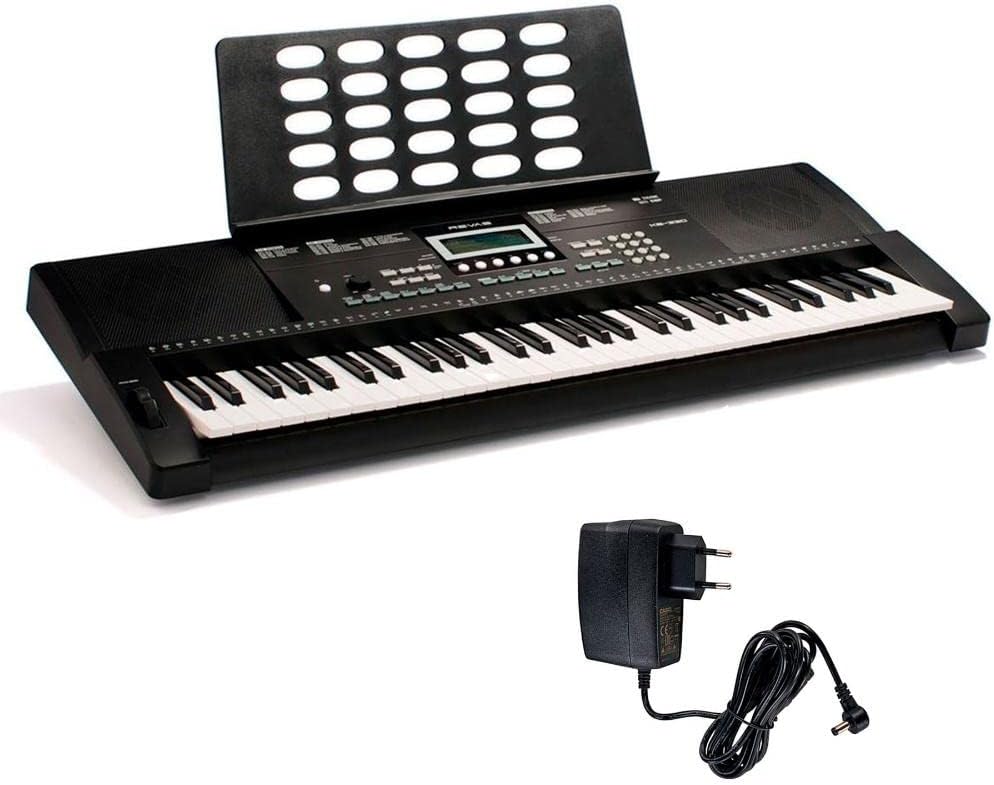
Figure 3.1: Medeli M17 keyboard and included power adapter.
4. Product Overview
The Medeli M17 keyboard features 61 dynamic keys, a comprehensive control panel, integrated speakers, and various connectivity options.

Figure 4.1: Top view of the Medeli M17 keyboard, showing the 61 dynamic keys, control panel, and integrated speakers.

Figure 4.2: Front and rear view of the Medeli M17 keyboard, highlighting the control panel and rear connectivity ports (Sustain, Phones, USB, 12V DC In).

Figure 4.3: Approximate dimensions of the Medeli M17 keyboard: 100 cm length, 36 cm width, 14.5 cm height.

Figure 4.4: Close-up of the pitch bend wheel located on the left side of the keyboard, used for real-time pitch modulation.

Figure 4.5: Detailed view of the Medeli M17 control panel, showing the LCD display, voice/style selection buttons, function buttons (Lesson, Tempo, Mixer, Record, etc.), and volume knob.
5. Setup
Follow these steps to set up your Medeli M17 keyboard:
- Power Connection: Connect the included power adapter to the DC 12V IN jack on the rear of the keyboard. Plug the other end into a standard AC power outlet.
- Headphones (Optional): If you wish to practice silently, connect a standard stereo headphone jack to the PHONES output on the rear panel.
- Sustain Pedal (Optional): For enhanced expression, connect a sustain pedal (not included) to the SUSTAIN jack on the rear panel.
- USB Connection (Optional): To connect the keyboard to a computer for MIDI data transfer, use a USB cable (not included) to connect the USB port on the rear panel to your computer.
- Power On: Press the POWER button located on the control panel to turn on the keyboard.
6. Operating Instructions
This section covers the basic functions and features of your Medeli M17 keyboard.
6.1. Power On/Off and Volume
- Power: Press the POWER button to turn the keyboard on or off.
- Volume: Use the VOLUME knob on the control panel to adjust the overall output volume.
6.2. Voice Selection
The Medeli M17 features 390 voices. To select a voice:
- Press the VOICE button.
- Use the numeric keypad or the +/- buttons to enter the desired voice number. The selected voice name will appear on the LCD display.
6.3. Style Selection
The keyboard includes 100 styles (rhythms and accompaniments). To select a style:
- Press the STYLE button.
- Use the numeric keypad or the +/- buttons to enter the desired style number.
- Press START/STOP to begin or end the style playback.
6.4. Lesson Function
The built-in lesson function helps you learn songs. Press the LESSON button to access different lesson modes. Refer to the on-screen prompts for guidance.
6.5. Tempo Adjustment
Adjust the tempo of styles or lesson songs using the TEMPO +/- buttons.
6.6. Pitch Bend Wheel
The pitch bend wheel, located to the left of the keys, allows you to smoothly raise or lower the pitch of notes in real-time for expressive playing.
6.7. Recording Function
The keyboard allows you to record your performances. Press the RECORD button to enter recording mode. Follow the instructions on the display to record and playback your tracks.
7. Maintenance
Proper care will ensure the longevity of your Medeli M17 keyboard:
- Cleaning: Use a soft, dry cloth to wipe the surface of the keyboard. For stubborn dirt, slightly dampen the cloth with water and a mild detergent, then wipe dry immediately. Do not use abrasive cleaners, waxes, or solvents.
- Storage: When not in use, store the keyboard in a cool, dry place away from direct sunlight and extreme temperatures. If storing for an extended period, disconnect the power adapter.
- Handling: Avoid dropping the keyboard or subjecting it to strong impacts. Do not place heavy objects on top of it.
8. Troubleshooting
If you encounter issues with your Medeli M17, refer to the following common problems and solutions:
| Problem | Possible Cause | Solution |
|---|---|---|
| No power | Power adapter not connected properly; Power outlet not working. | Ensure the power adapter is securely connected to the keyboard and a working power outlet. Try a different outlet. |
| No sound | Volume too low; Headphones connected; Speakers muted. | Increase the VOLUME knob. Disconnect headphones if connected. Check if any internal mute function is active (refer to full manual if available). |
| Keys not responding | Keyboard not powered on; Specific voice selected has no sound. | Ensure the keyboard is powered on. Try selecting a different voice. |
| Style/Rhythm not playing | Style not selected; START/STOP not pressed. | Select a style and press the START/STOP button. |
If the problem persists after trying these solutions, please contact Medeli customer support or a qualified service technician.
9. Specifications
| Feature | Description |
|---|---|
| Model Name | KB-330 |
| Number of Keys | 61 Dynamic Keys |
| Voices | 390 (approx.) |
| Styles | 100 (approx.) |
| Supported Software | GarageBand |
| Connector Type | USB |
| Power Source | Wired Electric (12V DC) |
| Instrument Type | Electronic Keyboard |
| Product Dimensions | 10 x 10 x 10 cm (as per product data); Actual approx. 100 x 36 x 14.5 cm |
| Weight | 4.8 Kilograms |
| Special Feature | Portable |
Note: Product dimensions provided in the source data (10x10x10 cm) appear to be placeholder or incorrect for a 61-key keyboard. Visual inspection suggests dimensions closer to 100x36x14.5 cm.
10. Warranty & Support
Medeli products are manufactured to high-quality standards. For specific warranty terms and conditions, please refer to the warranty card included with your product or visit the official Medeli website. Keep your proof of purchase for warranty claims.
For technical support, service, or inquiries, please contact your local Medeli distributor or the retailer from whom you purchased the product. Contact information can typically be found on the Medeli official website or on your purchase receipt.
No official product videos from the seller were available for embedding in this manual.
Documents and downloads
Ask a question about this manual
Ask about setup, troubleshooting, compatibility, parts, safety, or missing instructions. Manuals+ will review the question and use this page’s manual context to help answer it.