
1. Introduction and Overview
The DJI Mavic Air is a compact, foldable drone designed for portability and advanced aerial photography. It features a 3-axis gimbal with a 4K camera, 32 MP sphere panoramas, and intelligent flight modes for an enhanced user experience. This manual provides essential information for setting up, operating, and maintaining your Mavic Air drone.

Figure 1: DJI Mavic Air drone in Arctic White.
2. Package Contents
The DJI Mavic Air Fly More Combo package includes the following items:
- MAVIC AIR Aircraft
- MAVIC AIR Remote Controller
- Three Intelligent Flight Batteries
- MAVIC AIR Gimbal Protector
- Six pairs of Quick-Release Propellers
- Two Control Sticks
- MAVIC AIR Carrying Case
- Propeller Guards (set)
- MAVIC AIR Travel Bag
- MAVIC AIR Battery Charging Hub
- MAVIC AIR Battery to Power Bank Adapter
- RC Cable (Lightning connector)
- RC Cable (Standard Micro USB connector)
- RC Cable (USB Type-C connector)
- Communication Cable (USB 3.0 Type-C)
- USB Adapter
- Two RC Cable Sliders (large)
- Two RC Cable Sliders (small)
- Other accessories
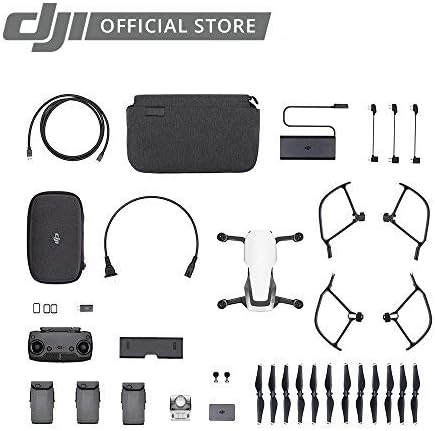
Figure 2: Contents of the DJI Mavic Air Fly More Combo.
3. Setup
3.1 Unfolding the Aircraft
- Gently unfold the front arms of the drone.
- Unfold the rear arms. Ensure all arms click into place securely.
Video 1: Demonstrating the folding and unfolding of the DJI Mavic Air drone arms.
3.2 Battery Installation
- Ensure the Intelligent Flight Battery is fully charged.
- Slide the battery into the battery compartment on the top of the aircraft until it clicks into place.
3.3 Remote Controller Setup
- Unfold the mobile device clamps on the remote controller.
- Attach your smartphone to the remote controller using the appropriate RC cable (Lightning, Micro USB, or USB Type-C).
- Ensure the control sticks are securely screwed into place.
Video 2: Attaching a smartphone to the DJI Mavic Air remote controller.
3.4 DJI GO 4 App
Download and install the DJI GO 4 app on your mobile device. This app is essential for controlling the drone, accessing flight modes, and viewing the camera feed.
4. Operating Instructions
4.1 Powering On/Off
- To power on the aircraft and remote controller, press the power button once, then press and hold it for two seconds.
- To power off, repeat the same procedure.
4.2 Takeoff and Landing
- Automatic Takeoff: In the DJI GO 4 app, tap the auto-takeoff icon and confirm. The drone will ascend to a preset height.
- Manual Takeoff: Push both control sticks to the bottom inner or outer corners to start the motors. Then, push the left stick up to ascend.
- Automatic Landing: In the DJI GO 4 app, tap the auto-landing icon and confirm. The drone will descend and land automatically.
- Manual Landing: Pull the left control stick down slowly to descend. Once landed, hold the stick down for a few seconds to stop the motors.
4.3 Flight Modes
The Mavic Air offers various flight modes:
- P-Mode (Positioning): Provides GPS and vision positioning for stable flight and obstacle avoidance.
- S-Mode (Sport): Increases flight speed and agility, disabling obstacle avoidance. Use with caution.
- T-Mode (Tripod): Limits flight speed for precise control and stable shots.
4.4 Intelligent Flight Modes
Access these modes via the DJI GO 4 app:
- QuickShots: Pre-programmed flight paths for cinematic shots (Rocket, Dronie, Circle, Helix, Asteroid, Boomerang).
- ActiveTrack: Follows a selected subject automatically.
- TapFly: Tap a point on your screen, and the drone will fly to it while avoiding obstacles.
- SmartCapture: Control the drone with hand gestures for intuitive photo and video capture.
5. Features
- 32 MP Sphere Panoramas: Stitches 25 photos in eight seconds for crystal clear sphere panoramas.
- Lightweight and Compact Foldable Design: Easy to transport and store.
- 3-Axis Gimbal & 4K Camera: Supports 4K video at 30 fps and 12 MP stills with Adobe DNG RAW support. The gimbal stabilizes the camera for smooth footage.
- Extended Control Range: Control your drone from up to 6562 feet away.
- Intelligent Flight Battery: Provides up to 21 minutes of flight time per charge.
- Dedicated Remote Controller: Features a foldable, ergonomic design with detachable control sticks.
- 3-Directional Environment Sensing: Equipped with five vision sensors, GPS, GLONASS, ultrasonic range finders, and redundant sensors for safe flight and obstacle avoidance.
- 8GB Internal Storage: Allows for direct storage of photos and videos, expandable via microSD card.

Figure 3: The DJI Mavic Air in its folded, compact state.
Video 3: Overview of the DJI Mavic Air drone's features, including its compact size and camera capabilities.
6. Maintenance
6.1 Propeller Care
- Regularly inspect propellers for cracks, bends, or damage. Replace damaged propellers immediately.
- Ensure propellers are securely attached before each flight.
6.2 Battery Maintenance
- Store batteries in a cool, dry place.
- Do not overcharge or over-discharge batteries.
- If storing for extended periods, discharge batteries to 50-60% capacity.
6.3 Gimbal Protection
Always attach the gimbal protector when transporting the drone to prevent damage to the camera and gimbal system.
Video 4: Demonstrating the installation and removal of the gimbal protector on the DJI Mavic Air drone.
7. Troubleshooting
- No GPS Signal: Ensure you are flying in an open area away from tall buildings or interference.
- App Disconnection: Check the connection cable between your smartphone and the remote controller. Restart the app or drone if necessary.
- Obstacle Avoidance Not Working: Ensure vision sensors are clean and unobstructed. Obstacle avoidance may be limited in certain lighting conditions or flight modes (e.g., Sport Mode).
- Short Flight Time: Ensure batteries are fully charged. Cold weather can reduce battery performance.
8. Specifications
| Feature | Specification |
|---|---|
| Brand | DJI |
| Model Name | Mavic Air |
| Color | White |
| Video Capture Resolution | 1080p (up to 4K at 30 fps) |
| Effective Still Resolution | 12 MP |
| Connectivity Technology | USB 3.0 Type-C port, Wi-Fi |
| Item Weight | 15.2 ounces (0.95 Pounds) |
| Video Capture Format | MP4/MOV (H.264/MPEG-4 AVC) |
| Maximum Range | 6562 Feet |
| Battery Cell Composition | Lithium Ion |
| Batteries Required | 3 Lithium Polymer batteries (included) |
| Product Dimensions | 6.5 x 1.57 x 3.24 inches |
9. Warranty and Support
For detailed warranty information and technical support, please refer to the official DJI website or contact DJI customer service. Keep your proof of purchase for warranty claims.
Video 5: Demonstrating the DJI Mavic Air carrying case, highlighting its hard shell for protection during travel.
Video 6: Demonstrating the DJI Mavic Air shoulder bag, showing its compartments for accessories and drone storage.


