
1. Introduction
This manual provides instructions for the BOMAZ RMT-AH100U replacement remote controller, designed for use with specific Sony Sound Bar models. This remote offers direct functionality without requiring programming.
Please read this manual thoroughly before using the remote controller to ensure proper operation and to maximize its lifespan.
2. Package Contents
- 1 x BOMAZ RMT-AH100U Replacement Remote Controller
3. Setup
3.1 Battery Installation
The remote controller requires two AAA batteries (not included) for operation. Follow these steps to install the batteries:
- Locate the battery compartment cover on the back of the remote controller.
- Press down on the tab and slide the cover downwards to open the compartment.
- Insert two AAA batteries, ensuring the positive (+) and negative (-) terminals align correctly with the markings inside the compartment.
- Slide the battery compartment cover back into place until it clicks securely.
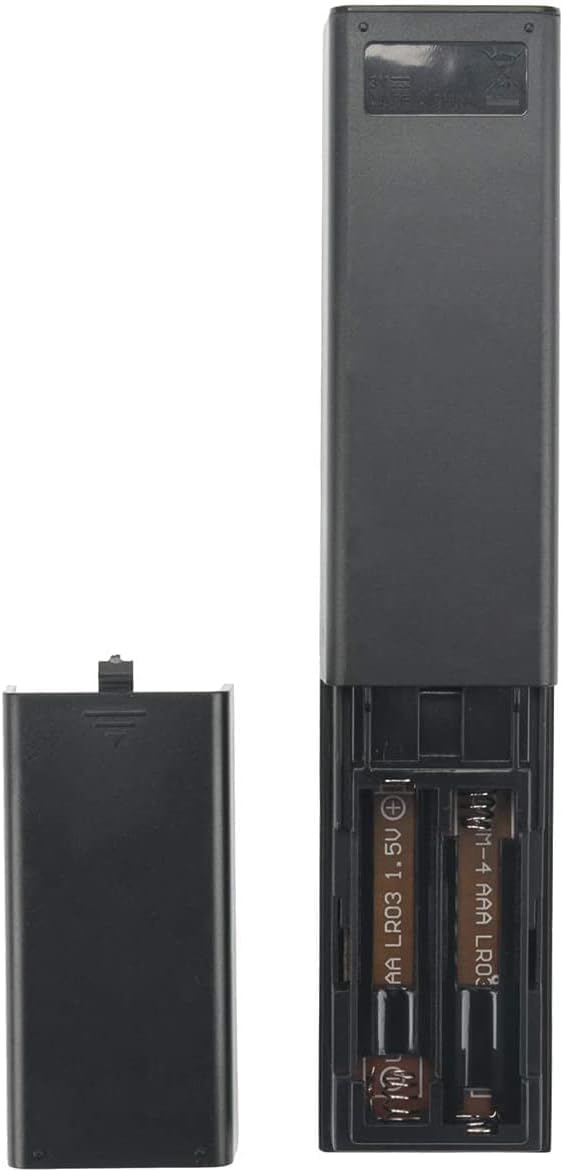
Figure 1: Battery installation in the remote controller.
Note:
- Always use new batteries of the same type.
- Do not mix old and new batteries, or different types of batteries.
- Remove batteries if the remote will not be used for an extended period to prevent leakage.
4. Operating Instructions
4.1 Basic Operation
The BOMAZ RMT-AH100U remote controller is pre-programmed and ready for use with compatible Sony Sound Bar models. No additional programming is required. Simply insert the batteries as described in Section 3.1.
Ensure there is a clear line of sight between the remote controller and the infrared receiver on your Sony Sound Bar for optimal performance. The operable distance is typically more than 8 meters (approximately 26 feet).

Figure 2: Front view of the remote controller with button layout.
4.2 Button Functions
The remote controller features the following buttons:
- TV I/O: Power button for the connected TV.
- I/O (Sound Bar Power): Power button for the Sony Sound Bar.
- INPUT: Selects the input source for the Sound Bar.
- -TV-: Controls TV functions (specific functionality may vary by TV model).
- STANDBY: Puts the Sound Bar into standby mode.
- OPTICAL: Selects the optical input source.
- ANALOG: Selects the analog input source.
- Volume (+/-): Adjusts the main volume level of the Sound Bar.
- Mute: Mutes or unmutes the Sound Bar audio.
- SW (+/-): Adjusts the subwoofer volume level.
- CLEAR AUDIO+: Activates or deactivates Clear Audio+ sound mode.
- VOICE: Enhances voice clarity.
- SURROUND: Activates or deactivates surround sound mode.
- NIGHT: Activates or deactivates Night Mode for reduced dynamic range.
- AUDIO: Cycles through audio modes or settings.
5. Troubleshooting
If you experience issues with your remote controller, please refer to the following common solutions:
- Remote not responding:
- Ensure batteries are correctly inserted with the correct polarity (+/-).
- Replace depleted batteries with new AAA batteries.
- Verify there is no obstruction between the remote and the sound bar's infrared receiver.
- Ensure you are within the operable distance (within 8 meters).
- Specific functions not working:
- Confirm that your Sony Sound Bar model (HT-CT180, SA-CT180, SA-WCT180, SS-WCT80, SA-CT80) is listed as compatible.
- Some buttons (e.g., TV I/O, -TV-) may have limited or no functionality with certain TV models or if the Sound Bar is not properly connected to the TV.
6. Specifications
- Model: RMT-AH100U
- Compatible Devices: Sony Sound Bar models HT-CT180, SA-CT180, SA-WCT180, SS-WCT80, SA-CT80
- Connectivity Technology: Infrared (IR)
- Battery Type: 2 x AAA (LR03) 1.5V (not included)
- Operable Distance: > 8 meters (26 feet)
- Material: ABS
- Product Dimensions: Approximately 0.5 x 2 x 8 inches (1.27 x 5.08 x 20.32 cm)
- Item Weight: Approximately 1.9 ounces (53.86 grams)
- Max Number of Supported Devices: 1 (the Sound Bar)
7. Maintenance
- Cleaning: Wipe the remote controller with a soft, dry cloth. Avoid using liquid cleaners, solvents, or abrasive materials, as these can damage the surface or internal components.
- Battery Care: If the remote controller will not be used for an extended period (e.g., one month or more), remove the batteries to prevent potential leakage and damage to the device.
- Storage: Store the remote controller in a cool, dry place, away from direct sunlight, high temperatures, and excessive humidity.
- Avoid Drops: Protect the remote from physical impact or dropping, which can cause internal damage.
8. Warranty and Support
8.1 Warranty Information
This BOMAZ replacement remote controller is covered by a 90-day warranty from the date of purchase. This warranty covers manufacturing defects under normal use. It does not cover damage caused by misuse, accidents, unauthorized modifications, or battery leakage.
8.2 Customer Support
For any questions, troubleshooting assistance, or warranty claims, please contact BOMAZ customer support through the retailer where the product was purchased. Please have your purchase details and product model number (RMT-AH100U) available when contacting support.