
1. Introduction
The VIPARSPECTRA TC1200 LED Grow Light is engineered for optimal indoor plant cultivation. It features a built-in timer, efficient 12-band full spectrum, and individually dimmable Veg and Bloom channels, all integrated into a reflector design for balanced light distribution.
2. Safety Information
- Eye Protection: The light is extremely bright. Do not look directly at the LED bulbs when the light is operating to prevent eye strain or damage.
- Indoor Use Only: This product is designed for indoor use and is not waterproof. Avoid exposure to water or high humidity.
- No External Ballast Required: The unit operates without the need for an additional ballast.
- Infrared (IR) LEDs: This light includes IR LEDs (730nm) which may appear dim or invisible to the naked eye. These are functional and not faulty LEDs.
- Timer Functionality: The built-in timer controls both the Veg and Bloom channels simultaneously. It is not possible to turn the Veg and Bloom channels on or off independently using the timer.
3. Package Contents
Verify that all items listed below are included in your package:
- 1 x TC1200 LED Grow Light Unit
- 1 x Remote Control
- 1 x User Instructions (this manual)
- 1 x Hanging Kit
- 1 x 6ft Power Cord
- 2 x 1/8'' Adjustable Rope Hangers

Image: The VIPARSPECTRA TC1200 LED Grow Light unit, remote control, power cord, hanging kit, and adjustable rope hangers. Also shown are the power inlet, cooling fan, and the display screen with control knob on the light unit.
4. Product Features
- Optimized PAR Output: Scientifically engineered reflector design ensures a balanced Photosynthetically Active Radiation (PAR) output and coverage, preventing concentrated hotspots that can stunt plant growth or cause sunburning.
- Built-in Timer: Allows for automatic on/off scheduling of the light, simplifying daily operation.
- Dimmable Channels: Independent dimming for both the Veg and Bloom channels, enabling precise light intensity control for different growth stages.
- Energy Efficient: Consumes approximately 530W while providing light output comparable to traditional 800W HPS/MH systems.
- Advanced Cooling System: Equipped with high-speed, quiet fans and upgraded aluminum cooling heat sinks for efficient heat dissipation, ensuring longevity and stable performance.
- 12-Band Full Spectrum: Provides a comprehensive light spectrum suitable for all stages of plant growth, from vegetative to flowering.

Image: Diagram illustrating the 12-band full spectrum wavelengths (IR 730nm to 440nm, 3000K, 7500K) and how the Veg and Bloom channels appear when active. The Veg stage uses the blue-dominant channel, while the Bloom stage activates both channels, including the red-dominant spectrum.
5. Setup
5.1 Unpacking and Inspection
Carefully remove all components from the packaging. Inspect the light unit and accessories for any signs of damage. If any components are missing or damaged, contact customer support immediately.
5.2 Hanging the Grow Light
- Attach the provided hanging kit to the four hanging points on the top of the grow light unit.
- Use the adjustable rope hangers to suspend the light at the desired height above your plants. Ensure the light is securely fastened and level.
- Refer to the 'Specifications' section for recommended hanging heights for vegetative and flowering stages.

Image: The VIPARSPECTRA TC1200 LED Grow Light suspended at 18 inches above plants inside a reflective grow tent, demonstrating a typical setup.
5.3 Power Connection
Connect the 6ft power cord to the power inlet on the grow light unit, then plug the other end into a standard AC100-240V, 50-60Hz power outlet. Ensure the connection is secure.
6. Operating Instructions
6.1 Control Panel Overview

Image: Close-up of the VIPARSPECTRA TC1200 control panel, showing the digital display for time and brightness settings, along with buttons for remote control, digital timer, and adjustable intensity.
6.2 Remote Control Functions
The included remote control simplifies operation of the grow light. Ensure the remote's battery is installed correctly.
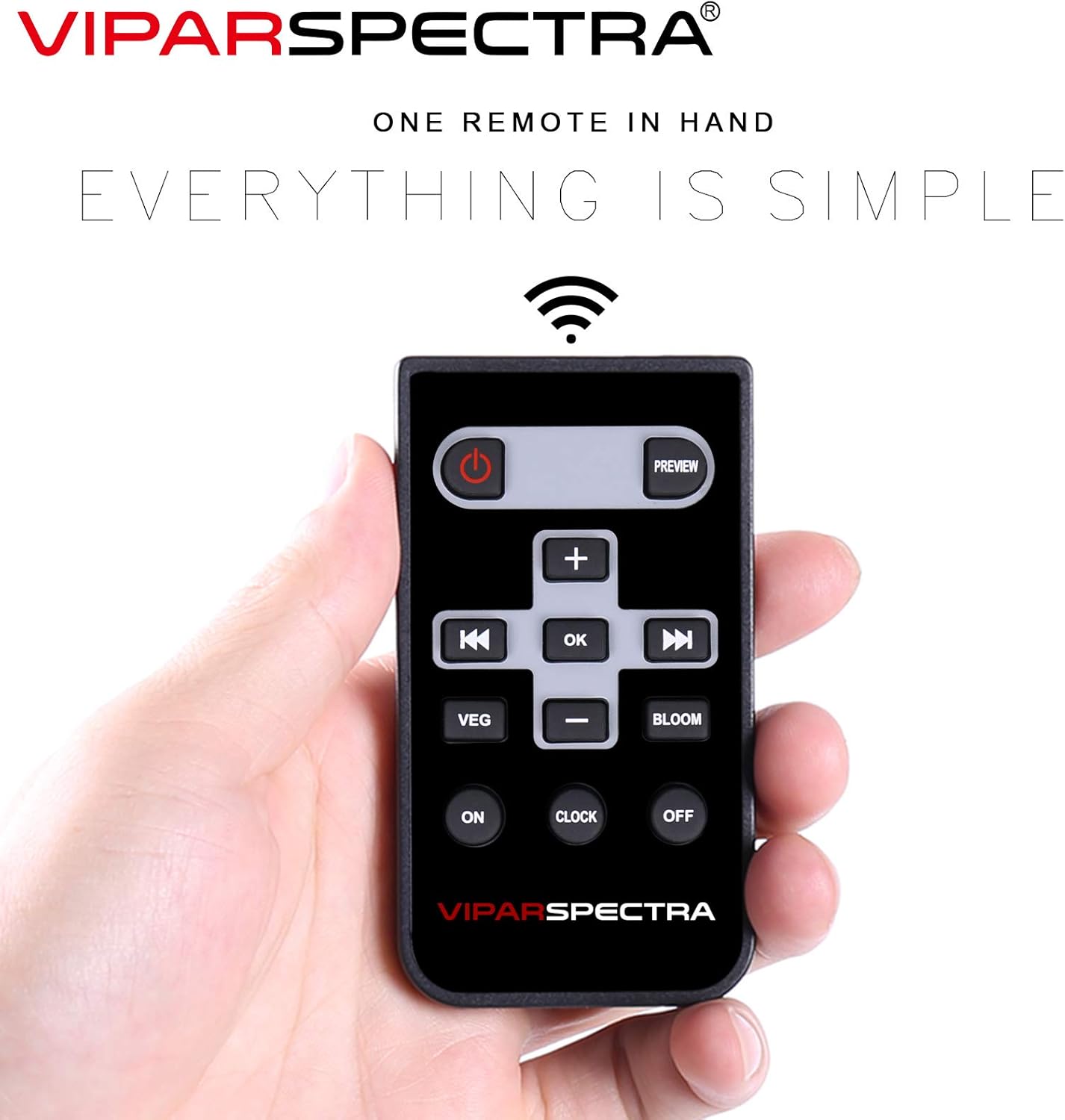
Image: The VIPARSPECTRA remote control, showing buttons for power, preview, volume/navigation, OK, VEG, BLOOM, ON, CLOCK, and OFF functions.
- Power Button: Turns the light unit on or off.
- +/- Buttons: Adjust brightness levels for Veg and Bloom channels, or navigate menu options.
- OK Button: Confirms selections.
- VEG Button: Activates or adjusts the Veg channel brightness.
- BLOOM Button: Activates or adjusts the Bloom channel brightness.
- ON/OFF Buttons: Manual control for turning the light on or off.
- CLOCK Button: Accesses timer settings.
6.3 Setting the Timer
The built-in timer allows for automated operation. Use the remote control or the control knob on the unit to set the desired start and stop times. Note that the timer controls both Veg and Bloom channels simultaneously.
6.4 Adjusting Dimmable Channels
The Veg and Bloom channels can be dimmed independently to suit your plants' specific needs at different growth stages. Use the VEG and BLOOM buttons on the remote, followed by the +/- buttons, to adjust intensity. The digital display on the unit will show the current brightness level.
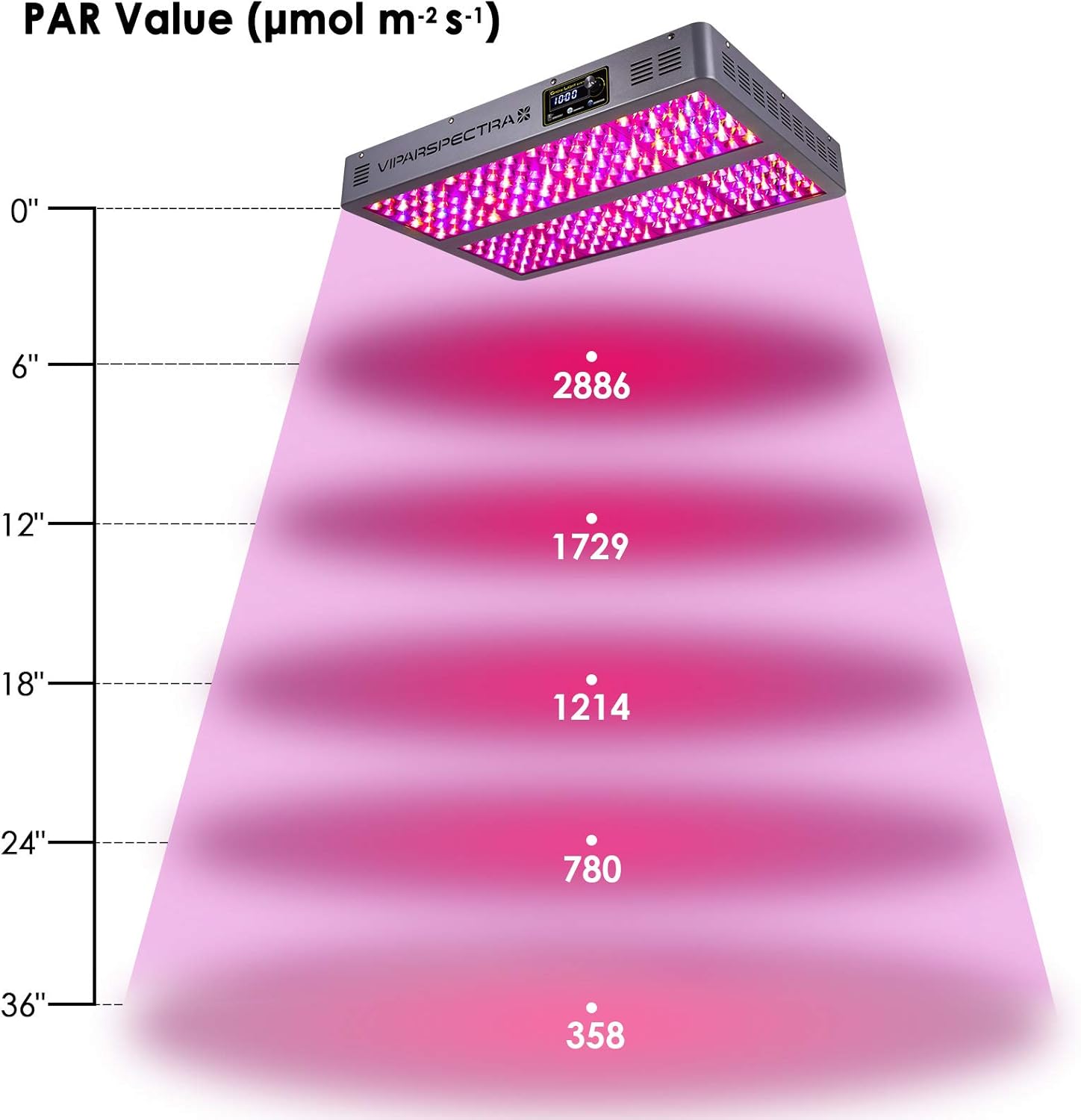
Image: A diagram showing the Photosynthetically Active Radiation (PAR) values in µmol m⁻² s⁻¹ at different distances from the VIPARSPECTRA TC1200 LED Grow Light, ranging from 0 to 36 inches.

Image: A PAR value map for the VIPARSPECTRA TC1200 LED Grow Light positioned at a 24-inch height, showing light intensity distribution across a 3x3ft area, with peak PAR values in the center.
7. Maintenance
7.1 Cleaning
Periodically clean the light unit to ensure optimal performance. Use a soft, dry cloth to wipe down the exterior and LED lenses. Do not use abrasive cleaners or allow liquids to enter the unit.
7.2 Fan and Vent Inspection
Regularly check the cooling fans and vents for dust accumulation. Keep the vents clear to ensure proper airflow and heat dissipation, which is crucial for the longevity of the LED chips.
8. Troubleshooting
- Light Not Turning On: Ensure the power cord is securely plugged into both the light unit and a functional power outlet. Check if the remote control battery needs replacement.
- Dim or Non-Functional LEDs: Remember that IR LEDs appear dim or invisible. If other visible LEDs are not functioning, ensure the unit is receiving power and contact customer support if the issue persists.
- Timer Issues: Verify that the timer settings are correctly configured. Ensure the light is not set to manual ON/OFF mode if automated operation is desired.
- Overheating: Ensure the cooling vents are not obstructed and the fans are operating. Maintain adequate air circulation around the grow light.
9. Specifications
| Feature | Specification |
|---|---|
| Model Number | TC1200 |
| HPS/MH Equivalent | 800W |
| Average Power Draw | 530W ±3% |
| LED Chips | 240pcs High Intensity 5W LEDs |
| LEDs Angle | 90° |
| Lifespan | 100,000 hours |
| Input Voltage | AC100-240V |
| Frequency | 50-60Hz |
| Product Dimensions | 25.4 x 16.5 x 3 inches |
| Item Weight | 23 pounds |
| Vegetative Coverage (at 32") | 4.5 x 4.5 ft |
| Flowering Coverage (at 24") | 3.5 x 3.5 ft |
| Remote Control Batteries | 1 Product Specific battery (included) |
10. Warranty
Specific warranty terms and conditions for the VIPARSPECTRA TC1200 LED Grow Light may vary. Please refer to the warranty card included with your product or contact VIPARSPECTRA directly for detailed warranty information and registration procedures.
11. Support
For technical assistance, product inquiries, or support regarding your VIPARSPECTRA TC1200 LED Grow Light, please contact VIPARSPECTRA customer service. Contact details can typically be found on the manufacturer's official website or on the product packaging.


