
JVC TH-M327B
JVC 37-Inch 2.0 Channel Bluetooth Sound Bar User Manual
Model: TH-M327B
Brand: JVC
Introduction
This manual provides detailed instructions for the setup, operation, and maintenance of your JVC 37-Inch 2.0 Channel Bluetooth Sound Bar (Model: TH-M327B). This sound bar is designed to enhance your home entertainment experience by delivering rich and powerful sound for movies, TV shows, and music. It features built-in Bluetooth for wireless audio streaming and multiple connectivity options.
What's In The Box
- JVC 37-Inch Sound Bar
- Remote Control
- Power Cord
- 3.5mm to 3.5mm Audio Cable
- RCA to 3.5mm Audio Cable
- Wall Mount Kit
Product Overview

Figure 1: JVC 37-Inch Sound Bar and Remote Control. This image displays the sound bar from a front-angle view, alongside its compact black remote control.
Sound Bar Controls
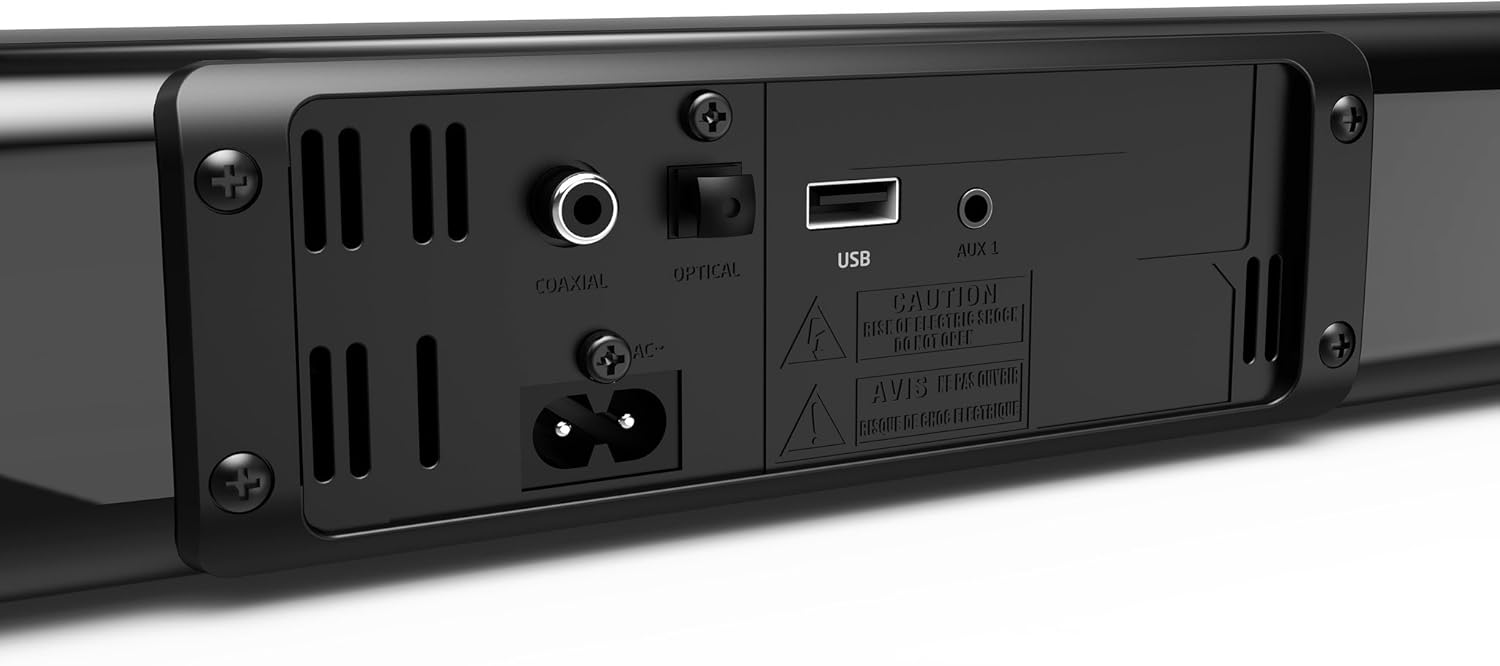
Figure 2: Close-up of the control buttons on top of the JVC Sound Bar. From left to right, these buttons include Power, Source, EQ, Volume Down, and Volume Up.
- Power Button: Turns the sound bar on or off.
- Source Button: Cycles through input sources (Bluetooth, AUX, Coaxial, Optical, USB).
- EQ Button: Selects pre-loaded equalizer settings.
- Volume - Button: Decreases the volume level.
- Volume + Button: Increases the volume level.
Rear Panel Connections

Figure 3: Rear view of the JVC Sound Bar showing input ports. From left to right, these include Coaxial, Optical, USB, and AUX 1 (3.5mm stereo mini jack) ports, along with the AC power input.
- AC Power Input: Connects the power cord.
- Coaxial Input: For digital audio connection from compatible devices.
- Optical (Toslink) Input: For digital audio connection from compatible devices.
- USB Input: For playing .WAV and MP3 audio files from a USB drive.
- AUX 1 (3.5mm) Input: For analog audio connection from devices with a 3.5mm audio output.
Remote Control

Figure 4: JVC Sound Bar remote control. This image shows the compact black remote with various buttons for power, mute, volume, source selection, EQ, and Bluetooth pairing.
The included remote control provides full functionality for operating your sound bar from a distance. It includes buttons for power, mute, volume adjustment, source selection (BT, AUX, Coaxial, Optical, USB), and EQ settings.
Setup
Placement Options
The JVC Sound Bar offers flexible placement options to suit your home entertainment setup.
- Tabletop Placement: Place the sound bar on a flat, stable surface in front of your television. Ensure there are no obstructions blocking the sound.
- Wall Mounting: Use the included wall mount kit to securely attach the sound bar to a wall below your television. Refer to the wall mount kit instructions for detailed installation steps.
Connecting Your Sound Bar
Before connecting, ensure all devices are powered off. Connect the sound bar to a power outlet using the provided power cord.
- Optical Connection (Recommended for best audio quality):
Connect an optical cable (not included) from the OPTICAL OUT port on your TV or audio device to the OPTICAL input on the sound bar.
- Coaxial Connection:
Connect a coaxial cable (not included) from the COAXIAL OUT port on your TV or audio device to the COAXIAL input on the sound bar.
- AUX (3.5mm) Connection:
Use the provided 3.5mm to 3.5mm audio cable to connect the AUX 1 input on the sound bar to the headphone jack or audio output on your device.
Alternatively, use the provided RCA to 3.5mm audio cable to connect the sound bar to RCA audio outputs on your TV or other audio source.
- USB Connection:
Insert a USB flash drive containing .WAV or MP3 audio files into the USB input port on the sound bar.
Operating Instructions
Power On/Off
- Press the Power button on the sound bar or remote control to turn the unit on or off.
Selecting an Input Source
- Press the Source button on the sound bar or the corresponding input button (BT, AUX, COAXIAL, OPTICAL, USB) on the remote control to switch between connected audio sources.
Volume Control
- Press the Volume + button to increase the volume.
- Press the Volume - button to decrease the volume.
- Press the Mute button on the remote control to temporarily silence the audio. Press again to unmute.
Bluetooth Pairing
To stream audio wirelessly from your Bluetooth-enabled device:
- Turn on the sound bar and select the Bluetooth source using the Source button or the BT button on the remote. The sound bar will enter pairing mode.
- Enable Bluetooth on your smartphone, tablet, or other device.
- Search for available Bluetooth devices and select "JVC TH-M327B" (or similar name) from the list.
- Once paired, the sound bar will indicate a successful connection, and you can begin streaming audio.
EQ Settings
- Press the EQ button on the sound bar or remote control to cycle through pre-loaded equalizer settings (e.g., Movie, Music, News) to optimize audio for different content types.
Maintenance
Proper maintenance ensures the longevity and optimal performance of your sound bar.
- Cleaning: Use a soft, dry cloth to wipe the exterior of the sound bar. Do not use liquid cleaners or abrasive materials, as they may damage the finish.
- Ventilation: Ensure the sound bar's vents are not blocked to prevent overheating.
- Storage: If storing the sound bar for an extended period, disconnect it from power and store it in a cool, dry place.
- Avoid Moisture: Keep the sound bar away from water, humidity, and direct sunlight.
Troubleshooting
| Problem | Possible Cause | Solution |
|---|---|---|
| No power | Power cord not securely connected. | Ensure the power cord is firmly plugged into the sound bar and a working power outlet. |
| No sound | Incorrect input source selected. Volume too low or muted. Cables not connected properly. | Select the correct input source. Increase volume and check if muted. Verify all audio cables are securely connected. |
| Bluetooth pairing failed | Sound bar not in pairing mode. Device too far. Bluetooth disabled on device. | Ensure sound bar is in Bluetooth pairing mode. Move device closer to sound bar. Enable Bluetooth on your device and try pairing again. |
| Remote control not working | Batteries are dead or incorrectly inserted. Obstruction between remote and sound bar. | Replace batteries with new ones, ensuring correct polarity. Remove any obstructions. Ensure you are within range and pointing the remote at the sound bar's sensor. |
| Distorted sound | Volume too high. Poor audio source quality. | Lower the volume. Try a different audio source or cable. |
Specifications
| Model Number | TH-M327B |
| Audio Channels | 2.0 Channel |
| Speaker Size | 2" x 2 (50.8mm x 2) |
| Audio Enhancement | Dolby Digital |
| Bluetooth Version | 4.2 |
| Inputs | 3.5mm Stereo Mini Jack (AUX), Coaxial Digital Audio, Optical (Toslink) Digital Audio, USB (for .WAV & MP3) |
| Dimensions (W x D x H) | 37.4" x 2.36" x 2.36" (95cm x 6cm x 6cm) |
| Weight | 2.2 lbs (1 kg) |
| Color | Black |
| Control Method | Remote Control |
| Mounting Type | Tabletop or Wall Mountable |
| UPC | 600136199007 |
Note: Specifications are subject to change without notice.
Warranty and Support
For warranty information and technical support, please refer to the warranty card included with your product or visit the official JVC website. Keep your purchase receipt as proof of purchase for warranty claims.
JVC Official Website: www.jvc.com
Related Documents - TH-M327B
 |
JVC CS-J620 Car Stereo Speaker Installation and Specifications Detailed installation guide and technical specifications for the JVC CS-J620 6.5-inch 2-way coaxial car stereo speaker. Includes dimensions, power handling, impedance, and connection information. |
 |
JVC TH-E631B 2.1 Channel Soundbar with Wireless Subwoofer Instruction Manual Operating instructions and safety guide for the JVC TH-E631B 2.1 Channel Soundbar with Wireless Subwoofer. Learn about setup, connections, features, and troubleshooting. |
 |
JVC TH-E874B 5.1.2 Channel Soundbar User Manual Official instruction manual for the JVC TH-E874B 5.1.2 Channel Soundbar with Wireless Subwoofer. Learn about setup, operation, safety, and troubleshooting. |
 |
JVC TH-E324B 2.0 Channel Soundbar Instruction Manual Comprehensive instruction manual for the JVC TH-E324B 2.0 Channel Soundbar, covering setup, operation, safety precautions, and troubleshooting. |
 |
JVC TH-E431B 2.1 Channel Soundbar Instruction Manual Official instruction manual for the JVC TH-E431B 2.1 Channel Soundbar with Built-in Subwoofer. Includes important safety information and operating guidelines. |
 |
JVC TH-E434B 2.1 Channel Soundbar with Wireless Subwoofer: User Manual & Setup Guide This instruction manual provides detailed information on setting up, operating, and troubleshooting the JVC TH-E434B 2.1 Channel Soundbar with Wireless Subwoofer. Learn about its features, connections, and safety precautions. |
Ask a question about this manual
Ask about setup, troubleshooting, compatibility, parts, safety, or missing instructions. Manuals+ will review the question and use this page’s manual context to help answer it.