
1. Introduction
This manual provides essential information for the safe and efficient operation of your N1C L-Series 1200 Lithium-Ion Uninterruptible Power Supply (UPS). The N1C L-Series UPS is designed to provide reliable power protection for critical equipment, featuring a 2000VA, 2kVA, 120V capacity with a pure sine wave output. It incorporates advanced Lithium-Ion battery technology for extended runtime and a long service life. Please read this manual thoroughly before installation and use.
2. Safety Information
Observe the following safety precautions during installation, operation, and maintenance of the UPS unit:
- Electrical Hazard: The UPS contains high voltage components. Do not open the UPS enclosure. Refer all servicing to qualified personnel.
- Battery Hazard: The UPS contains Lithium-Ion batteries. Do not dispose of batteries in a fire, as they may explode. Do not open or mutilate batteries.
- Ventilation: Ensure adequate ventilation around the UPS. Do not block ventilation openings.
- Environment: Install the UPS in a controlled environment, free from excessive dust, humidity, and extreme temperatures. The unit is designed to withstand temperatures up to 140°F (60°C).
- Grounding: Always connect the UPS to a grounded power outlet.
3. Product Overview
The N1C L-Series 1200 UPS is a rackmount unit designed for robust power protection. Key features include online double conversion topology, a 0.9 power factor, and an integrated SNMP card for network monitoring. The unit provides an 11-minute runtime with internal Lithium-Ion batteries, expandable to over 12 hours with optional external battery modules (EBMs).

Figure 1: Rear panel of the N1C L-Series 1200 UPS. This view displays the various power outlets, including NEMA 5-15R receptacles, communication ports (USB, SNMP), and cooling fan exhausts.
4. Setup
Follow these steps for initial setup of your N1C L-Series 1200 UPS:
- Unpacking: Carefully unpack the UPS and inspect for any shipping damage. Retain packaging for future transport.
- Placement: Install the UPS in a standard 19-inch rack using the included 4-post rail mounting kits. Ensure sufficient clearance for airflow around the front and rear panels.
- Initial Charging: Connect the UPS to a grounded 120V AC power outlet. Allow the internal batteries to charge for at least 8 hours before connecting any critical loads.
- Load Connection: Connect your equipment to the output receptacles on the rear panel of the UPS. Do not overload the UPS beyond its rated capacity.
- Communication Setup: For remote monitoring and management, connect an Ethernet cable to the SNMP port and configure the network settings as required. The UPS includes a standard SNMP card and 1000 Node Software Suite.
5. Operating Instructions
The N1C L-Series 1200 UPS operates with online double conversion technology, providing continuous, clean power to connected devices.
- Powering On: Press and hold the power button on the front panel for approximately 3 seconds until the UPS powers on. The display will illuminate, indicating operational status.
- Powering Off: To shut down the UPS, ensure all connected equipment is safely powered off. Then, press and hold the power button for approximately 3 seconds until the UPS powers off.
- Battery Runtime: The internal Lithium-Ion batteries provide approximately 11 minutes of runtime at full load. For extended runtime, connect compatible N1C External Battery Modules (EBMs) to achieve 12+ hours of backup power.
- Monitoring: Utilize the integrated SNMP card and software suite to monitor UPS status, battery health, and power events remotely.
6. Maintenance
The N1C L-Series 1200 UPS is designed for minimal maintenance, offering a 15-year maintenance-free design life for its Lithium-Ion batteries.
- Battery Monitoring: The UPS features standard internal battery monitoring to ensure optimal performance and alert you to any issues.
- Cleaning: Periodically clean the exterior of the UPS with a dry cloth. Ensure ventilation openings are free from dust and obstructions.
- Environmental Conditions: Maintain the operating environment within specified temperature and humidity ranges to prolong the life of the unit.
7. Troubleshooting
Refer to the following common issues and solutions. For problems not listed here, contact N1C support.
| Problem | Possible Cause | Solution |
|---|---|---|
| UPS does not power on | No input power; Battery not charged | Check power cord connection and wall outlet. Allow UPS to charge for several hours. |
| UPS beeps continuously | Overload condition; Low battery | Reduce connected load. Allow UPS to recharge. |
| Connected equipment loses power | UPS in bypass mode; Battery fault | Check UPS status display. Contact support if battery fault is indicated. |
8. Specifications
Detailed technical specifications for the N1C L-Series 1200 UPS (Model N1C.L2000) are provided below. Note that specifications are subject to change without prior notice.
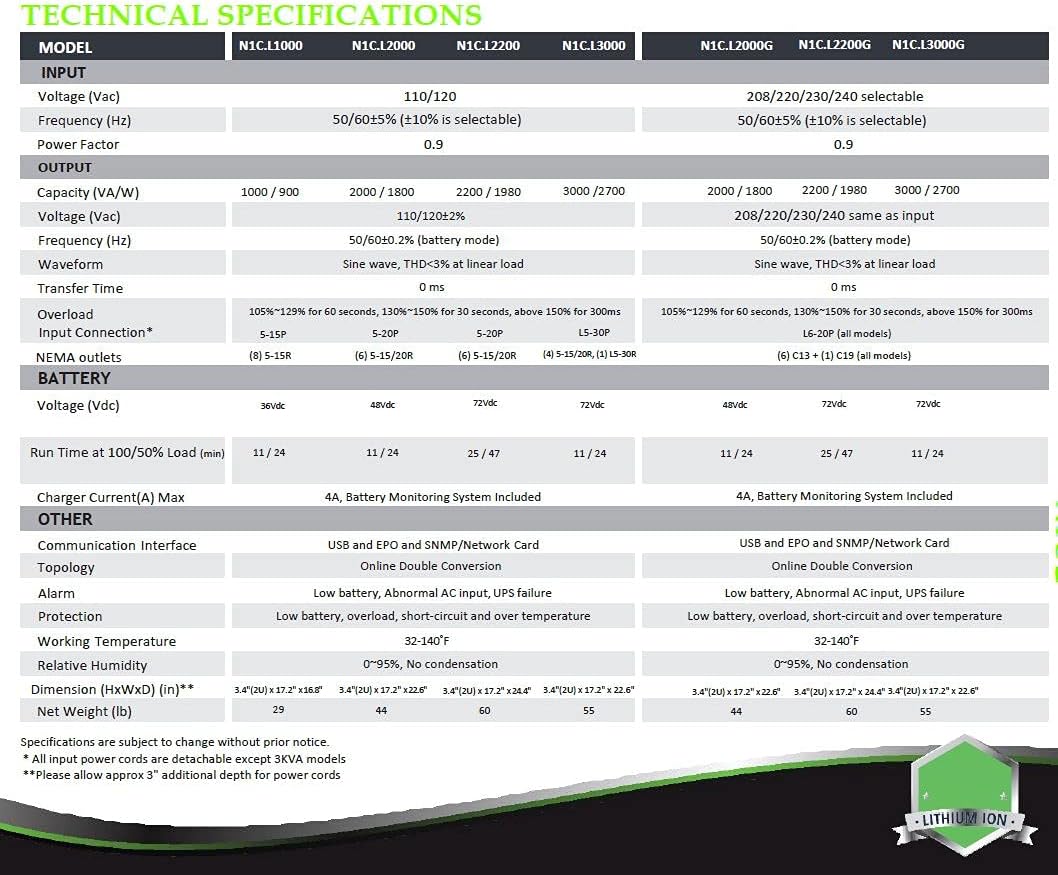
Figure 2: Technical Specifications for N1C L-Series UPS models. This table provides detailed information on input voltage, frequency, output capacity, runtime, battery voltage, communication interfaces, and physical dimensions for various models including N1C.L2000.
General Specifications:
- Model Number: N1C.L2000
- Product Dimensions: 22.6 x 17.2 x 3.4 inches
- Item Weight: 44 pounds
- Battery Cell Composition: Lithium Ion
- Voltage: 120 Volts
- Color: Black
- Material: Metal
- Topology: Online Double Conversion
- Power Factor: 0.9
- Operating Temperature: Up to 140°F (60°C)
9. Warranty Information
N1C stands behind the quality and reliability of its products:
- Electronics Warranty: Lifetime
- Battery Warranty: 10 Years
- Battery Design Life: 15 Years (Maintenance Free)
For detailed warranty terms and conditions, please refer to the official N1C website or contact customer support.
10. Support
For technical assistance, product inquiries, or warranty claims, please contact N1C Technologies, Inc. directly:
- Manufacturer: N1C Technologies, Inc.
- Website: www.lithium-ion-ups.com
Please have your UPS model number (N1C.L2000) and serial number available when contacting support.