
1. Introduction
This manual provides instructions for the Huayu Universal Remote Control, designed for use with various Samsung LED, LCD, HDTV, and 3D Smart TV models. This remote control is ready to use directly out of the box, requiring no complex setup or programming. Simply insert batteries, and it is ready for operation.
Key Features:
- No configuration required; functions immediately.
- Compatible with Samsung Smart TV LED/LCD/HDTV and 3D models.
- Backlit buttons for volume up/down and channel change for enhanced visibility in low light.
Compatible Samsung TV Models:
AA59-00326, BN59-00516A, BN59-00701A, BN59-01039A, AA59-00357, BN59-00517A, BN59-00702A, BN59-01040A, AA59-00370A/B, BN59-00529A, BN59-00705A, BN59-01052A, AA59-00399A/B/E, BN59-00530A, BN59-00706A, BN59-01069A, AA59-00424A, BN59-00531A, BN59-00752A, BN59-01069A, AA59-00465A, BN59-00539A, BN59-00857A, BN59-01078A, AA59-00466A, BN59-00555A, BN59-00847A, BN59-01081A, AA59-00483A, BN59-00559A, BN59-00859A, BN59-01175C, AA59-00484A, BN59-00602A, BN59-00862A, BN59-01175K, AA59-00508A, BN59-00603A, BN59-00863A, BN59-01178B, AA59-00478A, BN59-00604A, BN59-00864A, BN59-01178F, AA59-00560A, BN59-00610A, BN59-00865A, BN59-01179B, AA59-00582A, BN59-00609A, BN59-00886A, BN59-01175B, AA59-00594A, BN59-00610A, BN59-00901A, BN59-01175N, AA59-00616A, BN59-00611A, BN59-00937A, BN59-01180A, AA59-00628A, BN59-00613A, BN59-00938A, BN59-01189A, AA59-00630A, BN59-00676A, BN59-00940A, BN59-01189B, AA59-00640A, BN59-00681A, BN59-00943A, BN59-01198C, AA59-00649A, BN59-00683A, BN59-00960A, BN59-01198Q, AA59-00714A, BN59-00684A/B, BN59-01005A, BN59-01199G, AA59-00741A, BN59-00685A/B, BN59-01015A, BN59-01247A, AA59-00742A, BN59-00686A, BN59-01012A, BN59-01198D, AA59-00743A, BN59-00687A, BN59-01014A, BN59-01198R, AA59-00793A, BN59-00557A, BN59-01018A, BN59-01054A, AA59-00795A, BN59-00567A, AA59-00799A, AA59-00809A, AA59-00823A, AA59-00655A, BN59-000624A, BN59-00399A, BN59-00343A/C, BN59-00457A/C, BN59-00457A, BN59-00477A, BN59-00489, BN59-00507A, BN59-00512A.
2. Safety Information
- Do not expose the remote control to direct sunlight, heat sources, or extreme temperatures.
- Avoid dropping or subjecting the remote control to strong impacts.
- Keep out of reach of children to prevent accidental ingestion of batteries.
- Do not mix old and new batteries, or different types of batteries.
- Dispose of used batteries according to local regulations.
3. Package Contents
- 1 x Huayu Universal Remote Control (Model: B078VSHY8Z)
Note: 2 x AAA batteries are required and are not included in the package.
4. Setup
4.1 Battery Installation
- Locate the battery compartment on the back of the remote control.
- Slide open the battery compartment cover.
- Insert two (2) AAA batteries, ensuring the correct polarity (+ and -) as indicated inside the compartment.
- Close the battery compartment cover securely.
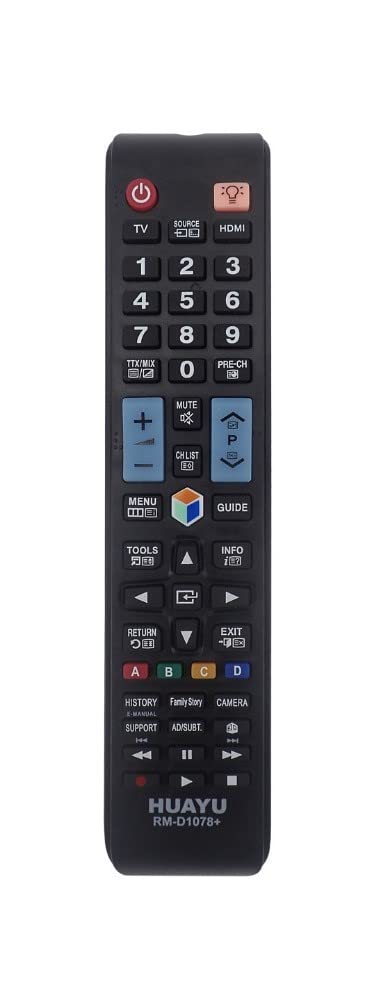
Image: Huayu Universal Remote Control. This image shows the front view of the remote control, highlighting its button layout and design. The remote is black with clearly labeled buttons.
4.2 Initial Use (No Configuration Required)
This Huayu remote control is pre-programmed for Samsung Smart TVs. After installing the batteries, it is ready for immediate use with compatible Samsung models. No additional programming steps are necessary.
5. Operating Instructions
5.1 Basic Functions
- Power Button: Press to turn your Samsung TV on or off.
- Number Buttons (0-9): Use to directly input channel numbers.
- Volume Up/Down (VOL +/-): Adjusts the audio volume. These buttons feature a backlight for visibility.
- Channel Up/Down (CH +/-): Changes the TV channel. These buttons also feature a backlight.
- Mute Button: Mutes or unmutes the TV audio.
- Navigation Pad (Up/Down/Left/Right/Enter): Used to navigate menus and select options on your TV.
- Smart Hub/Home Button: Accesses the Smart Hub or Home screen of your Samsung Smart TV.
- Back/Return Button: Returns to the previous screen or menu.
- Exit Button: Exits the current menu or application.
5.2 Backlight Feature
The Volume Up/Down and Channel Up/Down buttons are equipped with a backlight. This feature automatically illuminates these buttons, making them easier to locate and use in dimly lit environments. The backlight activates when any button is pressed and typically fades after a few seconds of inactivity to conserve battery life.
6. Maintenance
6.1 Cleaning
- Wipe the remote control with a soft, dry cloth.
- Do not use abrasive cleaners, solvents, or chemical agents, as these may damage the surface or internal components.
6.2 Battery Replacement
When the remote control's performance degrades (e.g., reduced range, unresponsive buttons), it is likely time to replace the batteries. Follow the steps in Section 4.1 Battery Installation to replace the two AAA batteries.
Always replace both batteries at the same time with new ones of the same type.
7. Troubleshooting
| Problem | Possible Cause | Solution |
|---|---|---|
| Remote control not responding. | Dead or incorrectly inserted batteries. Obstruction between remote and TV. Remote out of range. | Replace batteries with new AAA batteries, ensuring correct polarity. Remove any obstructions. Ensure you are within 10 meters (33 feet) of the TV. |
| Buttons are unresponsive or sticky. | Dirt or debris under buttons. Worn-out internal contacts. | Clean the remote control as described in Section 6.1. If the issue persists, the remote may need replacement. |
| Backlight not working. | Low battery power. Feature not active on all buttons. | Replace batteries. Note that only Volume and Channel buttons are backlit. |
| Remote works intermittently. | Weak batteries. Infrared sensor on TV is blocked. | Replace batteries. Ensure the TV's infrared sensor is clear and unobstructed. |
8. Specifications
- Brand: HUAYU
- Model: B078VSHY8Z (Universal Remote Control)
- Compatible Devices: Samsung LED/LCD/HDTV and 3D Smart TVs
- Connectivity Technology: Infrared (IR)
- Number of Buttons: 25
- Maximum Range: 10 meters (approximately 33 feet)
- Power Source: 2 x AAA batteries (not included)
- Special Features: Backlit Volume and Channel buttons, Universal compatibility (no setup)
9. Warranty and Support
Warranty information for this product is not explicitly provided in the available documentation. For support or warranty inquiries, please contact your retailer or the manufacturer directly.
Manufacturer: Huayu