
1. Introduction
This manual provides detailed instructions for the installation, operation, and maintenance of the Planet ISW-500T 5-Port 10/100TX Fast Ethernet Switch. Please read this manual thoroughly before using the device to ensure proper functionality and safety.
2. Product Overview
The Planet ISW-500T is a compact, industrial-grade 5-port 10/100TX Fast Ethernet Switch designed for reliable performance in harsh environments. It features an IP30-rated metal casing and supports a wide operating temperature range of -40 to 75 degrees Celsius, making it suitable for industrial automation, transportation, and surveillance applications. The switch provides five 10/100Mbps auto-negotiating Ethernet ports with auto MDI/MDI-X functionality, simplifying network deployment.
3. Package Contents
Please verify the contents of your package. If any items are missing or damaged, contact your vendor immediately.
- Planet ISW-500T 5-Port 10/100TX Fast Ethernet Switch
- User Manual (this document)
- DIN-rail mounting kit
- Terminal block for power input
- (Optional) Power Adapter (may be sold separately depending on region/vendor)
4. Hardware Description
The ISW-500T features a robust metal enclosure with clearly labeled ports and LED indicators for easy status monitoring.
4.1 Front Panel
The front panel includes the Ethernet ports and LED indicators.
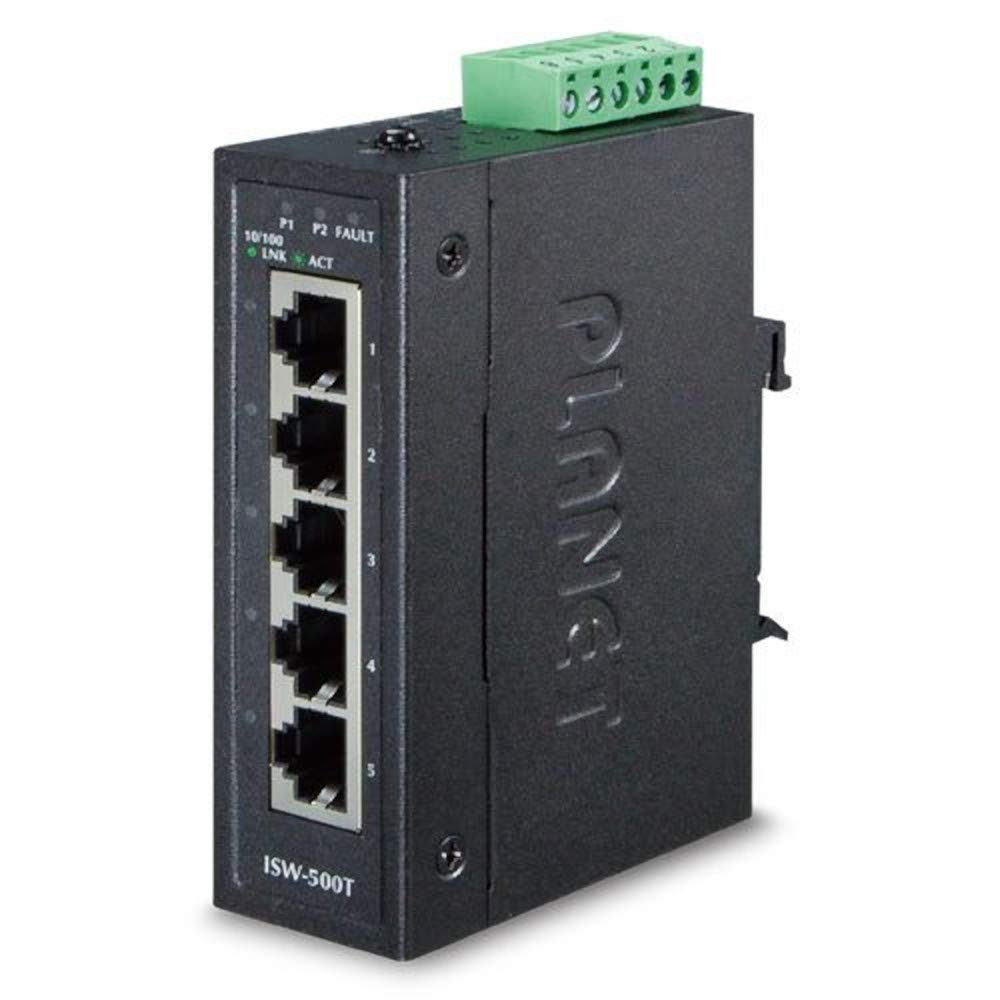
Figure 1: Front view of the ISW-500T switch. This image displays the five 10/100TX RJ45 ports and the corresponding LED indicators for power, link, and activity status.
- RJ45 Ports (1-5): Five 10/100Mbps Fast Ethernet ports with auto MDI/MDI-X.
- Power LED: Indicates power status (On: Power is supplied; Off: No power).
- Link/Act LEDs (per port): Indicates connection status and activity (On: Link established; Blinking: Data activity).
4.2 Top Panel
The top panel features the terminal block for power input.
- Terminal Block: Provides redundant DC power input (e.g., 12-48V DC, check specifications for exact range).
5. Installation and Setup
5.1 Safety Precautions
- Ensure power is disconnected before installation or maintenance.
- Install the device in a well-ventilated area.
- Avoid exposing the device to excessive moisture or extreme temperatures outside its specified operating range.
- Use appropriate grounding procedures.
5.2 Mounting the Switch
The ISW-500T can be mounted on a standard DIN-rail or directly to a wall.
5.2.1 DIN-Rail Mounting
- Attach the DIN-rail clip to the rear of the switch using the provided screws.
- Hook the top of the clip over the DIN-rail.
- Push the bottom of the switch towards the DIN-rail until it clicks into place.
5.2.2 Wall Mounting
- Remove the DIN-rail clip if it is attached.
- Use the mounting holes on the back of the switch as a template to mark screw positions on the wall.
- Insert appropriate screws into the wall, leaving a small gap.
- Hang the switch onto the screws and tighten them to secure the device.
5.3 Connecting Power
- Ensure the power source is off.
- Connect the positive and negative wires from your DC power supply to the corresponding terminals on the terminal block.
- Securely tighten the terminal block screws.
- Insert the terminal block into the power input port on the switch.
- Connect the ground wire to the grounding screw on the switch chassis.
- Turn on the power supply. The Power LED on the front panel should illuminate.
5.4 Connecting Network Devices
Use standard RJ45 Ethernet cables (Category 5e or higher) to connect your network devices (e.g., computers, servers, other switches) to any of the five 10/100TX ports on the switch. The switch supports auto MDI/MDI-X, so straight-through or crossover cables can be used interchangeably.
- Once a device is connected, the corresponding Link/Act LED will light up, indicating a successful connection.
- The LED will blink when data is being transmitted or received.
6. Operating Instructions
The Planet ISW-500T is a plug-and-play unmanaged switch. No software configuration is required for basic operation.
6.1 Power On
After connecting the power supply as described in Section 5.3, the switch will power on automatically. The Power LED will be solid green.
6.2 Network Connectivity
Connect your Ethernet devices to any of the five RJ45 ports. The switch will automatically detect the speed (10Mbps or 100Mbps) and duplex mode (half or full) of the connected device. The corresponding Link/Act LED will indicate the connection status.
- Solid Green Link/Act LED: Indicates a stable 10/100Mbps link.
- Blinking Green Link/Act LED: Indicates data activity on the port.
7. Maintenance
The ISW-500T is designed for minimal maintenance. However, periodic checks can help ensure optimal performance.
- Cleaning: Gently wipe the exterior of the switch with a soft, dry cloth. Do not use liquid or aerosol cleaners.
- Environmental Check: Ensure the operating environment remains within the specified temperature and humidity ranges.
- Cable Integrity: Periodically inspect Ethernet and power cables for damage or loose connections.
8. Troubleshooting
This section provides solutions to common issues you might encounter.
| Problem | Possible Cause | Solution |
|---|---|---|
| No Power LED | No power supply; faulty power connection. | Check power cable connection to the switch and power outlet. Verify power source is active. Ensure terminal block is correctly inserted and wires are secure. |
| Link/Act LED is off for a connected device | Faulty Ethernet cable; device is off or faulty; incorrect port connection. | Ensure the connected device is powered on and functioning. Replace the Ethernet cable. Try connecting to a different port on the switch. |
| Slow network speed | Cable quality issue; network congestion; device limitations. | Ensure you are using Category 5e or higher Ethernet cables. Check for excessive network traffic. Verify the capabilities of connected devices. |
9. Specifications
The following table lists the technical specifications for the Planet ISW-500T switch.
| Feature | Description |
|---|---|
| Brand | Planet |
| Model Number | ISW-500T (Mfr Part Number: 9381) |
| Number of Ports | 5 x 10/100TX Fast Ethernet |
| Data Transfer Rate | 100 Megabits Per Second (max) |
| Voltage Input | 24 Volts DC (typical, check product label for exact range) |
| Item Weight | 0.38 Kilograms |
| Operating Temperature | -40 to 75 Degrees Celsius |
| Enclosure | IP30-rated Metal Case |
10. Warranty and Support
For warranty information and technical support, please refer to the official Planet Technology website or contact your authorized Planet reseller. Keep your purchase receipt for warranty claims.
Planet Technology Website: www.planet.com.tw


