1. Introduction
The Sony 18-135mm F3.5-5.6 OSS APS-C E-Mount Zoom Lens is a versatile lens designed for Sony Alpha E-Mount cameras. It offers a 7.5x high magnification zoom, equivalent to a 27-202.5mm focal length in 35mm format. This lens is ideal for a wide range of photography, from wide-angle landscapes to telephoto shots, thanks to its broad focal range.
Key Features:
- 7.5x high magnification zoom (27-202.5mm 35mm equivalent focal length).
- Outstanding sharpness from 1x aspherical and 2x ED glass elements.
- 7-blade circular aperture for smooth bokeh.
- Optical SteadyShot image stabilization for sharper stills and video.
- Fast, precise, quiet autofocus for high-speed stills and impressive video.
2. Setup
Attaching the Lens
To attach the lens to your camera, align the white dot on the lens barrel with the corresponding white dot on your camera's E-mount. Gently insert the lens into the camera mount and rotate it clockwise until it clicks securely into place. Ensure the lens is firmly attached before use.

Image: The Sony 18-135mm lens with its E-mount visible, along with the AF/MF switch on the side.
Removing the Lens
To remove the lens, press and hold the lens release button on your camera body. While holding the button, rotate the lens counter-clockwise until it detaches from the camera mount. Always place the front and rear lens caps back on the lens immediately after removal to protect the glass elements.

Image: The Sony 18-135mm lens with its zoom and focus rings, indicating the focal length markings.
Attaching the Lens Hood
Attach the petal-shaped lens hood by aligning its mark with the mark on the lens barrel, then rotate it until it locks into place. The lens hood helps to block unwanted light and protect the front element of the lens.
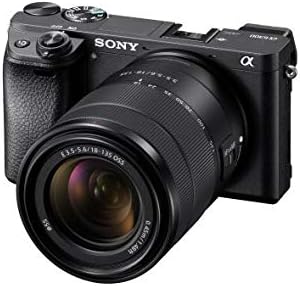
Image: The Sony 18-135mm lens with its petal-shaped lens hood, attached to a Sony camera body.
3. Operating the Lens
Zooming
To adjust the focal length, rotate the zoom ring on the lens barrel. The focal length markings (18, 24, 35, 50, 70, 100, 135mm) are indicated on the lens. Always finish zooming before focusing to maintain optimal image quality.
Focusing (AF/MF Switch)
The lens features an AF/MF (Autofocus/Manual Focus) switch. Slide the switch to 'AF' for automatic focusing, or to 'MF' for manual focusing. In manual focus mode, rotate the focus ring to achieve desired sharpness.
Optical SteadyShot
This lens is equipped with Optical SteadyShot image stabilization. This technology helps to reduce camera shake, resulting in sharper images and smoother videos, especially in low-light conditions or when shooting at longer focal lengths.
Aperture
The lens has a variable aperture of F3.5-5.6. This means the maximum aperture changes with the focal length: F3.5 at 18mm and F5.6 at 135mm. This design contributes to the lens's compact size and lightweight nature.
4. Maintenance
Proper maintenance ensures the longevity and performance of your lens.
- Cleaning: Use a soft, lint-free cloth to clean the lens barrel. For lens elements, use a lens brush to remove dust, then gently wipe with a lens cleaning solution and a microfiber cloth. Avoid touching the glass directly.
- Storage: Always attach the front and rear lens caps when the lens is not in use. Store the lens in a dry, cool place, away from direct sunlight and extreme temperatures. Consider using a dehumidifying cabinet if you live in a humid environment.
- Handling: Avoid exposing the lens to excessive moisture, dust, or sand. Do not apply excessive force when attaching or detaching the lens.
5. Troubleshooting
If you encounter issues with your lens, consider the following general troubleshooting steps:
- Lens not recognized: Ensure the lens is securely attached to the camera body. Clean the electrical contacts on both the lens and camera with a dry, clean cloth.
- Autofocus issues: Check if the AF/MF switch on the lens is set to 'AF'. Ensure there is sufficient light for the autofocus system to operate effectively.
- Blurry images: Verify that Optical SteadyShot is enabled if needed. Check your camera's shutter speed and aperture settings. Ensure the lens elements are clean.
- Lens not zooming/focusing smoothly: Avoid forcing the rings. If resistance is felt, do not attempt to disassemble the lens. Contact Sony support for assistance.
6. Specifications
| Feature | Detail |
|---|---|
| Product Dimensions | 2.75 x 3.5 x 0.03 inches |
| Item Weight | 11.5 ounces |
| Item Model Number | SEL18135 |
| Manufacturer | Sony |
| Focal Length Description | 18-135mm |
| Lens Type | Wide Angle, Normal, Telephoto |
| Compatible Mountings | Sony E |
| Minimum Focus Distance | 0.45 m (1.48 feet) |
| Filter Diameter | 55mm |
| Lens Groups / Elements | 12-16 |
7. What's in the Box
The following items are typically included with your Sony 18-135mm F3.5-5.6 OSS APS-C E-Mount Zoom Lens:
- Sony 18-135mm F3.5-5.6 OSS APS-C E-Mount Zoom Lens
- Lens front cap
- Lens rear cap
- Lens hood
8. Warranty and Support
For warranty information, please refer to the documentation included with your product or visit the official Sony support website. For technical assistance, product registration, or service inquiries, please contact Sony customer support.
9. Product Videos
Sony 18-135mm F3.5-5.6 OSS APS-C E-Mount Zoom Lens Overview
Video: A detailed overview of the Sony 18-135mm F3.5-5.6 OSS APS-C E-Mount Zoom Lens, highlighting its features and benefits for various photography needs.
Overview & Demo - Sony 18-135mm Zoom Lens
Video: This video provides an overview and demonstration of the Sony 18-135mm Zoom Lens, showcasing its functionality and performance in real-world scenarios.
Great Sony Lens! Crisp Quality Every Time!
Video: A review highlighting the crisp image quality and overall performance of the Sony 18-135mm lens, emphasizing its reliability for consistent results.


