
Introduction
The DIGITEN G3/8 Inch Quick Connect Water Flow Sensor Switch (Model FL-308) is designed to measure water flow rates accurately. This device features quick connect fittings for easy installation and provides a pulse signal output proportional to the water flow. It is suitable for various applications requiring precise flow monitoring.
This manual provides essential information for the safe and effective installation, operation, and maintenance of your flow sensor.
Safety Information
- Ensure the power supply voltage is within the specified range (DC 3-24V) to prevent damage to the sensor.
- Do not exceed the maximum water pressure of 0.8 MPa to avoid leaks or sensor failure.
- Install the sensor in a location protected from extreme temperatures and humidity outside the specified operating ranges.
- Always disconnect power before performing any installation, wiring, or maintenance.
- Handle the sensor with care to prevent physical damage.
Package Contents
- 1 x DIGITEN G3/8" Water Flow Sensor (Model FL-308)
Please inspect the package contents upon receipt to ensure all items are present and undamaged. If any items are missing or damaged, contact customer support.
Specifications
| Model | FL-308 |
| Working Range | 0.3 - 10 L/min |
| Working Voltage Range | DC 3 - 24 V |
| Max Current | 10 mA |
| Output Pulse Rate | F = 21 * Q (L/Min) ±2% |
| Output Waveform | Square Wave |
| Water Pressure Range | ≤ 0.8 MPa |
| Operating Temperature | ≤ 80℃ |
| Operating Humidity | 35% - 90% RH |
| Storage Temperature | -25℃ - 80℃ |
| Storage Humidity | 25% - 95% RH |
| Material | Copper (internal components) |
| Cable Length | 15 cm |
| Compliance | ROHS Compliant |
 Figure 1: Product features and dimensions of the DIGITEN FL-308 Water Flow Sensor.
Setup and Installation
1. Physical Installation
- Identify Flow Direction: The sensor has an arrow indicating the direction of water flow. Ensure the sensor is installed correctly in line with the water flow.
- Connect Fittings: Use the G3/8 inch quick connect fittings to integrate the sensor into your water line. Ensure connections are secure and watertight to prevent leaks.
- Mounting: Secure the sensor in a stable position to prevent movement or strain on the connections.
 Figure 2: Top view of the flow sensor with quick connect fittings.
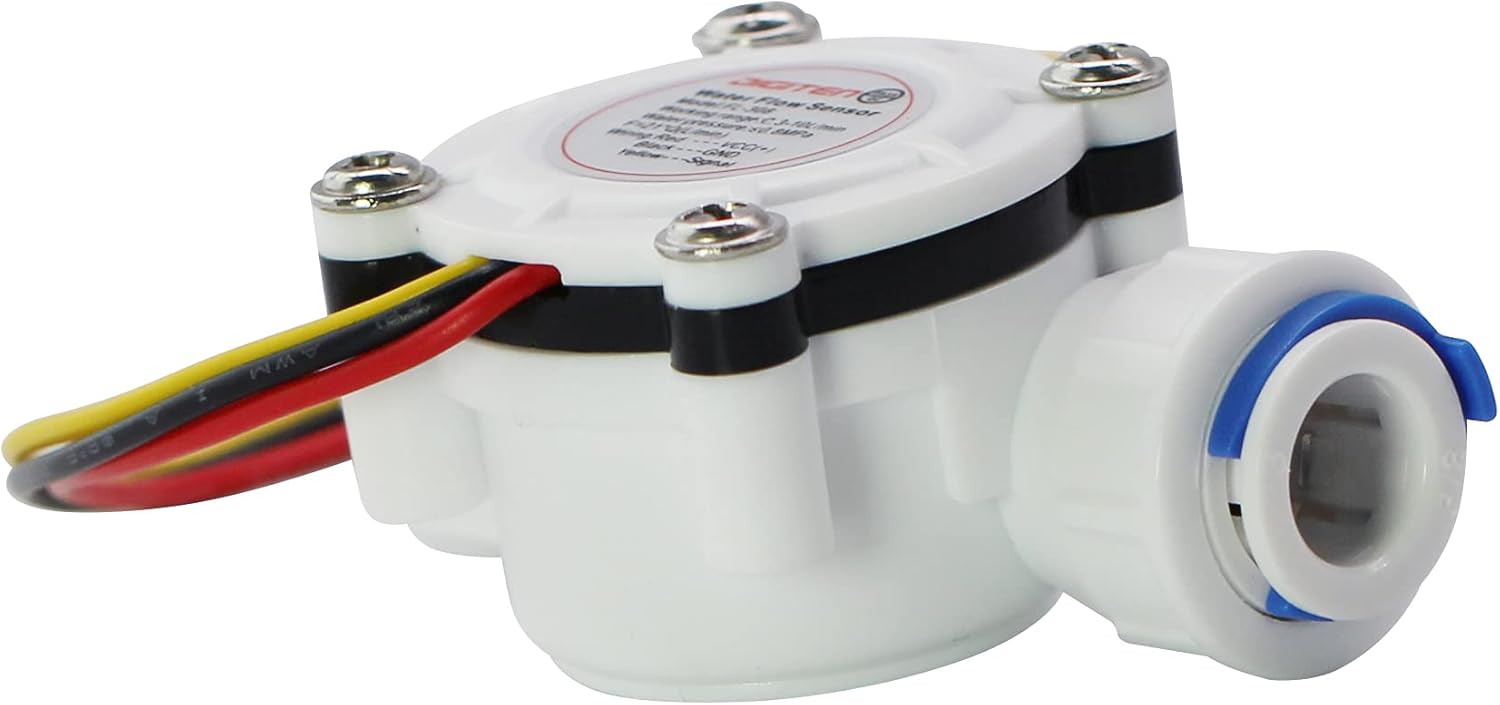 Figure 3: Side view of the flow sensor.
2. Electrical Wiring
The sensor comes with a 3-wire connection. Follow the wiring diagram below:
- Red Wire: Connect to VCC (+) (DC 3-24V power supply).
- Black Wire: Connect to GND (Ground).
- Yellow Wire: Connect to Signal Output (Pulse signal).
 Figure 4: Wiring connections for the flow sensor.
Ensure all electrical connections are secure and properly insulated to prevent short circuits or electrical hazards.
Operating Instructions
The DIGITEN FL-308 water flow sensor operates based on the Hall effect principle, generating a square wave pulse signal proportional to the water flow rate.
Flow Rate Calculation
The output frequency (F) in Hz can be calculated using the following formula:
F = 21 * Q (L/Min)
Where:
- F is the output pulse frequency in Hz.
- Q is the water flow rate in Liters per Minute (L/Min).
The sensor provides approximately 450 output pulses per liter of water. This value can be used for total volume measurement over time.
Connect the yellow signal wire to a microcontroller or a pulse counter to read the frequency and calculate the flow rate or total volume.
Maintenance
- Regular Inspection: Periodically check the sensor and its connections for any signs of wear, damage, or leaks.
- Cleaning: If the sensor's performance degrades, it may be due to debris accumulation. Disconnect the sensor from the water line and power, then carefully flush it with clean water. Avoid using harsh chemicals.
- Storage: If storing the sensor for an extended period, ensure it is clean, dry, and stored within the specified storage temperature and humidity ranges.
Troubleshooting
| Problem | Possible Cause | Solution |
|---|---|---|
| No signal output |
|
|
| Inaccurate flow readings |
|
|
| Water leakage |
|
|
Warranty and Support
DIGITEN provides a one-year warranty for any quality problems with this product. For technical support, troubleshooting assistance, or warranty claims, please contact DIGITEN customer service through the retailer where the product was purchased or visit the official DIGITEN website.
Please retain your purchase receipt as proof of purchase for warranty purposes.

