
Introduction
This manual provides instructions for the AIDITIYMI BN59-01199F replacement remote control. This remote is designed to function as a direct replacement for your original Samsung TV remote, offering seamless operation without the need for complex programming.
Setup
1. Battery Installation
The remote control requires two AAA batteries (not included) for operation. Follow these steps to install the batteries:
- Locate the battery compartment cover on the back of the remote control.
- Press down on the tab and slide the cover downwards to open the compartment.
- Insert two AAA batteries, ensuring the positive (+) and negative (-) terminals align correctly with the markings inside the compartment.
- Slide the battery compartment cover back into place until it clicks securely.
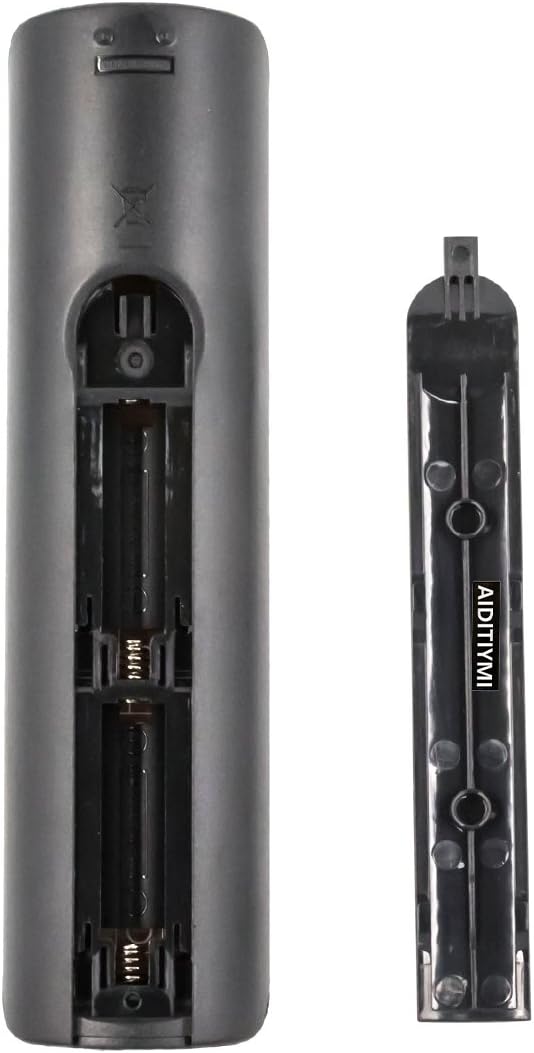
Figure 1: Battery compartment with cover removed.
2. Initial Use
This replacement remote control is designed for immediate use with compatible Samsung TV models. No programming or pairing is typically required. Simply install the batteries and point the remote towards your television to begin operation.
Operating Instructions
Familiarize yourself with the buttons and their functions for optimal control of your Samsung TV.

Figure 2: Front view of the remote control.
Button Functions:
- POWER (●): Turns the TV on or off.
- SOURCE: Selects the input source (e.g., HDMI1, AV, Component).
- Number Buttons (0-9): Directly selects TV channels.
- PRE-CH: Returns to the previous channel.
- VOL (+/-): Adjusts the volume level.
- MUTE: Mutes or unmutes the TV sound.
- CH (Up/Down): Changes TV channels sequentially.
- CH LIST: Displays the channel list.
- MENU: Opens the TV's main menu.
- SMART HUB: Accesses the Samsung Smart Hub for apps and streaming services.
- GUIDE: Displays the electronic program guide.
- INFO: Displays information about the current program or input.
- TOOLS: Accesses quick settings or context-sensitive options.
- Directional Pad (Up/Down/Left/Right) & Enter: Navigates menus and confirms selections.
- RETURN: Returns to the previous screen or menu.
- EXIT: Exits the current menu or function.
- Colored Buttons (A, B, C, D): Provide access to specific functions within certain menus or applications (e.g., Red for E-Manual, Green for Sports, Yellow for CC, Blue for other functions).
- Playback Controls (Play, Pause, Stop, Fast Forward, Rewind): Controls media playback.
Maintenance
Battery Replacement:
Replace batteries when the remote's response becomes sluggish or stops working. Always replace both batteries at the same time with new AAA batteries. Do not mix old and new batteries, or different types of batteries.
Cleaning:
To clean the remote control, wipe it with a soft, dry cloth. Do not use liquid cleaners, sprays, or abrasive materials, as these can damage the remote's surface or internal components.
Storage:
If the remote control will not be used for an extended period, remove the batteries to prevent leakage and potential damage to the device.
Troubleshooting
- Remote not responding:
- Ensure the batteries are correctly installed with the correct polarity (+/-).
- Replace old batteries with new AAA batteries.
- Point the remote directly at the TV's infrared sensor. Ensure there are no obstructions between the remote and the TV.
- Check if the TV's power is on.
- Buttons not working or slow response:
- This can indicate low battery power. Replace the batteries.
- Ensure the remote is within the effective operating range (up to 32 feet).
- Clean the remote's surface, especially around the buttons, to ensure no debris is interfering with button presses.
- Remote works intermittently:
- This could be due to weak batteries or interference from other electronic devices. Try replacing batteries and moving potential sources of interference.
Specifications
| Feature | Detail |
|---|---|
| Brand | AIDITIYMI |
| Model Name | BN59-01199F |
| Connectivity Technology | Infrared |
| Compatible Devices | Television (Samsung) |
| Number of Buttons | 44 |
| Maximum Range | 32 Feet |
| Battery Type | 2 x AAA batteries (not included) |
| Color | Black |
| Item Weight | 0.16 Pounds |
Compatible Samsung TV Models
This remote control is compatible with a wide range of Samsung TV models, including but not limited to:
- UN24M4500AFXZA
- UN28M4500AFXZA
- UN32J4500AF
- UN32J4500AFXZA
- UN32J5205AF
- UN32J5205AFXZA
- UN32J525DAF
- UN32J525DAFXZA
- UN32M4500AFXZA
- UN32M5300AFXZA
- UN40J5200AF
- UN40J5200AFXZA
- UN40J520DAF
- UN40J520DAFXZA
- UN40J6200AF
- UN40J6200AFXZA
- UN40JU6400F
- UN40JU6400FXZA
- UN40JU640DAFXZA
- UN40JU640DFXZA
- UN40JU650DF
- UN40M5300AFXZA
- UN43J5200AF
- UN43J5200AFXZA
- UN43J5202AF
- UN43J5202AFXZA
- UN43J520DAF
- UN43J520DAFXZA
- UN43JU640DF
- UN43JU640DFXZA
- UN43M530D
- UN43M5300AFXZA
- UN48J5200AF
- UN48J5200AFXZA
- UN48J5201AF
- UN48J5201AFXZA
- UN48J520DAF
- UN48J520DAFXZA
- UN48J6200AF
- UN48J6200AFXZA
- UN48J620DAF
- UN48J620DAFXZA
- UN48JU6400F
- UN48JU6400FXZA
- UN48JU640DF
- UN48JU640DFXZA
- UN50J5200AF
- UN50J5200AFXZA
- UN50J5201
- UN50J520DAF
- UN50J520DAFXZA
- UN50J520DFXZA
- UN50J6200AF
- UN50J6200AFXZA
- UN50J620DAF
- UN50J620DAFXZA
- UN50M5300AFXZA
- UN50M5300FXZA
- UN50MU6070F
- UN50MU6070FXZA
- UN55J6200AF
- UN55J6200AFXZA
- UN55J6201AF
- UN55J6201AFXZA
- UN55J620DAF
- UN55J620DAFXZA
- UN55JU6400F
- UN55JU6400FXZA
- UN55JU640DF
- UN55JU640DFXZA
- UN58MU6100
- UN58MU6100F
- UN58MU6100FXZA
- UN60J6200AF
- UN60J6200AFXZA
- UN60J620DAF
- UN60J620DAFXZA
- UN60JU6400F
- UN60JU6400FXZA
- UN65J6200AF
- UN65J6200AFXZA
- UN65J620DAF
- UN65J620DAFXZA
- UN65JU6400F
- UN65JU6400FXZA
- UN65JU640DAFXZA
- UN65JU640DF
- UN65JU640DFXZA
- UN65MU6070F
- UN65MU6070FXZA
For a complete list of compatible models, please refer to the product packaging or contact AIDITIYMI customer support.
Warranty Information
This AIDITIYMI remote control comes with a 1-Year Warranty from the date of purchase. This warranty covers manufacturing defects and malfunctions under normal use. It does not cover damage caused by misuse, accidents, unauthorized modifications, or battery leakage.
Please retain your proof of purchase for warranty claims.
Customer Support
If you encounter any issues not covered in this manual or require further assistance, please contact AIDITIYMI customer support. Provide your product model number (BN59-01199F) and a detailed description of the issue for efficient service.
Contact information can typically be found on the product packaging or the manufacturer's official website.