
1. Product Overview
The BTMETER BT-7200B is a True RMS 6000 counts digital clamp multimeter designed for accurate and reliable electrical measurements. It offers a wide range of functions suitable for both professional and DIY applications.
Key features include:
- AC/DC Clamp Amperage: Measures AC/DC current up to 400A without breaking the circuit.
- AC/DC Voltage: Measures voltage up to 600V.
- Resistance, Capacitance, and Frequency: Comprehensive testing capabilities for various electrical components.
- Non-Contact Voltage (NCV) Detection: Enhances safety by detecting live wires without physical contact.
- Continuity and Diode Test: Essential for circuit diagnostics.
- Temperature Measurement: Supports temperature readings in Celsius and Fahrenheit using the included thermocouple probe.
- Large Backlit LCD Display: Ensures clear readability in various lighting conditions.
- Data Logging: Records measurements for later analysis, including maximum, minimum, and average values.
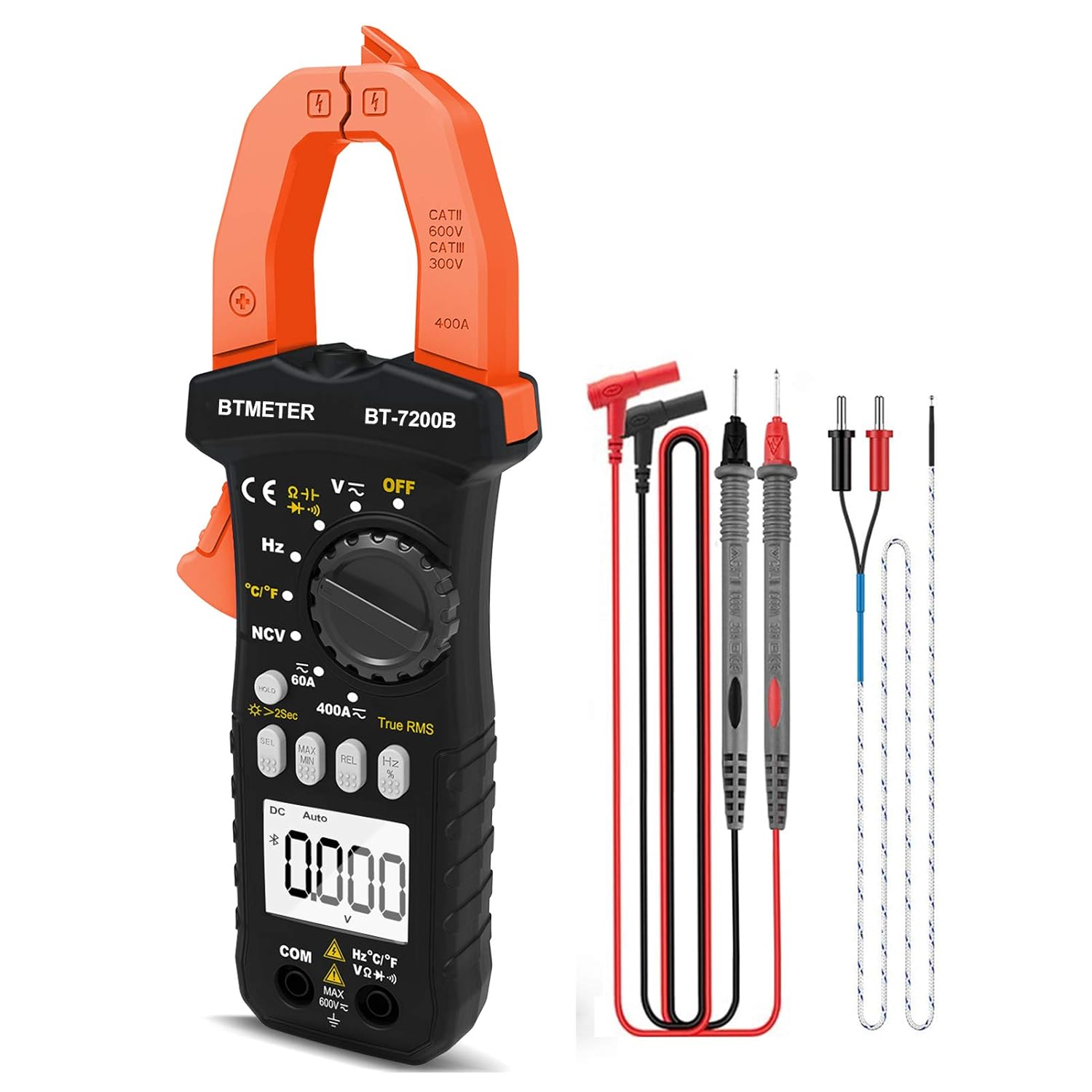
Figure 1.1: BTMETER BT-7200B Clamp Multimeter and included accessories.

Figure 1.2: Overview of the BTMETER BT-7200B's main features.
2. Setup
2.1 Package Contents
Before first use, verify all items are present in the package:
- BTMETER BT-7200B Clamp Multimeter
- Test Leads (Red and Black)
- Thermocouple Temperature Probe
- Screwdriver
- 1.5V AAA Batteries (x2)
- Carrying Case
- User Manual (PDF - external document)
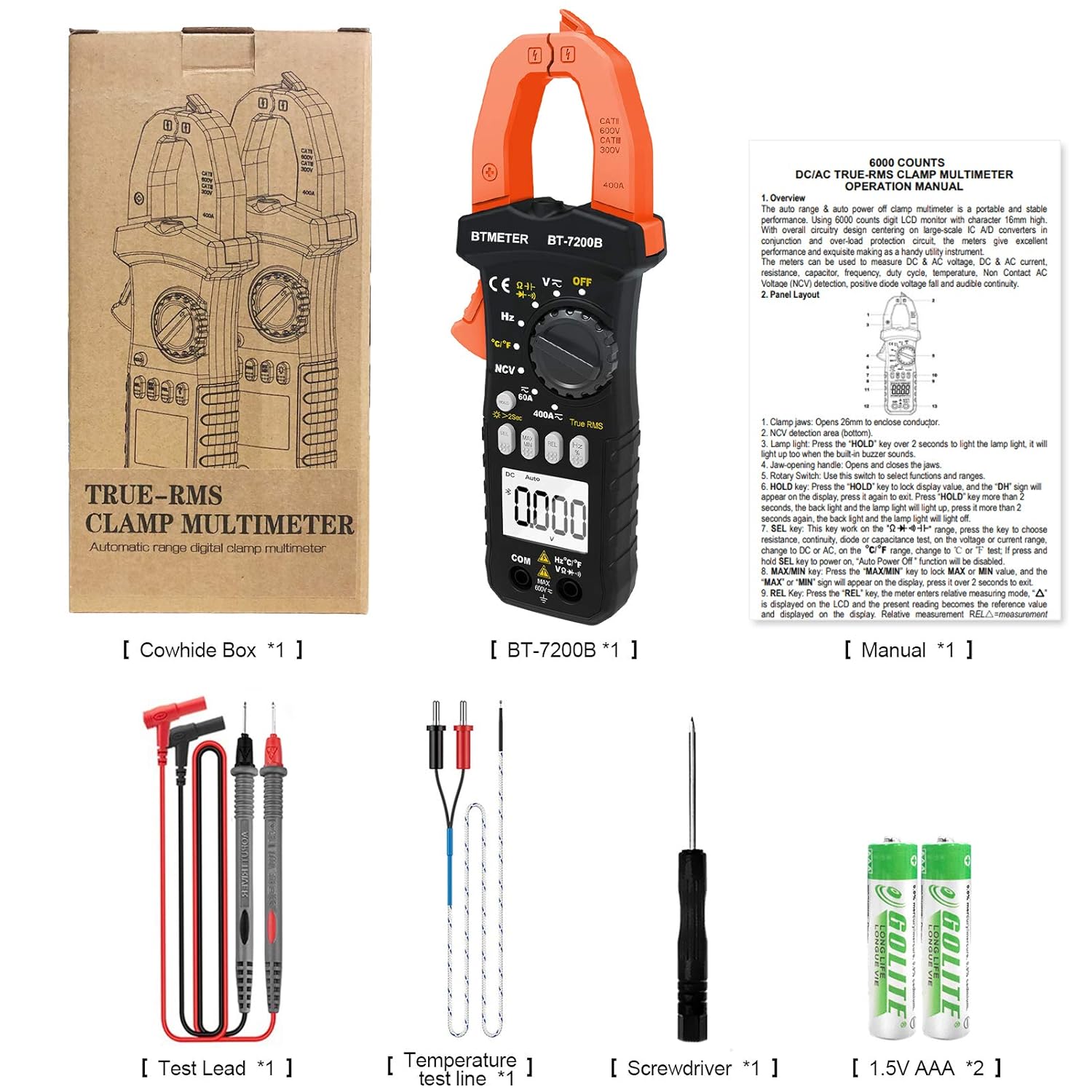
Figure 2.1: All items included in the BTMETER BT-7200B package.
2.2 Battery Installation
The BT-7200B requires two AAA batteries for operation. To install or replace batteries:
- Locate the battery compartment on the back of the multimeter.
- Use the provided screwdriver to loosen the screw securing the battery cover.
- Remove the battery cover.
- Insert two AAA batteries, ensuring correct polarity (+/-).
- Replace the battery cover and tighten the screw.
2.3 Connecting Test Leads and Probes
For most measurements, connect the test leads to the appropriate input jacks:
- Connect the black test lead to the COM (common) jack.
- Connect the red test lead to the VΩHzCapTemp jack for voltage, resistance, frequency, capacitance, and temperature measurements.
For temperature measurements, plug the thermocouple probe into the VΩHzCapTemp and COM jacks, observing polarity if applicable.
3. Operating Instructions
3.1 Power On/Off and Mode Selection
Turn the rotary dial to the desired measurement function to power on the multimeter. Select 'OFF' to power off the device. The multimeter features an auto shut-down function to conserve battery life.
3.2 Basic Measurements
The BT-7200B offers various measurement modes:
- AC/DC Voltage & Current: Select the appropriate voltage (V) or current (A) range on the rotary dial. Use the 'SEL' button to switch between AC and DC modes if necessary.
- Resistance: Select the Ohm (Ω) symbol on the dial.
- Continuity Buzzer: Select the continuity symbol (speaker icon) on the dial. An audible beep indicates continuity.
- Diode Test: Select the diode symbol on the dial.
- Capacitance: Select the capacitance (Cap) symbol on the dial.
- Frequency/Duty Cycle: Select the Hz symbol on the dial.
- Temperature: Select the °C/°F symbol on the dial and connect the thermocouple probe.

Figure 3.1: Visual guide to common measurement types.
3.3 Clamp-on Amperage Measurement
To measure AC/DC current using the clamp:
- Select the 60A or 400A range on the rotary dial.
- Press the 'SEL' button to choose between AC or DC current measurement.
- Press the 'REL' button to zero the display before clamping, especially for DC current measurements, to ensure accuracy.
- Important: For accurate current measurement, clamp around only one live wire (e.g., the hot wire). Clamping around both hot and neutral wires will result in a zero reading as the currents cancel each other out. An AC Line Splitter can be used for convenience without stripping wires.

Figure 3.2: Correct method for clamp-on live wire measurement.

Figure 3.3: Clamp multimeter in action on an electrical panel.
3.4 Non-Contact Voltage (NCV) Detection
The NCV function allows for safe detection of AC voltage without direct contact:
- Select the NCV mode on the rotary dial.
- Place the top of the clamp jaw near the wire or outlet you wish to test.
- The multimeter will beep and the NCV indicator light will illuminate if AC voltage is detected.
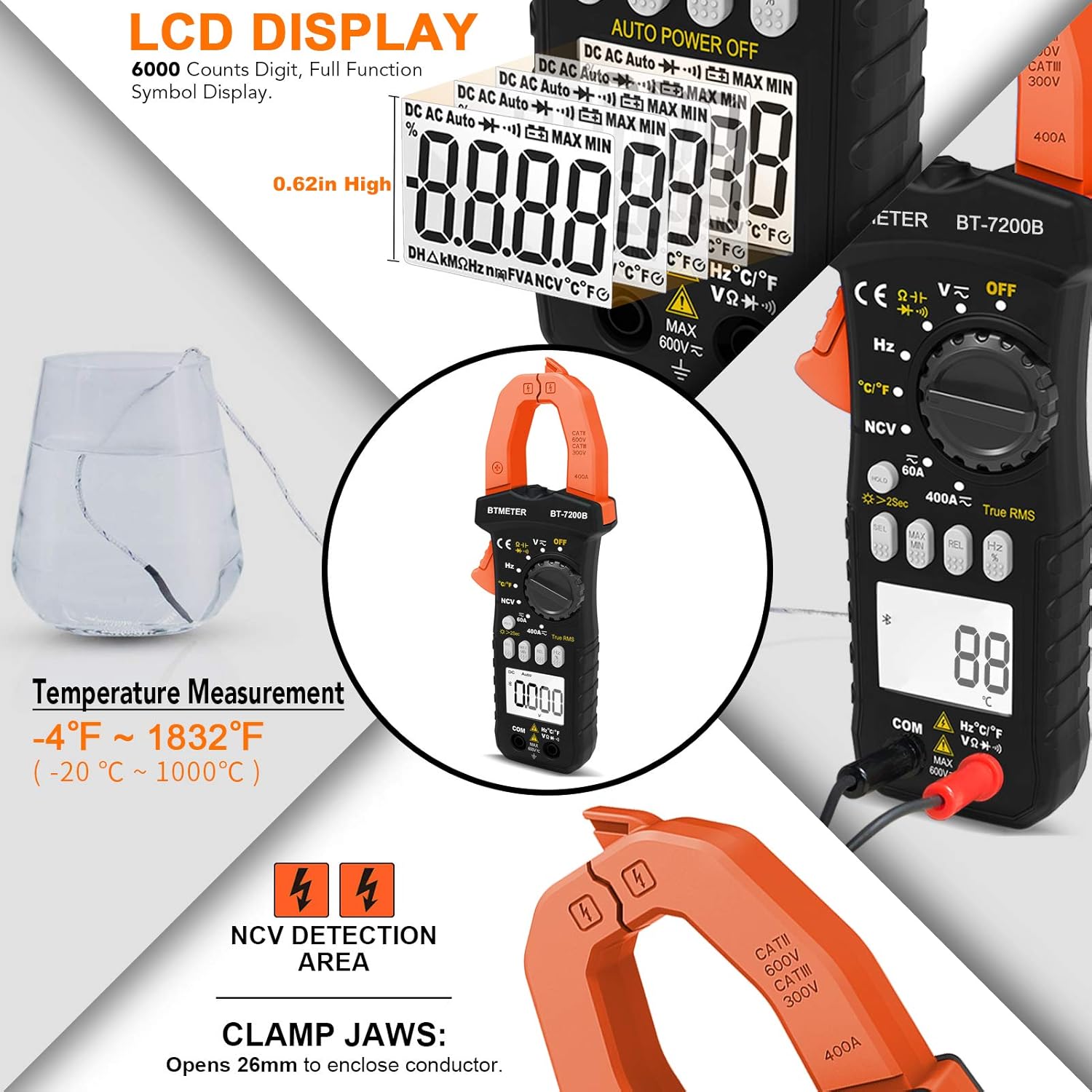
Figure 3.4: Non-Contact Voltage detection feature.

Figure 3.5: NCV detection on an electrical outlet.
3.5 Display and Backlight
The BT-7200B features a large 6000 counts digital display with a backlight for visibility in dimly lit areas. To activate the backlight, press and hold the 'HOLD' button for 2 seconds. A quick press of the 'HOLD' button will freeze the current reading on the display.

Figure 3.6: Detailed view of the LCD display and its features.

Figure 3.7: Multimeter display with backlight activated.
4. Maintenance
4.1 Cleaning
Regularly clean the multimeter with a dry, soft cloth. For the temperature probe, especially after use in corrosive environments like saltwater, ensure to wash off any residue to prevent damage.
4.2 Battery Replacement
When the battery indicator appears on the display, replace the two AAA batteries as described in Section 2.2. The auto power-off feature helps extend battery life, but regular checks are recommended.
5. Troubleshooting
This section addresses common issues and provides solutions.
- Zero Amp Reading: If measuring current with the clamp and the reading is zero, ensure you are clamping around only one live wire. Clamping around both hot and neutral wires will result in cancellation and a zero reading. Use the 'REL' button to zero the meter before measurement.
- Inaccurate Frequency Measurement: Some users have reported that the frequency measurement may be less precise compared to other functions. For critical frequency measurements, consider cross-referencing with a dedicated frequency meter.
- Intermittent Readings: If you suspect intermittent electrical issues, utilize the data logging feature of the multimeter. The companion app (if applicable to your model) can record data over time, allowing you to review charts and identify fluctuations or drops in readings.
- Display Not Lighting Up: If the display backlight is not working, ensure batteries are properly installed and have sufficient charge. Press and hold the 'HOLD' button for 2 seconds to toggle the backlight.
6. Specifications
The following table outlines the technical specifications of the BTMETER BT-7200B Clamp Multimeter:
| Parameter | Value |
|---|---|
| Model Number | BT-7200B |
| Product Dimensions | 7.6 x 3.4 x 1.5 inches |
| Item Weight | 13.51 ounces |
| Power Source | Battery Powered (2 x AAA) |
| Display Counts | 6000 Counts |
| AC/DC Current Range | Up to 400A |
| AC/DC Voltage Range | Up to 600V |
| Temperature Range | -4 to 1832°F (-20 to 1000°C) |
| Jaw Caliber Size | 1.77 inches (45mm) |
| True RMS | Yes |
| NCV Detection | Yes |
| Auto Shut-down | Yes |

Figure 6.1: BTMETER BT-7200B in an electrical measurement scenario.
7. Warranty and Support
For detailed warranty information and customer support, please refer to the documentation included with your product packaging or visit the official BTMETER website. Additional protection plans may be available for purchase separately.
A comprehensive User Manual in PDF format is available for download: User Manual (PDF)


