
1. Introduction
Thank you for choosing the Fitfiu Fitness BEST-100 Exercise Bike. This manual provides essential information for the safe assembly, operation, and maintenance of your new fitness equipment. Please read this manual thoroughly before use and retain it for future reference.
The Fitfiu Fitness BEST-100 is designed for moderate home exercise, featuring a 5kg inertia flywheel and 8 resistance levels. Its compact design makes it suitable for various indoor spaces.

Image 1.1: The Fitfiu Fitness BEST-100 Exercise Bike, showcasing its compact design and red and black color scheme.
2. Safety Information
Before using this exercise bike, please observe the following safety precautions:
- Consult your physician before starting any exercise program.
- Keep children and pets away from the equipment during use.
- Place the exercise bike on a flat, stable surface. Ensure adequate space around the equipment.
- Inspect the bike for loose or damaged parts before each use. Do not use if any components are compromised.
- Wear appropriate exercise clothing and footwear. Avoid loose clothing that could get caught in moving parts.
- Do not exceed the maximum user weight of 100 kg (220 lbs).
- Stop exercising immediately if you feel faint, dizzy, or experience pain.
- This product is intended for home use only, not for commercial or institutional settings.
3. Package Contents
Please verify that all components are present in the package:
- 1x Fitfiu Fitness BEST-100 Exercise Bike (Red)
- 1x Instruction Manual
- 1x Assembly Kit (includes necessary tools and fasteners)
If any parts are missing or damaged, please contact customer support immediately.
4. Setup and Assembly
Follow these steps to assemble your Fitfiu Fitness BEST-100 Exercise Bike:
- Unpack Components: Carefully remove all parts from the packaging and lay them out on a clean, flat surface. Check against the package contents list.
- Attach Stabilizers: Secure the front and rear stabilizer bars to the main frame using the provided bolts and washers. Ensure they are tightened firmly for stability.
- Install Pedals: Identify the left (L) and right (R) pedals. Thread the left pedal counter-clockwise and the right pedal clockwise into their respective crank arms. Tighten securely with a wrench.
- Mount Seat Post and Seat: Insert the seat post into the main frame and adjust to your desired height. Secure it with the quick-release lever or knob. Attach the seat to the seat post.
- Assemble Handlebar Post and Handlebars: Connect the handlebar post to the main frame. Attach the handlebars to the handlebar post, ensuring all cables (if any) are properly routed and not pinched.
- Connect Console: If applicable, connect the wires from the main frame to the LCD console. Mount the console onto the handlebar assembly.
- Final Check: Before first use, double-check all bolts, nuts, and connections to ensure they are tight and secure.
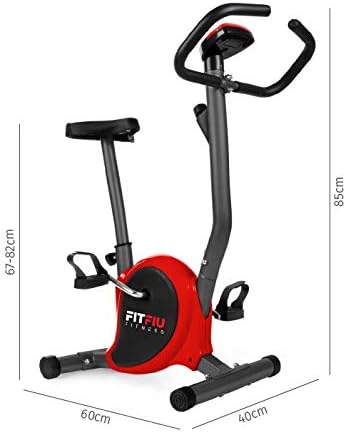
Image 4.1: Dimensions of the Fitfiu Fitness BEST-100 Exercise Bike (60 x 40 x 85 cm), useful for planning placement and assembly.
5. Operating Instructions
5.1 Adjusting the Seat
To adjust the seat height, loosen the quick-release lever or knob on the seat post. Raise or lower the seat to a comfortable position where your leg is slightly bent at the knee when the pedal is at its lowest point. Securely tighten the lever or knob.

Image 5.1: The comfortable seat of the exercise bike, designed for extended use.
5.2 Adjusting Resistance
The Fitfiu Fitness BEST-100 features 8 levels of magnetic resistance. To increase resistance, turn the resistance knob clockwise. To decrease resistance, turn the knob counter-clockwise. Start with a low resistance level and gradually increase as your fitness improves.
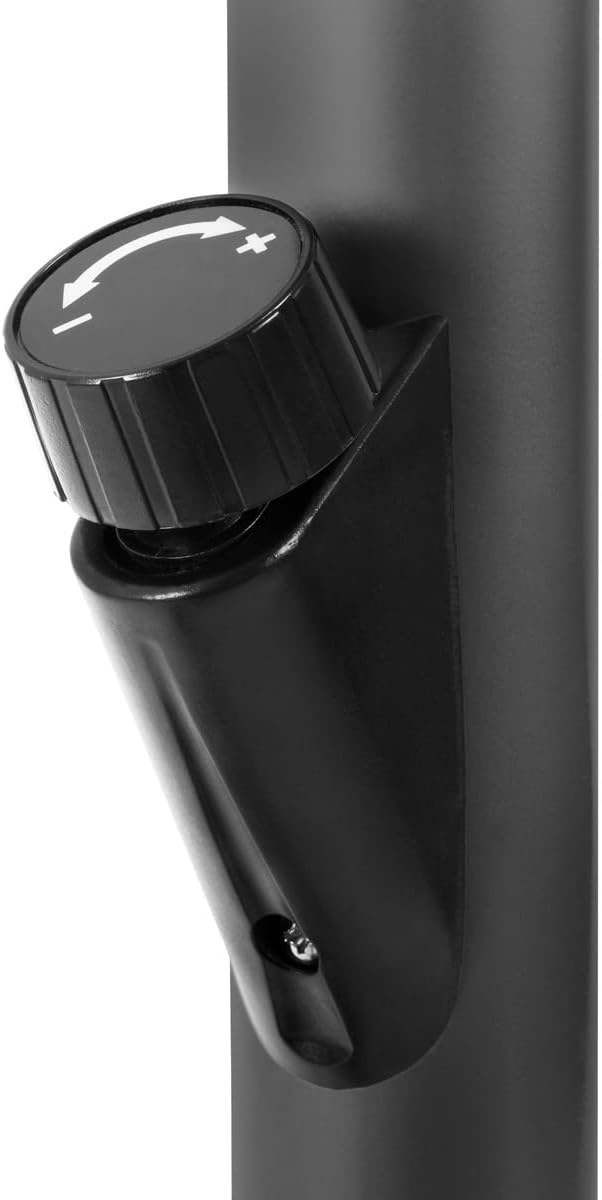
Image 5.2: The resistance knob, allowing users to select from 8 levels of magnetic resistance.
5.3 Using the LCD Display
The multi-functional LCD display tracks your workout data. It typically shows:
- Speed: Current cycling speed.
- Time: Duration of your workout.
- Distance: Total distance covered during the session.
- Calories: Estimated calories burned.
Refer to the specific console manual (if provided separately) for detailed instructions on mode selection and resetting values.

Image 5.3: The pedals with adjustable straps and the protective cover for the flywheel mechanism.
6. Maintenance
Regular maintenance ensures the longevity and safe operation of your exercise bike:
- Cleaning: Wipe down the bike with a damp cloth after each use to remove sweat and dust. Avoid abrasive cleaners.
- Inspection: Periodically check all bolts, nuts, and moving parts for tightness. Tighten any loose fasteners.
- Lubrication: Moving parts generally do not require lubrication. If you notice any squeaking or friction, consult customer support.
- Storage: Store the bike in a dry, cool place away from direct sunlight and extreme temperatures.
7. Troubleshooting
Here are some common issues and their potential solutions:
| Problem | Possible Cause | Solution |
|---|---|---|
| Bike is unstable or wobbles. | Uneven surface; loose stabilizer bolts. | Ensure bike is on a flat surface. Tighten all stabilizer bolts. Adjust leveling caps if present. |
| Pedals are difficult to turn or make noise. | Resistance set too high; loose pedal or crank arm. | Decrease resistance. Check and tighten pedals and crank arms. |
| LCD display is not working. | Batteries are dead or incorrectly installed; loose connection. | Replace batteries. Check all cable connections to the console. |
| Squeaking or grinding noises. | Loose parts; friction in moving components. | Inspect and tighten all bolts and nuts. If noise persists, contact customer support. |
If you encounter issues not listed here or if solutions do not resolve the problem, please contact Fitfiu Fitness customer support.
8. Specifications
| Feature | Detail |
|---|---|
| Model Name | BEST-100 |
| Brand | Fitfiu Fitness |
| Color | Red |
| Material | Alloy Steel |
| Inertia Flywheel | 5 kg |
| Resistance Mechanism | Magnetic |
| Resistance Levels | 8 |
| Drive System | Belt |
| Display Functions | Speed, Time, Distance, Calories |
| Maximum User Weight | 100 kg |
| Product Dimensions (L x W x H) | 60 x 40 x 85 cm |
| Product Weight | 9 kg |
| Power Source (Display) | Battery Powered (Batteries not included) |
9. Warranty and Support
Fitfiu Fitness products are manufactured to high-quality standards and are covered by a limited warranty. Please refer to the warranty card included with your purchase for specific terms and conditions.
For technical assistance, missing parts, or warranty claims, please contact Fitfiu Fitness customer support through their official website or the retailer where the product was purchased. Please have your model number (BEST-100) and proof of purchase ready.
Contact Information:
- Website: www.fitfiufitness.com (Example, actual URL may vary)
- Email: support@fitfiufitness.com (Example)


