
Introduction
The FITFIU Fitness PV-200 3D Vibrating Platform is designed to enhance your home fitness routine. This compact and oscillating platform features advanced 3D movement technology, combining linear (up and down), oscillating (side to side), and circular vibrations to provide a comprehensive workout. It is equipped with two 500W motors, offering 180 speed levels and 4 predefined training programs. The PV-200 is ideal for muscle toning, improving circulation, and supporting fat burning with minimal effort. Its non-slip base ensures stability during use, and the included elastic cords allow for upper body exercises. Control is convenient with an intuitive LCD screen and a remote control.
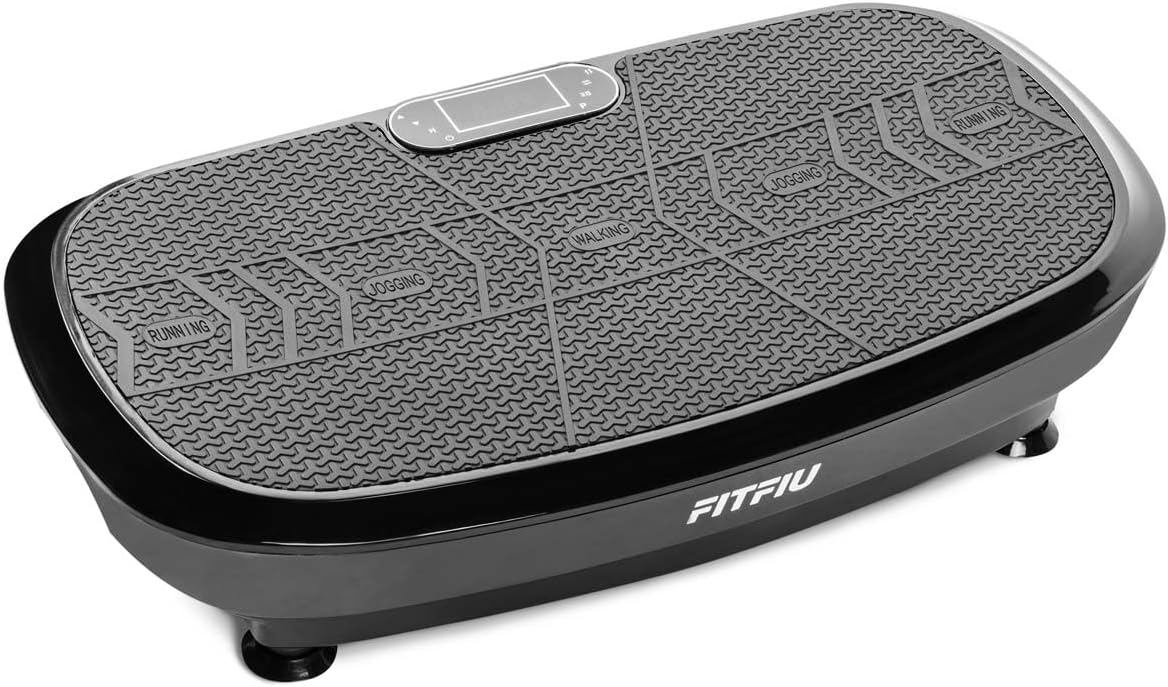
Image: Top view of the FITFIU Fitness PV-200 3D Vibrating Platform, showing the control panel and designated foot placement areas for walking, jogging, and running.
Safety Instructions
Please read all safety instructions carefully before using the FITFIU Fitness PV-200 3D Vibrating Platform. Failure to follow these instructions may result in injury or damage to the product.
- Consult a physician before starting any new exercise program, especially if you have pre-existing medical conditions.
- Keep children and pets away from the equipment during operation.
- Place the platform on a flat, stable, and non-slip surface. Ensure there is adequate clear space around the unit.
- Do not use the platform if you weigh more than the maximum recommended user weight of 150 kg.
- Ensure the power cord is not damaged and is properly connected to a grounded outlet.
- Do not use the platform in wet or damp environments.
- Always maintain balance while on the platform. If you feel dizzy or unwell, stop exercising immediately.
- Do not insert any objects into the openings of the platform.
- Unplug the unit from the power outlet when not in use or before cleaning.
Setup
- Unpacking: Carefully remove the vibrating platform and all accessories from the packaging. Retain packaging for future storage or transport.
- Placement: Choose a firm, level surface for the platform. Ensure there is enough space around the unit for safe movement during exercise.
- Power Connection: Insert the power cord into the designated port on the side of the platform and then into a suitable electrical outlet. Ensure the power switch is in the OFF position before connecting.

Image: A hand connecting the power cord to the power input port on the side of the vibrating platform, with the power switch visible.
- Elastic Cords (Optional): If desired, attach the elastic resistance cords to the designated attachment points on the platform.
Operating Instructions
Powering On/Off
- To turn on the platform, flip the main power switch located on the side of the unit to the 'ON' position.
- Press the power button on the control panel or remote control to activate the display.
- To turn off, press the power button on the control panel or remote, then flip the main power switch to 'OFF'.
Using the Control Panel and Remote Control
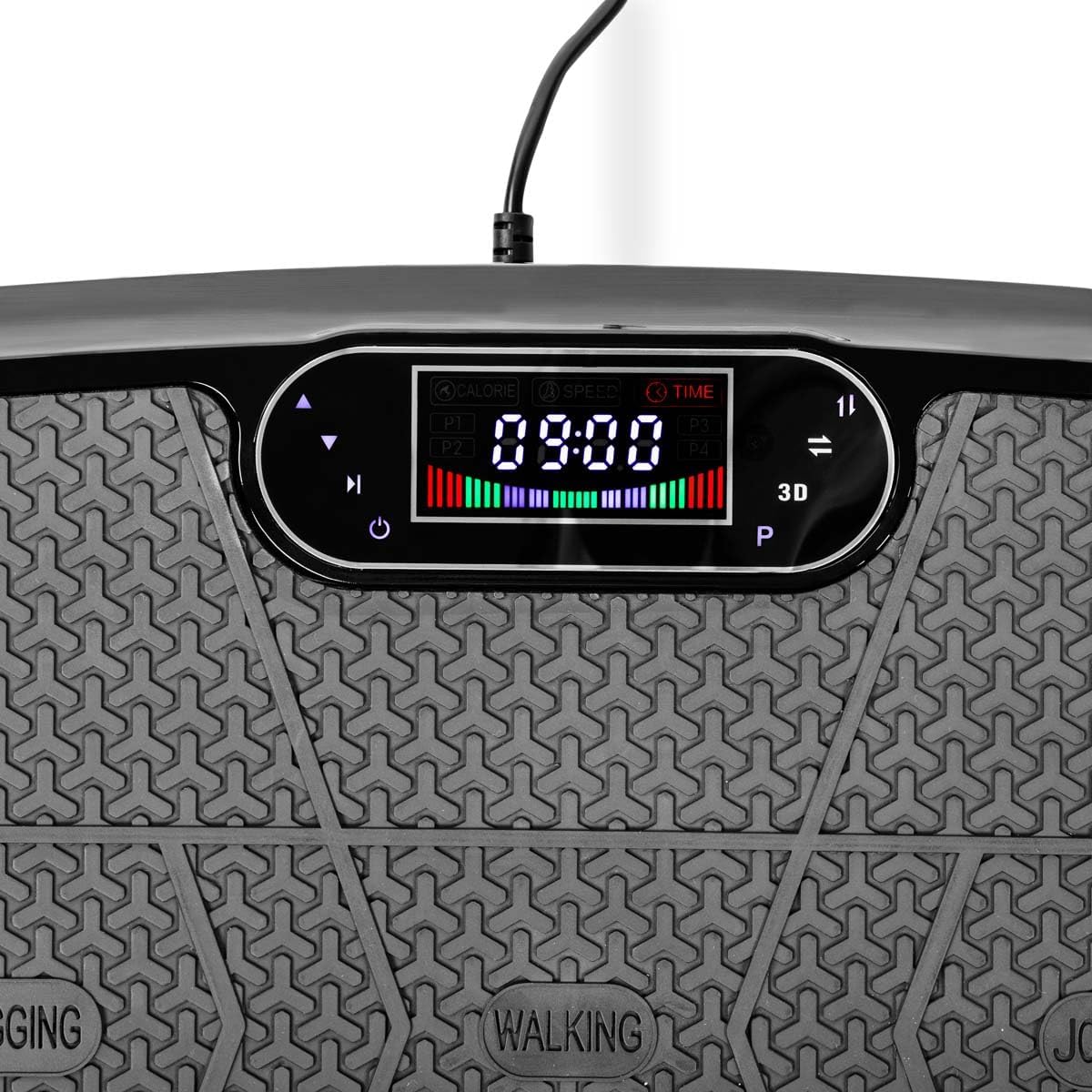
Image: Close-up view of the platform's LCD display, showing time, speed, and program indicators, along with control buttons.
- The LCD screen displays real-time information such as time, speed, and selected program.
- Use the '+' and '-' buttons on the control panel or remote to adjust the speed. The platform offers 180 speed levels.
- Press the 'P' button to cycle through the 4 predefined training programs (P1, P2, P3, P4). Each program has different intensity levels and durations.
- The '3D' button activates or deactivates the triple vibration mode (oscillating, linear, circular).
- The remote control allows for convenient adjustment of settings without bending down.

Image: A hand holding the remote control for the vibrating platform, showing buttons for power, program selection, time, speed, and 3D mode.
Exercise Poses
The platform can be used for various exercises. Refer to the markings on the platform for suggested foot positions (Walking, Jogging, Running) to vary intensity.

Image: A woman performing a squat exercise while standing on the vibrating platform, demonstrating a common use case.

Image: A woman performing a plank exercise with her forearms resting on the vibrating platform, illustrating another exercise variation.
Maintenance
- Cleaning: Wipe the platform with a soft, damp cloth after each use. Do not use abrasive cleaners or solvents. Ensure no liquid enters the internal components.
- Storage: Store the platform in a cool, dry place away from direct sunlight and moisture. Its compact design allows for easy storage.
- Inspection: Regularly check the power cord for any signs of damage. If any damage is found, discontinue use and contact customer support.
Troubleshooting
| Problem | Possible Cause | Solution |
|---|---|---|
| Platform does not power on. | Power cord not connected; Main power switch off; Outlet malfunction. | Ensure power cord is securely plugged in. Check main power switch. Test outlet with another device. |
| Remote control not working. | Batteries depleted; Obstruction between remote and platform. | Replace remote control batteries. Ensure clear line of sight to the platform's receiver. |
| Unusual noise during operation. | Loose components; Uneven surface. | Ensure all components are secure. Place platform on a completely flat surface. If noise persists, contact support. |
Specifications

Image: Diagram showing the dimensions of the vibrating platform: 78cm (length), 42cm (width), and 18cm (height).
| Feature | Detail |
|---|---|
| Model | PV-200 |
| Brand | Fitfiu Fitness |
| Power | 2 x 500W (Total 1000W) |
| Movement Type | Triple 3D (Oscillating, Linear, Circular) |
| Speed Levels | 180 |
| Training Programs | 4 Predefined |
| Display | LCD (Time, Speed, Program Mode) |
| Control Type | Control Panel, Remote Control |
| Max User Weight | 150 kg (330 lbs) |
| Product Dimensions (L x W x H) | 78 cm x 42 cm x 18 cm |
| Product Weight | 19 kg (41.9 lbs) |
| Material | Plastic |
| Color | Black |
| Included Components | 1 Vibrating Platform, 2 Elastic Cords, 1 Remote Control |
Warranty and Support
For warranty information, please refer to the documentation provided with your purchase or visit the official FITFIU Fitness website. If you encounter any issues or require technical assistance, please contact FITFIU Fitness customer support through their official channels. Do not attempt to repair the device yourself.
